BATTERY BLOWER INSPECTION
PROCEDURE
-
INSPECT BATTERY COOLING BLOWER ASSEMBLY
-
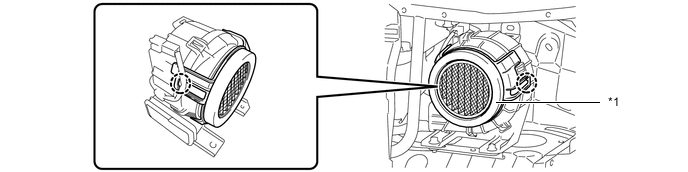
Inspect the battery cooling blower filter.
Tech Tips
-
It is not necessary to remove the front floor cover LH to inspect the battery cooling blower filter.
-
Inspect the battery cooling blower filter with the battery cooling blower assembly installed to the vehicle.
-
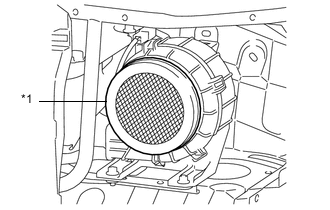
Text in Illustration *1 Battery Cooling Blower Filter Inspect the battery cooling blower filter.
Standard No clogs or damage. Note
If the battery cooling blower filter is damaged, replace it with a new one.
-
-
Clean the battery cooling blower filter.
Note
If the battery cooling blower filter is extremely dirty, replace it with a new one.
-
When not removed from the vehicle:
-
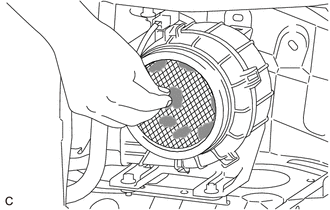
Clean the battery cooling blower filter by hand or using a vacuum cleaner.
Note
-
Do not use compressed air.
-
Do not use water or any other liquids when cleaning the battery cooling blower filter.
-
Do not use a wire brush or scrubber.
-
Do not disassemble the battery cooling blower assembly.
-
Do not allow any foreign matter to enter the battery cooling blower assembly.
Tech Tips
-
It is not necessary to remove the front floor cover LH to clean the battery cooling blower filter.
-
Clean the battery cooling blower filter with the battery cooling blower assembly installed to the vehicle.
-
-
-
When removed from the vehicle:
Note
-
This procedure is for type B only.
-
As type A is a non-reusable part, do not perform this procedure.
-
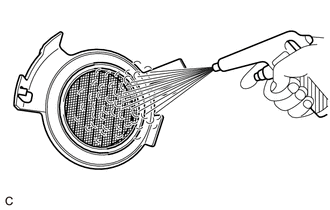
Clean the battery cooling blower filter by blowing compressed air as shown in the illustration.
Note
-
Do not use water or any other liquids when cleaning the battery cooling blower filter. Use only compressed air.
-
To prevent damage to the battery cooling blower filter, do not use a wire brush or other tool.
-
Do not clean the battery cooling blower filter with it installed to the vehicle.
-
Keep the air blow gun at least 30 mm (1.18 in.) away from the battery cooling blower filter.
-
Blow compressed air through the rear side of battery cooling blower filter.
-
-
-
-
Replace the battery cooling blower filter.
Tech Tips
Replace the battery cooling blower filter while the battery cooling blower assembly is installed to the vehicle.
-
Remove the front floor cover LH (for Front Floor Cover Type A).
-
Remove the center front floor cover (for Front Floor Cover Type B).
-
Remove the front floor cover LH (for Front Floor Cover Type B).
-
Type A:
-
Remove the battery cooling blower filter from the battery cooling blower assembly.
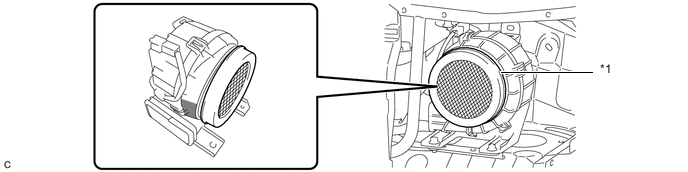
*1 Battery Cooling Blower Filter - - 
Indentation - - Tech Tips
-
The battery cooling blower filter is attached with double-sided tape.
-
Place your hand at the indentation of the battery cooling blower assembly, to remove the battery cooling blower filter.
-
-
Completely remove any double-sided tape remaining on the battery cooling blower assembly.
-
Peel off the backing paper from a new battery cooling blower filter, taking care not to touch the adhesive surface.
-
Install the battery cooling blower filter to the battery cooling blower assembly.
Tech Tips
To ensure proper adhesion, make sure to apply sufficient pressure when installing the battery cooling blower filter.
-
-
Type B:
-
Disengage the 2 claws to remove the battery cooling blower filter from the battery cooling blower assembly.
*1 Battery Cooling Blower Filter - - -
Engage the 2 claws to install the battery cooling blower filter to the battery cooling blower assembly.
Note
After installing the battery cooling blower filter, make sure that each claw is securely engaged.
-
-
Install the front floor cover LH (for Front Floor Cover Type A).
-
Install the front floor cover LH (for Front Floor Cover Type B).
-
Install the center front floor cover (for Front Floor Cover Type B).
-
-