POWER MIRROR CONTROL SYSTEM Power Mirrors do not Return to Memorized Position
SYSTEM DESCRIPTION
If any of the M1, M2 or M3 seat memory switches is pressed, the outer mirror control ECU (driver side) detects the seat memory switch status and sends the switch signal to the main body ECU (multiplex network body ECU) via CAN communication. The main body ECU (multiplex network body ECU) sends back reproduction signals to each outer mirror control ECU via CAN communication. When receiving the reproduction signals, each outer mirror control ECU assembly operates the vertical and horizontal mirror motors, which are built into the outer rear view mirror assembly, to adjust the mirror surface to the stored position.
WIRING DIAGRAM
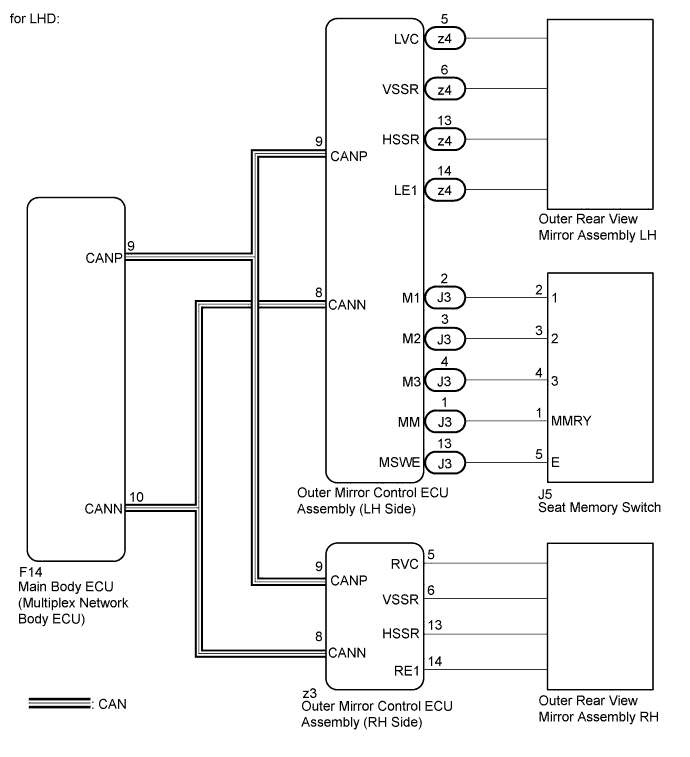
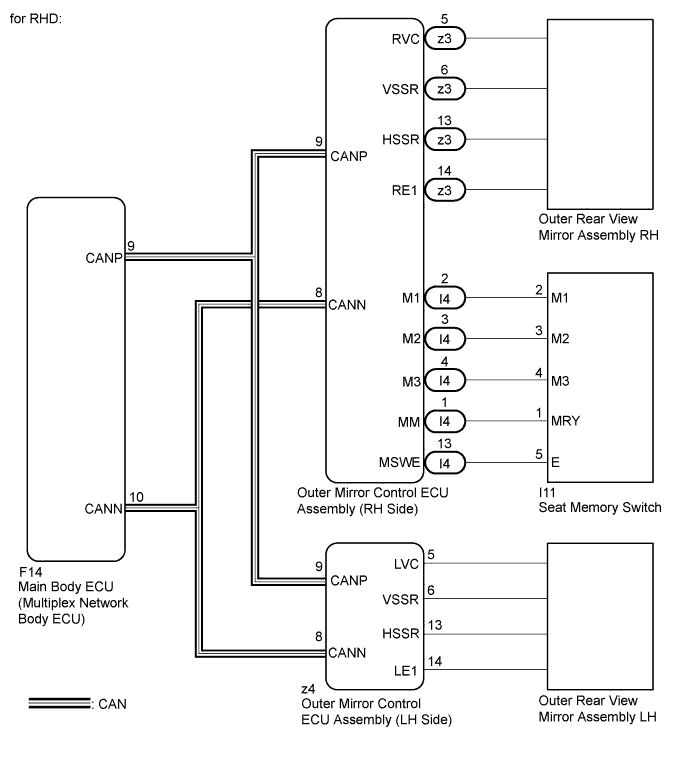
INSPECTION PROCEDURE
PROCEDURE
-
CHECK CAN COMMUNICATION SYSTEM
-
Use the intelligent tester to check if the CAN communication system is functioning normally Click here.
OK CAN communication DTC is not output.
NG 
GO TO CAN COMMUNICATION SYSTEM (DIAGNOSTIC TROUBLE CODE CHART) Click here
OK 
-
-
CHECK SEAT MEMORY SWITCH FUNCTION
-
When any seat memory switch (M1, M2 or M3 switch) is pressed, check that the driver side seat moves to the recorded position.
OK The driver side seat moves to the memorized position.
NG
GO TO POWER SEAT CONTROL SYSTEM (Power Seat does not Return to Memorized Position) Click here
OK
-
-
CHECK POWER MIRROR CONTROL FUNCTION (ELECTRICAL REMOTE CONTROL MIRROR FUNCTION)
-
Check the electrical remote control mirror function Click here.
OK Electrical remote control mirror function is normal.
NG
GO TO OTHER FLOW CHART Click here
OK
-
-
READ VALUE USING INTELLIGENT TESTER (MIRROR POSITION MEMORY)
-
Connect the intelligent tester to the DLC3.
-
Turn the power switch on (IG).
-
Turn the intelligent tester on.
-
Enter the following menus: Body / Mirror L or Mirror R / Data List.
-
Read the Data List according to the display on the intelligent tester.
Mirror L / Mirror R Tester Display Measurement Item/Range Normal Condition Diagnostic Note Mirror Memory No. 1 Mirror position memorized in seat memory switch M1 / ON or OFF ON: Memorized
OFF: Not memorized
- Mirror Memory No. 2 Mirror position memorized in seat memory switch M2 / ON or OFF ON: Memorized
OFF: Not memorized
- Mirror Memory No. 3 Mirror position memorized in seat memory switch M3 / ON or OFF ON: Memorized
OFF: Not memorized
- OK "ON" (Memorized) appears on the screen.
NG
GO TO OTHER FLOW CHART (Power Mirror Surface Position is not Memorized) Click here
OK
-
-
CHECK MEMORY AND REACTIVATION FUNCTION
-
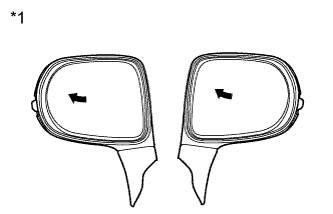
Text in Illustration *1 Turn to Left Fully Turn the power switch on (IG).
-
Using the outer mirror switch assembly, turn the mirror surface to the fully left position.
-
Press the M1 switch while the SET switch is being pressed.
-
Check that the buzzer sounds for 0.5 seconds and the mirror surface position is memorized.
-
Using the outer mirror switch assembly, turn the mirror surface to the fully right position.
-
Press the M1 switch.
-
Check that the buzzer sounds for 0.1 seconds and the outer mirror automatically moves to the recorded fully left position.
Result Result Proceed to Memory and reactivation function on both mirrors is normal A Memory and reactivation function on RH side mirror is not normal B Memory and reactivation function on LH side mirror is not normal C
B 
REPLACE OUTER REAR VIEW MIRROR ASSEMBLY RH Click here
C
REPLACE OUTER REAR VIEW MIRROR ASSEMBLY LH Click here
A 
REPLACE MAIN BODY ECU (MULTIPLEX NETWORK BODY ECU) Click here
-
-
REPLACE OUTER REAR VIEW MIRROR ASSEMBLY RH
-
Replace the outer rear view mirror assembly RH Click here.
NEXT
-
-
CHECK MEMORY AND REACTIVATION FUNCTION
-
Text in Illustration *1 Turn to Left Fully Turn the power switch on (IG).
-
Using the outer mirror switch assembly, turn the mirror surface to the fully left position.
-
Press the M1 switch while the SET switch is being pressed.
-
Check that the buzzer sounds for 0.5 seconds and the mirror surface position is memorized.
-
Using the outer mirror switch assembly, turn the mirror surface to the fully right position.
-
Press the M1 switch.
-
Check that the buzzer sounds for 0.1 seconds and the outer mirror automatically moves to the recorded fully left position.
OK Memory and reactivation function is normal.
NG
REPLACE OUTER MIRROR CONTROL ECU ASSEMBLY (RH SIDE) Click here
OK
END (OUTER REAR VIEW MIRROR ASSEMBLY RH WAS DEFECTIVE)
-
-
REPLACE OUTER REAR VIEW MIRROR ASSEMBLY LH
-
Replace the outer rear view mirror assembly LH Click here.
NEXT
-
-
CHECK MEMORY AND REACTIVATION FUNCTION
-
Text in Illustration *1 Turn to Left Fully Turn the power switch on (IG).
-
Using the outer mirror switch assembly, turn the mirror surface to the fully left position.
-
Press the M1 switch while the SET switch is being pressed.
-
Check that the buzzer sounds for 0.5 seconds and the mirror surface position is memorized.
-
Using the outer mirror switch assembly, turn the mirror surface to the fully right position.
-
Press the M1 switch.
-
Check that the buzzer sounds for 0.1 seconds and the outer mirror automatically moves to the recorded fully left position.
OK Memory and reactivation function is normal.
NG
REPLACE OUTER MIRROR CONTROL ECU ASSEMBLY (LH SIDE) Click here
OK
END (OUTER REAR VIEW MIRROR ASSEMBLY LH WAS DEFECTIVE)
-