FRONT POWER SEAT CONTROL SYSTEM (w/ Memory) Power Seat does not Return to Memorized Position
DESCRIPTION
-
for driver side
When the M1 switch, M2 switch or M3 switch is pressed, the outer mirror control ECU assembly (driver side) sends a switch signal to the main body ECU (multiplex network body ECU) via CAN. Then, the main body ECU (multiplex network body ECU) sends a recall request signal to the front power seat switch (driver side). The front power seat switch (driver side) operates each motor to achieve each memorized position value.
-
for front passenger side
When the M1 switch, M2 switch or M3 switch is pressed, the outer mirror control ECU assembly (front passenger side) sends a switch signal to the front power seat switch (front passenger side) via CAN. Then, the front power seat switch (front passenger side) operates the motors to recall each memorized position value.
WIRING DIAGRAM
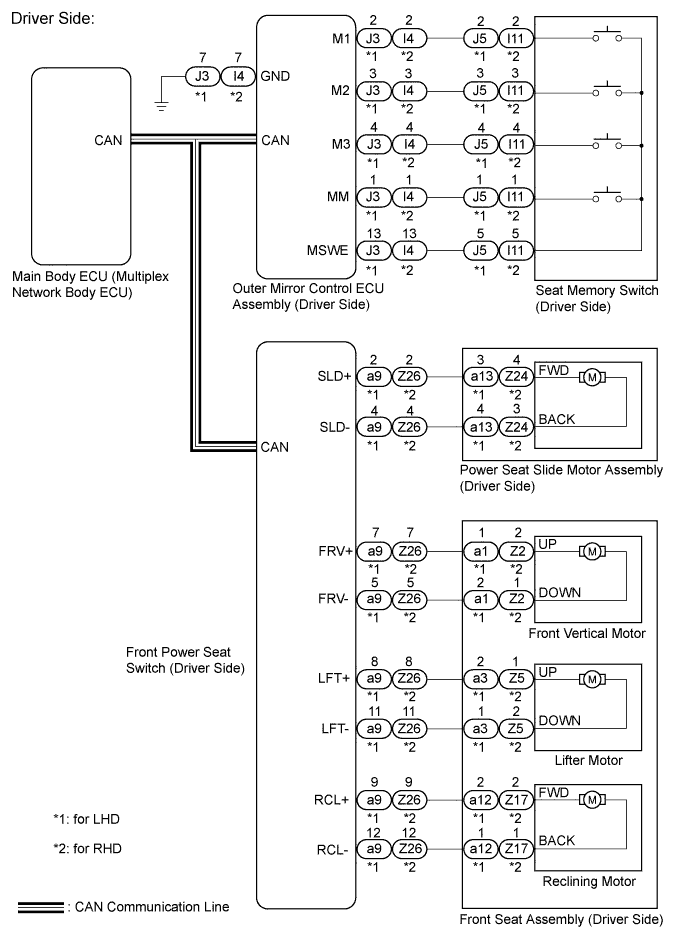
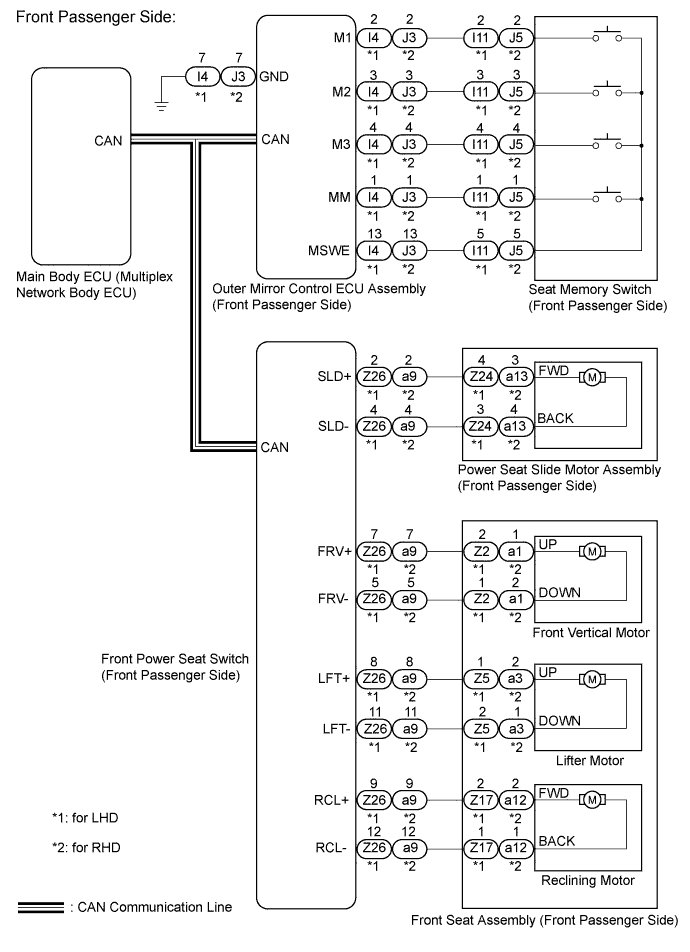
INSPECTION PROCEDURE
Tech Tips
Inspect the fuses for circuits related to this system before performing the following inspection procedure.
PROCEDURE
-
CHECK CAN COMMUNICATION SYSTEM
-
Use the intelligent tester to check if the CAN communication system is functioning normally Click here.
OK CAN communication DTC is not output.
NG 
GO TO CAN COMMUNICATION SYSTEM Click here
OK 
-
-
CHECK POWER SEAT CONTROL FUNCTION
-
Check that each function of the power seat operates normally by using the switches on the front power seat switch Click here.
OK Each function of the power seat operates normally using the switches on the front power seat switch.
NG
GO TO OTHER FLOW CHART (Power Seat does not Operate with Front Power Seat Switch) Click here
OK
-
-
CHECK SEAT MEMORY FUNCTION
-
Perform a memory operation and check that the buzzer sounds to indicate the completion of the memory operation Click here.
Note
-
The seat position will not be recorded if the SET switch and 2 or more of the memory switches (for example, M1 switch and M2 switch) are pressed simultaneously.
-
If a memorizing operation has failed, release all switches. The seat memory function does not operate unless the switches are released.
OK Seat position memory function is normal. -
NG
GO TO OTHER FLOW CHART (Power Seat Position is not Memorized) Click here
OK
-
-
CHECK FOR DTC
-
Check for DTC P0705.
-
Clear the DTC Click here.
-
Recheck for DTC P0705.
Result Result Proceed to DTC P0705 is not output A DTC P0705 is output B
B
GO TO HYBRID CONTROL SYSTEM Click here
A
-
-
CHECK SEAT RESTORING FUNCTION
-
Under each of the following conditions, check that the seat restoring operation operates by pressing the M1 switch, M2 switch or M3 switch Click here.
Tech Tips
-
Power switch is on (ACC) or on (IG), Shift lever is in P.
-
Power switch is off, within 180 seconds after driver door is closed and opened.
-
Power switch is off, within 60 seconds after driver door is opened and closed (only driver side).
Result Result Proceed to Driver side seat restoring function does not operate A Front passenger side seat restoring function does not operate B -
B 
CHECK SEAT RESTORING FUNCTION Click here
A
-
-
CHECK SEAT RESTORING FUNCTION
-
Under each of the following conditions, check that the seat restoring operation operates by pressing the M1 switch, M2 switch or M3 switch Click here.
Tech Tips
-
Power switch is on (ACC) or on (IG), Shift lever is in P.
-
Power switch is off, within 180 seconds after driver door is closed and opened.
-
Power switch is off, within 60 seconds after driver door is opened and closed.
Result Result Proceed to Seat restoring operation does not operate A Seat restoring operation operates B -
B
REPLACE FRONT POWER SEAT SWITCH (DRIVER SIDE) Click here
A
-
-
READ VALUE USING INTELLIGENT TESTER (SEAT POSITION MEMORY)
-
Connect the intelligent tester to the DLC3.
-
Turn the power switch on (IG).
-
Turn the intelligent tester on.
-
Enter the following menus: Body / Driver Seat / Data List.
-
Read the Data List according to the display on the intelligent tester.
Driver Seat Tester Display Measurement Item/Range Normal Condition Diagnostic Note Seat Memory No1 Seat position memorized with M1 switch / Mem or Not Mem Mem: Memorized
Not Mem: Not memorized
- Seat Memory No2 Seat position memorized with M2 switch / Mem or Not Mem Mem: Memorized
Not Mem: Not memorized
- Seat Memory No3 Seat position memorized with M3 switch / Mem or Not Mem Mem: Memorized
Not Mem: Not memorized
- OK Mem or Not Mem appears on the screen.
NG
GO TO OTHER FLOW CHART (Power Seat Position is not Memorized) Click here
OK
-
-
REPLACE FRONT POWER SEAT SWITCH (DRIVER SIDE)
-
Replace the front power seat switch (driver side) Click here.
NEXT
-
-
CHECK POWER MEMORY FUNCTION
-
Perform a seat memory operation properly Click here.
-
Check that the buzzer sounds for 0.1 seconds and the seat automatically moves to the memorized position.
Note
-
The seat position will not return to the memorized position if the 2 or more of the seat memory switches (for example, M1 switch and M2 switch) are pressed simultaneously.
-
If a restoring operation has failed, release all switches. The seat memory restoring function does not operate unless the switches are released.
OK Seat position restoring function operates normally. -
NG
REPLACE MAIN BODY ECU (MULTIPLEX NETWORK BODY ECU) Click here
OK 
END (FRONT POWER SEAT SWITCH (DRIVER SIDE) WAS DEFECTIVE)
-
-
CHECK SEAT RESTORING FUNCTION
-
Under each of the following conditions, check that the seat restoring operation operates by pressing the M1 switch, M2 switch or M3 switch Click here.
Tech Tips
-
Power switch is on (ACC) or on (IG), Shift lever is in P.
-
Power switch is off, within 180 seconds after driver door is closed and opened.
Result Result Proceed to Seat restoring operation does not operate A Seat restoring operation operates B -
B
REPLACE FRONT POWER SEAT SWITCH (FRONT PASSENGER SIDE) Click here
A
-
-
READ VALUE USING INTELLIGENT TESTER
-
Connect the intelligent tester to the DLC3.
-
Turn the power switch on (IG).
-
Turn the intelligent tester on.
-
Enter the following menus: Body / Passenger Seat / Data List.
-
Read the Data List according to the display on the intelligent tester.
Passenger Seat Tester Display Measurement Item/Range Normal Condition Diagnostic Note Seat Memory No1 Seat position memorized with M1 switch / Mem or Not Mem Mem: Memorized
Not Mem: Not memorized
- Seat Memory No2 Seat position memorized with M2 switch / Mem or Not Mem Mem: Memorized
Not Mem: Not memorized
- Seat Memory No3 Seat position memorized with M3 switch / Mem or Not Mem Mem: Memorized
Not Mem: Not memorized
- OK Mem or Not Mem appears on the screen.
NG
GO TO OTHER FLOW CHART (Power Seat Position is not Memorized) Click here
OK
REPLACE FRONT POWER SEAT SWITCH (FRONT PASSENGER SIDE) Click here
-