PRE-CRASH SAFETY SYSTEM PRECAUTION

-
TROUBLESHOOTING PRECAUTIONS
-
If a terminal contact point malfunction or part installation problem occurs, removal and reinstallation of the suspected part may return the system to normal. However, be aware that the normal condition may only be temporary.
-
Before disconnecting connectors or removing/installing parts, determine the malfunctioning area by checking and writing down the vehicle condition at the time of the malfunction (DTC outputs, etc.).
-
Be sure to check for DTCs related to other systems. The pre-crash safety system may be influenced by malfunctions in other systems.
-
-
HANDLING PRECAUTIONS
-
When removing and installing the ECU, sensor, switch or other pre-crash safety system related parts, perform the following:
-
Make sure the power switch is off unless otherwise specified in the inspection procedure.
-
After the removal/installation, check for DTCs and confirm that a normal system code is output.
-
-
-
DISCONNECTING AND RECONNECTING NEGATIVE BATTERY CABLE
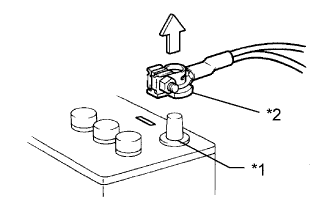
Text in Illustration *1 Negative (-) Battery Terminal *2 Cable
-
Before performing work on electronic components, disconnect the cable from the negative (-) battery terminal to prevent damage to the electrical system or electrical components.
-
Before disconnecting and reconnecting the battery cable, turn the power switch off and the headlight switch off. Then loosen the terminal nut completely. Do not damage the cable or terminal.
-
When the battery cable is disconnected, the clock and radio settings and stored DTCs are cleared. Therefore, before disconnecting the battery cable, make a note of them.
Note
-
When the cable is disconnected from the negative (-) battery terminal, initialize the following system(s) after the cable is reconnected.
System Name See Procedure Parking Assist Monitor System Side Monitor System (w/ Parking Assist Monitor System) Back Door Closer System Power Back Door System -
w/ HDD Navigation System
After the power switch is turned off, the display and navigation module display (HDD navigation system) records various types of memory and settings. As a result, after turning the power switch off, make sure to wait for the time specified in the following table before disconnecting the cable from the negative (-) battery terminal.
Waiting Time before Disconnecting Cable from Negative (-) Battery Terminal Specification Waiting Time w/o Telematics transceiver 60 sec. w/ Telematics transceiver 120 sec.
-
-