ENGINE HOOD COURTESY SWITCH INSTALLATION

-
INSTALL ENGINE HOOD COURTESY SWITCH (HOOD LOCK ASSEMBLY)
-
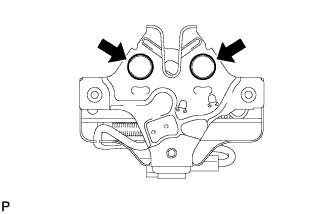
Apply MP grease to the sliding areas of the lock.
-
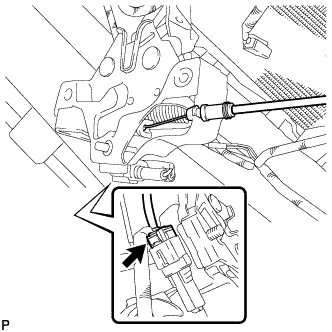
Connect the hood lock control cable assembly.
-
Connect the connector.
-
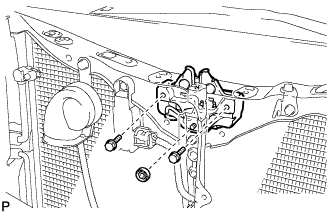
Install the hood lock assembly with the 2 bolts and hood lock nut.
- Torque:
- 8.0 N*m { 82 kgf*cm, 71 in.*lbf }
-
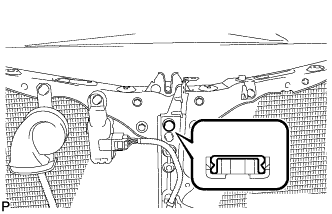
Install a new hood lock nut cap.
-
-
INSTALL HOOD LOCK CONTROL CABLE COVER
-
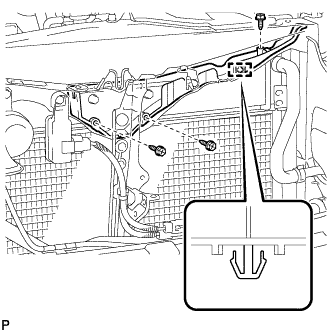
Engage the clamp.
-
Install the hood lock control cable cover with the 3 screws.
-
-
INSTALL SMOG VENTILATION SENSOR (for RHD)
-
w/ Smog Ventilation Sensor:
-
-
INSTALL LOW PITCHED HORN ASSEMBLY (for LHD)
-
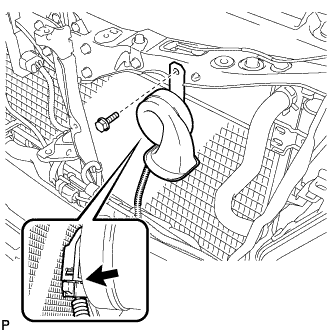
Install the low pitched horn assembly with the bolt.
- Torque:
- 19 N*m { 194 kgf*cm, 14 ft.*lbf }
-
Connect the connector.
-
-
INSTALL HIGH PITCHED HORN ASSEMBLY (for RHD)
-
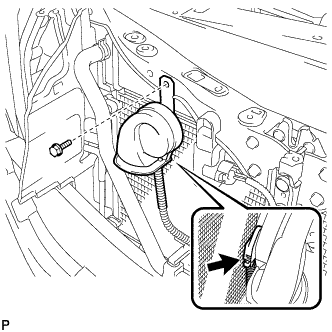
Install the high pitched horn assembly with the bolt.
- Torque:
- 19 N*m { 194 kgf*cm, 14 ft.*lbf }
-
Connect the connector.
-
-
INSTALL MILLIMETER WAVE RADAR SENSOR ASSEMBLY (w/ Dynamic Radar Cruise Control System)
-
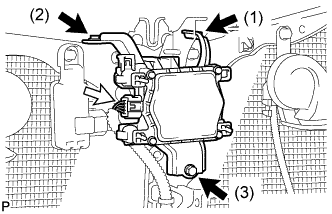
Tighten the 3 bolts on the millimeter wave radar sensor assembly.
- Torque:
- 5.5 N*m { 56 kgf*cm, 49 in.*lbf }
Tech Tips
Tighten the bolts in the order indicated in the illustration.
-
Connect the connector.
-
-
INSTALL FRONT BUMPER ASSEMBLY
-
Connect the No. 1 clearance sonar connector. (w/ LEXUS Parking Assist-sensor System)
-
Connect the headlight cleaner hose.
-
Connect the fog light connector.
-
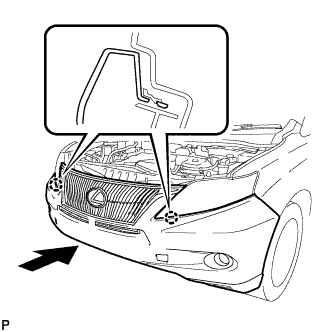
Engage the 2 claws and install the front bumper assembly as shown in the illustration.
-
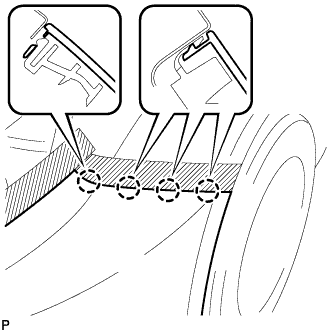
Engage the 4 claws to install the front bumper assembly.
Tech Tips
Use the same procedure for the RH side and LH side.
-
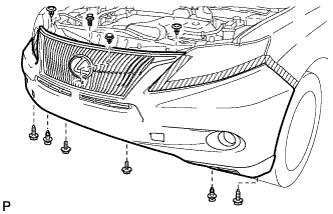
Install the 6 clips.
-
Install the 2 bolts and 2 screws.
- Torque:
- 7.5 N*m { 77 kgf*cm, 66 in.*lbf }
-
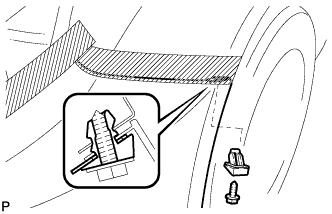
Install the front bumper seal bracket.
Tech Tips
Use the same procedure for the RH side and LH side.
-
Install the screw.
- Torque:
- 7.5 N*m { 77 kgf*cm, 66 in.*lbf }
Tech Tips
Use the same procedure for the RH side and LH side.
-
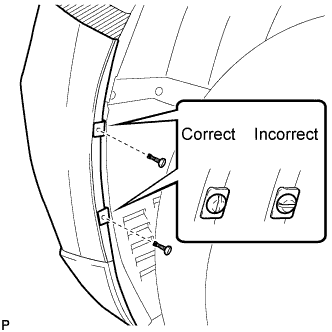
Install the 2 pin hold clips.
Note
Insert the pin hold clip with the slot aligned vertically. Do not rotate the clip after inserting it. After installation, confirm that the slot is aligned vertically.
Tech Tips
Use the same procedure for the RH side and LH side.
-
-
INSTALL HOOD CENTER CUSHION
-
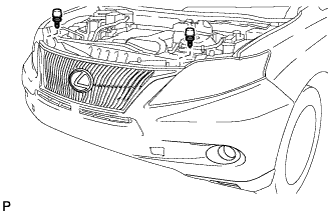
Install the 2 hood center cushions.
-
-
ADJUST MILLIMETER WAVE RADAR SENSOR ASSEMBLY (w/ Dynamic Radar Cruise Control System)
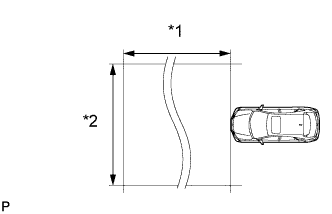
Text in Illustration *1 Approx. 10 m *2 Approx. 14 m CAUTION:
Exposure to radio frequency emissions is hazardous to your health. It is hazardous to be within 20 cm (7.87 in.) of the device's radio frequency aperture.
Note
-
This device complies with FCC radio frequency emission regulations.
-
Perform measurements on a level surface.
-
Make sure that no large pieces of metal are within a 10 m (32.8 ft.) x 14 m (45.9 ft.) area in front of the vehicle. If possible, the surrounding area should also be free of large metal objects.
-
Before adjusting the radar beam axis, prepare the vehicle as follows.
-
Check the tire pressure and adjust it if necessary.
-
Remove all excess weight from the vehicle (luggage, heavy objects, etc.).
-
-
w/ Air Suspension:
Adjust the vehicle's height to the standard height.
-
Check and adjust the vertical direction of the radar sensor.
-
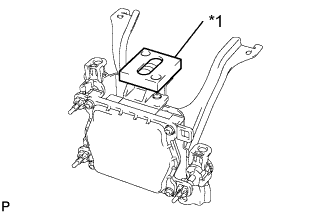
Text in Illustration *1 Level Remove dust, oil and foreign matter from the radar sensor's level rack.
-
Set a level on the radar sensor's level rack.
-
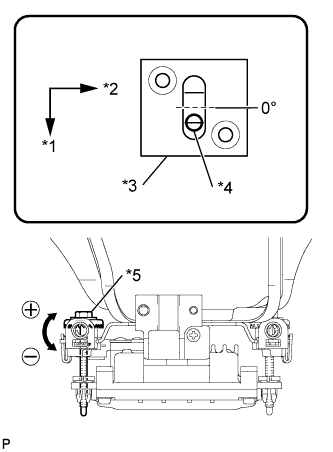
Text in Illustration *1 FR *2 LH *3 Level *4 Air Bubble *5 Bolt A Check that the level's air bubble is within the red frame.
OK Level's air bubble is within red frame. If the bubble is not within the red frame, use a screwdriver to adjust bolt A until the level's air bubble is within the red frame.
Tech Tips
-
The adjustable range within the red frame of the level is +/-0.2°.
-
The target angle is +0.2° (upward angle of 0.2°).
Result Adjustment Direction Adjustment Procedure Adjustment Angle Vertical adjustment Upward direction: Turn bolt A to negative (-) side For every 1.4 rotations of adjustment bolt, sensor moves about 1° Downward direction: Turn bolt A to positive (+) side -
-
-
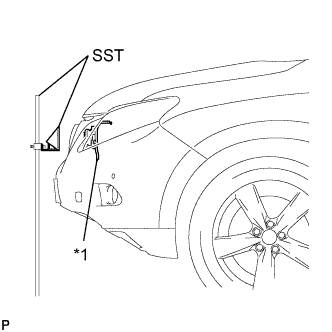
Text in Illustration *1 Millimeter Wave Radar Sensor Adjust the reflector height.
-
Adjust the reflector so that the center of SST reflector is the same height as the millimeter wave radar sensor.
- SST
- 09870-60000 ( 09870-60010 )
- 09870-60040
Tech Tips
Prepare a 10 m (32.8 ft.) string, a string with a sharp-pointed weight (plumb bob), and a 5 m (16.4 ft.) tape measure.
-
-
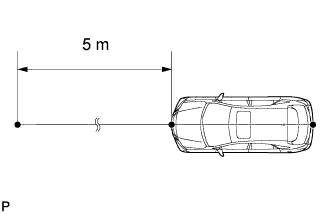
Place the reflector.
-
Hang the string (with weight) from the center of the vehicle's rear emblem. Mark the vehicle's rear center point on the ground. Repeat for the front of the vehicle.
-
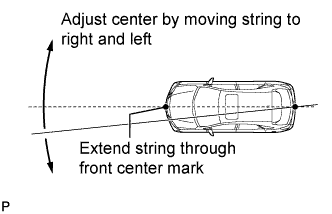
Set one end of the 10 m (32.8 ft.) string on the vehicle's rear center point. Run the string over the vehicle's front center point to a position 5 m (16.4 ft.) beyond the vehicle's front center point, as shown in the illustration. Mark the 5 m (16.4 ft.) position.
-
Using a tape measure, measure 15 mm (0.591 in.) to the right of the 5 m (16.4 ft.) position. Place the reflector at that position.
Note
Perform the operation as precisely as possible.
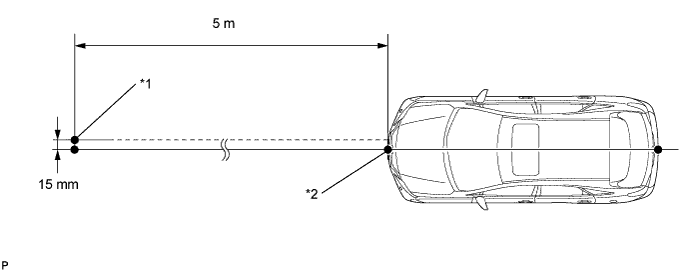
Text in Illustration *1 Reflector Placement Point *2 Millimeter Wave Radar Sensor Position
-
-
Check the radar beam axis.
-
Connect the intelligent tester to the DLC3.
-
Turn the power switch on (IG).
-
Turn the intelligent tester on, and turn the cruise control main switch on.
-
Select "Auto" from the intelligent tester display screen. *1
-
Select "Radar Cruise" from the display screen.
-
Select "Radar Cruise" from the display screen.
-
Select "Utility" from the display screen.
-
Select "Beam Axis Adjustment" from the display screen.
-
Follow the tester display, and select "Next".
CAUTION:
Do not come within 20 cm (7.87 in.) of the radar sensor.
Note
-
Turn the cruise control main switch on before pressing Next.
-
Make sure there is at least 20 cm (7.87 in.) between the radar sensor and any nearby individuals.
-
-
Check the following items on the laser cruise divergence data screen.
CAUTION:
While using the intelligent tester's beam axis adjustment mode, the actual direction and angle of the radar sensor may be different from the intelligent tester's data. In such a case, the deviation is displayed on the combination meter's multi-information display.
-
Confirm that the distance value is approximately 5 m (16.4 ft.).
Tech Tips
-
A value between 0.0 m (0.0 ft.) and 6.3 m (20.7 ft.) is indicated.
-
If the distance is 0.0 m (0.0 ft.), the sensor cannot detect the target. Reconfirm that there is no metal in the specified area in front of the vehicle (refer to the NOTICE at the beginning of this adjustment procedure).
-
-
Confirm that the left/right side value is between 0.0 m (0.0 ft.) and 6.3 m (20.7 ft.).
Tech Tips
If the distance is 0.0 m (0.0 ft.), the sensor cannot detect the target. Reconfirm that there is no metal in the specified area in front of the vehicle (refer to the NOTICE at the beginning of this adjustment procedure).
-
-
-
Check and adjust the horizontal direction of the radar sensor.
-
Check that the divergence of the radar beam axis is 0°.
Standard 0° (Both right and left) If the axis is not as specified, use a screwdriver to adjust bolt B until the divergence of the radar beam axis is 0°.
-
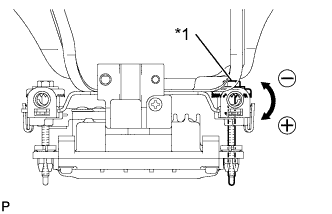
Text in Illustration *1 Bolt B Based on the measured divergence of the beam axis, turn and adjust bolt B for horizontal adjustment of the millimeter wave radar sensor using a screwdriver.
Result Adjustment Direction Adjustment Procedure Adjustment Angle Horizontal adjustment Right direction: Turn bolt B to positive (+) side. For every 2.5 rotations of adjustment bolt, sensor moves about 1° Left direction: Turn bolt B to negative (-) side. Tech Tips
-
If "LEFT SIDE: 1.0°" is displayed, the divergence is 1.0° in the left direction. Turn bolt B approximately 2.5 turns to the negative (-) side.
-
If the value does not change to 0°, it is possible that the sensor is aiming at something different. Reconfirm that there are no reflective materials in the surrounding area.
-
-
Select "Next". The driving learning value is automatically reset.
Tech Tips
A buzzer will sound for 10 seconds or more.
-
Disconnect the intelligent tester from the DLC3.
-
-
Recheck and readjust the vertical direction of the radar sensor.
-
Text in Illustration *1 Level Set a level on the radar sensor's level rack.
-
Text in Illustration *1 FR *2 LH *3 Level *4 Air Bubble *5 Bolt A Check that the level's air bubble is within the red frame.
OK Level's air bubble is within the red frame. If the bubble is not within the red frame, use a screwdriver to adjust bolt A until the level's air bubble is within the red frame.
Tech Tips
-
The adjustable range within the red frame is +/-0.2°.
-
The target angle is +0.2° (upward angle of 0.2°).
Result Adjustment Direction Adjustment Procedure Adjustment Angle Vertical adjustment Upward direction: Turn bolt A to negative (-) side For every 1.4 rotations of adjustment bolt, sensor moves about 1° Downward direction: Turn bolt A to positive (+) side -
-
-
-
INSTALL COOL AIR INTAKE DUCT SEAL
-
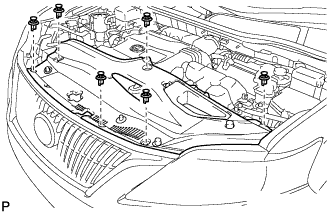
Install the cool air intake duct seal with the 6 clips.
-
-
INSTALL ENGINE ROOM SIDE COVER
-
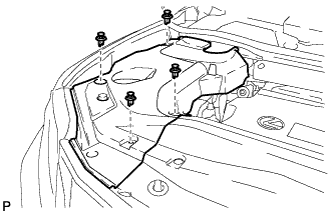
Install the engine room side cover with the 4 clips.
-
-
INSTALL ENGINE ROOM SIDE COVER LH
-
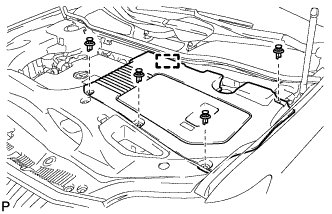
Engage the guide.
-
Install the engine room side cover LH with the 4 clips.
-
-
INSPECT HOOD SUB-ASSEMBLY
-
Check that the clearance measurements of areas *1 through *7 are within each standard range.
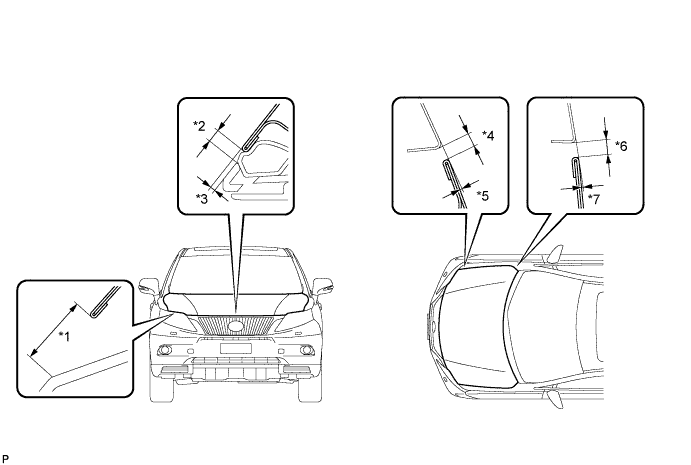
Standard Clearance Area Measurement Area Measurement *1 18.3 to 21.3 mm (0.720 to 0.839 in.) *2 3.5 to 6.5 mm (0.138 to 0.256 in.) *3 0 to 3.0 mm (0 to 0.118 in.) *4 2.3 to 5.3 mm (0.0905 to 0.209 in.) *5 -1.5 to 1.5 mm (-0.0591 to 0.0591 in.) *6 2.7 to 5.7 mm (0.106 to 0.224 in.) *7 -1.5 to 1.5 mm (-0.0591 to 0.0591 in.) - -
-
-
ADJUST HOOD SUB-ASSEMBLY
-
ADD WASHER FLUID
-
Add washer fluid to the washer jar.
-
-
PREPARE VEHICLE FOR FOG LIGHT AIM ADJUSTMENT
-
Prepare the vehicle:
-
Ensure there is no damage or deformation to the body around the fog lights.
-
Fill the fuel tank.
-
Make sure that the oil is filled to the specified level.
-
Make sure that the coolant is filled to the specified level.
-
Inflate the tires to the appropriate pressure.
-
Unload the trunk and vehicle, ensuring that the spare tire, tools and jack are in their original positions (except Taiwan).
-
Unload the trunk and vehicle, ensuring that the spare tire, tools and jack are also removed (for Taiwan).
-
Sit a person of average weight (75 kg, 165 lb) in the driver's seat (except Taiwan).
-
Sit a person of average weight (55 kg, 121 lb) in the driver's seat (for Taiwan).
-
Vehicles with height adjustable suspension should set the vehicle height to the lowest setting prior to adjusting the headlight aim.
-
-
-
PREPARE FOR FOG LIGHT AIMING
-
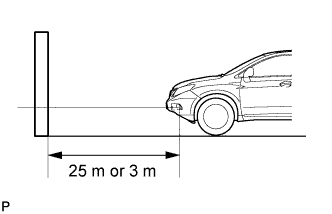
Prepare the vehicle (except Taiwan and China):
-
Place the vehicle in a location that is dark enough to clearly observe the cutoff line. The cutoff line is a distinct line, below which light from the fog lights can be observed and above which it cannot.
-
Place the vehicle at a 90° angle to the wall.
-
Create a 25 m (82 ft.) distance between the vehicle (fog light bulb center) and the wall.
-
Make sure that the vehicle is on a level surface.
-
Position the front wheels straight ahead.
-
Bounce the vehicle up and down to settle the suspension.
Note
A distance of 25 m (82 ft.) between the vehicle (fog light bulb center) and the wall is necessary for proper aim adjustment. If sufficient space is not available, secure a distance of exactly 3 m (9.84 ft.) to allow for checking and adjustment of fog light aim. (The size of the target zone will change with the distance, so follow the instructions in the illustration.)
-
-
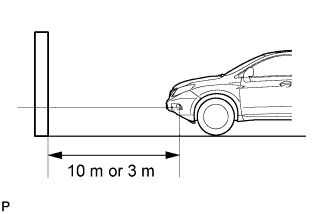
Prepare the vehicle (for Taiwan and China):
-
Place the vehicle in a location that is dark enough to clearly observe the cutoff line. The cutoff line is a distinct line, below which light from the fog lights can be observed and above which it cannot.
-
Place the vehicle at a 90° angle to the wall.
-
Create a 10 m (32.8 ft.) distance between the vehicle (fog light bulb center) and the wall.
-
Make sure that the vehicle is on a level surface.
-
Position the front wheels straight ahead.
-
Bounce the vehicle up and down to settle the suspension.
Note
A distance of 10 m (32.8 ft.) between the vehicle (fog light bulb center) and the wall is necessary for proper aim adjustment. If sufficient space is not available, secure a distance of exactly 3 m (9.84 ft.) to allow for checking and adjustment of fog light aim. (The size of the target zone will change with the distance, so follow the instructions in the illustration.)
-
-
Prepare a piece of thick white paper (approximately 2 m (6.6 ft.) (height) x 4 m (13.1 ft.) (width)) to use as a screen.
-
Draw a vertical line down the center of the screen (V line).
-
Set the screen as shown in the illustration (except Taiwan and China).
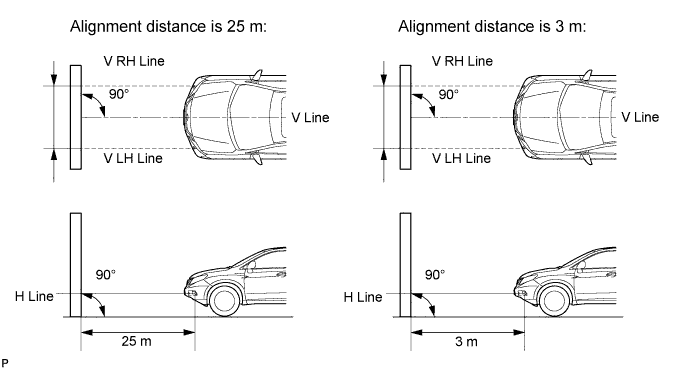
Tech Tips
-
Stand the screen perpendicular to the ground.
-
Align the V line on the screen with the center of the vehicle.
-
-
Set the screen as shown in the illustration (for Taiwan and China).
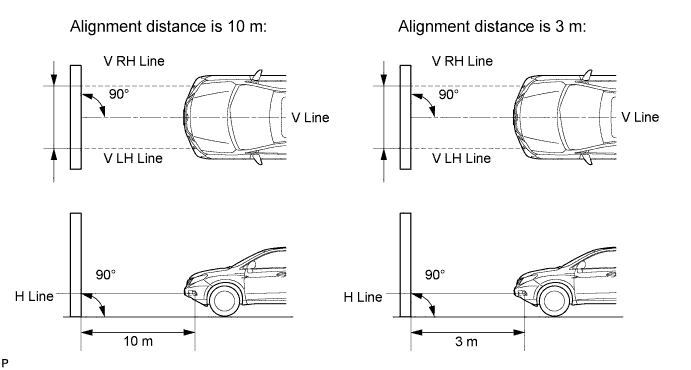
Tech Tips
-
Stand the screen perpendicular to the ground.
-
Align the V line on the screen with the center of the vehicle.
-
-
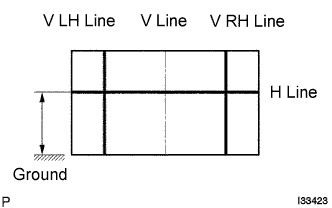
Draw base lines (H, V LH, and V RH lines) on the screen as shown in the illustration.
Tech Tips
Mark the fog light bulb center marks on the screen. If the center mark cannot be observed on the fog light, use the center of the fog light bulb or the manufacturer's name marked on the fog light as the center mark.
-
H Line (Fog light height):
Draw a horizontal line across the screen so that it passes through the center marks. The H line should be at the same height as the fog light bulb center marks of the fog lights.
-
V LH Line, V RH Line (Center mark position of left-hand (LH) and right-hand (RH) fog lights):
Draw two vertical lines so that they intersect the H line at each center mark (Aligned with the center of the fog light bulbs).
-
-
-
INSPECT FOG LIGHT AIMING
-
Cover the fog light or disconnect the connector of the fog light on the opposite side to prevent light from the fog light that is not being inspected from affecting the fog light aiming inspection.
Note
Do not keep the fog light covered for more than 3 minutes. The fog light lens is made of synthetic resin, which may melt or be damaged due to excessive heat.
-
Start the engine.
-
Turn on the fog lights and check if the upper edge of the hot zone for each fog light matches the upper edge as shown in the illustration (except Taiwan and China).
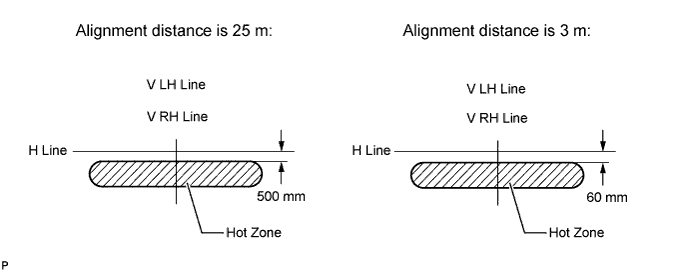
Tech Tips
-
If the alignment distance is 25 m (82 ft.):
The upper edge of the hot zone for the fog light should be 500 mm (19.7 in.) below the H line.
-
If the alignment distance is 3 m (9.84 ft.):
The upper edge of the hot zone for the fog light should be 60 mm (2.37 in.) below the H line.
-
-
Turn on the fog lights and check if the upper edge of the hot zone for each fog light matches the upper edge as shown in the illustration (for Taiwan and China).
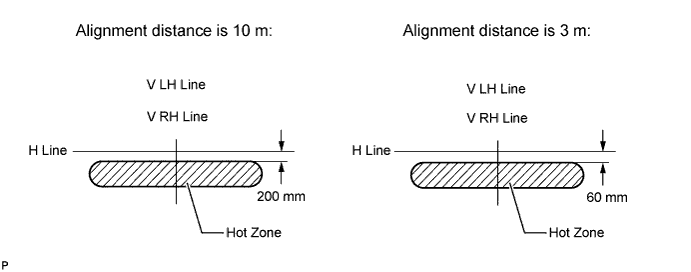
Tech Tips
-
If the alignment distance is 10 m (32.8 ft.):
The upper edge of the hot zone for the fog light should be 200 mm (7.88 in.) below the H line.
-
If the alignment distance is 3 m (9.84 ft.):
The upper edge of the hot zone for the fog light should be 60 mm (2.37 in.) below the H line.
-
-
-
ADJUST FOG LIGHT AIMING
-
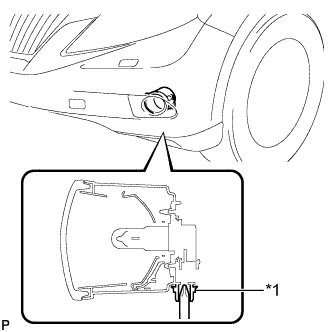
Text in Illustration *1 Aiming Screw Adjust the aim vertically:
Adjust the aim of each fog light to the specified range by turning each aiming screw with a screwdriver.
Note
The final turn of the aiming screw should be made in the clockwise direction. If the screw is tightened excessively, loosen it and then retighten it, so that the final turn of the screw is in the clockwise direction.
Tech Tips
If it is not possible to correctly adjust fog light aim, check bulb, fog light unit and fog light unit reflector installation.
-