MAYDAY SWITCH REMOVAL

-
REMOVE MAP LIGHT ASSEMBLY
-
w/ Holder:
-
Open the holder.
-
-
w/o Holder:
-
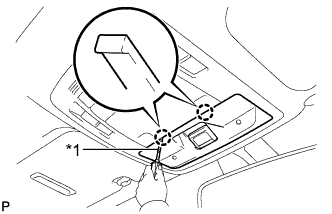
Text in Illustration *1 Protective Tape Using a screwdriver wrapped with protective tape, disengage the 2 claws and disconnect the cover.
-
-
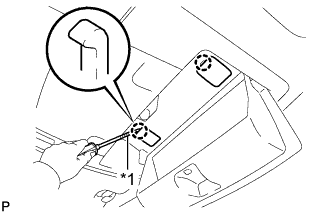
Text in Illustration *1 Protective Tape Using a screwdriver wrapped with protective tape, disengage the 2 claws and disconnect the 2 caps.
-
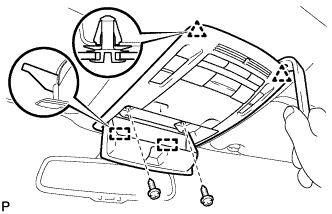
Remove the 2 screws.
-
Using a moulding remover, disengage the 2 clips and 2 guides.
-
Disconnect each connector and remove the map light assembly.
-
-
REMOVE THEFT WARNING RADAR SENSOR (w/ Theft Deterrent System)
-
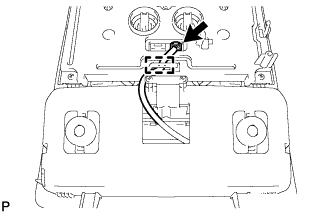
Disconnect the connector.
-
Disengage the clamp.
-
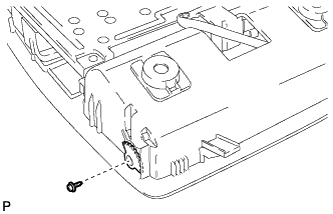
Remove the screw and gear.
-
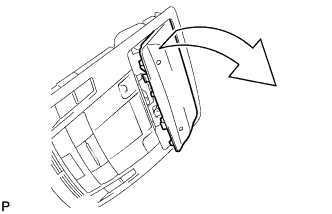
Remove the cover as shown in the illustration.
-
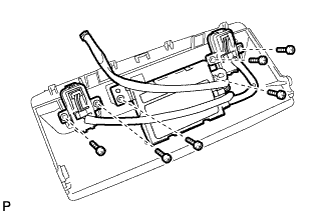
Remove the 6 screws and theft warning radar sensor.
-
-
REMOVE TELEPHONE SWITCH ASSEMBLY
-
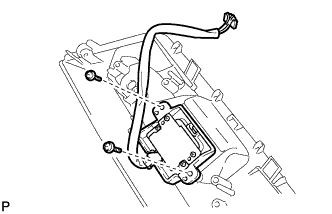
Remove the 2 screws and telephone switch assembly.
-