G-BOOK SYSTEM Received Voice Signal Circuit
WIRING DIAGRAM
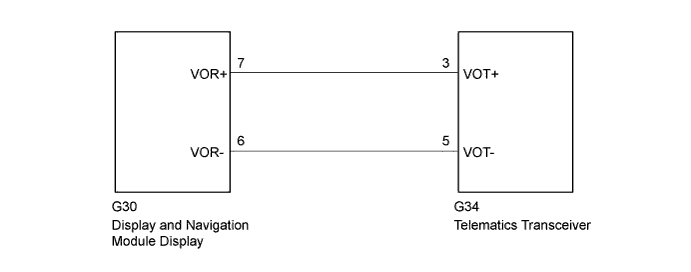
INSPECTION PROCEDURE
Tech Tips
When replacing the display and navigation module display or the telematics transceiver, perform the vehicle contract setting Click here.
PROCEDURE
-
CHECK HARNESS AND CONNECTOR
-
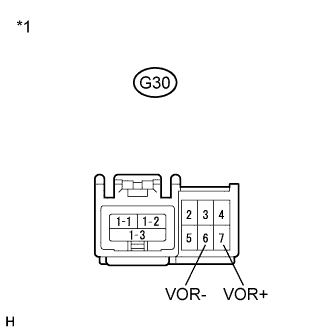
Disconnect the G30 display and navigation module display connector.
-
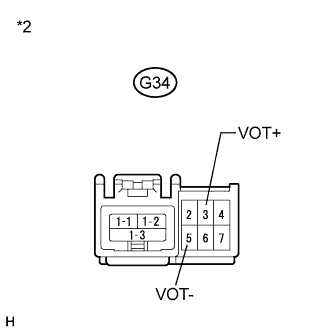
Disconnect the G34 telelmatics transceiver connector.
-
Measure the resistance according to the value(s) in the table below.
Standard Resistance Tester Connection Condition Specified Condition G30-7 (VOR+) - G34-3 (VOT+) Always Below 1 Ω G30-6 (VOR-) - G34-5 (VOT-) Always Below 1 Ω G30-7 (VOR+) - Body ground Always 10 kΩ or higher G30-6 (VOR-) - Body ground Always 10 kΩ or higher Text in Illustration *1 Front view of wire harness connector
(to Display and Navigation Module Display)
*2 Front view of wire harness connector
(to Telematics Transceiver)
NG 
REPAIR OR REPLACE HARNESS OR CONNECTOR
OK 
-
-
INSPECT TELEMATICS TRANSCEIVER
-
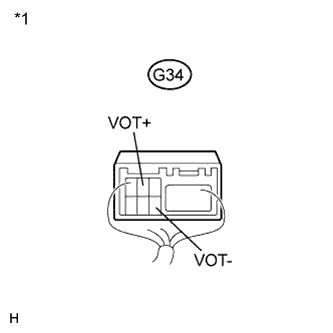
Text in Illustration *1 Component with harness connected
(Telelmatics Transceiver)
Check for pulses according to the value(s) in the table below.
Standard Tester Connection Condition Specified Condition G34-3 (VOT+) - Body ground Receiving a call while using the operator service A waveform synchronized with the received voice is output. G34-5 (VOT-) - Body ground Receiving a call while using the operator service A waveform synchronized with the received voice is output.
NG
REPLACE TELEMATICS TRANSCEIVER Click here
OK 
REPLACE DISPLAY AND NAVIGATION MODULE DISPLAY Click here
-