G-BOOK SYSTEM PRECAUTION

-
PRECAUTION FOR DISCONNECTING CABLE FROM NEGATIVE (-) BATTERY TERMINAL
Note
When disconnecting the cable from the negative (-) battery terminal, initialize the following systems after the terminal is reconnected.
System Name See Procedure Parking Assist Monitor System Side Monitor System Back Door Closer System Power Back Door System -
WARNING NOTIFICATION FUNCTION
Note
-
Before performing inspections or repairs which may cause warning messages or DTC to occur, such as a simulation test or road test, it is necessary to activate warning notification restraint mode so that the G-BOOK center does not recognize the warnings as real ones.
-
Warning notification restraint mode can be entered by using the intelligent tester or operating the multi-display.
Tech Tips
The warning notification function sends a warning message signal, received from the combination meter assembly via CAN communication, to the G-BOOK center using the G-BOOK device if a warning is displayed due to a vehicle malfunction.
-
Warning notification restraint mode
Tech Tips
-
Performing the following procedure will select warning notification restraint mode.
-
After warning notification restraint mode is entered, driving the vehicle 10 km (6 mile) will cancel the mode.
-
Warning notification restraint mode (Using the intelligent tester)
-
Turn the power switch off.
-
Connect the intelligent tester to the DLC3.
-
Start the engine.
-
Enter the following menus: Powertrain / Engine / DTC.
-
-
Warning notification restraint mode (Operating the multi-display)
-
Enter diagnostic mode of the navigation system (for HDD) Click here.
-
-
-
-
STRICT PROHIBITION OF MANUAL EMERGENCY CALL USING EMERGENCY CALL SERVICE
-
Do not make an emergency call when not in emergency situations. For inspections, use the manual maintenance check.
Note
-
If the emergency call service is used to connect to the G-BOOK center when not in an emergency situation, an unnecessary workload will be generated at the G-BOOK center. This may cause a delayed response by the G-BOOK center to other emergency calls.
-
If emergency vehicles are dispatched due to an accidental operation of the telephone switch assembly, you may be charged for the dispatch of the vehicle or punished according to related laws.
-
-
If an accidental operation of the telephone switch assembly is made:
-
If an accidental operation of the telephone switch assembly is made, contact the G-BOOK center to tell that the call was made by mistake.
-
The emergency call cannot be halted or finished from the vehicle. Only the G-BOOK center can halt or finish the call.
-
If the G-BOOK center cannot be informed that the call was made by mistake, the center will report to authorities, emergency facilities and dealerships in compliance with its agreements. As a result, emergency vehicles may be dispatched.
-
-
-
PRECAUTIONS FOR G-BOOK
-
After replacing the display and navigation module display or the telematics transceiver and performing the vehicle contract setting, perform the procedure to resume the G-BOOK service and to start the emergency call service Click here.
-
On this model, the display and navigation module display functions as the G-BOOK device and has the G-BOOK ID.
-
If the hard disk drive is replaced on vehicles that have a contract for the G-BOOK service, perform "Download necessary data" after installing the new hard disk drive Click here.
-
Necessary data for the G-BOOK system is stored in the hard disk drive that is built into the display and navigation module display.
-
-
INSPECTION PROCEDURE FOR TELEMATICS TRANSCEIVER (DATA COMMUNICATION MODULE (DCM))
-
The telematics transceiver uses a CDMA2000 1X type radio wave signal. The radio signals and communication lines may occasionally be unstable depending on time or location factors. Therefore, network access errors may occur intermittently because of radio signal conditions. To determine if there is a problem, it may be necessary to make a judgment based on frequency of the phenomenon or by making a comparison with a comparable type of cell phone.
-
The display and navigation module display and the telematics transceiver have a one-to-one relationship on the registered G-BOOK system. Therefore, if the display and navigation module display or the telematics transceiver is replaced, a network access cannot be made unless the vehicle contract setting is performed. Use of a substitute component is also not possible to confirm network access.
-
It is not permitted to disassemble the telematics transceiver (the case cannot be opened). If the telematics transceiver malfunctions, replace it.
-
-
PRECAUTIONS FOR EMERGENCY CALL SERVICE
-
Depending on the content of troubleshooting, a manual maintenance check may be performed.
Tech Tips
Communication charges are not incurred for the manual maintenance check because the telematics transceiver is used for communication (the communication cost is included in the G-BOOK service cost).
-
The telematics transceiver functions as the emergency call service device and it has the mayday ID.
-
-
PRECAUTION FOR MAYDAY BATTERY
-
After automatic emergency call is performed, the mayday battery must be replaced with a new one.
-
-
AUTOMATIC MAINTENANCE CHECK FOR EMERGENCY CALL SERVICE
-
The emergency call system regularly performs an automatic maintenance check and communication test with the G-BOOK center so that the emergency call service can always function correctly. There are no operations required to initiate an automatic maintenance check. The automatic maintenance check is performed as follows:
-
The automatic maintenance check ends 1 to 2 minutes after it starts.
-
During the automatic maintenance check, a telephone call or network access is not possible using G-BOOK system. In this case, wait several minutes before trying again.
-
If communication is interrupted for some reason after the automatic maintenance check has started, the automatic maintenance check will resume the next time the power switch is turned on (ACC).
-
There are no communication charges incurred for the manual and automatic maintenance check because the telematics transceiver is used for communication (the communication cost is included in the G-BOOK service cost).
-
-
-
IF EMERGENCY CALL CANNOT BE MADE
-
The emergency call service may not be available, or its quality may deteriorate in the following cases. (For details, refer to the terms of service and operation manual for the device.)
Cause Detail Communication is interrupted due to malfunctions in the G-BOOK device or any other related device. The G-BOOK device does not operate normally, such as when the device is damaged or malfunctioning due to an impact caused by a collision. Communication is interrupted due to a G-BOOK center system error.
-
The G-BOOK center system may need either periodic or urgent maintenance.
-
An extreme volume of emergency calls is made to the G-BOOK center due to a large-scale traffic accident or fire.
-
Malfunctions or problems with the G-BOOK center system.
-
The G-BOOK center system is damaged due to a fire.
-
The emergency call service is suspended or halted due to emergency call provider reasons.
Communication is interrupted due to the network used for the emergency call system.*1
-
The registered vehicle is located outside the cellular phone service area used for the emergency call system.
-
The vehicle is overseas.
-
The vehicle is in a cellular phone service area where communication is not possible, such as an indoor environment, a basement parking area, mountains, tunnels or beside a building.
-
Network availability or the time of use is limited, such as when cellular phone networks or public fixed networks (including junction networks) are extremely busy.
-
Network availability is limited by the communication service provider due to a large-scale disaster.
-
The cellular phone network or public fixed network (including junction networks) service used for the emergency call system is suspended or halted due to accidents, maintenance or engineering works.
The G-BOOK center system cannot determine the vehicle location.
-
The vehicle is in the area where the Global Positioning System (GPS) radio waves cannot be received or where it is difficult for radio waves to penetrate, such as indoor environment, a basement parking area, mountains, tunnels or beside a building.
-
The vehicle location cannot be determined normally or accurately because the vehicle is in the following areas:
-
Areas that cause a large error of the location calculation using the GPS, such as in tunnels or a densely built-up area, or after getting off a ferry.
-
Areas that cause a large error of map matching due to an old map database.
-
The GPS system malfunctions.
Others
-
Although a manual call is made, the situation cannot be confirmed because the user cannot respond to questions from the G-BOOK center.
-
The G-BOOK contract has not been established, the user fell behind in payments or cancelled the service.
-
The emergency call service start procedure has not been completed.
Note
*1: Even when the vehicle is within the cellular phone service area, emergency or phone calls may be difficult to be made due to radio wave signal conditions or busy lines. In this case, it may not be possible to access the G-BOOK center. As a result, no calls can be made to ask for rescue in the event of a traffic accident. If emergency calls cannot be made, use a landline telephone or cellular phone.
-
-
-
ALARM NOTIFICATION FUNCTION
-
If the vehicle automatic alarm is activated, the G-BOOK center makes a phone call to the customer.
Note
-
When servicing the vehicle, ensure that the vehicle does not experience any conditions that cause a telephone call to be made by a G-BOOK operator.
-
Before performing inspections or repairs which may activate the alarm notification function, be sure to inform the customer that they may receive a telephone call from a G-BOOK operator.
Tech Tips
Customers can cancel the alarm notification on the multi-display.
-
-
-
PRECAUTIONS FOR DISPLAY AND NAVIGATION MODULE DISPLAY
-
An HDD is built into the display and navigation module display to store map data etc. which will be used for the navigation system. Therefore, care must be taken for the following points when handling:
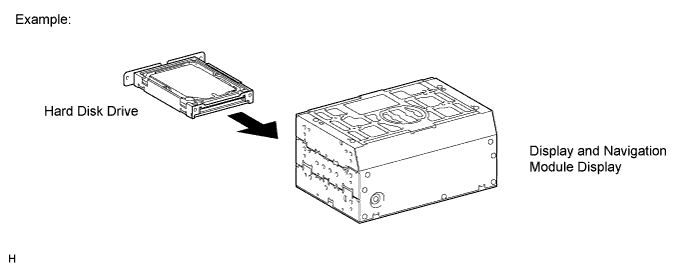
-
-
PRECAUTIONS FOR HARD DISK DRIVE (HDD)
-
The map data for the navigation system is stored on the Hard Disk Drive (HDD). Make sure to follow the following instructions when replacing the HDD:
Note
Data recorded by the customer may be stored on the HDD. (w/ Sound Library Function) This data will be lost when the HDD is replaced. Make sure to warn the customer that their data will be lost and obtain their consent prior to replacing the HDD.
-
The HDD must only be replaced with a new one. Do not attempt to install a used HDD from another vehicle.
Note
The display and navigation module display can recognize only a new HDD.
-
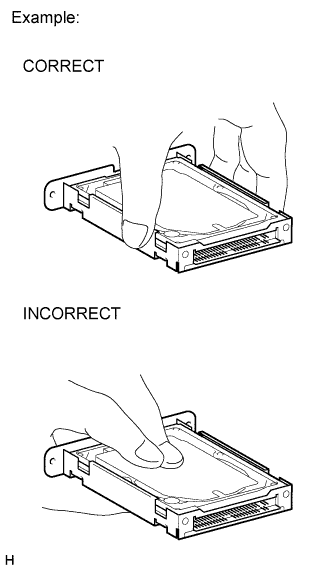
Do not touch the HDD cover.
Note
When removing or installing the HDD, only hold it by the areas shown in the illustration.
-
Do not apply any vibration or shock to the HDD.
Note
-
Do not drop or allow anything to strike the HDD.
-
Never use an HDD that has been dropped or struck.
-
Do not store an HDD by itself if it has been removed from the display and navigation module display. (Only remove the HDD from the display and navigation module display when the replacement display and navigation module display or HDD is ready.)
-
-
Do not remove the HDD if there is a risk that condensation may occur.
Note
If the temperature of the HDD changes rapidly, condensation may occur inside the unit. This may cause a malfunction of the HDD. Therefore, when the display and navigation module display is removed from the instrument panel, it needs to be kept inside the vehicle or in an environment with an equivalent temperature and humidity.
-
Take measures to prevent static electricity.
Note
Touching the terminals of a connector can cause static electricity to be transmitted to the internal circuits. This may cause a malfunction of the HDD.
-
Keep the HDD away from magnets or magnetized items.
Note
Keep the HDD away from speakers, motors, magnetized tools and other magnetic items.
-
Inspect after HDD replacement.
Note
Make sure to perform Check Hard Disk Drive in Operation Check to confirm that there are no HDD abnormalities after removal or installation Click here.
-
-