NAVIGATION SYSTEM (for HDD) Black Screen
INSPECTION PROCEDURE
PROCEDURE
-
CHECK DISPLAY SETTING
-
Check that the display is not in "Screen OFF" mode.
OK The display setting is not in "Screen OFF" mode.
NG 
CHANGE SCREEN TO "SCREEN ON" MODE
OK 
-
-
CHECK IMAGE QUALITY SETTING
-
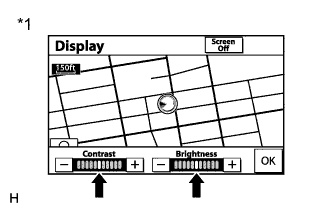
Text in Illustration *1 Example Press the "DISP" switch on the remote touch.
-
Check that the screen color quality can be set.
OK Setting is possible.
NG 
CHECK CABIN Click here
OK 
PRESS REMOTE TOUCH "DISPLAY" SWITCH AND SET SCREEN COLOR QUALITY TO NORMAL
-
-
CHECK CABIN
-
Check that condensation is not likely to occur in the cabin, and that the temperature is not high or extremely low in the cabin.
Tech Tips
-
A humid cabin and a rapid change in temperature may lead to condensation. Condensation in the cabin may cause a short circuit.
-
The navigation system may not operate normally when the temperature is -20°C (-4°F) or lower, or 65°C (149°F) or higher.
OK Condensation is not likely being produced and the temperature is not high or extremely low. -
NG
SET CABIN TO APPROPRIATE TEMPERATURE
OK
PROCEED TO NEXT SUSPECTED AREA SHOWN IN PROBLEM SYMPTOMS TABLE Click here
-