NAVIGATION SYSTEM (for HDD) Cannot Call in a Certain Place
INSPECTION PROCEDURE
PROCEDURE
-
CHECK SURROUNDING CONDITIONS
-
Check if the cellular phone can make calls in a certain place.
OK It can make calls.
NG 
END (CELLULAR PHONES CAN ONLY FUNCTION IN CELLULAR SERVICE AREAS)
OK 
-
-
CHECK RECEPTION
-
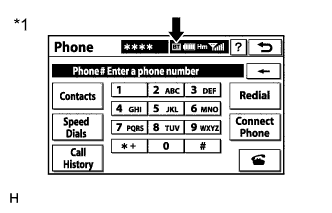
Text in Illustration *1 Example Display the "Phone" screen and check the "Bluetooth" connection indicator ("BT" indicator).
Result Result Proceed to "BT" indicator color is yellow. A "BT" indicator color is blue. B No connection mark is displayed. C Tech Tips
-
The "BT" indicator color is yellow when the cellular phone has a bad or weak connection to Bluetooth.
-
The "BT" indicator color is blue when the cellular phone has an excellent connection to Bluetooth.
-
No connection mark is displayed when the cellular phone is not connected to Bluetooth.
-
B
REPLACE RADIO RECEIVER ASSEMBLY Click here
C
SELECT A REGISTERED CELLULAR PHONE OR REGISTER A "Bluetooth" COMPATIBLE PHONE
A 
MOVE CELLULAR PHONE TO A LOCATION WHERE "BT" MARK TURNS BLUE
-