REAR SEAT ENTERTAINMENT SYSTEM SYSTEM DESCRIPTION

-
OUTLINE
-
As a unique feature of the Rear Seat Entertainment (RSE) system, the rear seat occupants can enjoy different audio-visual modes at the same time.
-
The rear seat occupants can control the audio-visual modes with the remote control, and listen to audio by using wired or wireless headphones.
-
The multi-display controller sub-assembly receives image and sound signals from the display and navigation module display and distributes the signals to each television display assembly.
-
A television display assembly is installed on the back of each front seat.
-
The rear seat occupants can enjoy watching video by connecting an external device.
-
MOST communication is used between the display and navigation module display and the multi-display controller. AVC-LAN communication is used between the multi-display controller sub-assembly and television display assembly.
-
Occupants in the front seats, rear left seat and rear right seat can enjoy different content at the same time. However, this is possible for the rear left and rear right seats only when a VIDEO is selected for either the left or right seat and another source is selected for the other seat.
-
-
FUNCTION OF MAIN COMPONENT
Component Function Television Display Assembly
-
Displays DVD and video images in accordance with video signals from the multi-display controller sub-assembly.
-
Receives signals from the remote control and outputs them to the multi-display controller sub-assembly.
-
Outputs audio signals to the wireless headphones in the form of infrared signals.
-
Displays the audio-visual control screen.
-
Displays the adjustment screen.
-
Displays the diagnosis screen. The diagnosis screen appears when diagnosis mode is started on the multi-display assembly.
-
Even if the power switch is turned from on (ACC) to off to on (ACC), display condition continues (image adjustments maintained, sources continue playing on the left and right sides).
Radio Receiver Assembly
-
Outputs DVD image signals to the display and navigation module display.
Multi-display Controller Sub-assembly (RSE ECU)
-
Processes video and audio signals from the video terminal and DVD image and audio signals from the radio receiver assembly, and outputs them to the television display and headphone terminals.
-
Controls the distribution of the audio-visual content to the rear left and rear right.
-
Outputs audio signals for the video to the front seats.
Remote Control Outputs various control signals of the RSE system to the television display assembly in the form of infrared signals. Wireless Headphone
-
Receives audio signals from the television display assembly in the form of infrared signals.
-
Volume adjustment of the wireless headphone can be done by using the volume adjuster on the wireless headphone.
Headphone Terminal
-
Outputs audio signals to the wired headphones that are connected.
-
Adjusts the volume of the wired headphones in accordance with volume control.
Video Terminal This terminal is for connecting the video player's video and audio output terminals. Display and Navigation Module Display Receives DVD image signals from the radio receiver assembly and sends the signals to the multi-display controller sub-assembly. -
-
COMMUNICATION SYSTEM
-
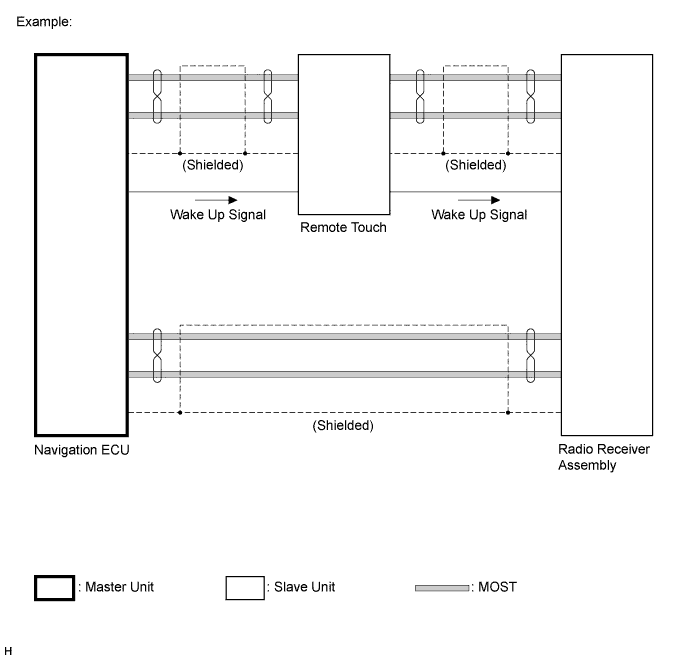
MOST NETWORK OUTLINE
-
Navigation system components communicate with each other via the MOST network.
-
The MOST network uses a shielded twisted pair of wires for its communication lines.
-
The master unit of the MOST network is the display and navigation module display.
-
MOST communication lines connect each slave unit centering around the master unit to form a MOST network ring.
-
The master unit sends a wake-up signal to activate each slave unit connected to the MOST network.
Tech Tips
If a short or open circuit occurs in the MOST circuit, communication will be interrupted and the system will not operate normally.
-
-
AVC-LAN OUTLINE
-
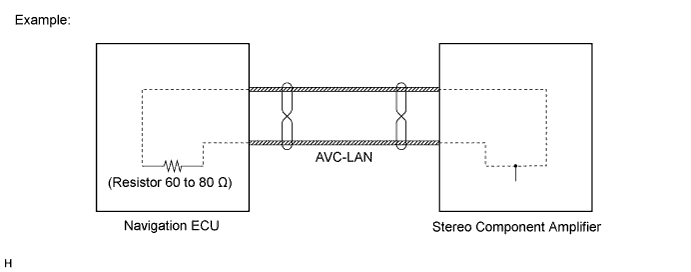
Components of the navigation system communicate with each other via the AVC-LAN.
-
The AVC-LAN uses a twisted pair of wires for its communication lines.
-
The master unit of the AVC-LAN is the display and navigation module display.
Tech Tips
-
The display and navigation module display has enough resistance (60 to 80 Ω) necessary for communication.
-
If a short or open circuit occurs in the AVC-LAN circuit, communication is interrupted and system will not operate normally.
-
-
-
-
DIAGNOSIS FUNCTION
-
When the navigation system changes to the diagnosis screen, the television display assembly shows the "RSE Check" screen.
-
-
DIGITAL VERSATILE DISC (DVD) PLAYER OUTLINE
-
The DVD player can only play DVD videos that have one of the following marks:

-
Precaution for use of discs
Note
-
Keep the discs away from dirt. Be careful not to damage the discs or leave your fingerprints on them.
-
Hold discs by the outer edge and center hole with the label side up.
-
Leaving the disc exposed halfway out of the slot for a long time after pressing the disc eject button may cause deformation of the disc, making the disc unusable.
-
Do not use uniquely-shaped CDs because these may cause player malfunctions.
-
Do not use discs whose recording portion is transparent or translucent because they may not be able to be inserted, ejected or played normally.
-
-
-
Check disc
-
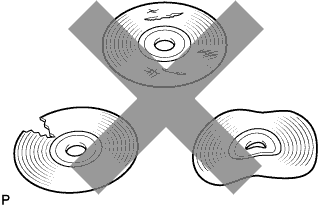
Check that the disc is not deformed or cracked.
-
-
Disc cleaning
Note
Do not use a lens cleaner because it may cause a malfunction in the pickup portion of the player.
-
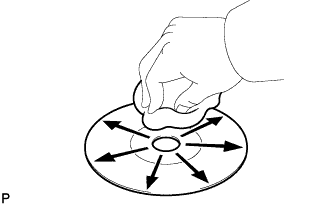
If dirt is on the disc surface, wipe it clean with a soft cloth from the inside to the outside in a radial direction.
Note
-
Pressing on the disc by hand or rubbing the disc with a hard cloth may scratch the disc surface.
-
Use of solvent such as a record spray, antistatic agent, alcohol, benzine, and thinner or a chemical cloth may cause damage to the disc, making the disc unusable.
-
-
-