AIR CONDITIONING UNIT REMOVAL

-
PRECAUTION
-
w/ Air Suspension:
Note
Be sure to read Precaution thoroughly before servicing Click here.
-
w/ Navigation System for HDD:
Note
w/ Navigation System for HDD:After the power switch is turned off, the display and navigation module display (HDD navigation system) records various types of memory and settings. As a result, after turning the power switch off, make sure to wait for the time specified in the following table before disconnecting the cable from the negative (-) battery terminal Click here.
Waiting Time before Disconnecting Cable from Negative (-) Battery Terminal Specification Waiting Time w/o Telematics transceiver 60 sec. w/ Telematics transceiver 120 sec.
-
-
RECOVER REFRIGERANT FROM REFRIGERATION SYSTEM
-
Turn the A/C switch on.
-
Operate the A/C with the setting temperature at 25°C (77°F) and the blower level at LO for 10 minutes to circulate the refrigerant. This causes most of the compressor oil from the various components of the A/C system to collect in the A/C compressor.
-
Turn the power switch off.
-
Recover the refrigerant from the A/C system using a refrigerant recovery unit.
-
-
ALIGN FRONT WHEELS STRAIGHT AHEAD
-
REMOVE FRONT WHEEL RH
-
REMOVE REAR DECK FLOOR BOX
-
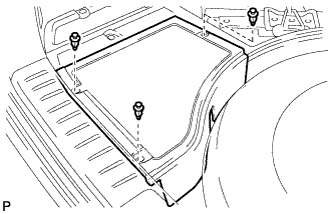
Remove the 3 clips and the rear deck floor box.
-
-
DISCONNECT CABLE FROM NEGATIVE BATTERY TERMINAL
-
Disable the auto tilt away function by changing the customize parameter Click here.
Note
Record the current customize parameter setting (whether the auto tilt away function is enabled or disabled) in order to restore the current setting after finishing this operation.
Tech Tips
Performing the above operation disables the auto tilt away function when the power switch is turned off.
-
Turn the power switch on (IG). Operate the tilt and telescopic switch to fully extend and lower the steering column assembly.
-
Turn the power switch off and disconnect the cable from the negative (-) battery terminal.
CAUTION:
Wait at least 90 seconds after disconnecting the cable from the negative (-) battery terminal to disable the SRS system.
Note
-
When disconnecting the cable, some systems need to be initialized after the cable is reconnected Click here.
-
Make sure to select FACE mode before disconnecting the cable from the negative (-) battery terminal.
-
-
-
REMOVE FRONT SEAT ASSEMBLY
-
for LH Side:
-
Refer to the procedure for Remove Front Seat Assembly Click here.
-
-
for RH Side:
Tech Tips
Use the same procedure for the RH side and LH side.
-
-
REMOVE ENGINE ROOM SIDE COVER
-
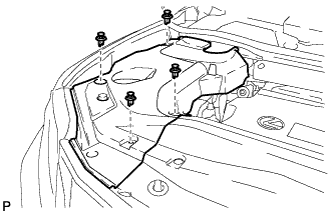
Remove the 4 clips and engine room side cover.
-
-
REMOVE ENGINE ROOM SIDE COVER LH
-
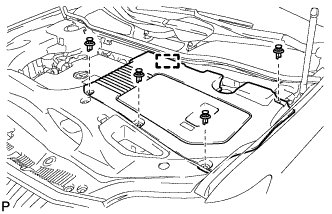
Remove the 4 clips.
-
Disengage the guide and remove the engine room side cover LH.
-
-
REMOVE COOL AIR INTAKE DUCT SEAL
-
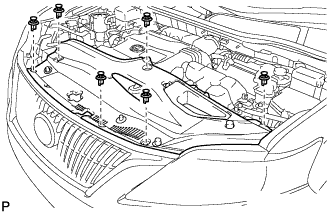
Remove the 6 clips and cool air intake duct seal.
-
-
REMOVE FRONT FENDER TOP REINFORCEMENT SUB-ASSEMBLY LH
-
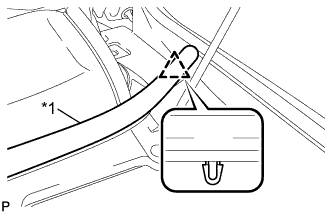
Text in Illustration *1 Hood to Cowl Top Seal Disengage the clip and the hood to cowl top seal from the front fender top reinforcement sub-assembly LH.
-
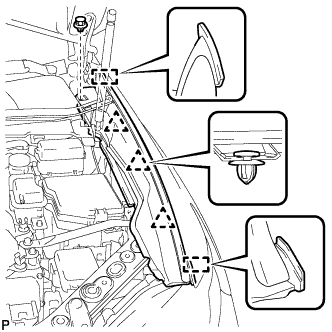
Remove the clip.
-
Disengage the 3 clips and 2 guides, and remove the front fender top reinforcement sub-assembly LH.
-
-
REMOVE FRONT FENDER TOP REINFORCEMENT SUB-ASSEMBLY RH
Tech Tips
Use the same procedure for the RH side and LH side.
-
REMOVE FRONT FENDER TO COWL SIDE SEAL LH
-
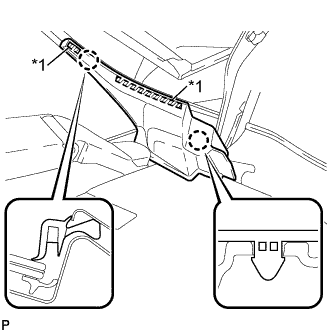
Text in Illustration *1 Double-sided Tape Disengage the 2 claws and remove the front fender to cowl side seal LH.
-
-
REMOVE FRONT FENDER TO COWL SIDE SEAL RH
Tech Tips
Use the same procedure for the RH side and LH side.
-
REMOVE FRONT WIPER ARM HEAD CAP
-
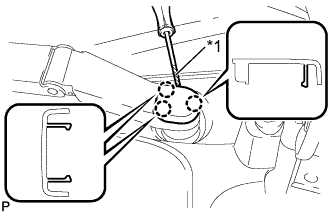
Text in Illustration *1 Protective Tape Using a screwdriver, disengage the 3 claws and remove the front wiper arm head cap.
Tech Tips
Tape the screwdriver tip before use.
-
-
REMOVE FRONT WIPER ARM AND BLADE ASSEMBLY LH
-
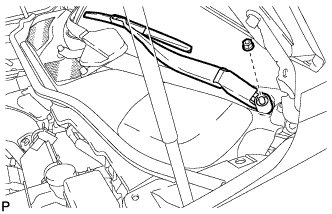
Remove the nut and the front wiper arm and blade assembly LH.
-
-
REMOVE FRONT WIPER ARM AND BLADE ASSEMBLY RH
-
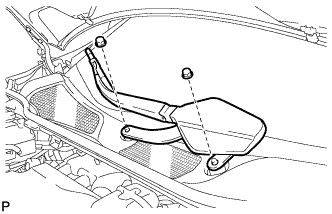
Remove the 2 nuts and the front wiper arm and blade assembly RH.
-
-
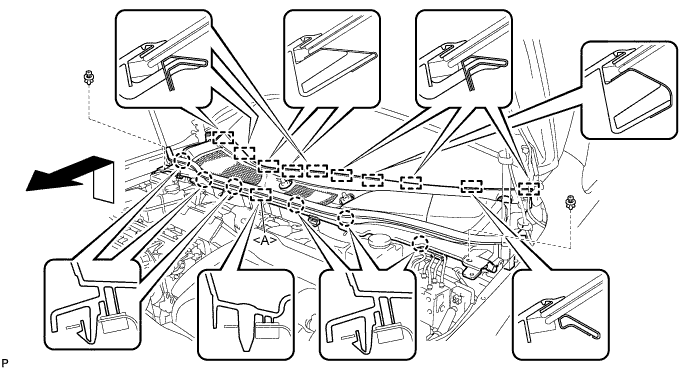
REMOVE COWL TOP VENTILATOR LOUVER SUB-ASSEMBLY
-
Remove the 2 clips.
-
Disengage the 6 claws and guide <A>.
-
Disengage the 10 guides and pull out the cowl top ventilator louver sub-assembly as shown in the illustration.
-
-
REMOVE WINDSHIELD WIPER MOTOR AND LINK ASSEMBLY
-
Operate the wiper and stop the windshield wiper motor at the automatic stop position.
-
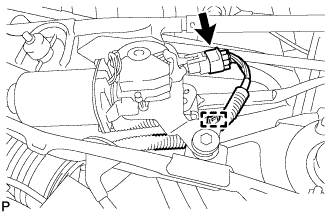
w/o Deicer:
-
Disconnect the connector.
-
Disengage the clamp.
-
-
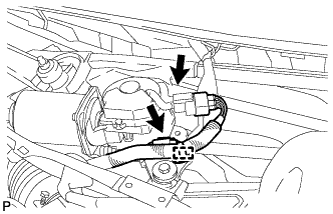
w/ Deicer:
-
Disconnect the 2 connectors.
-
Disengage the clamp.
-
-
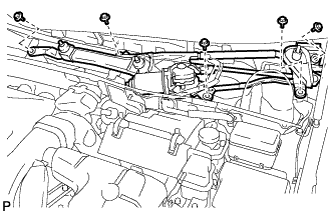
Remove the 5 bolts and the windshield wiper motor and link assembly.
Note
Be careful not to damage the windshield when removing the windshield wiper motor and link assembly.
-
-
REMOVE FRONT SHOCK ABSORBER CAP LH (w/ Air Suspension)
-
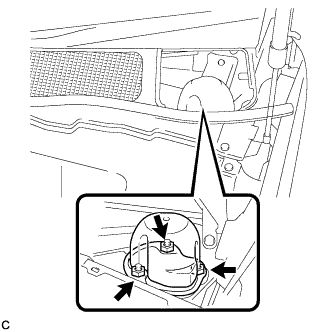
Remove the 3 nuts and front shock absorber cap.
-
-
REMOVE FRONT SHOCK ABSORBER CAP RH (w/ Air Suspension)
Tech Tips
Use the same procedure for the RH side and LH side.
-
REMOVE OUTER COWL TOP PANEL SUB-ASSEMBLY
for LHD: Click here
for RHD: Click here
-
DISCONNECT SUCTION PIPE SUB-ASSEMBLY
-
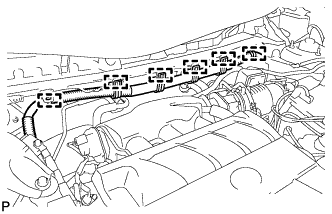
Disengage the 6 clamps and separate the engine wire harness.
-
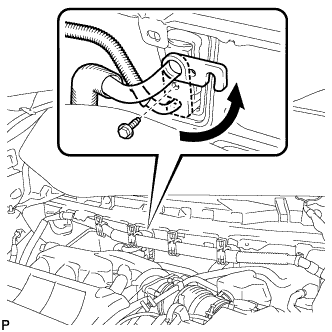
Remove the bolt and slide the hook connector.
-
Disconnect the suction pipe assembly.
-
Remove the O-ring from the suction pipe assembly.
Note
Seal the openings of the disconnected parts using vinyl tape to prevent entry of moisture and foreign matter.
-
-
DISCONNECT AIR CONDITIONING TUBE AND ACCESSORY ASSEMBLY
-
Disconnect the air conditioning tube and accessory assembly.
-
Remove the O-ring from the air conditioning tube and accessory assembly.
Note
Seal the openings of the disconnected parts using vinyl tape to prevent entry of moisture and foreign matter.
-
-
DISCONNECT OUTLET HEATER WATER HOSE
-
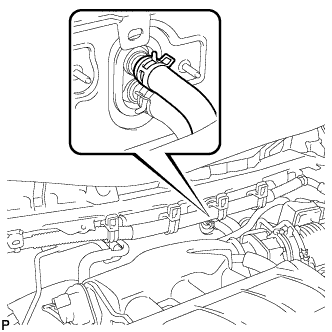
Using pliers, grip the claws of the clip and slide the clip to disconnect the outlet heater water hose.
Note
-
Do not apply excessive force to the outlet heater water hose.
-
Prepare a drain pan or cloth in case the coolant leaks.
-
-
-
DISCONNECT INLET HEATER WATER HOSE
-
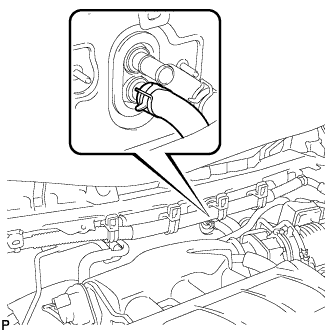
Using pliers, grip the claws of the clip and slide the clip to disconnect the inlet heater water hose.
Note
-
Do not apply excessive force to the inlet heater water hose.
-
Prepare a drain pan or cloth in case the coolant leaks.
-
-
-
REMOVE LOWER NO. 3 STEERING WHEEL COVER
-
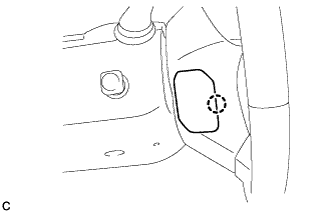
Using a screwdriver with its tip wrapped with protective tape, disengage the claw to remove the lower No. 3 steering wheel cover.
-
-
REMOVE LOWER NO. 2 STEERING WHEEL COVER
-
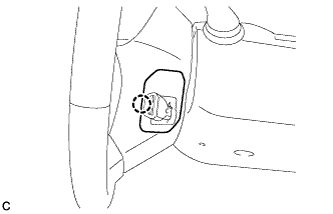
Using a screwdriver with its tip wrapped with protective tape, disengage the claw to remove the lower No. 2 steering wheel cover.
-
-
REMOVE STEERING PAD
CAUTION:
When storing the steering pad, keep the airbag deployment side facing upward.
-
Check that the power switch is off.
-
Check that the cable is disconnected from the negative (-) battery terminal.
CAUTION:
Wait at least 90 seconds after disconnecting the cable from the negative (-) battery terminal to disable the SRS system.
-
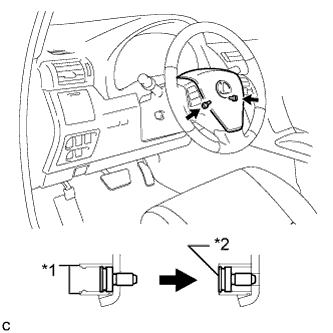
Text in Illustration *1 Screw Case *2 "TORX" Screw Using a T30 "TORX" socket wrench, loosen the 2 "TORX" screws until the groove along the screw circumference catches on the screw case.
-
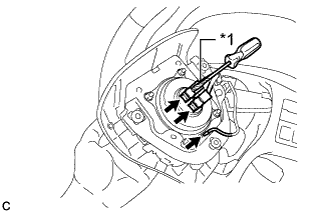
Text in Illustration *1 Protective Tape Pull out the steering pad from the steering wheel assembly and support the steering pad with one hand as shown in the illustration.
Note
When removing the steering pad, do not pull the airbag wire harness.
-
Disconnect the horn connector from the steering pad.
-
Using a screwdriver with its tip wrapped with protective tape, release the airbag connector locks.
-
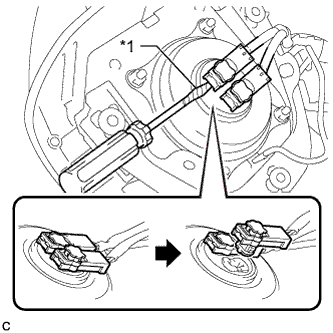
Text in Illustration *1 Protective Tape Disconnect the airbag connectors to remove the steering pad as shown in the illustration.
Note
When disconnecting any airbag connector, take care not to damage the airbag wire harness.
-
-
REMOVE STEERING WHEEL ASSEMBLY
-
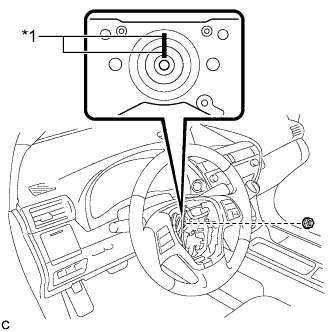
Text in Illustration *1 Matchmark Remove the steering wheel assembly set nut.
-
Put matchmarks on the steering wheel assembly and steering main shaft.
-
Disconnect the connectors from the spiral cable.
-
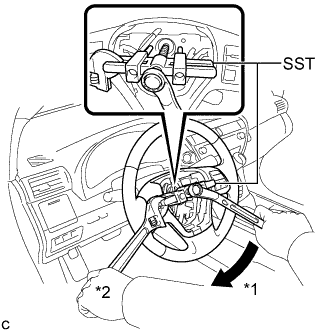
Text in Illustration *1 Turn *2 Hold Using SST, remove the steering wheel assembly.
- SST
- 09950-50013 ( 09951-05010, 09952-05010, 09953-05020, 09954-05070 )
Note
Apply a small amount of grease to the threads and tip of SST (09953-05020) before use.
-
-
REMOVE STEERING COLUMN COVER
Note
Removing the lower steering column cover in the incorrect order will cause the parts to break.
-
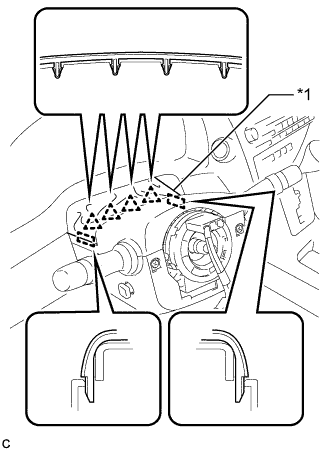
Text in Illustration *1 Instrument Panel Cluster Finish Panel Disengage the 4 clips and 2 guides to separate the instrument panel cluster finish panel from the upper steering column cover.
-
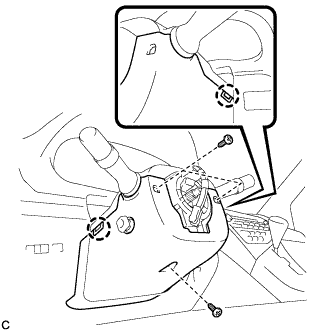
Remove the 3 screws.
-
Disengage the 2 claws to remove the lower steering column cover.
Note
Do not damage the tilt and telescopic switch.
-
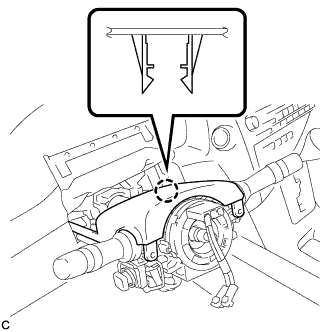
Disengage the claw to remove the upper steering column cover.
-
-
REMOVE TURN SIGNAL SWITCH ASSEMBLY WITH SPIRAL CABLE SUB-ASSEMBLY
-
Disconnect the connectors from the turn signal switch assembly with spiral cable sub-assembly.
-
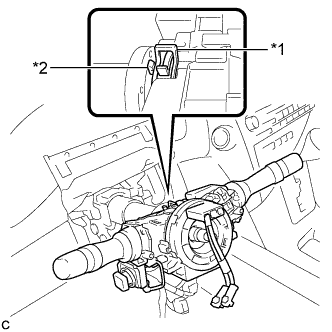
Text in Illustration *1 Clamp *2 Claw Using pliers, expand the clamp.
-
While holding the clamp expanded, raise the claw using a screwdriver to disengage it, and then remove the turn signal switch assembly with spiral cable sub-assembly from the steering column assembly.
-
-
REMOVE SHIFT LEVER KNOB SUB-ASSEMBLY
-
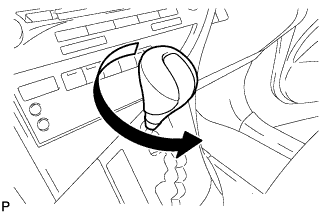
Turn the shift lever knob sub-assembly counterclockwise and remove the shift lever knob sub-assembly.
-
-
REMOVE UPPER CONSOLE PANEL SUB-ASSEMBLY
-
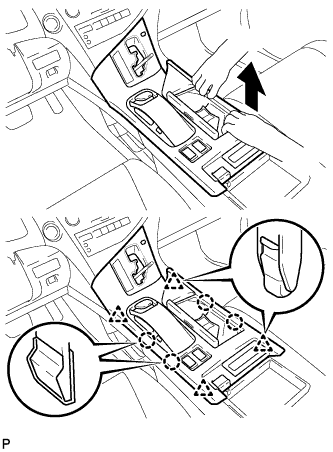
Move the shift lever to N.
-
Pull the upper console panel sub-assembly in the direction indicated by the arrow to disengage the 4 claws and 4 clips.
-
w/o Seat Heater System:
-
Disconnect the connector from the console box hole cover.
-
-
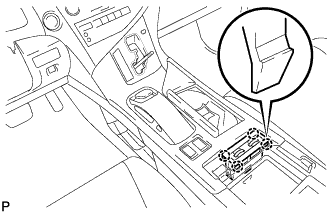
w/ Seat Heater System:
-
Disengage the 4 claws.
-
Disconnect the connector and remove the seat heater switch assembly.
-
-
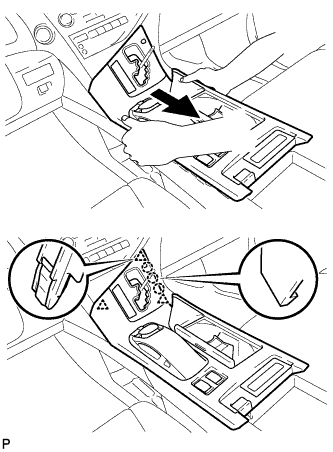
Pull the upper console panel sub-assembly in the direction indicated by the arrow to disengage the 3 claws and 3 clips.
-
Disconnect each connector.
-
Disengage the clamp and remove the upper console panel sub-assembly.
-
-
REMOVE NO. 2 CONSOLE BOX DUCT
-
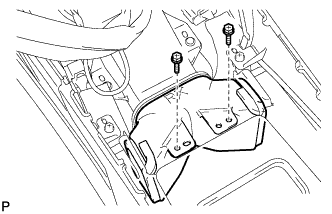
Remove the 2 screws and the No. 2 console box duct.
-
-
REMOVE CONSOLE REAR END PANEL SUB-ASSEMBLY
-
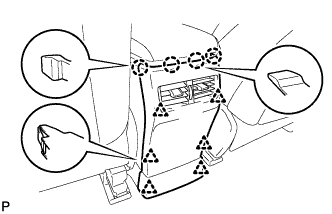
w/o Rear Seat Entertainment System:
-
Disengage the 4 claws and 6 clips, and remove the console rear end panel sub-assembly.
-
-
w/ Rear Seat Entertainment System:
-
Disengage the 4 claws and 6 clips.
-
Disconnect each connector and remove the console rear end panel sub-assembly.
-
-
-
REMOVE MULTI-MEDIA INTERFACE ECU ASSEMBLY
-
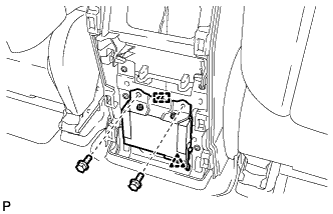
Remove the 2 bolts.
-
Disengage the clip and guide.
-
Disconnect the connector and remove the multi-media interface ECU assembly.
-
-
REMOVE REAR CONSOLE BOX ASSEMBLY
-
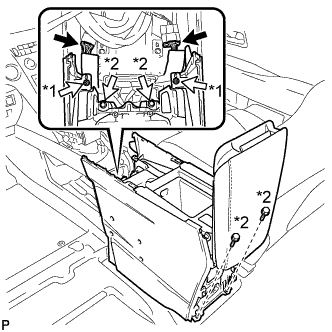
Text in Illustration *1 Screw *2 Bolt Disconnect each connector.
-
Remove the 2 screws and 4 bolts.
-
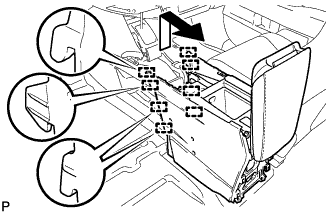
Pull the rear console box assembly in the direction indicated by the arrow to disengage the 8 guides and remove the rear console box assembly.
-
-
REMOVE FRONT DOOR SCUFF PLATE LH
-
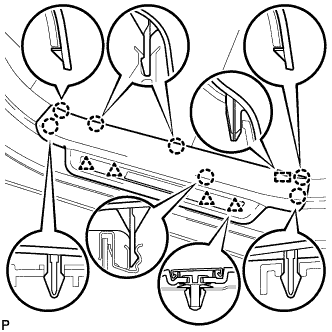
Disengage the 7 claws, 4 clips and guide, and remove the front door scuff plate LH.
Tech Tips
A part of the clip remains on the vehicle side.
-
w/ Illumination:
-
Disconnect the connector.
-
-
-
REMOVE COWL SIDE TRIM SUB-ASSEMBLY LH
-
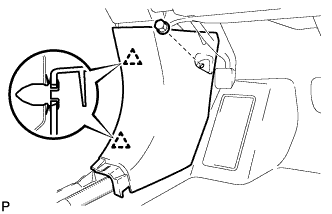
Remove the clip.
-
Disengage the 2 clips and remove the cowl side trim sub-assembly LH.
-
-
REMOVE NO. 1 INSTRUMENT PANEL UNDER COVER SUB-ASSEMBLY (for LHD)
-

Remove the 2 screws <D>.
-
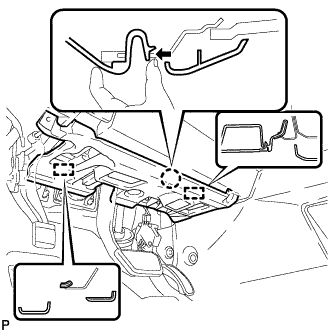
Disengage the claw and 2 guides as shown in the illustration.
-
Disconnect each connector.
-
Disengage each clamp and remove the No. 1 instrument panel under cover sub-assembly.
-
-
REMOVE NO. 1 INSTRUMENT PANEL UNDER COVER SUB-ASSEMBLY (for RHD)
-
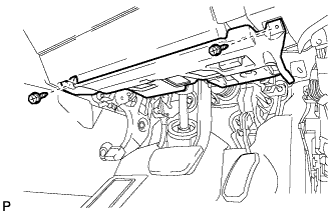
Remove the 2 screws <D>.
-
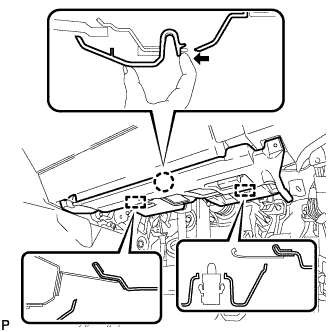
Disengage the claw and 2 guides as shown in the illustration.
-
Disconnect each connector.
-
Disengage each clamp and remove the No. 1 instrument panel under cover sub-assembly.
-
-
REMOVE INSTRUMENT PANEL GARNISH LH
-
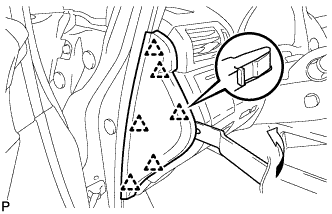
Using moulding remover B, disengage the 6 clips and remove the instrument panel garnish LH as shown in the illustration.
-
-
REMOVE NO. 1 SWITCH HOLE BASE
-
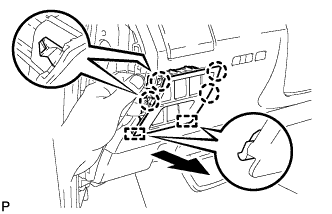
Push the No. 1 switch hole base in the direction indicated by the arrow to disengage the 4 claws and 2 guides.
-
Disconnect each connector and remove the No. 1 switch hole base.
-
-
REMOVE LOWER INSTRUMENT PANEL FINISH PANEL SUB-ASSEMBLY
-
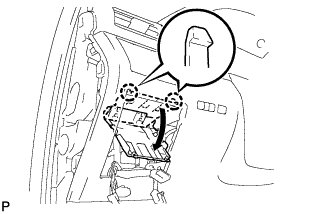
Disengage the 2 claws and open the cover as shown in the illustration.
-
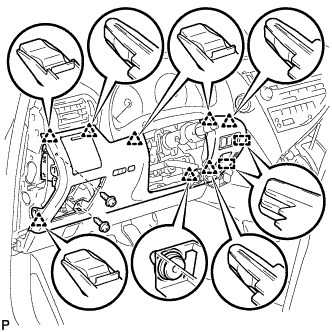
Remove the 2 screws <D>.
-
Disengage the 8 clips and 2 guides.
-
Disconnect each connector and remove the lower instrument panel finish panel sub-assembly.
-
-
REMOVE DRIVER SIDE KNEE AIRBAG ASSEMBLY
CAUTION:
When storing the driver side knee airbag assembly, keep the airbag deployment side facing upward.
-
Check that the power switch is off.
-
Check that the cable is disconnected from the negative (-) battery terminal.
CAUTION:
Wait at least 90 seconds after disconnecting the cable from the negative (-) battery terminal to disable the SRS system.
-
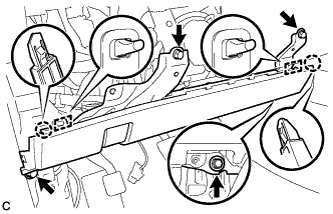
Remove the 4 bolts.
-
Disengage the 2 claws and 2 hooks to separate the driver side knee airbag assembly.
-
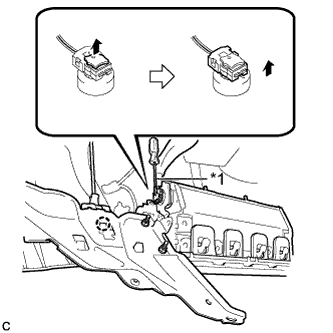
Disengage the claw to remove the hood lock control cable.
-
Using a screwdriver with the tip wrapped with protective tape, disconnect the airbag connector to remove the driver side knee airbag assembly.
Text in Illustration *1 Protective Tape Note
When disconnecting any airbag connector, take care not to damage the airbag wire harness.
-
-
REMOVE NO. 4 AIR DUCT SUB-ASSEMBLY (for LHD)
-
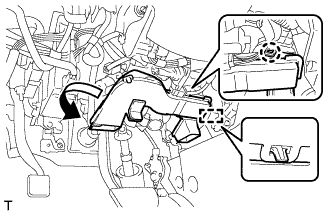
Disengage the claw and guide, and remove the No. 4 air duct sub-assembly.
Note
Do not damage the claw or guide.
-
-
REMOVE NO. 4 AIR DUCT SUB-ASSEMBLY (for RHD)
-
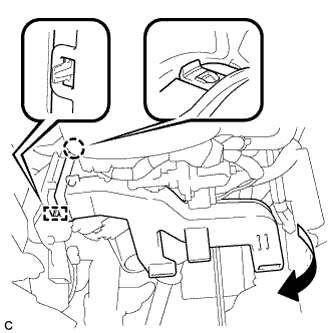
Disengage the claw and guide, and remove the No. 4 air duct sub-assembly.
Note
Do not damage the claw or guide.
-
-
REMOVE STOP LIGHT SWITCH ASSEMBLY
-
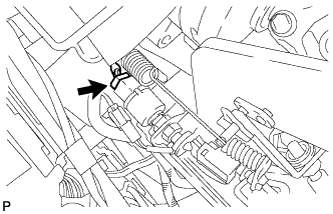
Disconnect the connector.
-
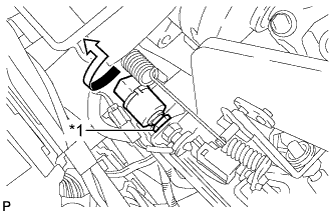
Text in Illustration *1 Lock Nut Loosen the stop light switch lock nut and remove the stop light switch assembly.
-
-
REMOVE BRAKE PEDAL STROKE SENSOR ASSEMBLY
for LHD: Click here
for RHD: Click here
-
REMOVE BRAKE PEDAL RETURN SPRING
for LHD: Click here
for RHD: Click here
-
SEPARATE MASTER CYLINDER PUSH ROD CLEVIS
for LHD: Click here
for RHD: Click here
-
REMOVE BRAKE PEDAL SUPPORT ASSEMBLY
for LHD: Click here
for RHD: Click here
-
SEPARATE STEERING INTERMEDIATE SHAFT ASSEMBLY
-
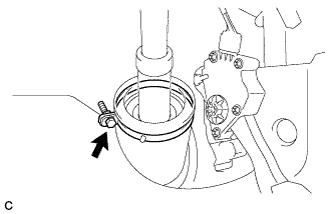
Loosen the bolt.
-
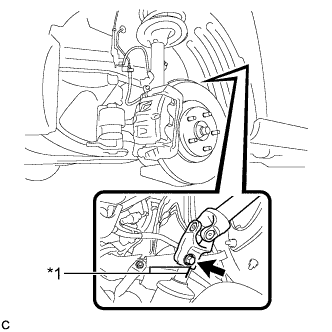
Text in Illustration *1 Matchmark Put matchmarks on the steering intermediate shaft assembly and power steering link assembly.
Note
Do not separate the steering intermediate shaft assembly from the power steering link assembly.
-
Remove the bolt.
-
Separate the steering intermediate shaft assembly from the power steering link assembly.
-
-
REMOVE STEERING POST ASSEMBLY
-
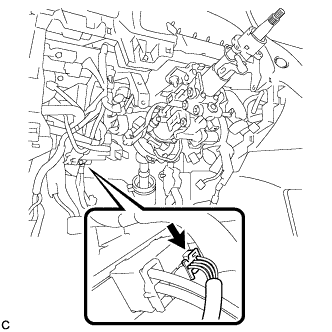
Disconnect the connector from the power steering ECU assembly.
-
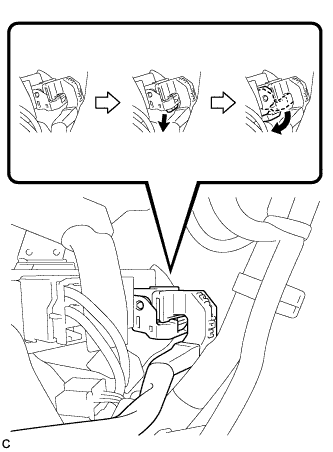
Disconnect the connector from the power steering ECU assembly.
Tech Tips
As shown in the illustration, turn the lock lever to disconnect the connector.
-
Disconnect the connectors and disengage the wire harness clamps from the steering post assembly.
-
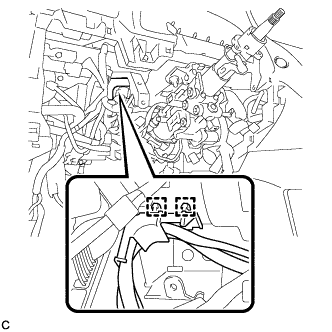
Disengage the 2 wire harness clamps.
-
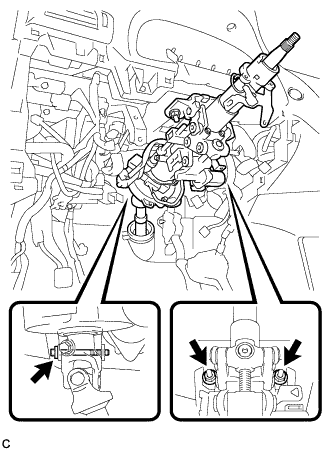
Remove the bolt, 2 nuts and steering post assembly.
-
-
REMOVE NO. 1 INSTRUMENT PANEL HOLE COVER
-
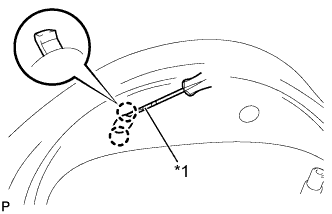
Text in Illustration *1 Protective Tape Using a screwdriver, disengage the 2 claws and remove the No. 1 instrument panel hole cover.
Tech Tips
Tape the screwdriver tip before use.
-
-
REMOVE NO. 2 INSTRUMENT PANEL HOLE COVER
Tech Tips
Use the same procedure for the No. 2 instrument panel hole cover and No. 1 instrument panel hole cover.
-
REMOVE NO. 1 INSTRUMENT CLUSTER FINISH PANEL
-
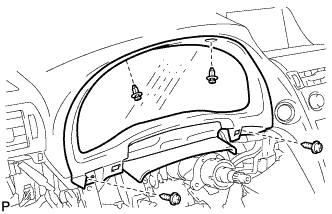
Remove the 2 clips.
-
Remove the 2 screws <E> and the No. 1 instrument cluster finish panel.
-
-
REMOVE COMBINATION METER ASSEMBLY
-
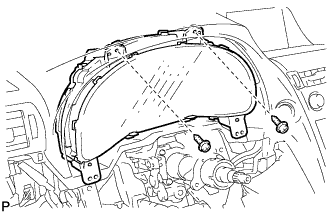
Remove the 2 screws <G>.
-
Disengage each connector and remove the combination meter assembly.
-
-
REMOVE CENTER INSTRUMENT CLUSTER FINISH PANEL
-
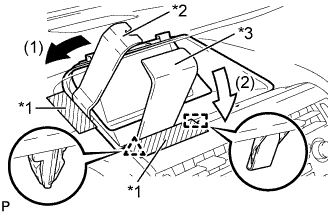
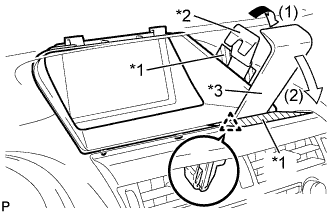
Text in Illustration *1 Protective Tape *2 Moulding Remover B *3 Moulding Remover D Apply protective tape to the areas shown in the illustration.
-
Insert moulding remover B and D as shown in the illustration.
-
Pull down moulding remover B in direction (1). With moulding remover B being pulled down, pull down moulding remover D in direction (2) to disengage the clip and guide.
-
Text in Illustration *1 Protective Tape *2 Moulding Remover B *3 Moulding Remover D Apply protective tape to the areas shown in the illustration.
-
Insert moulding remover B and D as shown in the illustration.
-
Pull down moulding remover B in direction (1). With moulding remover B being pulled down, pull down moulding remover D in direction (2) to disengage the clip.
-
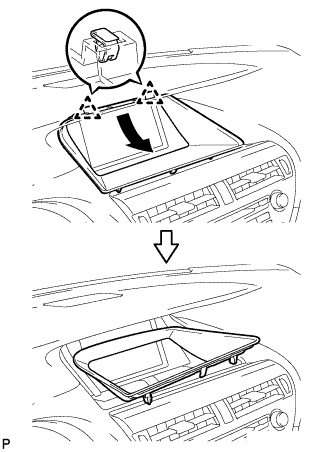
Disengage the 2 clips and remove the center instrument cluster finish panel as shown in the illustration.
-
-
REMOVE ACCESSORY METER ASSEMBLY (w/o Navigation System)
-
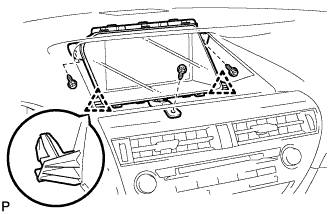
Remove the 3 screws.
-
Disengage the 2 clips.
-
Disconnect each connector and remove the accessory meter assembly.
-
-
REMOVE MULTI-DISPLAY ASSEMBLY (w/ Navigation System)
-
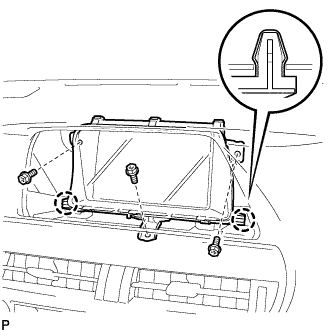
Remove the 3 bolts.
-
Disengage the 2 claws and remove the multi-display assembly.
-
-
REMOVE INSTRUMENT PANEL FINISH PANEL
-
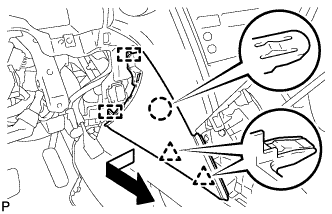
Pull the instrument panel finish panel in the direction indicated by the arrow to disengage the claw, 2 clips and 2 guides, and remove the instrument panel finish panel.
-
-
REMOVE LOWER INSTRUMENT PANEL FINISH PANEL
-
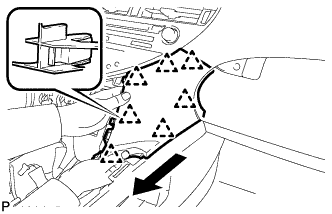
Pull the lower instrument panel finish panel in the direction indicated by the arrow to disengage the 7 clips and remove the lower instrument panel finish panel.
-
-
REMOVE RADIO RECEIVER ASSEMBLY WITH REGISTER
Note
-
The 4 bolts of the radio receiver assembly with register are installed though the service holes at the bottom in the instrument panel. Make sure to check all of them.
-
If the radio receiver assembly with register is pulled without removing the 4 bolts, it may result in damage to the radio receiver assembly with register.
-
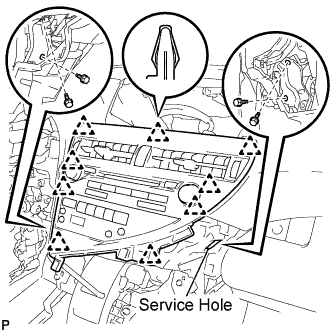
Remove the 4 bolts.
-
Disengage the 9 clips.
-
Disconnect each connector and remove the radio receiver assembly with register.
-
-
REMOVE CONSOLE BOX (for LHD)
-
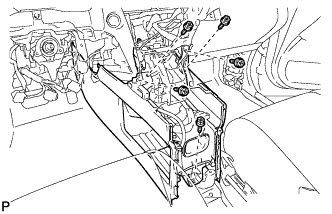
Remove the 5 screws <D>.
-
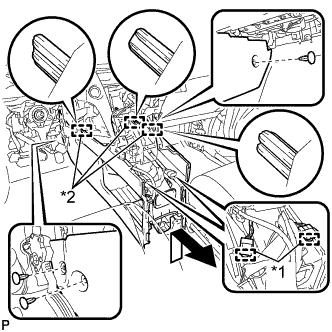
Text in Illustration *1 Clamp *2 Guide Disengage the 2 clamps.
-
Remove the 3 clips.
-
Disengage the 3 guides and remove the console box as shown in the illustration.
-
-
REMOVE CONSOLE BOX (for RHD)
-
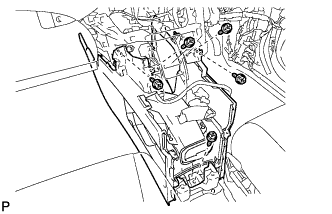
Remove the 5 screws <D>.
-
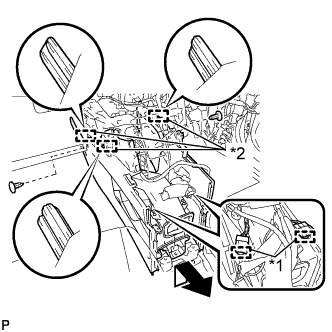
Text in Illustration *1 Clamp *2 Guide Disengage the 2 clamps.
-
Remove the 2 clips.
-
Disengage the 3 guides and remove the console box as shown in the illustration.
-
-
REMOVE FRONT DOOR SCUFF PLATE RH
Tech Tips
Use the same procedure for the RH side and LH side Click here.
-
REMOVE COWL SIDE TRIM SUB-ASSEMBLY RH
Tech Tips
Use the same procedure for the RH side and LH side Click here.
-
REMOVE NO. 2 INSTRUMENT PANEL UNDER COVER SUB-ASSEMBLY
-
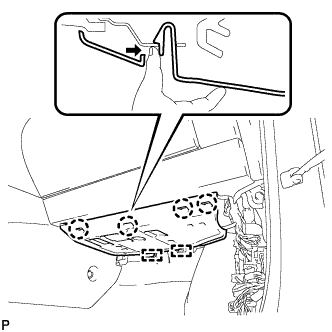
Disengage the 4 claws and 2 guides as shown in the illustration.
-
Disconnect the connector and remove the No. 2 instrument panel under cover sub-assembly.
-
-
REMOVE INSTRUMENT PANEL GARNISH RH (w/o Airbag Cut Off Switch)
Tech Tips
Use the same procedure for the RH side and LH side.
-
REMOVE INSTRUMENT PANEL GARNISH RH (w/ Airbag Cut Off Switch)
-
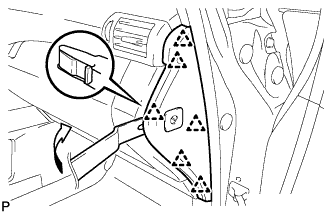
Using moulding remover B, disengage the 6 clips as shown in the illustration.
-
Disconnect the connector and remove the instrument panel garnish RH.
-
-
REMOVE FRONT PASSENGER SIDE KNEE AIRBAG ASSEMBLY
CAUTION:
When storing the front passenger side knee airbag assembly, keep the airbag deployment side facing upward.
-
Check that the power switch is off.
-
Check that the cable is disconnected from the negative (-) battery terminal.
CAUTION:
Wait at least 90 seconds after disconnecting the cable from the negative (-) battery terminal to disable the SRS system.
-
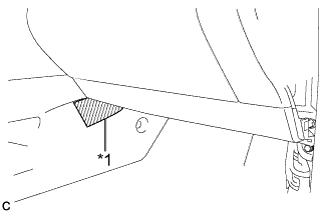
Text in Illustration *1 Protective Tape Put protective tape around the front passenger side knee airbag assembly.
-
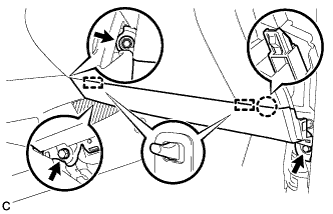
Remove the 3 bolts.
-
Disengage the claw and 2 pins to separate the front passenger side knee airbag assembly.
-
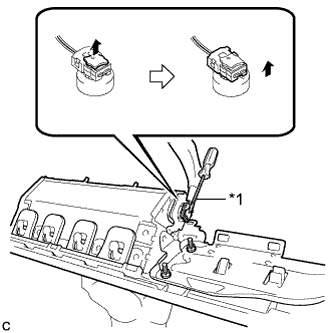
Text in Illustration *1 Protective Tape Using a screwdriver with the tip wrapped with protective tape, disconnect the airbag connector to remove the front passenger side knee airbag assembly.
Note
When disconnecting any airbag connector, take care not to damage the airbag wire harness.
-
-
REMOVE GLOVE COMPARTMENT DOOR ASSEMBLY
-
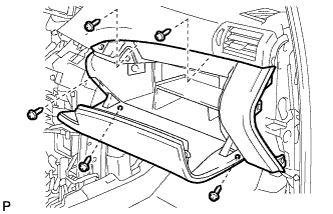
Remove the 5 screws <F>.
-
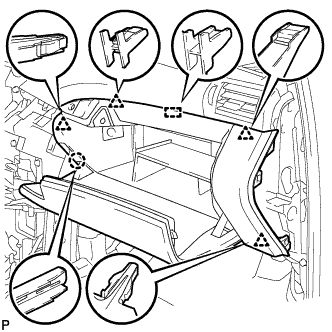
Disengage the claw, 4 clips and guide.
-
Disconnect each connector and remove the glove compartment door assembly.
-
-
REMOVE INSTRUMENT SIDE PANEL LH
-
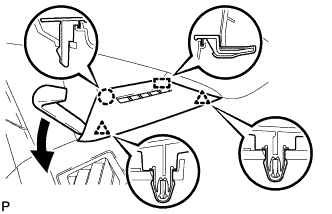
Using moulding remover A, disengage the claw and 2 clips.
-
Disengage the guide and remove the instrument side panel LH.
-
-
REMOVE FRONT PILLAR GARNISH LH
-
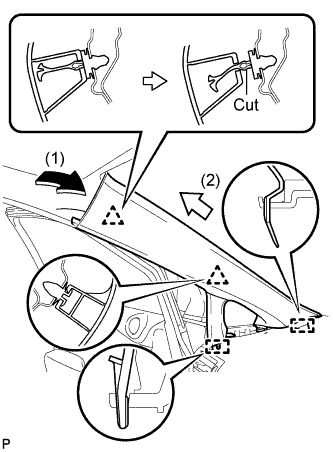
Pull the upper part of the garnish toward the inside of the cabin and disengage the 2 clips.
Tech Tips
Perform this step as shown by the arrow (1) in the illustration.
-
Cut off the clip <A>.
-
Disengage the 2 guides and remove the front pillar garnish LH.
Tech Tips
Perform this step as shown by the arrow (2) in the illustration.
-
Remove the clip <A>.
-
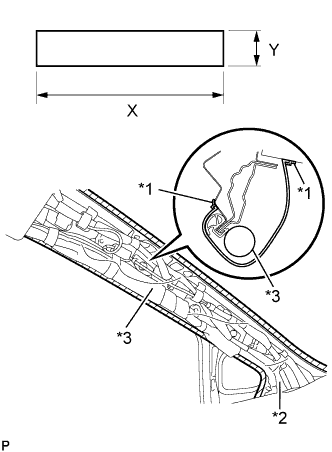
Text in Illustration *1 Adhesive Tape *2 Protective Cover *3 Curtain Shield Airbag Assembly Protect the curtain shield airbag assembly.
-
Cover the airbag with a cloth or piece of nylon and secure the ends of the cover with tape, as shown in the illustration.
Protective Cover size X 700 mm (2.30 ft.) Y 120 mm (4.72 in.) Note
Cover the curtain shield airbag with a protective cover as soon as the front pillar garnish is removed.
-
-
-
REMOVE INSTRUMENT SIDE PANEL RH
Tech Tips
Use the same procedure for the RH side and LH side Click here.
-
REMOVE FRONT PILLAR GARNISH RH
Tech Tips
Use the same procedure for the RH side and LH side Click here.
-
REMOVE NO. 1 INSTRUMENT PANEL REGISTER ASSEMBLY
-
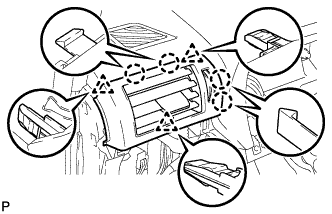
Disengage the 4 claws and 3 clips, and remove the No. 1 instrument panel register assembly.
-
-
REMOVE NO. 2 INSTRUMENT PANEL REGISTER ASSEMBLY
Tech Tips
Use the same procedure for the No. 2 instrument panel register assembly and No. 1 instrument panel register assembly.
-
REMOVE NO. 1 SPEAKER OPENING COVER ASSEMBLY
-
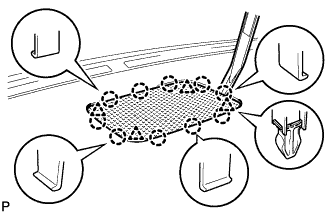
Using moulding remover A, disengage the 10 claws and 4 clips, and remove the No. 1 speaker opening cover assembly.
-
-
REMOVE FRONT NO. 4 SPEAKER ASSEMBLY
-
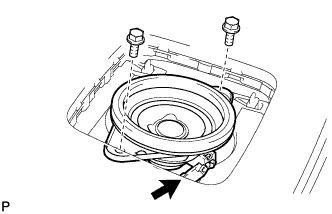
Remove the 2 bolts.
-
Disconnect the connector and remove the front No. 4 speaker assembly.
-
-
REMOVE NO. 1 DEFROSTER NOZZLE GARNISH
-
Using moulding remover B, disengage the 11 clips.
Tech Tips
Apply protective tape to the areas where moulding remover B is to be inserted.
-
Disengage the 7 claws.
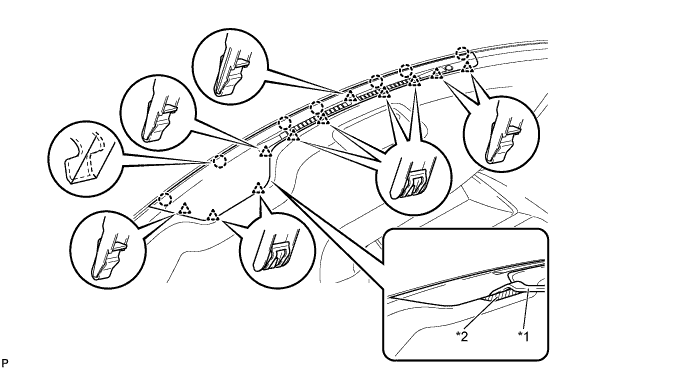
Text in Illustration *1 Moulding Remover B *2 Protective Tape -
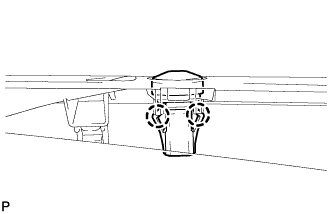
Disengage the 2 claws.
-
Disconnect the connector and remove the automatic light control sensor.
-
Remove the No. 1 defroster nozzle garnish.
-
-
REMOVE SHIFT LEVER ASSEMBLY
-
Move the shift lever to N.
-
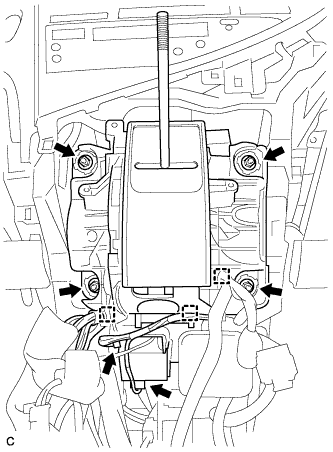
Disconnect the shift lock control ECU connector and transmission control switch wire connector.
-
Disconnect the 3 clamps.
-
Remove the 4 nuts and shift lever assembly.
-
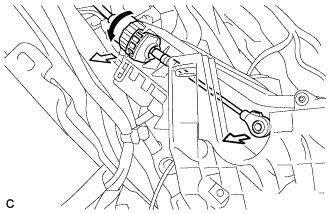
Disconnect the end of the transmission control cable assembly from the shift lever assembly.
-
Turn the lock nut counterclockwise. While holding the lock nut, disconnect the transmission control cable from the shift lever retainer.
-
-
REMOVE NO. 1 CONSOLE BOX DUCT
-
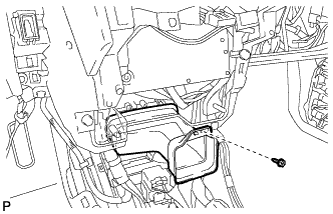
Remove the screw <D> and the No. 1 console box duct.
-
-
DISCONNECT INSTRUMENT PANEL WIRE ASSEMBLY
-
Check that the power switch is off.
-
Check that the cable is disconnected from the negative (-) battery terminal.
CAUTION:
Wait at least 90 seconds after disconnecting the cable from the negative (-) battery terminal to disable the SRS system.
-
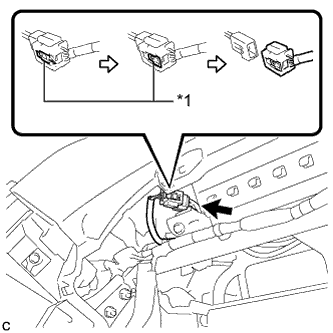
Text in Illustration *1 Slider Slide the slider to release the lock, and then disconnect the connector.
Note
When disconnecting any airbag connector, take care not to damage the airbag wire harness.
-
-
REMOVE INSTRUMENT PANEL SAFETY PAD ASSEMBLY
-
Disconnect each connector.
-
Disengage each clamp.
-
Disengage the 2 claws and disconnect the room temperature sensor.
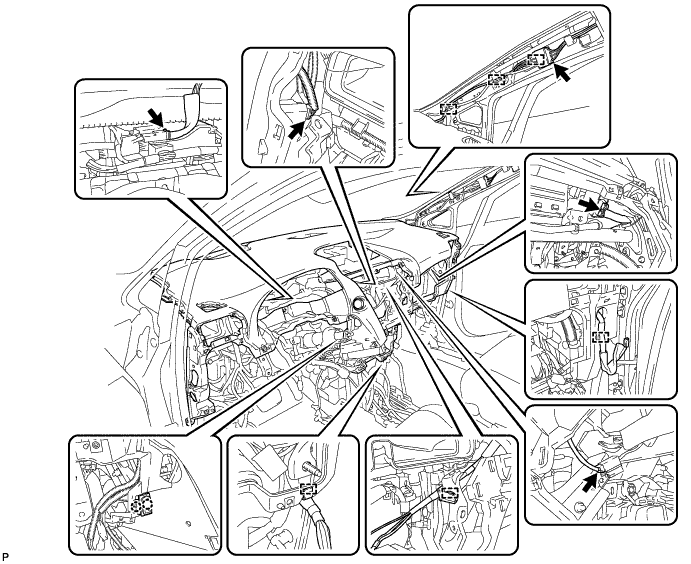
-
Remove the 2 passenger airbag bolts <A> or <B>.
-
Remove the 6 bolts <C> and nut <H> or <I>.
-
Remove the 2 clips.
-
Disengage the 5 claws and remove the instrument panel safety pad assembly.
Note
-
Do not damage the instrument panel safety pad assembly.
-
Do not allow the wire harnesses to interfere with the surrounding parts.
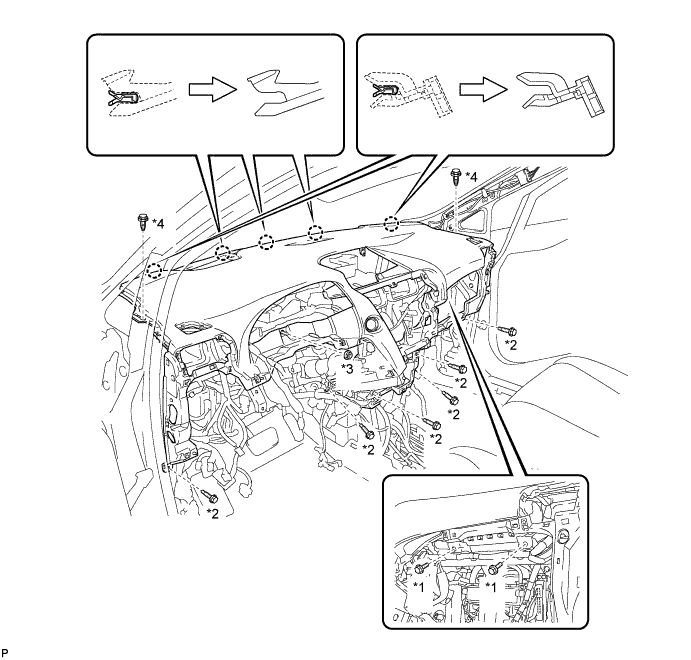
Text in Illustration *1 Passenger Airbag Bolt <A> or <B> *2 Bolt <C> *3 Nut <H> or <I> *4 Clip -
-
-
REMOVE NO. 3 INSTRUMENT PANEL STAY
-
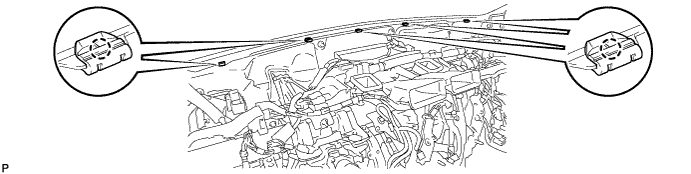
Disengage the 5 claws and remove the 5 No. 3 instrument panel stays.
-
-
REMOVE INSTRUMENT PANEL JUNCTION BLOCK ASSEMBLY (for LHD)
-
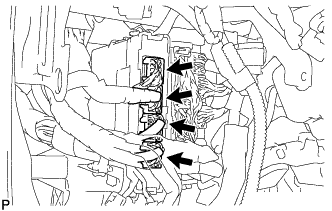
Disconnect the 4 connectors.
-
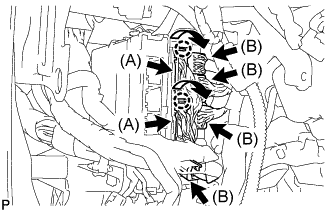
Disengage the 2 claws as shown in the illustration and disconnect the 2 connectors (A).
-
Disconnect the 4 connectors (B).
-
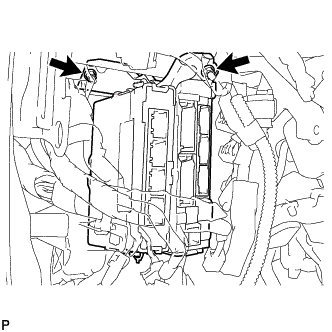
Remove the 2 nuts.
-
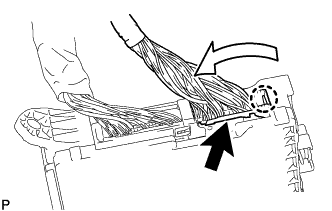
Disengage the claw as shown in the illustration and disconnect the connector.
-
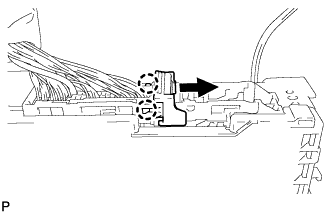
Disengage the 2 claws and release the connector lock as shown in the illustration.
-
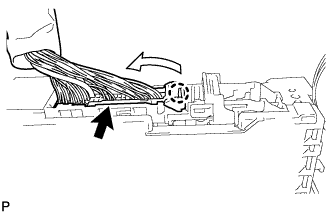
Disengage the claw as shown in the illustration and disconnect the connector and remove the instrument panel junction block assembly.
-
-
REMOVE INSTRUMENT PANEL JUNCTION BLOCK ASSEMBLY (for RHD)
-
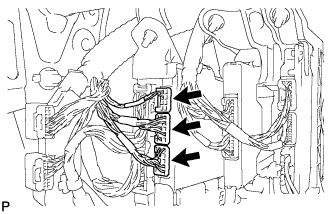
Disconnect the 3 connectors.
-
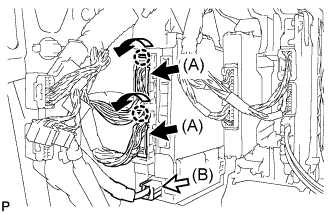
Disengage the 2 claws as shown in the illustration and disconnect the 2 connectors (A).
-
Disconnect the connector (B).
-
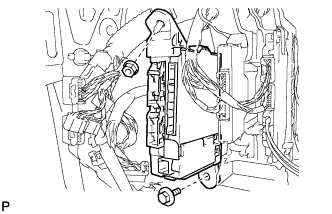
Remove the bolt and nut.
-
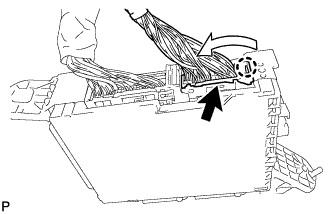
Disengage the claw as shown in the illustration and disconnect the connector.
-
Disengage the 2 claws and release the connector lock as shown in the illustration.
-
Disengage the claw as shown in the illustration and disconnect the connector and remove the instrument panel junction block assembly.
-
-
REMOVE POWER STEERING ECU ASSEMBLY
for LHD: Click here
for RHD: Click here
-
REMOVE TURN SIGNAL FLASHER ASSEMBLY
-
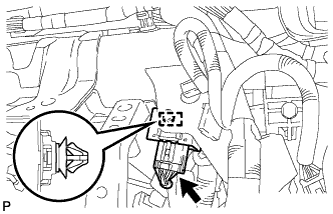
Disengage the clamp.
-
Disconnect the connector and remove the turn signal flasher assembly.
-
-
REMOVE CLEARANCE WARNING BUZZER
-
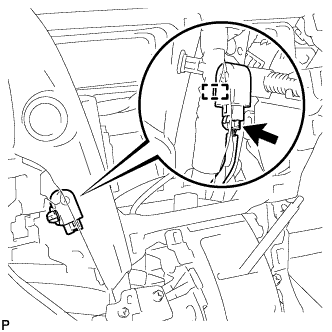
Disconnect the connector.
-
Disengage the clamp and remove the clearance warning buzzer.
-
-
REMOVE DISPLAY AND NAVIGATION MODULE DISPLAY WITH BRACKET (w/ Navigation System for HDD)
-
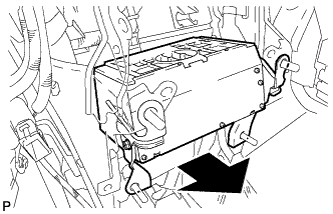
Pull out the display and navigation module display with bracket to the rear of the vehicle as shown in the illustration.
-
Disconnect each connector and remove the display and navigation module display with bracket.
-
-
REMOVE ECU INTEGRATION BOX
-
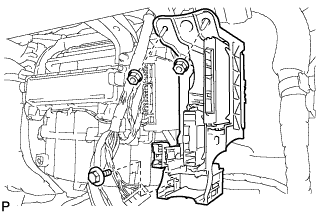
Remove the bolt, 2 nuts and ECU integration box.
-
-
REMOVE REAR NO. 2 AIR DUCT
-
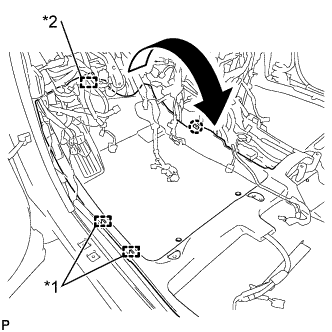
Disengage the 2 clamps and fastener.
-
Disengage the claw and turn back the floor carpet as shown in the illustration.
Text in Illustration *1 Clamp *2 Fastener -
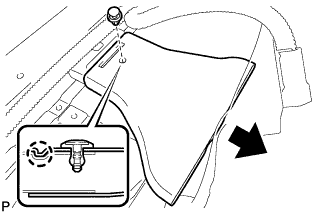
Remove the clip.
-
Disengage the claw and remove the rear No. 2 air duct.
-
-
REMOVE REAR NO. 1 AIR DUCT
-
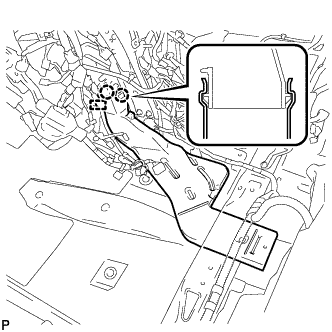
Disengage the clamp.
-
Disengage the 2 claws and remove the rear No. 1 air duct.
-
-
REMOVE FRONT FLOOR CAUTION PLATE COVER
-
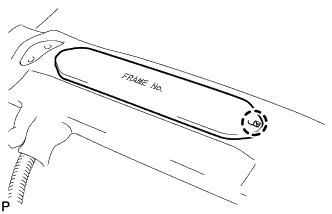
Disengage the claw.
-
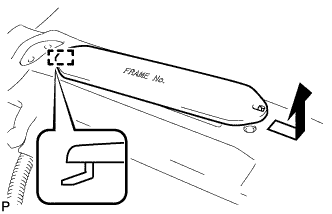
Disengage the guide and remove the frame number cover as shown in the illustration.
-
-
REMOVE REAR NO. 4 AIR DUCT
-
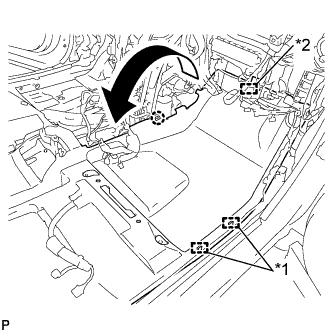
Disengage the 2 clamps and fastener.
-
Disengage the claw and turn back the floor carpet as shown in the illustration.
Text in Illustration *1 Clamp *2 Fastener -
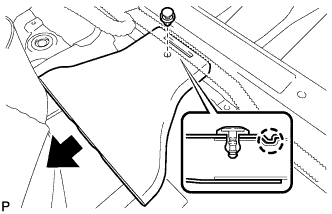
Remove the clip.
-
Disengage the claw and remove the rear No. 4 air duct.
-
-
REMOVE REAR NO. 3 AIR DUCT
-
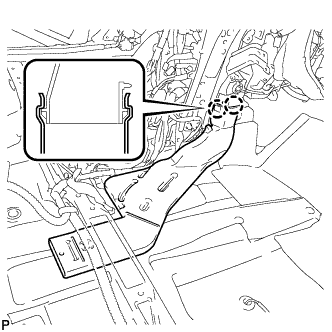
Disengage the 2 claws and remove the rear No. 3 air duct.
-
-
REMOVE CENTER HEATER TO REGISTER SUB DUCT
-
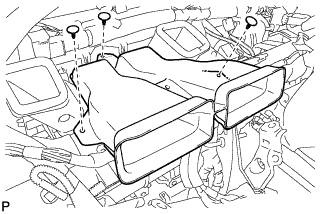
Remove the 3 clips and center heater to register sub duct.
-
-
REMOVE NO. 5 INSTRUMENT PANEL BRACKET (w/o Navigation System for HDD)
-
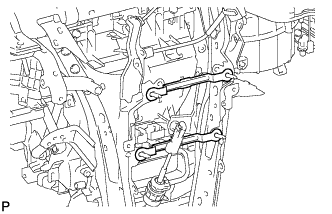
Remove the 2 No. 5 instrument panel brackets.
-
-
REMOVE NO. 1 INSTRUMENT PANEL BRACE SUB-ASSEMBLY
-
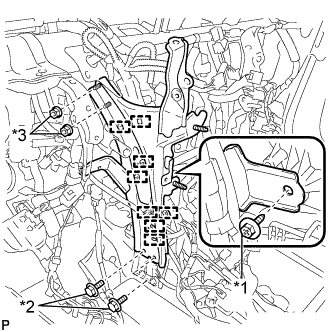
Text in Illustration *1 Screw *2 Bolt *3 Nut Disengage each clamp.
-
Remove the screw.
-
Remove the 2 bolts, 2 nuts and No. 1 instrument panel brace sub-assembly.
-
-
REMOVE NO. 2 INSTRUMENT PANEL BRACE SUB-ASSEMBLY
-
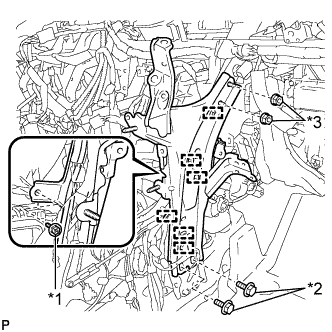
Text in Illustration *1 Screw *2 Bolt *3 Nut Disengage each clamp.
-
Remove the screw.
-
Remove the 2 bolts, 2 nuts and No. 2 instrument panel brace sub-assembly.
-
-
REMOVE INSTRUMENT PANEL REINFORCEMENT ASSEMBLY WITH AIR CONDITIONING UNIT ASSEMBLY
-
Disengage each clamp.
-
Disconnect each connector.
-
Remove the bolt and disconnect the earth wire.
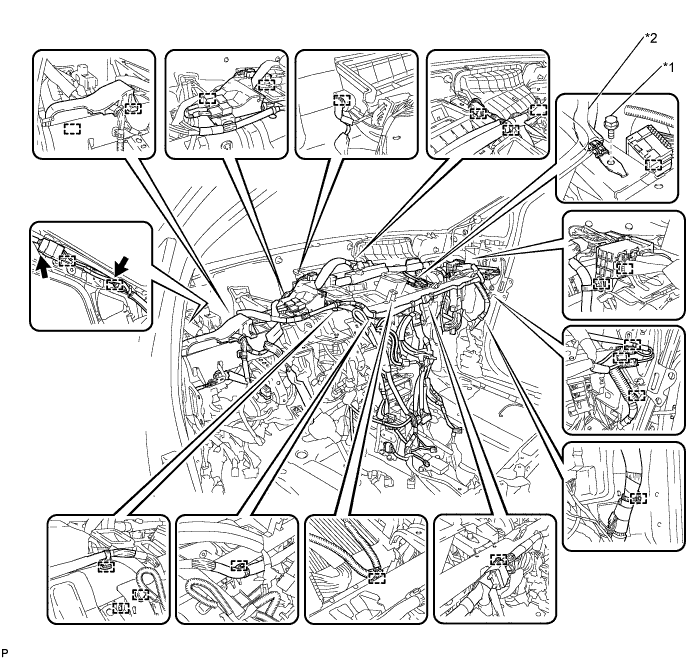
Text in Illustration *1 Bolt *2 Earth Wire -
Disengage each clamp.
-
Disconnect the connector.
-
Disconnect the blower motor connector.
-
Disconnect the 2 air conditioning ECU connectors.
-
Remove the bolt and disconnect the earth wire.
-
Remove the nut and disconnect the connector holder.
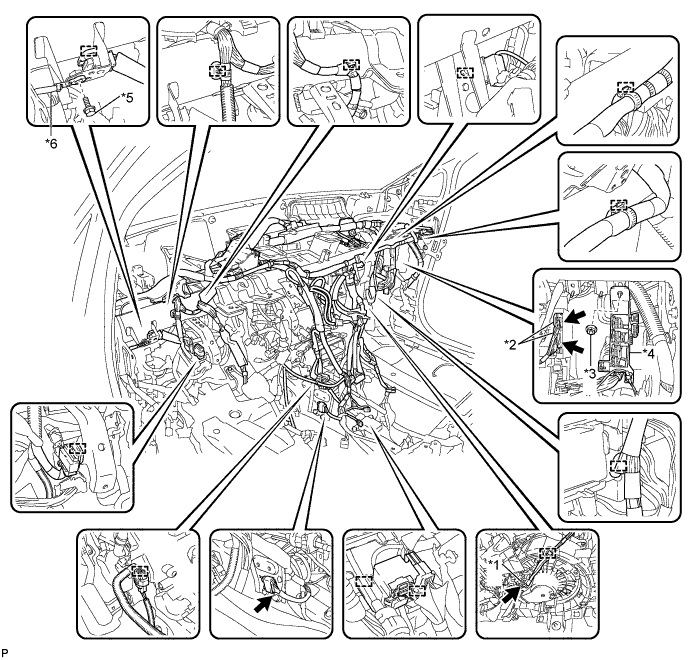
Text in Illustration *1 Blower Motor Connector *2 Air Conditioning ECU Connector *3 Nut *4 Connector Holder *5 Bolt *6 Earth Wire -
Remove the 2 bolts and 2 caps from the engine compartment side.
-
Remove the nut.
-
Disconnect the cooler drain hose.
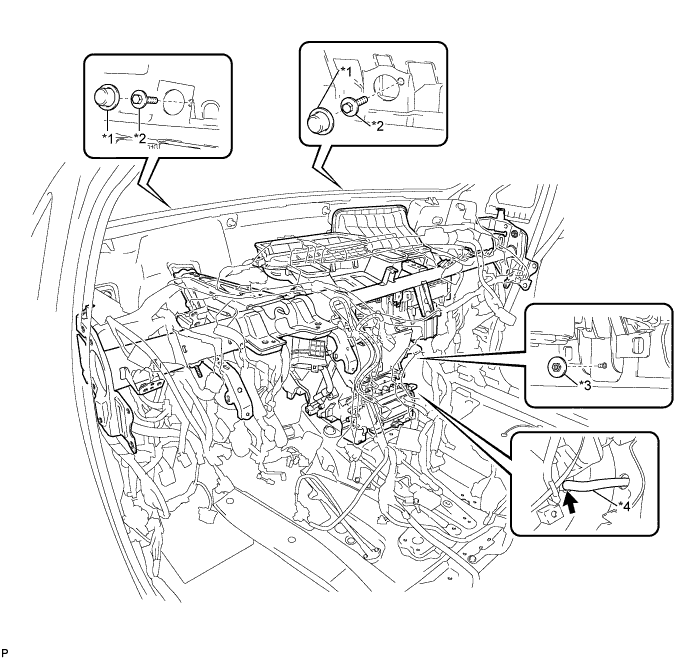
Text in Illustration *1 Cap *2 Bolt *3 Nut *4 Cooler Drain Hose -
Remove the 5 instrument panel safety pad caps.
-
Using a "TORX" socket wrench (T40), remove the 5 "TORX" bolts and the instrument panel reinforcement assembly with air conditioning unit assembly.
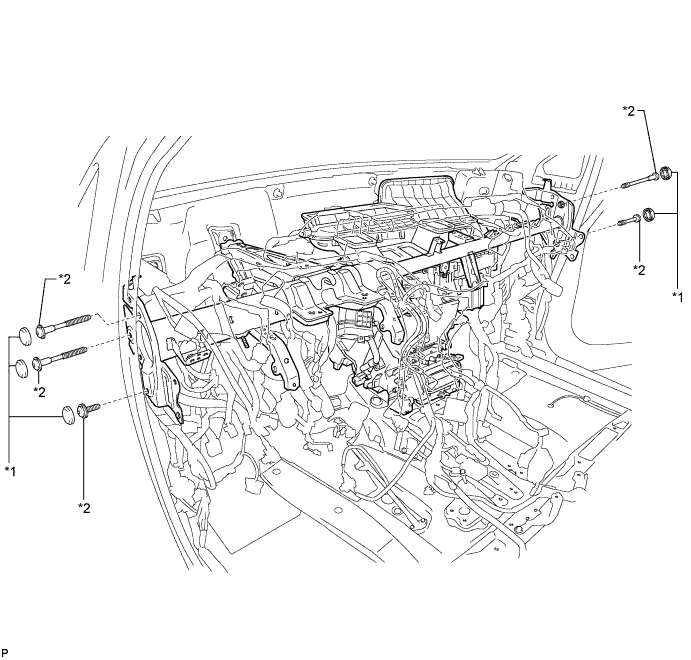
Text in Illustration *1 Instrument Panel Safety Pad Cap *2 "TORX" Bolt
-
-
REMOVE NO. 1 AIR DUCT SUB-ASSEMBLY
-
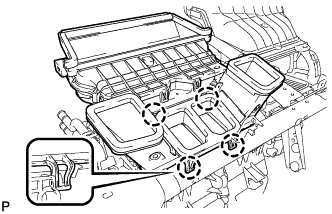
Disengage the 4 claws and remove the No. 1 air duct sub-assembly.
-
-
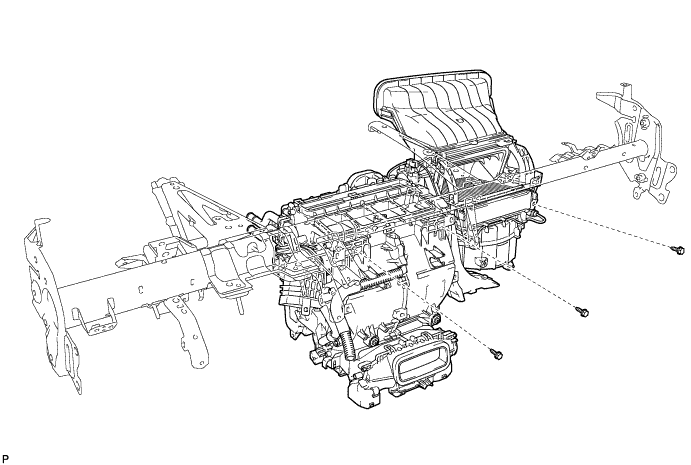
REMOVE AIR CONDITIONING UNIT ASSEMBLY
-
Remove the 3 bolts and air conditioning unit assembly from the instrument panel reinforcement assembly.
-