POWER BACK DOOR SYSTEM Jam Protection Function Activates During Power Back Door Operation
DESCRIPTION
When the jam protection function activates during power back door operation, one of the following may be the cause: 1) improper fit of back door or a foreign object is stuck in the back door, 2) malfunctioning power back door touch sensor circuit or 3) malfunctioning power back door ECU (power back door motor unit).
WIRING DIAGRAM
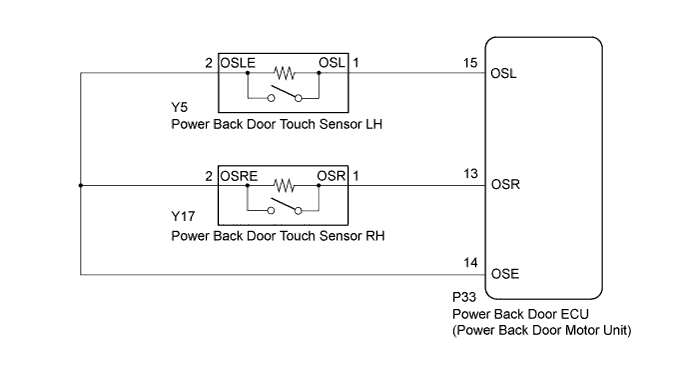
INSPECTION PROCEDURE
PROCEDURE
-
CHECK BACK DOOR LOCK FUNCTION
-
Check if there are any foreign objects interfering with back door operation.
OK There are no foreign objects.
NG 
REMOVE FOREIGN OBJECT
OK 
-
-
CHECK BACK DOOR OPERATION
-
Check back door operation.
-
Turn the power back door main switch off.
-
Open/close the back door by hand.
OK The back door fully opens and closes smoothly.
-
NG
ADJUST BACK DOOR Click here
OK
-
-
READ VALUE USING INTELLIGENT TESTER (POWER BACK DOOR TOUCH SENSOR)
-
Connect the intelligent tester to the DLC3.
-
Turn the power switch on (IG).
-
Turn the intelligent tester on.
-
Enter the following menus: Body / Back Door / Data List.
-
Check the Data List to determine if the power back door touch sensor functions properly.
Back Door (Power Back Door ECU (Power Back Door Motor Unit)) Tester Display Measurement Item/Range Normal Condition Diagnostic Note PBD Touch Sensor (Left) Power back door touch sensor LH signal/ON, OFF or Open ON: Power back door touch sensor LH pressed
OFF: Power back door touch sensor LH not pressed
Open: Power back door touch sensor LH circuit open
- PBD Touch Sensor (Right) Power back door touch sensor RH signal/ON, OFF or Open ON: Power back door touch sensor RH pressed
OFF: Power back door touch sensor RH not pressed
Open: Power back door touch sensor RH circuit open
- Result Result Proceed to On the intelligent tester screen, ON or OFF is displayed accordingly. A On the intelligent tester screen, ON or OFF is not displayed accordingly or Open is displayed. B
B
GO TO OTHER FLOW CHART (TOUCH SENSOR CIRCUIT) Click here
A 
REPLACE POWER BACK DOOR ECU (POWER BACK DOOR MOTOR UNIT) Click here
-