HYBRID CONTROL SYSTEM, Diagnostic DTC:P0A69-677, P0A69-683, P0A69-684, P0A69-688, P0A6C-678, P0A6C-685, P0A6C-686, P0A6C-689

| DTC Code | DTC Name |
|---|---|
| P0A69-677 | Drive Motor "B" Phase V Current |
| P0A69-683 | Drive Motor "B" Phase V Current |
| P0A69-684 | Drive Motor "B" Phase V Current |
| P0A69-688 | Drive Motor "B" Phase V Current |
| P0A6C-678 | Drive Motor "B" Phase W Current |
| P0A6C-685 | Drive Motor "B" Phase W Current |
| P0A6C-686 | Drive Motor "B" Phase W Current |
| P0A6C-689 | Drive Motor "B" Phase W Current |
DESCRIPTION
The MG ECU monitors the inverter current sensor. These DTCs are for malfunctions in the sensor lines and not for malfunctions in the high-voltage lines.
Tech Tips
The term "drive motor B" indicates MGR.
| DTC No. | INF Code | DTC Detection Condition | Trouble Area |
|---|---|---|---|
| P0A69 | 677 | Performance problem of the rear motor inverter current sensor phase V | Inverter with converter assembly |
| P0A69 | 683 | Malfunction in the rear motor inverter current sensor (phase V main sensor) | |
| P0A69 | 684 | Malfunction in the rear motor inverter current sensor (phase V sub sensor) | |
| P0A69 | 688 | Malfunction in the rear motor inverter current sensor (phase V main and sub sensors offset) | |
| P0A6C | 678 | Performance problem of the rear motor inverter current sensor phase W | |
| P0A6C | 685 | Malfunction in the rear motor inverter current sensor (phase W main sensor) | |
| P0A6C | 686 | Malfunction in the rear motor inverter current sensor (phase W sub sensor) | |
| P0A6C | 689 | Malfunction in the rear motor inverter current sensor (phase W main and sub sensors offset) |
INSPECTION PROCEDURE
PROCEDURE
-
CHECK DTC OUTPUT (HV)
-
Connect the intelligent tester to the DLC3.
-
Turn the power switch on (IG).
-
Enter the following menus: Powertrain / Hybrid Control / Trouble Codes.
-
Check if DTCs are output.
Result Result Proceed to P0A69 or P0A6C only is output. A P0A79-716 is output. B -
Turn the power switch off.
B 
GO TO DTC CHART Click here
A 
-
-
CHECK CONNECTOR CONNECTION CONDITION (INVERTER WITH CONVERTER ASSEMBLY CONNECTOR)
CAUTION:
Be sure to wear insulated gloves.
-
Check that the service plug grip is not installed.
Note
After removing the service plug grip, do not turn the power switch on (READY), unless instructed by the repair manual because this may cause a malfunction.
Note
Before disconnecting the connector, confirm that it is properly connected by checking that the locking claws are engaged and that the connector does not pull out.
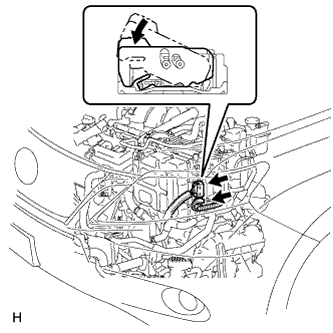
-
Check the connection of the low voltage connector of the inverter with converter assembly.
OK The connector is connected securely and there are no contact problems. Tech Tips
When connecting the connector, insert it with the locking lever in the raised position. Rotate the lever downward and make sure that the connector is pulled into its socket. When the locking lever is in its fully closed position, a click will be heard as its locking claws engage. After the click is heard, pull up on the connector to confirm that it is properly connected.
NG
CONNECT SECURELY
OK 
REPLACE INVERTER WITH CONVERTER ASSEMBLY Click here
-