HYBRID CONTROL SYSTEM, Diagnostic DTC:P0A08-264

| DTC Code | DTC Name |
|---|---|
| P0A08-264 | DC / DC Converter Status Circuit |
DESCRIPTION
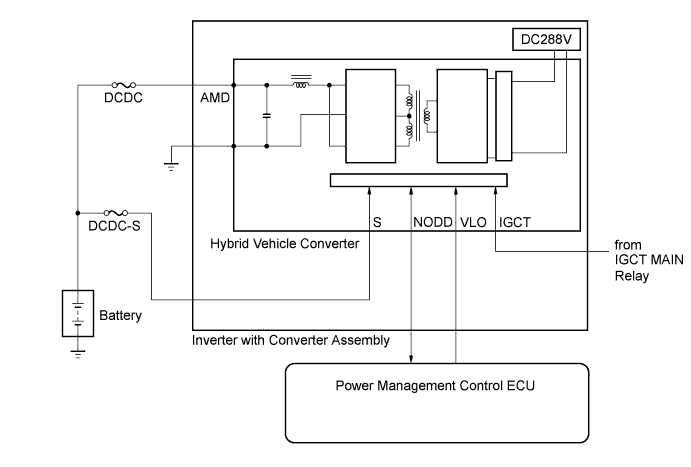
The hybrid vehicle converter (DC/DC converter) converts the DC 288 V of the HV battery into DC 12 V in order to supply power to areas such as the vehicle's lighting, audio, and ECU systems. In addition, it charges the auxiliary battery. A transistor bridge circuit initially converts DC 288 V into alternating current, and a transformer lowers its voltage. Then, it is rectified and smoothed (into DC) and converted into DC 12 V. The hybrid vehicle converter controls the output voltage in order to keep a constant voltage at the terminals of the auxiliary battery.
The power management control ECU (HV CPU) uses the NODD signal line to transmit a stop command to the hybrid vehicle converter and receive signals indicating the normal or abnormal condition of the 12 V charging system. If the vehicle is being driven with an inoperative hybrid vehicle converter, the voltage of the auxiliary battery will drop, which will prevent the continued operation of the vehicle. Therefore, the power management control ECU (HV CPU) monitors the operation of the hybrid vehicle converter and alerts the driver if it detects a malfunction.
| DTC No. | INF Code | DTC Detection Condition | Trouble Area |
|---|---|---|---|
| P0A08 | 264 | DC/DC converter malfunction |
|
WIRING DIAGRAM
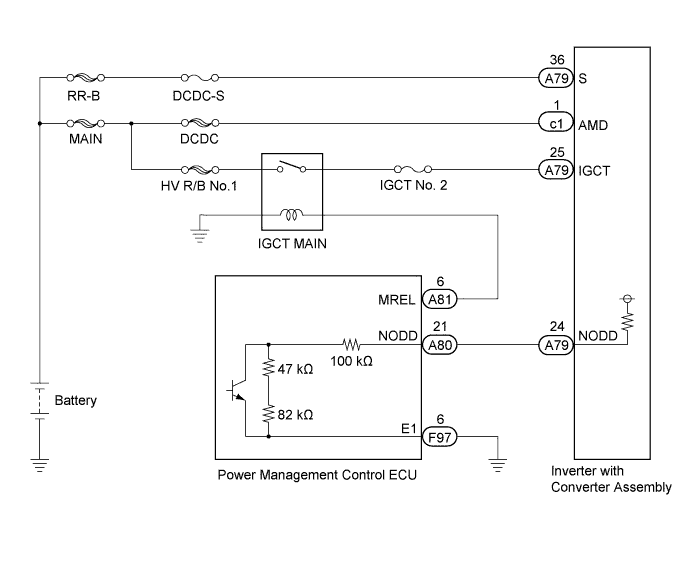
INSPECTION PROCEDURE
CAUTION:
-
Before inspecting the high-voltage system or disconnecting the low voltage connector of the inverter with converter assembly, take safety precautions such as wearing insulated gloves and removing the service plug grip to prevent electrical shocks. After removing the service plug grip, put it in your pocket to prevent other technicians from accidentally reconnecting it while you are working on the high-voltage system.
-
After disconnecting the service plug grip, wait for at least 10 minutes before touching any of the high-voltage connectors or terminals. After waiting for 10 minutes, check the voltage at the terminals in the inspection point in the inverter with converter assembly. The voltage should be 0 V before beginning work.
Tech Tips
Waiting for at least 10 minutes is required to discharge the high-voltage capacitor inside the inverter with converter assembly.
PROCEDURE
-
CHECK DTC OUTPUT (HV)
-
Connect the intelligent tester to the DLC3.
-
Turn the power switch on (IG).
-
Enter the following menus: Powertrain / Hybrid Control / Trouble Codes.
-
Check if DTCs are output.
Result Result Proceed to DTC P0A08-264 only is output. A Any of the following DTCs are also output. B DTC No. Relevant Diagnosis P0A93-346 Inverter Cooling System Performance P0A94-547, 548, 549 DC / DC Converter Performance P0AA6-526, 613, 655 Hybrid Battery Voltage System Isolation Fault P0ADB-227 Hybrid Battery Positive Contactor Control Circuit Low P0ADF-229 Hybrid Battery Negative Contactor Control Circuit Low P0AE6-225 Hybrid Battery Precharge Contactor Control Circuit Low P0C73-776 Motor Electronics Coolant Pump "A" Control Performance P3004-131, 803 Power Cable Malfunction P314A-828 Inverter Coolant Pump Speed Signal -
Turn the power switch off.
B 
GO TO DTC CHART Click here
A 
-
-
CHECK FUSE (IGCT NO. 2)
-
Disconnect the cable from the negative auxiliary battery terminal.
-
Remove the IGCT No. 2 fuse from the engine room relay block No. 2.
-
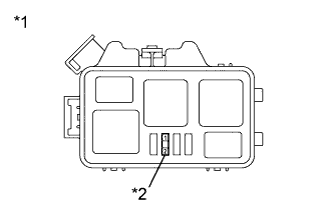
Text in Illustration *1 Engine Room Relay Block No. 2 *2 IGCT No. 2 Fuse Measure the resistance according to the value(s) in the table below.
Standard Resistance Tester Connection Switch Condition Specified Condition IGCT No. 2 fuse terminals Always Below 1 Ω -
Install the IGCT No. 2 fuse.
NG 
CHECK HARNESS AND CONNECTOR (INVERTER WITH CONVERTER ASSEMBLY - IGCT NO. 2 FUSE) Click here
OK
-
-
CHECK FUSE (DCDC-S)
-
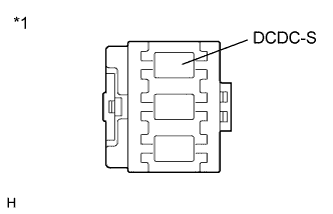
Text in Illustration *1 Fusible Link Block Assembly Remove the DCDC-S fuse from the fusible link block assembly.
-
Measure the resistance according to the value(s) in the table below.
Standard Resistance Tester Connection Switch Condition Specified Condition DCDC-S fuse terminals Always Below 1 Ω -
Install the DCDC-S fuse.
NG
CHECK HARNESS AND CONNECTOR (INVERTER WITH CONVERTER ASSEMBLY - DCDC-S FUSE) Click here
OK
-
-
CHECK FUSIBLE LINK BLOCK ASSEMBLY (MAIN, RR-B)
-
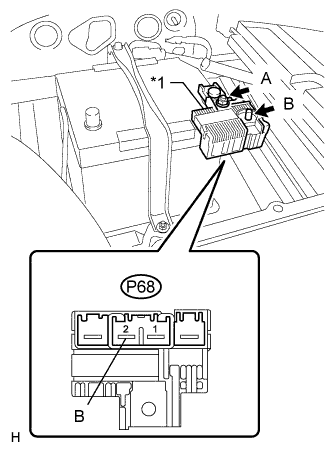
Text in Illustration *1 Fusible Link Block Assembly Disconnect all the connectors from the fusible link block assembly.
-
Measure the resistance according to the value(s) in the table below.
Standard Resistance Tester Connection Switch Condition Specified Condition terminal A - terminal B Always Below 1 Ω terminal A - P68-2 (B) Always Below 1 Ω -
Connect the fusible link block assembly connectors.
NG
REPLACE FUSIBLE LINK BLOCK ASSEMBLY (MAIN, RR-B)
OK
-
-
CHECK FUSIBLE LINK BLOCK ASSEMBLY (DCDC, HV R/B NO. 1)
-
Check the fusible links (DCDC and HV R/B NO.1) in the engine room junction block assembly for improper installation and for open circuits.
OK The fusible links are installed securely. There are no open circuits.
NG
REPLACE FUSIBLE LINK BLOCK ASSEMBLY (DCDC, HV R/B NO.1)
OK
-
-
CHECK CONNECTOR CONNECTION CONDITION (POWER MANAGEMENT CONTROL ECU CONNECTOR)
-
Check the connections of the power management control ECU connectors.
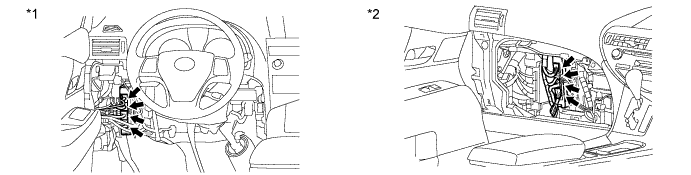
Text in Illustration *1 for LHD *2 for RHD OK The connectors are connected securely and there are no contact problems.
NG
CONNECT SECURELY
OK
-
-
CHECK CONNECTOR CONNECTION CONDITION (INVERTER WITH CONVERTER ASSEMBLY CONNECTOR)
CAUTION:
Be sure to wear insulated gloves.
-
Check that the service plug grip is not installed.
Note
After removing the service plug grip, do not turn the power switch on (READY), unless instructed by the repair manual because this may cause a malfunction.
Note
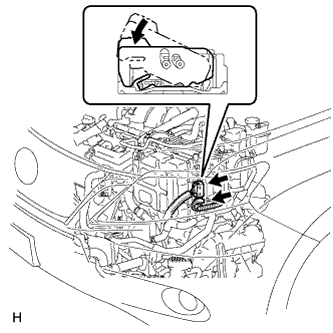
Before disconnecting the connector, confirm that it is properly connected by checking that the locking claws are engaged and that the connector does not pull out.
-
Check the connection of the low voltage connector of the inverter with converter assembly.
OK The connector is connected securely and there are no contact problems. Tech Tips
When connecting the connector, insert it with the locking lever in the raised position. Rotate the lever downward and make sure that the connector is pulled into its socket. When the locking lever is in its fully closed position, a click will be heard as its locking claws engage. After the click is heard, pull up on the connector to confirm that it is properly connected.
NG
CONNECT SECURELY
OK
-
-
CHECK CABLE AND WIRE HARNESS
CAUTION:
Be sure to wear insulated gloves.
-
Check that the service plug grip is not installed.
Note
After removing the service plug grip, do not turn the power switch on (READY), unless instructed by the repair manual because this may cause a malfunction.
-
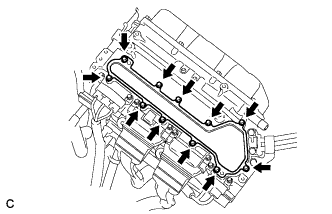
Remove the inverter terminal cover from the inverter with converter assembly.
-
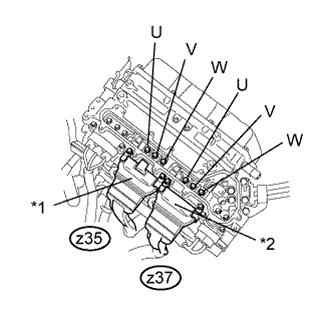
Text in Illustration *1 Three-phase AC Cable for MG1 *2 Three-phase AC Cable for MG2 Using a megohmmeter set to 500 V, measure the insulation resistance according to the value(s) in the table below.
Note
Be sure to set the megohmmeter to 500 V when performing this test. Using a setting higher than 500 V can result in damage to the component being inspected.
Standard Resistance Tester Connection Switch Condition Specified Condition z35-1 (U) - Body ground and shield ground Power switch off 1 MΩ or higher z35-2 (V) - Body ground and shield ground Power switch off 1 MΩ or higher z35-3 (W) - Body ground and shield ground Power switch off 1 MΩ or higher z37-3 (U) - Body ground and shield ground Power switch off 1 MΩ or higher z37-2 (V) - Body ground and shield ground Power switch off 1 MΩ or higher z37-1 (W) - Body ground and shield ground Power switch off 1 MΩ or higher Tech Tips
Perform this inspection while the three-phase AC cable for MG1 and for MG2 are connected.
-
Install the inverter terminal cover to the inverter with converter assembly.
NG
CHECK HYBRID VEHICLE TRANSAXLE ASSEMBLY (MG1) Click here
OK
-
-
CHECK AMD TERMINAL
CAUTION:
Be sure to wear insulated gloves.
-
Check that the service plug grip is not installed.
Note
After removing the service plug grip, do not turn the power switch on (READY), unless instructed by the repair manual because this may cause a malfunction.
-
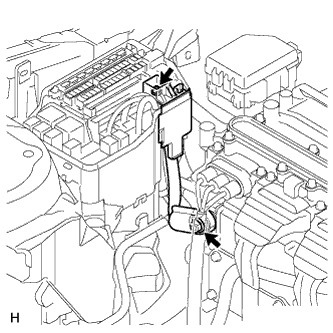
Check that the nuts for the AMD terminals are tightened to the specified torque, the AMD terminals are connected securely, and there are no contact problems.
- Torque:
- 8.35 N*m { 85 kgf*cm }
Result Result Proceed to There are no arc marks. The terminals are connected securely and there are no contact problems. A There are no arc marks. The terminals are not connected securely and there is a contact problem. B There are arc marks. - C
B
CONNECT SECURELY
C
REPLACE MALFUNCTIONING PARTS
A
-
-
CHECK TERMINAL VOLTAGE (AMD TERMINAL)
CAUTION:
Be sure to wear insulated gloves.
-
Check that the service plug grip is not installed.
Note
After removing the service plug grip, do not turn the power switch on (READY), unless instructed by the repair manual because this may cause a malfunction.
-
Connect the cable to the negative auxiliary battery terminal.
-
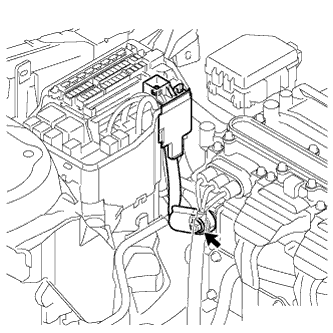
Measure the voltage according to the value(s) in the table below.
Standard Voltage Tester Connection Switch Condition Specified Condition AMD terminal (Inverter with converter assembly side) - Body ground Power switch off 11 to 14 V
NG
CHECK AMD TERMINAL (ENGINE ROOM JUNCTION BLOCK ASSEMBLY SIDE) Click here
OK
-
-
CHECK HARNESS AND CONNECTOR
CAUTION:
Be sure to wear insulated gloves.
-
Check that the service plug grip is not installed.
Note
After removing the service plug grip, do not turn the power switch on (READY), unless instructed by the repair manual because this may cause a malfunction.
-
Disconnect the A79 connector from the inverter with converter assembly.
-
Turn the power switch on (IG).
Tech Tips
Turning the power switch on (IG) with the service grip removed causes interlock switch system DTC P0A0D-350 to be output.
-
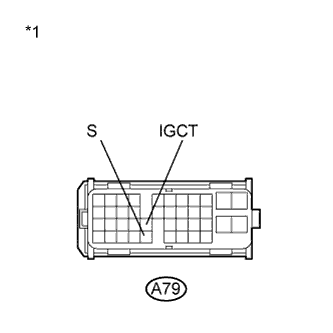
Text in Illustration *1 Front view of wire harness connector
(to Inverter with Converter Assembly)
Measure the voltage according to the value(s) in the table below.
Standard Voltage Tester Connection Switch Condition Specified Condition A79-25 (IGCT) - Body ground Power switch on (IG) 11 to 14 V A79-36 (S) - Body ground Power switch on (IG) 11 to 14 V -
Turn the power switch off.
-
Connect the inverter with converter assembly connector.
NG
REPAIR OR REPLACE HARNESS OR CONNECTOR
OK
-
-
CHECK POWER MANAGEMENT CONTROL ECU
-
Disconnect the A79 connector from the inverter with converter assembly.
-
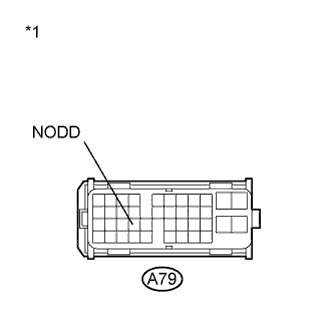
Text in Illustration *1 Front view of wire harness connector
(to Inverter with Converter Assembly)
Measure the resistance according to the value(s) in the table below.
Standard Resistance Tester Connection Switch Condition Specified Condition A79-24 (NODD) - Body ground Power switch off 120 to 140 kΩ -
Connect the inverter with converter assembly connector.
NG
INSPECT POWER MANAGEMENT CONTROL ECU Click here
OK
-
-
CHECK DC/DC CONVERTER FUNCTION
Tech Tips
The current at the AMD terminal cannot be measured directly because of space limitations. Measure the current flowing from the auxiliary battery instead.
-
Connect the AC/DC 400 A probe to the positive auxiliary battery line.
-
Install the service plug grip.
-
Turn the power switch on (READY) and leave the vehicle as it is until the electric current flowing into the auxiliary battery becomes 10 A or less.
-
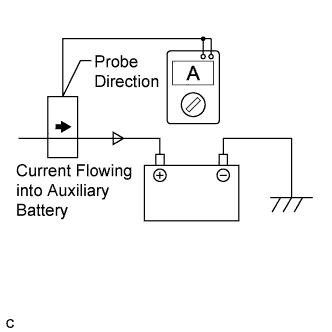
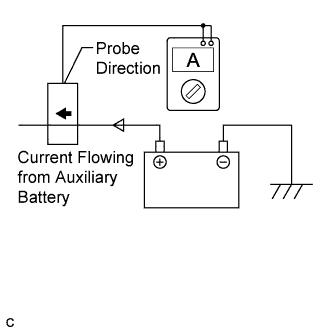
Measure the current flowing from the auxiliary battery with the power switch on (READY), the headlight position switch and blower motor switch in the HI position, and the rear window defogger turned on.
Standard Current Item Switch Condition Specified Condition Current flowing from auxiliary battery Power switch on (READY)
(The headlight position switch and blower motor switch are in the HI position, and the rear window defogger is turned on.)
0 A or less (no current from auxiliary battery) -
Measure the voltage according to the value(s) in the table below.
Standard Voltage Tester Connection Switch Condition Specified Condition Auxiliary battery voltage Power switch on (READY)
(The headlight position switch and blower motor switch are in the HI position, and the rear window defogger is turned on.)
13 to 15 V -
Turn the power switch off.
NG
REPLACE INVERTER WITH CONVERTER ASSEMBLY Click here
OK
-
-
CHECK QUANTITY OF HV COOLANT
-
Check the coolant level in the inverter reserve tank.
-
Check for coolant leaks.
Result Result Proceed to Coolant leaks are not evident. A sufficient amount of coolant remains in the inverter reserve tank. A Coolant leaks are not evident. No coolant remains in the inverter reserve tank. B Coolant leaks are evident. C Tech Tips
After repairing the coolant leaks and adding coolant, perform the "Activate the Water Pump" Active Test (HV Active Test item) and the "Control the Electric Cooling Fan" Active Test (Engine Active Test item) and make sure that there are no malfunctions.
B
ADD HV COOLANT
C
INSPECT FOR COOLANT LEAK AND ADD COOLANT
A
-
-
CHECK COOLANT HOSE
-
Check if the hoses of the cooling system are kinked or clogged.
NG
CORRECT THE PROBLEM
OK
-
-
PERFORM ACTIVE TEST USING INTELLIGENT TESTER (CONTROL THE ELECTRIC COOLING FAN)
-
Connect the intelligent tester to the DLC3.
-
Turn the power switch on (IG).
-
Enter the following menus: Powertrain / Engine and ECT / Active Test / Control the Electric Cooling Fan.
-
Perform the "Control the Electric Cooling Fan" Active Test.
OK The cooling fan rotates. -
Turn the power switch off.
NG
CHECK COOLING FAN SYSTEM Click here
OK
-
-
CHECK HV COOLANT (CHECK FOR CONDITIONS THAT MAY HAVE CAUSED FREEZING)
-
Connect the intelligent tester to the DLC3.
-
Turn the power switch on (IG).
-
Read the freeze frame data Ambient Temperature using the intelligent tester.
-
Check if the freeze frame data Ambient Temperature is below freezing.
Result Result Proceed to Ambient Temperature value is above freezing temperature of the HV coolant A Ambient Temperature value is below freezing temperature of the HV coolant B Tech Tips
-
HV coolant (SLLC) with a 30% concentration freezes at -15 °C (5°F) and HV coolant (SLLC) with a 50% concentration freezes at -35°C (-31°F).
-
If the HV coolant freezes in the HV radiator or inverter water pump assembly, the coolant temperature in the inverter with converter assembly rises because the HV coolant cannot circulate. As a result, a DTC may be set.
-
A DTC is set when the inverter water pump assembly impeller cannot rotate due to freezing of the HV coolant.
-
If a DTC is set due to freezing of HV coolant, the problem cannot be reproduced. Judge whether freezing of HV coolant occurred according to the freeze point of the HV coolant, HV coolant change history and ambient temperature when the DTC was set.
-
-
Turn the power switch off.
B
A 
REPLACE INVERTER WITH CONVERTER ASSEMBLY Click here
-
-
CHECK HYBRID VEHICLE TRANSAXLE ASSEMBLY (MG1)
CAUTION:
Be sure to wear insulated gloves.
-
Check that the service plug grip is not installed.
Note
After removing the service plug grip, do not turn the power switch on (READY), unless instructed by the repair manual because this may cause a malfunction.
-
Remove the inverter terminal cover from the inverter with converter assembly.
-
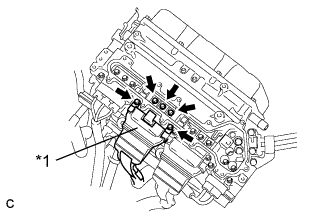
Text in Illustration *1 Three-phase AC Cables for MG1 Disconnect the three-phase AC cables for MG1 from the inverter with converter assembly.
-
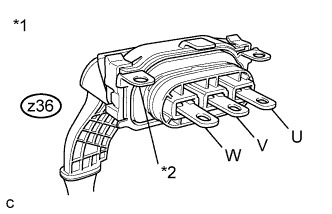
Text in Illustration *1 Three-phase AC Cables for MG1 *2 Shield Ground Using a megohmmeter set to 500 V, measure the insulation resistance according to the value(s) in the table below.
Note
Be sure to set the megohmmeter to 500 V when performing this test. Using a setting higher than 500 V can result in damage to the component being inspected.
Standard Resistance Tester Connection Switch Condition Specified Condition z36-3 (U) - Body ground and shield ground Power switch off 100 MΩ or higher z36-2 (V) - Body ground and shield ground Power switch off 100 MΩ or higher z36-1 (W) - Body ground and shield ground Power switch off 100 MΩ or higher -
Connect the three-phase AC cables for MG1 to the inverter with converter assembly.
-
Install the inverter terminal cover to the inverter with converter assembly.
NG
REPLACE HYBRID VEHICLE TRANSAXLE ASSEMBLY Click here
OK
-
-
CHECK HYBRID VEHICLE TRANSAXLE ASSEMBLY (MG2)
CAUTION:
Be sure to wear insulated gloves.
-
Check that the service plug grip is not installed.
Note
After removing the service plug grip, do not turn the power switch on (READY), unless instructed by the repair manual because this may cause a malfunction.
-
Remove the inverter terminal cover from the inverter with converter assembly.
-
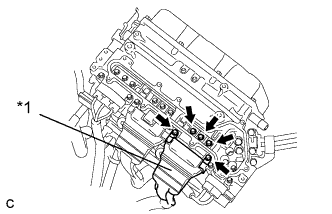
Text in Illustration *1 Three-phase AC Cables for MG2 Disconnect the three-phase AC cables for MG2 from the inverter with converter assembly.
-
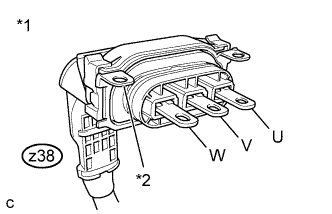
Text in Illustration *1 Three-phase AC Cables for MG2 *2 Shield Ground Using a megohmmeter set to 500 V, measure the insulation resistance according to the value(s) in the table below.
Note
Be sure to set the megohmmeter to 500 V when performing this test. Using a setting higher than 500 V can result in damage to the component being inspected.
Standard Resistance Tester Connection Switch Condition Specified Condition z38-3 (U) - Body ground and shield ground Power switch off 100 MΩ or higher z38-2 (V) - Body ground and shield ground Power switch off 100 MΩ or higher z38-1 (W) - Body ground and shield ground Power switch off 100 MΩ or higher -
Connect the three-phase AC cables for MG2 to the inverter with converter assembly.
-
Install the inverter terminal cover to the inverter with converter assembly.
NG
REPLACE HYBRID VEHICLE TRANSAXLE ASSEMBLY Click here
OK
-
-
CHECK REAR TRACTION MOTOR WITH TRANSAXLE ASSEMBLY
CAUTION:
Be sure to wear insulated gloves.
-
Check that the service plug grip is not installed.
Note
After removing the service plug grip, do not turn the power switch on (READY), unless instructed by the repair manual because this may cause a malfunction.
-
Remove the inverter terminal cover from the inverter with converter assembly.
-
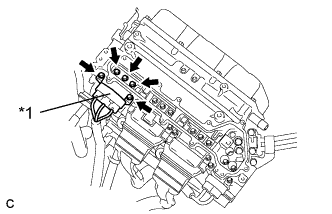
Text in Illustration *1 Three-phase AC Cable for MGR Disconnect the No. 3 wire frame from the inverter with converter assembly.
-
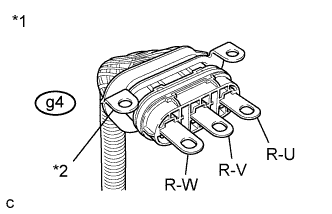
Text in Illustration *1 Three-phase AC Cable for MGR *2 Shield Ground Using a megohmmeter set to 500 V, measure the insulation resistance according to the value(s) in the table below.
Note
Be sure to set the megohmmeter to 500 V when performing this test. Using a setting higher than 500 V can result in damage to the component being inspected.
Standard Resistance Tester Connection Switch Condition Specified Condition g4-3 (R-U) - Body ground and shield ground Power switch off 10 MΩ or higher g4-2 (R-V) - Body ground and shield ground Power switch off 10 MΩ or higher g4-1 (R-W) - Body ground and shield ground Power switch off 10 MΩ or higher -
Connect the No. 3 wire frame to the inverter with converter assembly.
-
Install the inverter terminal cover to the inverter with converter assembly.
NG
CHECK NO.3 WIRE FRAME (REAR MOTOR CABLE) Click here
OK
REPLACE INVERTER WITH CONVERTER ASSEMBLY Click here
-
-
CHECK AMD TERMINAL (ENGINE ROOM JUNCTION BLOCK ASSEMBLY SIDE)
CAUTION:
Be sure to wear insulated gloves.
-
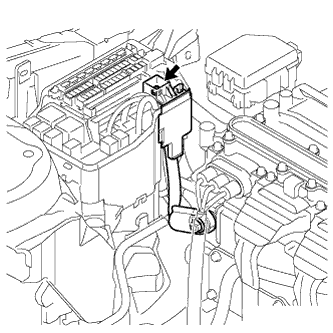
Measure the voltage according to the value(s) in the table below.
Standard Voltage Tester Connection Switch Condition Specified Condition AMD terminal (Engine Room Junction Block Assembly side) - Body ground Power switch off 11 to 14 V
NG
REPAIR OR REPLACE HARNESS OR CONNECTOR
OK
REPLACE INVERTER WITH CONVERTER ASSEMBLY Click here
-
-
INSPECT POWER MANAGEMENT CONTROL ECU
-
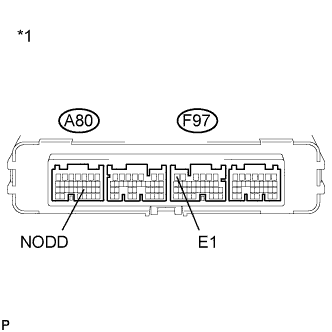
Text in Illustration *1 Component without harness connected
(to Power Management Control ECU)
Disconnect all the connectors from the power management control ECU.
-
Measure the resistance according to the value(s) in the table below.
Standard Resistance Tester Connection Switch Condition Specified Condition A80-21 (NODD) - F97-6 (E1) Power switch off 120 to 140 kΩ Result Result Proceed to OK A NG (for LHD) B NG (for RHD) C -
Connect the power management control ECU connectors.
B
REPLACE POWER MANAGEMENT CONTROL ECU (for LHD) Click here
C
REPLACE POWER MANAGEMENT CONTROL ECU (for RHD) Click here
A
REPAIR OR REPLACE HARNESS OR CONNECTOR
-
-
REPLACE HV COOLANT
-
Replace the HV coolant with coolant having an appropriate concentration (appropriate freeze point) for the vehicle usage conditions Click here.
NEXT
-
-
CHECK INVERTER WATER PUMP ASSEMBLY
-
Perform a road test and check that DTCs are not stored.
OK DTCs are not stored.
NG
REPLACE INVERTER WATER PUMP ASSEMBLY Click here
OK
COMPLETED
-
-
CHECK NO.3 WIRE FRAME (REAR MOTOR CABLE)
CAUTION:
Be sure to wear insulated gloves.
-
Check that the service plug grip is not installed.
Note
After removing the service plug grip, do not turn the power switch on (READY), unless instructed by the repair manual because this may cause a malfunction.
-
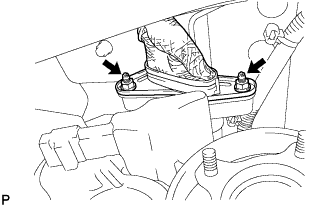
Disconnect the No. 3 wire frame from the rear traction motor with transaxle assembly.
-
Remove the inverter terminal cover from the inverter with converter assembly.
-
Text in Illustration *1 Three-phase AC Cable for MGR Disconnect the No. 3 wire frame from the inverter with converter assembly.
-
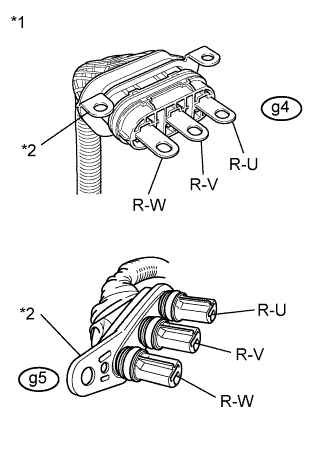
Text in Illustration *1 Three-phase AC Cable for MGR *2 Shield Ground Using a megohmmeter set to 500 V, measure the insulation resistance according to the value(s) in the table below.
Note
Be sure to set the megohmmeter to 500 V when performing this test. Using a setting higher than 500 V can result in damage to the component being inspected.
Standard Resistance Tester Connection Switch Condition Specified Condition g4-3 (R-U) - Body ground and shield ground Power switch off 10 MΩ or higher g4-2 (R-V) - Body ground and shield ground Power switch off 10 MΩ or higher g4-1 (R-W) - Body ground and shield ground Power switch off 10 MΩ or higher -
Connect the No. 3 wire frame to the rear traction motor with transaxle assembly.
-
Connect the No. 3 wire frame to the inverter with converter assembly.
-
Install the inverter terminal cover to the inverter with converter assembly.
NG
REPLACE NO.3 WIRE FRAME Click here
OK
-
-
CHECK EXTENSION WIRE ASSEMBLY
-
Remove the rear traction motor with transaxle assembly Click here.
-
Remove the extension wire assembly from the rear traction motor with transaxle assembly.
-
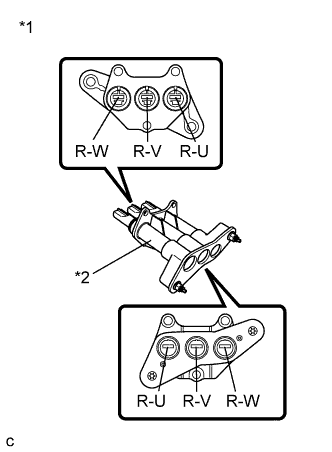
Text in Illustration *1 Extension Wire Assembly *2 Shield Shell Using a megohmmeter set to 500 V, measure the insulation resistance according to the value(s) in the table below.
Note
Be sure to set the megohmmeter to 500 V when performing this test. Using a setting higher than 500 V can result in damage to the component being inspected.
Standard Resistance Tester Connection Switch Condition Specified Condition R-U - Shield shell Power switch off 100 MΩ or higher R-V - Shield shell Power switch off 100 MΩ or higher R-W - Shield shell Power switch off 100 MΩ or higher -
Install the extension wire assembly to the rear traction motor with transaxle assembly.
-
Install the rear traction motor with transaxle assembly.
NG
REPLACE EXTENSION WIRE ASSEMBLY Click here
OK
REPLACE REAR TRACTION MOTOR WITH TRANSAXLE ASSEMBLY Click here
-
-
CHECK HARNESS AND CONNECTOR (INVERTER WITH CONVERTER ASSEMBLY - IGCT NO. 2 FUSE)
CAUTION:
Be sure to wear insulated gloves.
-
Check that the service plug grip is not installed.
Note
After removing the service plug grip, do not turn the power switch on (READY), unless instructed by the repair manual because this may cause a malfunction.
-
Disconnect the A79 connector from the inverter with converter assembly.
-
Remove the IGCT No. 2 fuse from the engine room relay block No. 2.
-
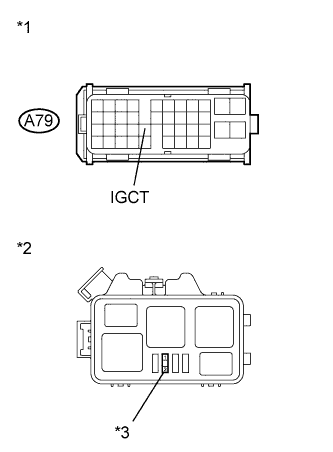
Text in Illustration *1 Front view of wire harness connector
(to Inverter with Converter Assembly)
*2 Engine Room Relay Block No. 2 *3 IGCT No. 2 Fuse Measure the resistance according to the value(s) in the table below.
Standard Resistance Tester Connection Switch Condition Specified Condition A79-25 (IGCT) or 2 (IGCT No. 2 fuse) - Body ground and other terminals Power switch off 10 kΩ or higher -
Install the IGCT No. 2 fuse.
-
Connect the inverter with converter assembly connector.
NG
REPAIR OR REPLACE HARNESS OR CONNECTOR Click here
OK
-
-
REPLACE INVERTER WITH CONVERTER ASSEMBLY
-
Replace the inverter with converter assembly Click here.
NEXT
REPLACE FUSE (IGCT NO. 2)
-
-
CHECK HARNESS AND CONNECTOR (INVERTER WITH CONVERTER ASSEMBLY - DCDC-S FUSE)
CAUTION:
Be sure to wear insulated gloves.
-
Check that the service plug grip is not installed.
Note
After removing the service plug grip, do not turn the power switch on (READY), unless instructed by the repair manual because this may cause a malfunction.
-
Disconnect the A79 connector from the inverter with converter assembly.
-
Remove the DCDC-S fuse from the fusible link block assembly.
-
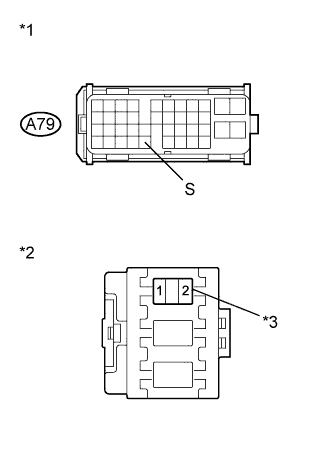
Text in Illustration *1 Front view of wire harness connector
(to Inverter with Converter Assembly)
*2 Fusible Link Block Assembly *3 DCDC-S fuse Measure the resistance according to the value(s) in the table below.
Standard Resistance Tester Connection Switch Condition Specified Condition A79-36 (S) or 2 (DCDC-S fuse) - Body ground and other terminals Power switch off 10 kΩ or higher -
Install the DCDC-S fuse.
-
Connect the inverter with converter assembly connector.
NG
REPAIR OR REPLACE HARNESS OR CONNECTOR Click here
OK
-
-
REPLACE INVERTER WITH CONVERTER ASSEMBLY
-
Replace the inverter with converter assembly Click here.
NEXT
REPLACE FUSE (DCDC-S)
-
-
REPAIR OR REPLACE HARNESS OR CONNECTOR
NEXT
REPLACE FUSE (IGCT NO. 2)
-
REPAIR OR REPLACE HARNESS OR CONNECTOR
NEXT
REPLACE FUSE (DCDC-S)