AUDIO AND VISUAL SYSTEM (w/ Navigation System), Diagnostic DTC:B15BB

| DTC Code | DTC Name |
|---|---|
| B15BB | Multi-media Interface ECU Malfunction |
DESCRIPTION
This DTC is stored when a malfunction occurs in the multi-media interface ECU.
| DTC NO. | DTC Detection Condition | Trouble Area |
|---|---|---|
| B15BB | When one of the conditions below is met:
|
|
WIRING DIAGRAM
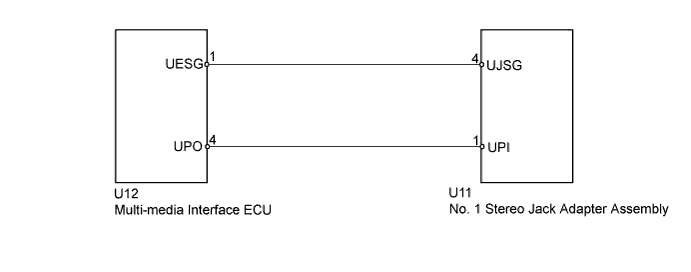
INSPECTION PROCEDURE
Tech Tips
After the inspection is completed, clear the DTC.
PROCEDURE
-
REPLACE "iPod" OR USB DEVICE
-
Disconnect the USB device or "iPod" from the No. 1 stereo jack adapter assembly.
-
Turn the power switch off.
Tech Tips
When this DTC has been stored, it is necessary to turn off the power switch to make it possible for the vehicle to recognize a new device when it is connected.
-
Turn the power switch on (ACC).
-
Connect a known good USB device or "iPod" to the No. 1 stereo jack adapter assembly.
Tech Tips
-
If the malfunction occurred when a USB device was in use, use another USB device for the inspection. If the malfunction occurred when an "iPod" was in use, use another "iPod" for the inspection.
-
NEXT 
-
-
CLEAR DTC
-
Clear the DTCs Click here.
NEXT
-
-
RECHECK FOR DTC
-
Recheck for DTCs and check if the same trouble occurs again.
OK No DTC is output.
NG 
INSPECT MULTI-MEDIA INTERFACE ECU Click here
OK 
USB DEVICE OR "iPod" WAS DEFECTIVE
-
-
INSPECT MULTI-MEDIA INTERFACE ECU
-
Disconnect the No. 1 stereo jack adapter assembly connector.
-
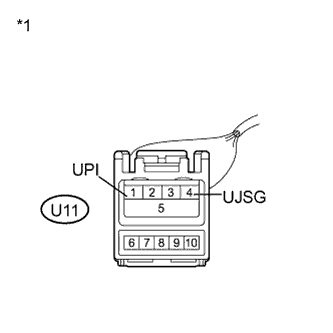
Text in Illustration *1 Front view of wire harness connector
(to No. 1 Stereo Jack Adapter Assembly)
Measure the voltage according to the value(s) in the table below.
Standard Voltage Tester Connection Condition Specified Condition U11-1 (UPI) - U11-4 (UJSG) Always 5 V
NG
CHECK HARNESS AND CONNECTOR Click here
OK
REPLACE NO. 1 STEREO JACK ADAPTER ASSEMBLY Click here
-
-
CHECK HARNESS AND CONNECTOR
-
Disconnect the multi-media interface ECU connector.
-
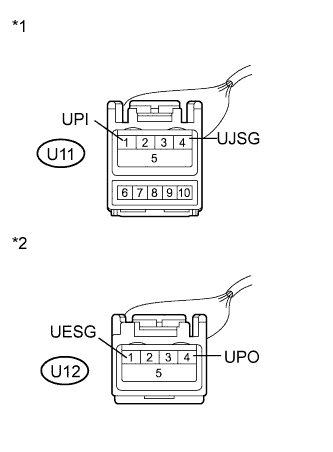
Text in Illustration *1 Front view of wire harness connector
(to No. 1 Stereo Jack Adapter Assembly)
*2 Front view of wire harness connector
(to Multi-media Interface ECU)
Measure the resistance according to the value(s) in the table below.
Standard Resistance Tester Connection Condition Specified Condition U11-1 (UPI) - U12-4 (UPO) Always Below 1 Ω U11-4 (UJSG) - U12-1 (UESG) Always Below 1 Ω U11-1 (UPI) - Body ground Always 10 kΩ or higher U11-4 (UJSG) - Body ground Always 10 kΩ or higher
NG 
REPLACE HARNESS OR CONNECTOR
OK
REPLACE MULTI-MEDIA INTERFACE ECU Click here
-