AUDIO AND VISUAL SYSTEM (w/ Navigation System) Audio cannot be Recorded to HDD
DESCRIPTION
Tech Tips
The HDD is compliant with the Serial Copy Management System (SCMS). Therefore, recording from a CD-R that is a copy of a commercially published music CD is not possible.
INSPECTION PROCEDURE
Note
When replacing the display and navigation module display, perform vehicle contract setting (w/ G-BOOK System) Click here.
PROCEDURE
-
CHECK SOUND LIBRARY SETTING OF HDD ON SOUND LIBRARY INFORMATION SCREEN
-
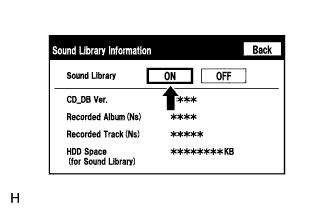
Enter the "Sound Library Information" (Check Sound Library Setting) Click here.
-
Select "ON" for the "Sound Library" setting.
-
Check if recording is possible.
OK Malfunction disappears.
NG 
CHECK FREE SPACE IN HDD Click here
OK 
END
-
-
CHECK FREE SPACE IN HDD
-
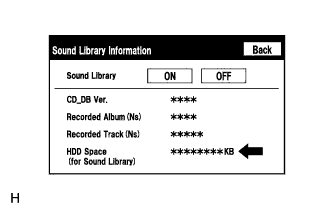
Enter the "Sound Library Information" (Check Sound Library Setting) Click here.
-
Check free space in HDD from the sound library setting screen.
Result Result Proceed to Insufficient space in HDD A Sufficient space in HDD B
B
CHECK IF AUDIO POWER IS ON Click here
A
DELETE UNNECESSARY DATA FROM HDD
-
-
CHECK IF AUDIO POWER IS ON
-
Check if the audio power is on.
Tech Tips
When the audio is off, audio recording is not possible.
OK Audio power is on.
NG 
TURN AUDIO ON
OK 
-
-
CHECK IF RECORDING SETTING IS SET TO AUTO
-
Check if the recording setting is set to AUTO.
Tech Tips
When the recording setting is set to manual, recording does not start automatically after a CD is inserted.
OK Recording setting is set to AUTO.
NG
CHANGE RECORDING SETTING TO AUTO
OK
-
-
CHECK CD
-
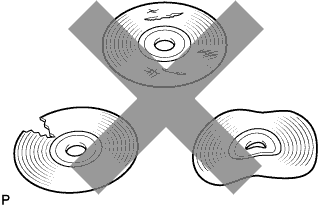
Check that the disc is not deformed or cracked.
OK No deformation or cracks on the CD
NG
CHANGE CD
OK
-
-
CLEAN CD AND RECHECK CD
-
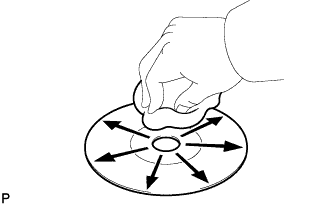
Check the disc by wiping it clean with a soft cloth from the inside to the outside in a radial direction.
OK Malfunction disappears. Note
Do not use a conventional record cleaner or anti-static preservative.
NG
CHECK USING ANOTHER VEHICLE WITH HDD NAVIGATION SYSTEM Click here
OK
END
-
-
CHECK USING ANOTHER VEHICLE WITH HDD NAVIGATION SYSTEM
-
Check if the CD plays normally using another vehicle with the HDD navigation system.
OK Malfunction disappears.
NG
CD WAS FAULTY
OK
PROCEED TO NEXT SUSPECTED AREA SHOWN IN PROBLEM SYMPTOMS TABLE Click here
-