PTC HEATER ASSEMBLY REMOVAL

-
REMOVE INSTRUMENT PANEL SUB-ASSEMBLY (for LHD)
-
Remove the instrument panel sub-assembly Click here.
-
-
REMOVE NO. 1 INSTRUMENT PANEL BRACE SUB-ASSEMBLY (for LHD)

-
Remove the 2 nuts.
-
Remove the bolt and screw.
-
Disengage the guide and remove the instrument panel brace.
-
-
REMOVE INSTRUMENT LOWER PANEL (for RHD)
-
Remove the instrument lower panel Click here.
-
-
REMOVE NO. 2 AIR DUCT SUB-ASSEMBLY
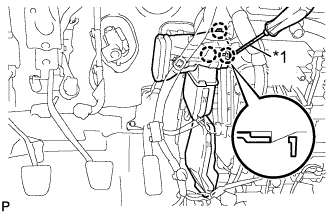
Text in Illustration *1 Protective tape
-
Using a screwdriver with its tip wrapped in protective tape, disengage the 3 claws and remove the air duct.
-
-
REMOVE QUICK HEATER ASSEMBLY
-
Disconnect the connector.
-
Remove the ground wire installing bolt.
-
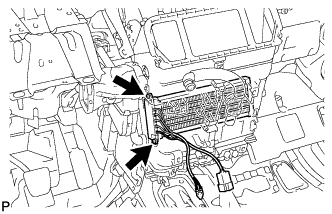
Remove the 2 screws and quick heater.
-