AIR CONDITIONING SYSTEM (for Automatic Air Conditioning System) DIAGNOSIS SYSTEM

-
CHECK DLC3
-
Check the DLC3 Click here.
-
-
PANEL DIAGNOSIS (INDICATOR CHECK)
-
Turn the ignition switch off.
-
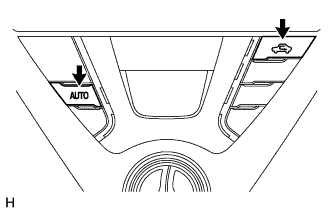
Press and hold the A/C control AUTO switch and Recirculation/Fresh switch simultaneously, and turn the ignition switch to ON. Continue holding the 2 switches unit the panel diagnosis mode begins.
-
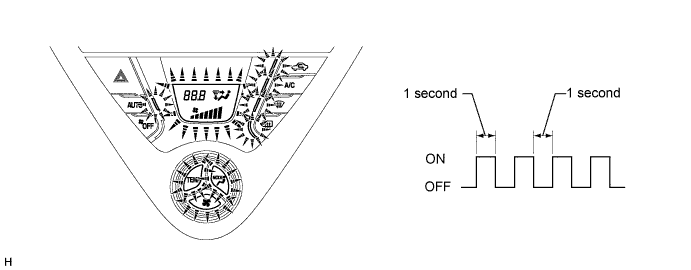
Check that all indicators and the display area are turned on and off 4 times in succession at 1-second intervals.
Tech Tips
After the indicator check is completed, the system automatically enters sensor check mode.
-
Press the OFF switch to terminate the panel diagnosis.
-
-
PANEL DIAGNOSIS (SENSOR CHECK)
-
Perform the indicator check.
Tech Tips
After the indicator check is completed, the system automatically enters sensor check mode.
-
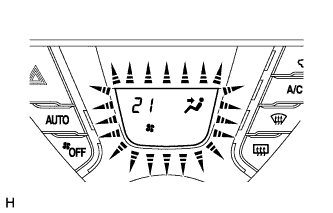
Check the sensor check results displayed on the set temperature display.
Result Code Display Present malfunction Blinks Past malfunction Blinks Tech Tips
-
The illustration shows the display when code 21 is output.
-
When 2 or more sensor check codes are detected, the codes are displayed in ascending numerical order.
-
In cases with 2 or more codes, if they are difficult to read, press the DEF switch to activate the step operation and display them one by one.
-
The codes are displayed in ascending numerical order as the DEF switch is pressed.
-
-
When any sensor check codes are displayed, refer to the DTC chart Click here.
-
Press the OFF switch to terminate the panel diagnosis.
Tech Tips
Pressing the AUTO switch returns to sensor check mode.
-
-
PANEL DIAGNOSIS (CLEAR SENSOR CHECK CODE)
-
Inspect, and repair or replace the malfunctioning parts.
-
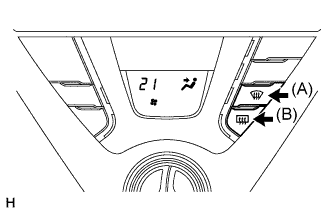
Clear the sensor check codes.
-
While pressing the DEF switch during sensor check mode, press the Rr DEF switch.
Tech Tips
Sensor check codes can be cleared by removing the HTG-IG fuse of the instrument panel junction block assembly (main body ECU) for more than 60 seconds.
-
-
Perform the sensor check and confirm that normal code 00 is displayed.
-