METER / GAUGE SYSTEM CUSTOMIZE PARAMETERS

-
CUSTOMIZING FUNCTION WITH INTELLIGENT TESTER
Tech Tips
The following items can be customized.
Note
-
When the customer requests a change in a function, first make sure that the function can be customized.
-
Record the current settings before customizing.
-
When troubleshooting a function, first make sure that the function is set to the default setting.
Warning Display Default Content Setting Driver Side Seatbelt Warning Buzzer ON To change the seat-belt warning buzzer ON/OFF Front Passenger Side Seatbelt Warning Buzzer ON To change the seat-belt warning buzzer ON/OFF Rear Seatbelt Warning Buzzer*1 ON To change the seat-belt warning buzzer ON/OFF
-
*1: w/ Rear Seat Belt Warning System
Display Display Default Content Setting ECO Drive Indicator Light*1 ON To change the ECO driving indicator light ON/OFF ECO Drive Indicator*1 ON To change the ECO driving indicator zone display ON/OFF
-
*1: w/ ECO Drive Indicator
-
-
CUSTOMIZE ECO DRIVING INDICATOR LIGHT (w/ ECO Drive Indicator)
-
Turn the ignition switch to ON.
-
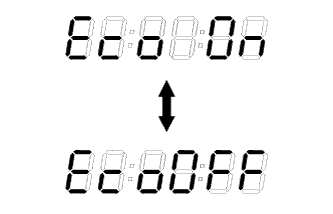
Press the trip meter reset knob until the odometer displays "ECO driving indicator light customize screen"
-
While pressing the trip meter reset knob, hold it for 0.8 seconds or more.
-
When "Eco OFF" is displayed as shown in the illustration, the customization is completed.
Tech Tips
-
When canceling, do not perform the ECO driving indicator light bulb check.
-
Select "Eco On" to restore normal operation.
-
-