ENTRY AND START SYSTEM (for Entry Function) Wireless Door Lock Buzzer Does not Sound
DESCRIPTION
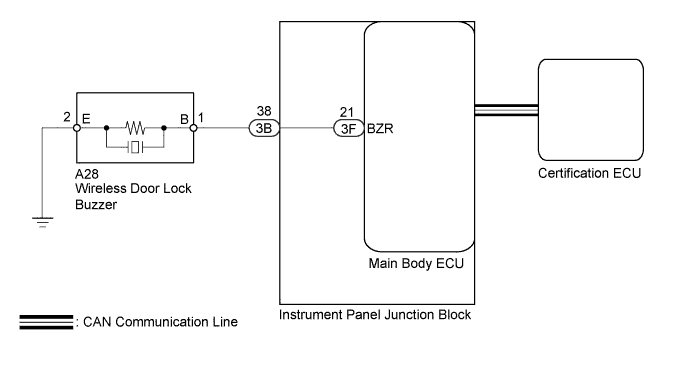
The entry and start system uses the wireless door lock buzzer to perform various vehicle exterior warnings. When the conditions for each warning are met, the certification ECU sends a buzzer signal to the main body ECU via CAN communication, the main body ECU sends the signal to the wireless door lock buzzer, and the wireless door lock buzzer sounds.
WIRING DIAGRAM
INSPECTION PROCEDURE
Note
The entry and start system (for entry function) uses a multiplex communication system (LIN communication system) and CAN communication system. Inspect the communication function by following How to Proceed with Troubleshooting Click here. Troubleshoot the entry and start system (for entry function) after confirming that the communication system is functioning properly.
PROCEDURE
-
PERFORM ACTIVE TEST USING INTELLIGENT TESTER (WIRELESS BUZZER)
-
Connect the intelligent tester to the DLC3.
-
Turn the engine switch on (IG).
-
Turn the intelligent tester on.
-
Enter the following menus: Body / Main Body / Active Test.
-
Perform the Active test according to the display on the intelligent tester.
Main Body Tester Display Test Part Control Range Diagnostic Note Wireless Buzzer Wireless door lock buzzer ON/OFF - OK Wireless buzzer turns ON/OFF.
NG 
CHECK HARNESS AND CONNECTOR (INSTRUMENT PANEL J/B - WIRELESS BUZZER AND BODY GROUND) Click here
OK 
REPLACE CERTIFICATION ECU
-
-
CHECK HARNESS AND CONNECTOR (INSTRUMENT PANEL J/B - WIRELESS BUZZER AND BODY GROUND)
-
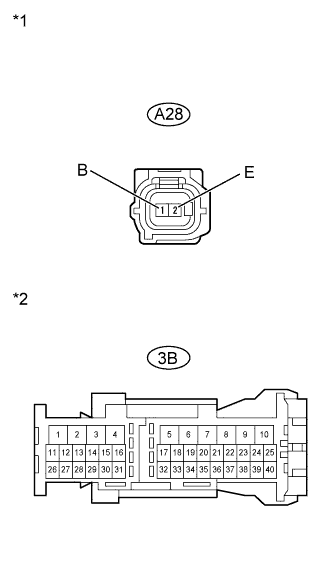
Text in Illustration *1 Front view of wire harness connector
(to Wireless Door Lock Buzzer)
*2 Front view of wire harness connector
(to Instrument Panel Junction Block)
Disconnect the A28 wireless door lock buzzer connector.
-
Disconnect the 3B instrument panel junction block connector.
-
Measure the resistance according to the value(s) in the table below.
Standard Resistance Tester Connection Condition Specified Condition A28-1(B) - 3B-38 Always Below 1 Ω A28-2(E) - Body ground A28-1(B) or 3B-38 - Body ground Always 10 kΩ or higher
NG 
REPAIR OR REPLACE HARNESS OR CONNECTOR
OK 
-
-
REPLACE WIRELESS DOOR LOCK BUZZER
-
Temporarily replace the wireless door lock buzzer with a new or normally functioning one Click here.
NEXT
-
-
PERFORM ACTIVE TEST USING INTELLIGENT TESTER (WIRELESS BUZZER)
-
Connect the intelligent tester to the DLC3.
-
Turn the engine switch on (IG).
-
Turn the intelligent tester on.
-
Enter the following menus: Body / Main Body / Active Test.
-
Perform the Active test according to the display on the intelligent tester.
Main Body Tester Display Test Part Control Range Diagnostic Note Wireless Buzzer Wireless door lock buzzer ON/OFF - OK Wireless buzzer turns ON/OFF.
NG
REPLACE MAIN BODY ECU Click here
OK
END (WIRELESS DOOR LOCK BUZZER IS DEFECTIVE)
-
-
REPLACE MAIN BODY ECU
-
Temporarily replace the main body ECU with a new or normally functioning one Click here.
NEXT
-
-
PERFORM ACTIVE TEST USING INTELLIGENT TESTER (WIRELESS BUZZER)
-
Connect the intelligent tester to the DLC3.
-
Turn the engine switch on (IG).
-
Turn the intelligent tester on.
-
Enter the following menus: Body / Main Body / Active Test.
-
Perform the Active test according to the display on the intelligent tester.
Main Body Tester Display Test Part Control Range Diagnostic Note Wireless Buzzer Wireless door lock buzzer ON/OFF - OK Wireless buzzer turns ON/OFF.
NG
REPLACE INSTRUMENT PANEL JUNCTION BLOCK
OK
END (MAIN BODY ECU IS DEFECTIVE)
-