UNLOCK WARNING SWITCH REMOVAL

-
REMOVE STEERING COLUMN ASSEMBLY
-
Remove the steering column assembly Click here.
-
-
REMOVE STEERING COLUMN UPPER WITH SWITCH BRACKET ASSEMBLY
-
Fix the steering post assembly in a vise between aluminum plates.
Note
Do not overtighten the vise.
-
Using a drill, drill a hole in each of the steering lock set bolt, to insert a screw extractor.
-
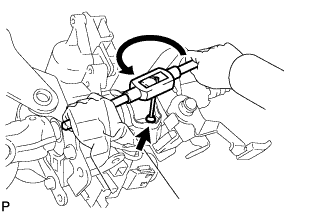
Using the screw extractor, remove the steering lock set bolt and remove the steering column upper with switch bracket assembly and steering column clamp upper.
-
-
REMOVE TRANSPONDER KEY AMPLIFIER
-
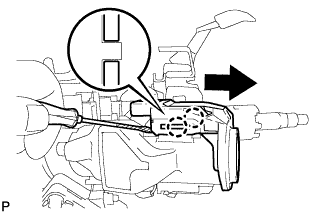
Disengage the 2 claws and slide the transponder key amplifier in the direction shown in the illustration, to detach it from the steering column upper with switch bracket assembly.
-
-
REMOVE IGNITION SWITCH ASSEMBLY
-
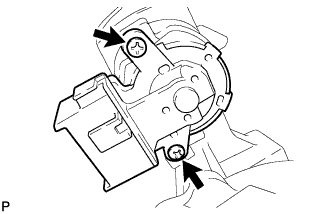
Remove the 2 screws and the ignition switch assembly from the steering column bracket assembly upper.
-
-
REMOVE KEY INTER LOCK SOLENOID (except Manual Transaxle without Smart Entry and Start System)
-
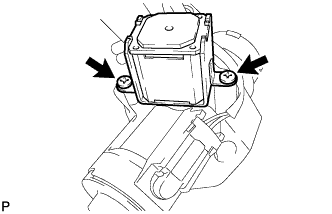
Remove the 2 screws and remove the key lock solenoid from the steering column bracket assembly upper.
-
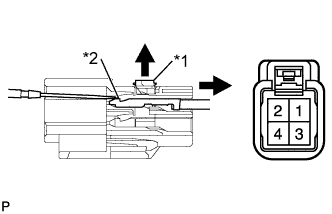
Text in Illustration *1 Stopper *2 Locking Lug Using a screwdriver, release the stopper.
-
Using a screwdriver, disengage the locking lug of terminals (3) and (4), and pull the terminals out from the rear of the connector.
-
-
REMOVE IGNITION SWITCH LOCK CYLINDER ASSEMBLY
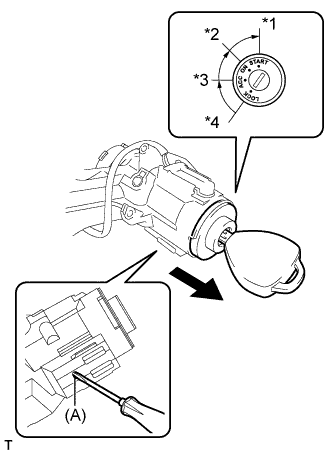
Text in Illustration *1 START *2 ON *3 ACC *4 LOCK
-
Turn the ignition switch to ACC.
-
Insert the tip of a screwdriver into the hole (A) in the steering column bracket assembly upper, and pull out the ignition switch lock cylinder from the steering column bracket assembly upper.
-
-
REMOVE UNLOCK WARNING SWITCH ASSEMBLY
-
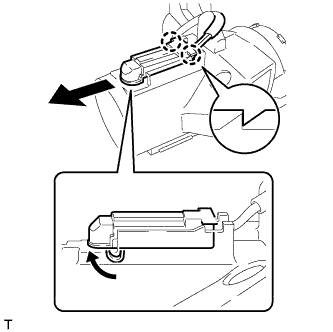
Disengage the 2 claws and remove the unlock warning switch.
-