WIRELESS DOOR LOCK CONTROL SYSTEM (w/o Entry and Start System) Only Wireless Control Function is Inoperative
DESCRIPTION
The door control receiver receives signals from the transmitter and sends these signals to the main body ECU. The main body ECU then controls all doors by sending lock/unlock signals to each door, and sends hazard flasher relay signals to the turn signal flasher relay (hazard warning lights).
WIRING DIAGRAM
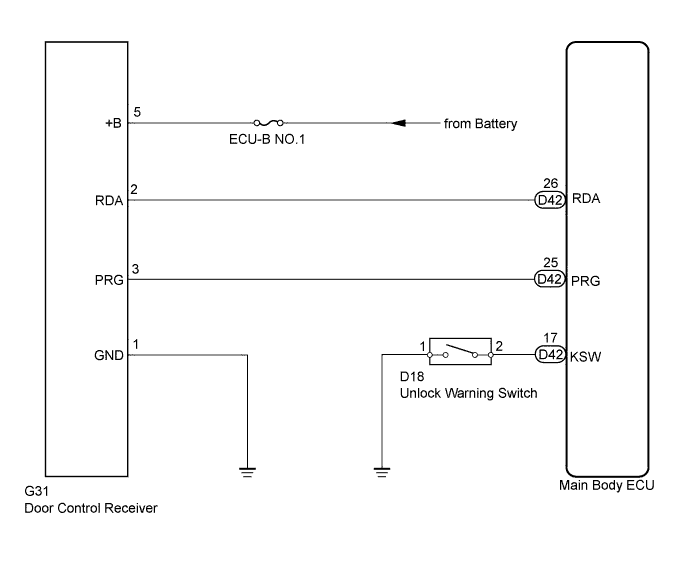
INSPECTION PROCEDURE
Note
Inspect the fuses for circuits related to this system before performing the following inspection procedure.
PROCEDURE
-
CHECK POWER DOOR LOCK OPERATION
-
When the door control switch on the master switch is operated, check that the locked doors unlock Click here.
OK Locked doors unlock.
NG 
GO TO POWER DOOR LOCK CONTROL SYSTEM Click here
OK 
-
-
CHECK KEY REMINDER WARNING SYSTEM
-
Check that the key reminder warning buzzer operates normally Click here.
OK Key reminder warning buzzer operates normally.
NG
GO TO KEY REMINDER WARNING SYSTEM Click here
OK
-
-
CHECK DOOR CONTROL TRANSMITTER MODULE
-
When another registered door control transmitter is used, check that the wireless door lock function operates normally.
OK Wireless door control functions operate normally.
NG 
CHECK WAVE ENVIRONMENT Click here
OK
-
-
CHECK TRANSMITTER LED ILLUMINATION
-
Check that the transmitter's LED illuminates 3 times when the switch is pressed 3 times.
Result Result Proceed to Transmitter's LED does not illuminate 3 times when switch is pressed 3 times A Transmitter's LED illuminates 3 times when switch is pressed 3 times B The transmitter's LED does not illuminate the second or third time C Tech Tips
If the transmitter's LED does not illuminate the second or third time, replace the transmitter battery, which is probably depleted.
B
REPLACE DOOR CONTROL TRANSMITTER MODULE Click here
C
REPLACE TRANSMITTER BATTERY Click here
A
-
-
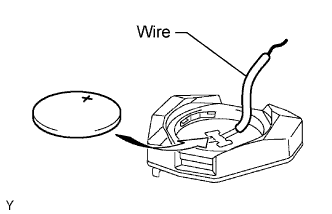
INSPECT TRANSMITTER BATTERY (VOLTAGE)
-
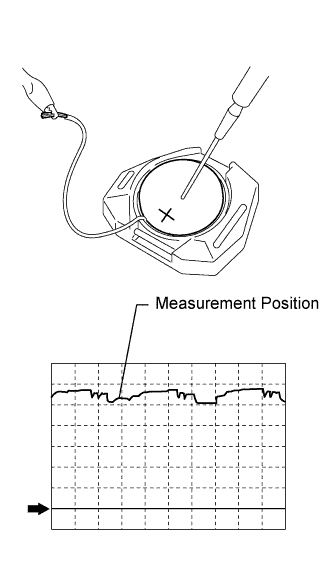
Remove the battery from the door control transmitter module that does not operate. Attach a lead wire (0.6 mm (0.0236 in.)) or less in diameter including wire sheath) with tape or equivalent to the negative terminal Click here.
Note
Do not wrap the lead wire around the terminal, wedge it between terminals, or solder it. The terminal may be deformed or damaged, and the battery will not be able to be installed correctly.
-
Carefully pull the lead wire out from the position shown in the illustration and install the previously removed transmitter battery.
-
Using an oscilloscope, check the transmitter battery voltage waveform.
Tech Tips
When measuring the battery voltage, press one of the transmitter switches.
Standard Voltage Item Content Tester Connection Battery positive (+) - Battery negative (-) Tool Setting 0.5 V/DIV., 100 ms/DIV. Condition Press one of the transmitter switches Specified Condition 2.2 to 3.2 V (Refer to the waveform)
NG
REPLACE TRANSMITTER BATTERY Click here
OK 
REPLACE DOOR CONTROL TRANSMITTER MODULE Click here
-
-
CHECK WAVE ENVIRONMENT
-
Bring the transmitter near the door control receiver, and perform a wireless operation check.
OK Wireless functions operate normally. Tech Tips
-
When the transmitter is brought near the door control receiver, the possibility of wave interference decreases, and it can be determined if wave interference is causing the problem symptom.
-
If the inspection result is that the problem only occurs in certain locations or times of day, the possibility of wave interference is high. Also, added vehicle components may cause wave interference. If installed, remove them and perform the operation check.
-
NG
AFFECTED BY WAVE INTERFERENCE
OK
-
-
SWITCH TO SELF DIAGNOSTIC MODE
-
Switch to self-diagnostic mode by operating the ignition key cylinder.
-
Make sure that the vehicle is in its initial condition. Then insert the key into the ignition key cylinder and remove it.
-
Within 5 seconds of removing the key, insert the key into the ignition key cylinder (ignition switch off). Then turn the ignition switch to ON and off.
-
Within 30 seconds of turning the ignition switch off, perform the following operation 9 times: turn the ignition switch to ON and off.
Note
If the system cannot enter self-diagnostic mode, the system returns to normal mode.
Tech Tips
-
Turning the ignition switch to ON after the above operations have been completed ends self-diagnostic mode.
-
Do not lock or unlock doors during self-diagnostic mode.
-
-
-
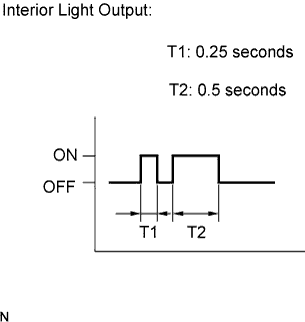
Check that the system has switched to self-diagnostic mode by checking the No. 1 room light assembly flash pattern.
OK Flash pattern is same as illustration on left.
NEXT
-
-
CHECK BY SELF DIAGNOSTIC MODE
-
Inspect the diagnosis outputs when the door control transmitter switch is held down. The diagnosis outputs can be checked by the flash patterns of the No. 1 room light assembly.
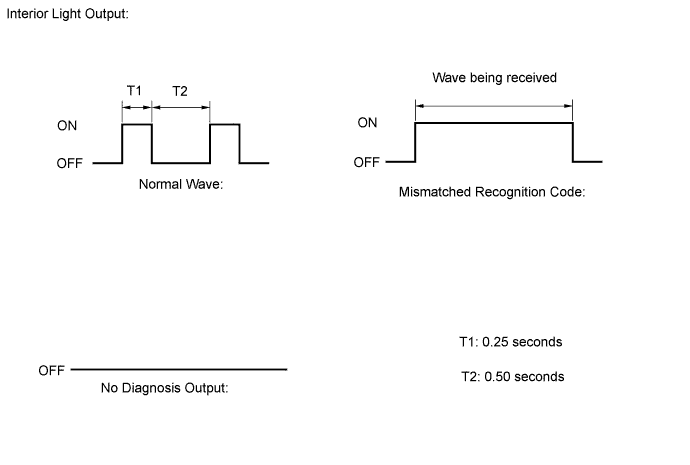
Result Result Proceed to Normal waves (light flash patterns) for LOCK and UNLOCK switches are output A Unmatching recognition code is output B No diagnosis outputs C
B
REGISTER RECOGNITION CODE Click here
C
CHECK RESPONSE OF DOOR CONTROL RECEIVER (RESPONSE) Click here
A
REPLACE MAIN BODY ECU
-
-
REGISTER RECOGNITION CODE
-
Check that the system can be switched to rewrite mode or add mode, and that a recognition code can be registered.
OK Recognition code can be registered.
NG
REPLACE DOOR CONTROL RECEIVER Click here
OK
END
-
-
CHECK RESPONSE OF DOOR CONTROL RECEIVER (RESPONSE)
-
Prepare the door control transmitter from another vehicle.
-
Press and hold down the door control transmitter switch.
-
Check that an unmatching recognition code is output.
OK Unmatching recognition code is output.
NG
INSPECT DOOR CONTROL RECEIVER (POWER SOURCE, GROUND) Click here
OK
REPLACE DOOR CONTROL TRANSMITTER MODULE Click here
-
-
INSPECT DOOR CONTROL RECEIVER (POWER SOURCE, GROUND)
-
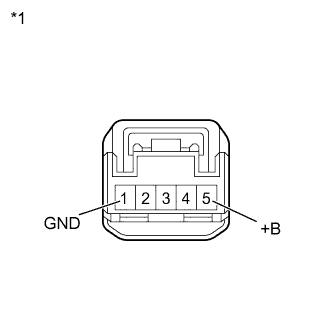
Text in Illustration *1 Front view of wire harness connector
(to Door Control Receiver)
Disconnect the door control receiver connector.
-
Measure the resistance and voltage according to the value(s) in the table below.
Standard Resistance Tester Connection Condition Specified Condition 1 (GND) - Body ground Always Below 1 Ω Standard Voltage Tester Connection Condition Specified Condition 5 (+B) - Body ground Always 11 to 14 V -
Reconnect the door control receiver connector.
NG
REPAIR OR REPLACE HARNESS OR CONNECTOR
OK
-
-
INSPECT DOOR CONTROL RECEIVER (OUTPUT)
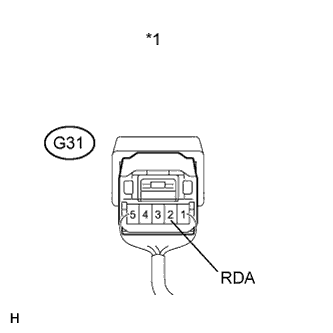
Text in Illustration *1 Front view of wire harness connector
(to Door Control Receiver)
-
Measure the voltage according to the value(s) in the table below.
Standard Voltage Tester Connection Switch Condition Specified Condition G31-2 (RDA) - Body ground Transmitter switch off → on (No key in ignition key cylinder, all doors closed) 6 V or higher → Below 1 V → 6 V or higher
NG
REPLACE DOOR CONTROL RECEIVER Click here
OK
-
-
CHECK HARNESS AND CONNECTOR (MAIN BODY ECU - DOOR CONTROL RECEIVER)
-
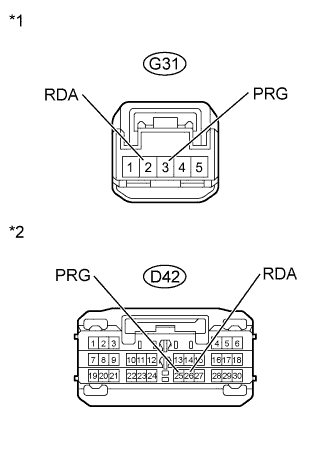
Text in Illustration *1 Front view of wire harness connector
(to Door Control Receiver)
*2 Front view of wire harness connector
(to Main Body ECU)
Disconnect the D42 main body ECU connector.
-
Disconnect the G31 door control receiver connector.
-
Measure the resistance according to the value(s) in the table below.
Standard Resistance Tester Connection Condition Specified Condition D42-26 (RDA) - G31-2 (RDA) Always Below 1 Ω D42-26 (RDA) or G31-2 (RDA) - Body ground Always 10 kΩ or higher D42-25 (PRG) - G31-3 (PRG) Always Below 1 Ω D42-25 (PRG) or G31-3 (PRG) - Body ground Always 10 kΩ or higher -
Reconnect the main body ECU connector and door control receiver connector.
NG
REPAIR OR REPLACE HARNESS OR CONNECTOR
OK
-
-
REPLACE DOOR CONTROL RECEIVER
-
Temporarily replace the door control receiver with a new or normally functioning one Click here.
NEXT
-
-
REGISTER RECOGNITION CODE
-
Perform the Registration procedures Click here.
NEXT
-
-
CHECK DOOR CONTROL RECEIVER (OPERATION)
-
Check that the doors can be locked and unlocked by using the transmitter LOCK and UNLOCK switches.
OK Doors can be locked and unlocked with transmitter.
NG
REPLACE MAIN BODY ECU
OK
END (DOOR CONTROL RECEIVER IS DEFECTIVE)
-