WIRELESS DOOR LOCK CONTROL SYSTEM (w/o Entry and Start System) REGISTRATION

Tech Tips
-
Register the recognition code when replacing the door control transmitter or the door control receiver.
-
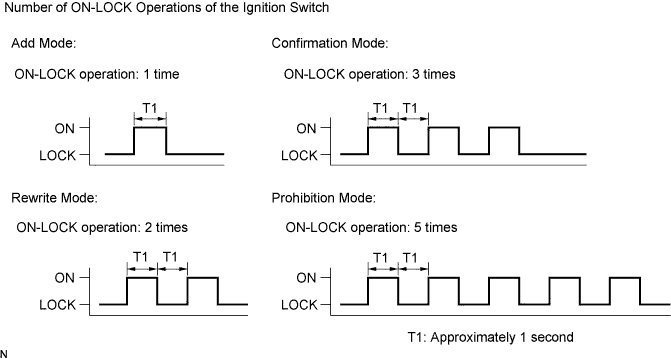
The Add mode is used to retain the already registered codes while registering a new recognition codes. This mode is used when adding a transmitter. If the number of registered codes exceeds 4, the previously registered code will be cleared in order, starting from the code registered first.
-
Rewrite mode is used to clear all the previously registered codes and register only new recognition codes. This mode is used when exchanging the transmitter or the door control receiver for new one.
-
Confirmation mode is used to confirm how many recognition codes have already been registered before an additional registration of a recognition code.
-
Prohibition mode is used to clear all the registered codes and cancel the wireless door lock function. Use this mode when the transmitter is lost.
-
All of the following registration procedures must be performed in order.
-
REGISTRATION OF RECOGNITION CODE (MANUAL OPERATION)
-
The vehicle should be in the following conditions.
-
No key is inserted in the ignition key cylinder.
-
Only driver's door is opened.
-
-
Perform the following operations to select the desired mode.
-
Insert and remove the key from the ignition switch twice within 5 seconds (end in removed).
-
After the above operations, close and open the driver's door twice (end in open).
Then insert the key into the ignition key cylinder and remove it.
Tech Tips
Complete these procedures within 40 seconds.
-
After the above operations, close and open the driver's door twice (end in open).
Then insert the key into the ignition key cylinder and close the door.
Tech Tips
Complete these procedures within 40 seconds.
-
Turn the ignition switch from LOCK to ON and back to LOCK at approximately 1-second intervals 1 to 5 times to select a mode (see the illustration). Then remove the key from the ignition key cylinder.
Tech Tips
Complete these procedures within 40 seconds.
Note
If the number of the ON-LOCK operations of the ignition switch is 0, 4, 6 or more, there will be no response to inform which mode has been selected.
-
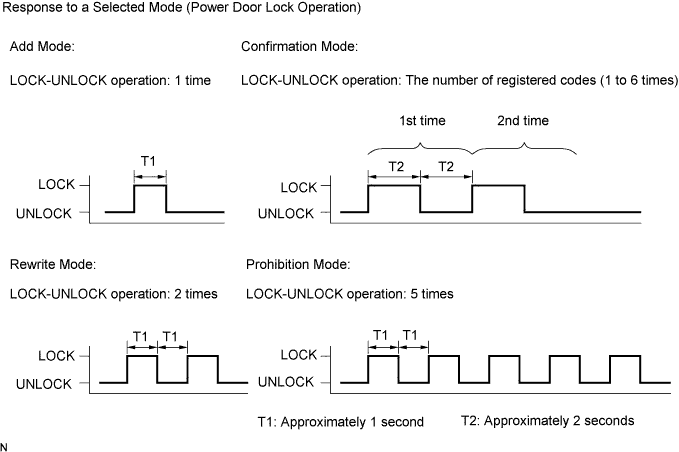
After selecting a mode, the main body ECU automatically performs the power door LOCK- UNLOCK operation within 5 seconds to inform the selected mode (see the illustration).
Tech Tips
-
In the confirmation mode, the LOCK- UNLOCK operation will occur once for each recognition code that has been registered. For example, if 2 recognition codes have been registered, the LOCK-UNLOCK operation will occur 2 times.
-
In the confirmation mode and prohibition mode, once a LOCK-UNLOCK operation response has occurred, the registration procedure will end.
-
-
-
Register the new recognition codes (Add mode or Rewrite mode):
-
Within 45 seconds after the add mode or the rewrite mode has been selected, press the LOCK and UNLOCK switches on the transmitter switch simultaneously for 1.0 to 1.5 seconds.
Then press either one of the switches for more than 1.0 second (Procedure "A").
-
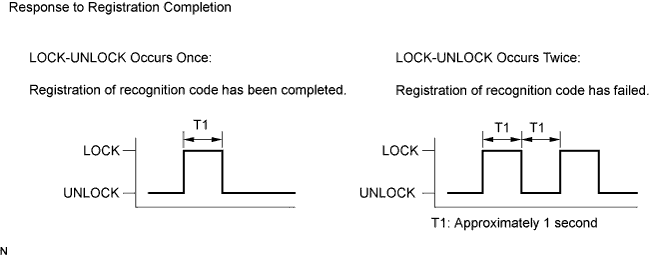
Within 5 seconds after the transmitter switch has been released, the LOCK-UNLOCK operation will be automatically performed once if the registration of the recognition code of the transmitter is completed correctly.
If the LOCK-UNLOCK operation is performed twice, registration of the recognition code has failed. Perform the registration procedure from the beginning (Procedure "B").
-
If multiple transmitters need to be registered, repeat procedure "A" and "B" within 45 seconds after the previous registration.
Tech Tips
-
4 recognition codes can be registered at once.
-
If even one of the following conditions is satisfied, the registration mode will end.
-
40 seconds have elapsed after a recognition code has been registered.
-
Any of the doors are opened.
-
The key is inserted into the ignition key cylinder.
-
4 recognition codes are registered.
-
-
-
-
REGISTRATION OF RECOGNITION CODE (USING INTELLIGENT TESTER)
-
Connect an intelligent tester to the DLC3.
-
Turn the ignition switch to ON.
-
Turn the intelligent tester on.
-
Enter the following menus: Body / Main Body / Utility / Wireless Code Registration.
-
Press both LOCK and UNLOCK switches within 1 to 1.5 seconds.
-
Press either switch for more than 1 second within 3 seconds.
-
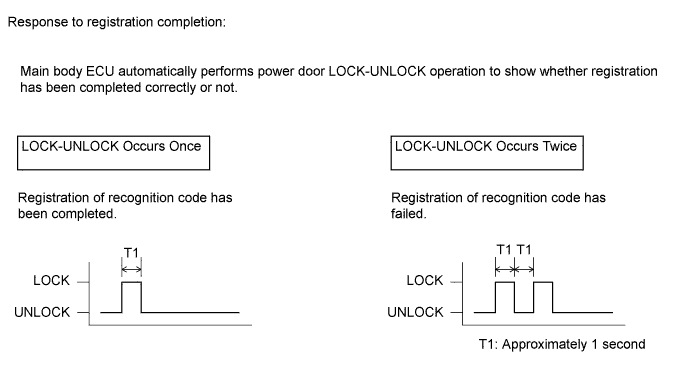
Check the response to the registration completion.
Tech Tips
-
If the LOCK-UNLOCK operation occurs twice, the registration of recognition code has failed. Perform the registration procedures again from the beginning.
-
If registering another transmitter, repeat the procedures after the tester operation. All 4 recognition codes can be registered consecutively.
-
-
Perform either of the following to complete the registration of recognition codes:
-
Use an intelligent tester to send a completion command.
-
Disconnect the intelligent tester.
-
-