POWER STEERING SYSTEM DTC CHECK / CLEAR

-
CHECK DTC
-
When using the intelligent tester;
-
Connect the intelligent tester to the DLC3.
-
Turn the ignition switch to ON.
-
Turn the tester on.
-
Read the DTCs by following the prompts on the intelligent tester.
Tech Tips
Refer to the intelligent tester operator's manual for further details.
-
-
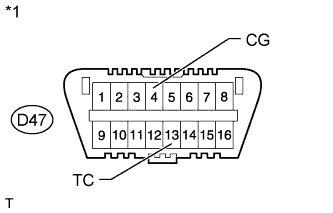
When not using the intelligent tester;
Text in Illustration *1 Front view of DLC3:
-
Using SST, connect terminals 13 (TC) and 4 (CG) of the DLC3.
- SST
- 09843-18040
-
Turn the ignition switch to ON.
-
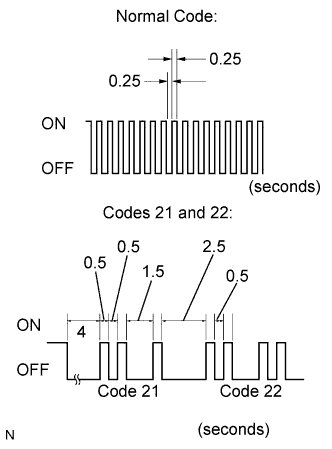
Read and write down any DTCs indicated by the EPS warning light on the combination meter. Refer to the chart on the left for examples of a normal code and DTCs 21 and 22.
Tech Tips
-
If the EPS warning light does not blink to display any DTCs stored or the normal code, inspect the circuit shown in the table below.
Trouble Area See page EPS warning light circuit -
If two or more malfunctions are detected simultaneously, DTCs will be displayed in ascending numerical order.
-
-
Refer to the Diagnostic Trouble Code Chart Click here for DTC information.
-
-
-
CLEAR DTC
-
When using the intelligent tester;
-
Connect the intelligent tester to the DLC3.
-
Turn the ignition switch to ON.
-
Turn the tester on.
-
Clear the DTCs by following the prompts on the intelligent tester.
-
Turn the ignition switch off.
-
Disconnect the intelligent tester from the DLC3.
-
-
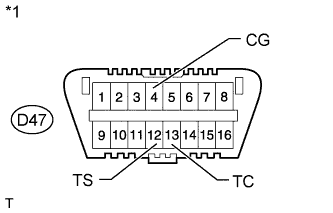
Text in Illustration *1 Front view of DLC3: When not using the intelligent tester;
-
Using SST, connect terminals 12 (TS) and 4 (CG) of the DLC3, and also terminals 13 (TC) and 4 (CG) of the DLC3.
- SST
- 09843-18040
-
Turn the ignition switch to ON.
-
Disconnect and reconnect terminal 13 (TC) of the DLC3 4 times or more within 8 seconds.
-
Check that the EPS warning light blinks a code to indicate normality.
-
Turn the ignition switch off.
-
Remove the SST from the DLC3.
-
-