VEHICLE STABILITY CONTROL SYSTEM Slip Indicator Light Remains ON
DESCRIPTION
The skid control ECU is connected to the combination meter assembly via CAN communication.
If the skid control ECU stores a DTC, the SLIP indicator light will come on in the combination meter assembly.
The SLIP indicator light blinks during VSC and/or TRC operation.
When the system fails, the SLIP indicator light comes on to warn the driver.
WIRING DIAGRAM
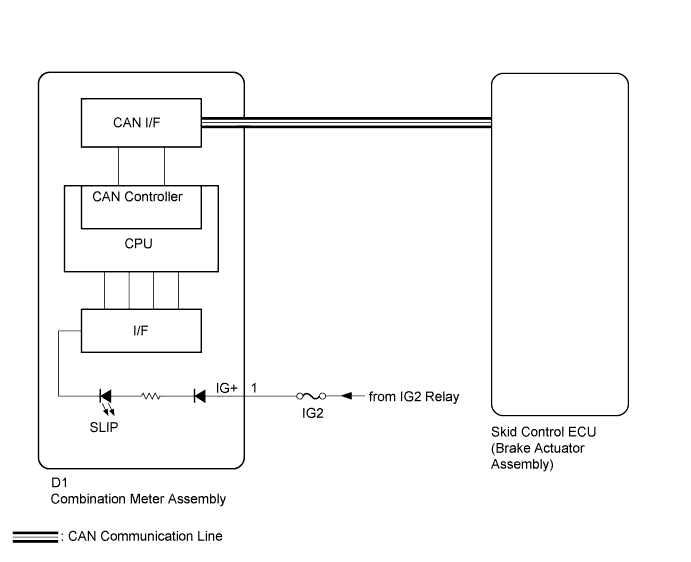
INSPECTION PROCEDURE
Note
-
When replacing the brake actuator assembly, perform zero point calibration and store system information Click here.
-
Inspect the fuses for circuits related to this system before performing the following inspection procedure.
PROCEDURE
-
CHECK CAN COMMUNICATION SYSTEM
-
Check if a CAN communication system DTC is output Click here.
Result Result Proceed to DTC is not output A DTC is output B
B 
GO TO CAN COMMUNICATION SYSTEM Click here
A 
-
-
CHECK IF BRAKE ACTUATOR ASSEMBLY CONNECTOR IS SECURELY CONNECTED
-
Check if the skid control ECU (brake actuator assembly) connector is securely connected.
OK The connector is securely connected.
NG
CONNECT CONNECTOR TO ECU CORRECTLY
OK
-
-
CHECK BATTERY
-
Check the battery voltage.
Standard voltage 11 to 14 V Result Result Proceed to OK A NG (1KR-FE) B NG (1NR-FE) C
B
CHECK OR REPLACE CHARGING SYSTEM OR BATTERY Click here
C
CHECK OR REPLACE CHARGING SYSTEM OR BATTERY Click here
A
-
-
READ VALUE USING GTS (SLIP INDICATOR LIGHT)
-
Connect the GTS to the DLC3.
-
Turn the ignition switch to ON.
-
Turn the GTS on.
-
Enter the following menus: Chassis / ABS/VSC/TRC / Data List.
-
According to the display on the GTS, read the Data List.
ABS/VSC/TRC GTS Display Measurement Item/Range Normal Condition Diagnostic Note Slip Indicator Light SLIP indicator light / OFF or ON OFF: Indicator light OFF
ON: Indicator light ON
- -
Check the GTS display condition of the SLIP indicator light.
Result Result Proceed to Display of the Data List remains OFF. A Display of the Data List remains ON. B Tech Tips
If troubleshooting has been carried out according to Problem Symptoms Table, refer back to the table and proceed to the next step Click here.
B
REPLACE BRAKE ACTUATOR ASSEMBLY Click here
A 
GO TO METER / GAUGE SYSTEM Click here
-