ENGINE SWITCH (w/ Entry and Start System) REMOVAL

-
REMOVE STEERING COLUMN COVER SUPPORT
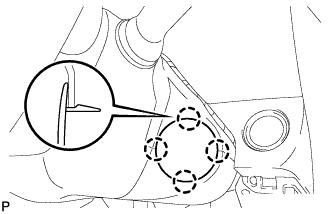
-
Disengage the 4 claws and remove the steering column cover support.
-
-
REMOVE LOWER STEERING COLUMN COVER
Note
Removing the lower steering column cover in the incorrect order will cause the lower steering column cover to break.
-
Release the tilt lever.
-
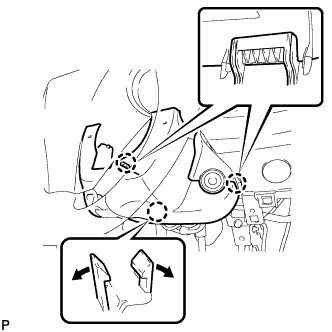
Push the right and left sides of the lower steering column cover, and disengage the 2 claws.
Note
Completely disengage the claws.
-
Insert your fingers into the tilt lever opening of the lower steering column cover and disengage the claw.
Tech Tips
Open the claw to disengage it.
-
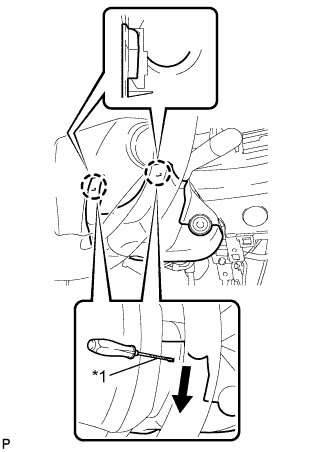
Text in Illustration *1 Protective Tape Turn the handle 90° to the right, disengage the right claw using a screwdriver with its tip wrapped in protective tape, and pull the lower steering column cover as shown by the arrow.
-
Turn the handle 90° to the left, disengage the left claw using a screwdriver with its tip wrapped in protective tape, and pull and remove the lower steering column cover as shown by the arrow.
-
-
REMOVE ENGINE SWITCH
-
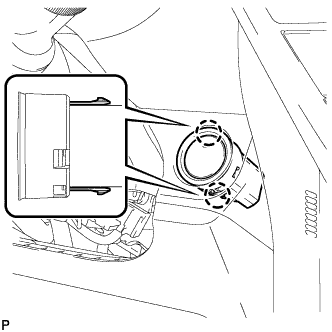
Disconnect the engine switch connector.
-
Disengage the 2 claws and remove the engine switch.
-