SFI SYSTEM, Diagnostic DTC:P1603, P1605

| DTC Code | DTC Name |
|---|---|
| P1603 | Engine Stall History |
| P1605 | Rough Idling |
DESCRIPTION
P1603After starting the engine, this DTC is stored when the engine stops without the ignition switch being operated.
Using the intelligent tester, the conditions present when the DTC was stored can be confirmed by referring to the freeze frame data. Freeze frame data records engine conditions when a malfunction occurs. This information can be useful when troubleshooting.
It is necessary to check if the vehicle has run out of fuel before performing troubleshooting, as this DTC is also stored when the engine stalls due to running out of fuel.
| DTC No. | DTC Detection Condition | Trouble Area |
|---|---|---|
| P1603*1 | After monitoring for startability problems (P1604) finishes and 5 seconds or more elapse after starting the engine, with the engine running, the engine stops (the engine speed drops to 200 rpm or less) without the ignition switch being operated for 0.5 seconds or more (1 trip detection logic). |
|
*1: for CVT
P1605This DTC is stored if the engine speed drops below the set speed.
Using the intelligent tester, the conditions present when the DTC was stored can be confirmed by referring to the freeze frame data. Freeze frame data records engine conditions when a malfunction occurs. This information can be useful when troubleshooting.
It is necessary to check if the vehicle ran out of fuel before performing troubleshooting, as this DTC is also stored when idling is unstable due to running out of fuel.
| DTC No. | DTC Detection Condition | Trouble Area |
|---|---|---|
| P1605 | After 5 seconds or more elapse after starting the engine, with the engine running, the engine speed drops to 400 rpm or less (1 trip detection logic). |
|
*1: for CVT
WIRING DIAGRAM
Refer to DTC P0010 for the Camshaft timing oil control valve (for intake camshaft) circuit Click here.
Refer to DTC P0013 for the Camshaft timing oil control valve (for exhaust camshaft) circuit Click here.
Refer to DTC P0102 for the mass air flow meter circuit Click here.
Refer to DTC P0115 for the engine coolant temperature sensor circuit Click here.
Refer to DTC P0136 for the air fuel ratio sensor circuit Click here.
Refer to DTC P0351 for the ignition coil circuit Click here.
Refer to DTC P0443 for the purge valve circuit Click here.
Refer to Fuel Injector Circuit Click here.
INSPECTION PROCEDURE
Tech Tips
-
In contrast to normal malfunction diagnosis for components, circuits and systems, DTCs P1603 and P1605 are used to determine the malfunctioning area from the problem symptoms and freeze frame data when the user mentions problems such as engine stall.
As these DTCs can be stored as a result of certain user actions, even if these DTCs are output, if the customer makes no mention of problems, clear these DTCs without performing any troubleshooting and return the vehicle to the customer.
-
If any other DTCs are output, perform troubleshooting for those DTCs first.
-
Use any information from the customer problem analysis about the condition of the vehicle at the time when the problem occurred (how the engine stopped, conditions when the engine was restarted, etc.) as a reference.
Symptom Suspected Area Engine vibration occurs and engine stops Air-fuel ratio abnormal Engine stops with no engine vibration Ignition system, injection stoppage, high load from external parts Engine can be started with accelerator pedal depressed Insufficient air volume Rough idling after engine started Air-fuel ratio abnormal, abnormal combustion -
Read freeze frame data using the intelligent tester. Freeze frame data records engine conditions when a malfunction occurs. This information can be useful when troubleshooting.
-
When confirming the freeze frame data, be sure to check all 5 sets of freeze frame data Click here.
-
When DTC P1603 (Engine Stall History) is stored, DTC P1605 (Rough Idling) is also stored. When confirming freeze frame data, check DTC P1605. The ECM stores DTC P1605 first. Therefore, 5 sets of freeze frame data can be confirmed through DTC P1605, enabling the technician to obtain more information.
-
When confirming freeze frame data, if there are multiple items related to the cause of the malfunction, perform troubleshooting for all related items.
-
Try to operate the vehicle under the conditions recorded in the freeze frame data which were present when the malfunction occurred. Confirm the data at this time and the data when the engine is idling (engine warmed up, no load, and shift lever in D or N) and compare these data with the freeze frame data.
-
Inspections take into account the fact that the malfunction may not have reoccurred and place emphasis on checking the vehicle conditions present at the time when the malfunction occurred.
-
When performing inspections, jiggle the relevant wire harnesses and connectors in an attempt to reproduce malfunctions that do not always occur.
| Inspection flow |
|---|
| Using freeze frame data, narrow down the parts to be inspected according to the vehicle conditions at the time when the malfunction occurred. |
-
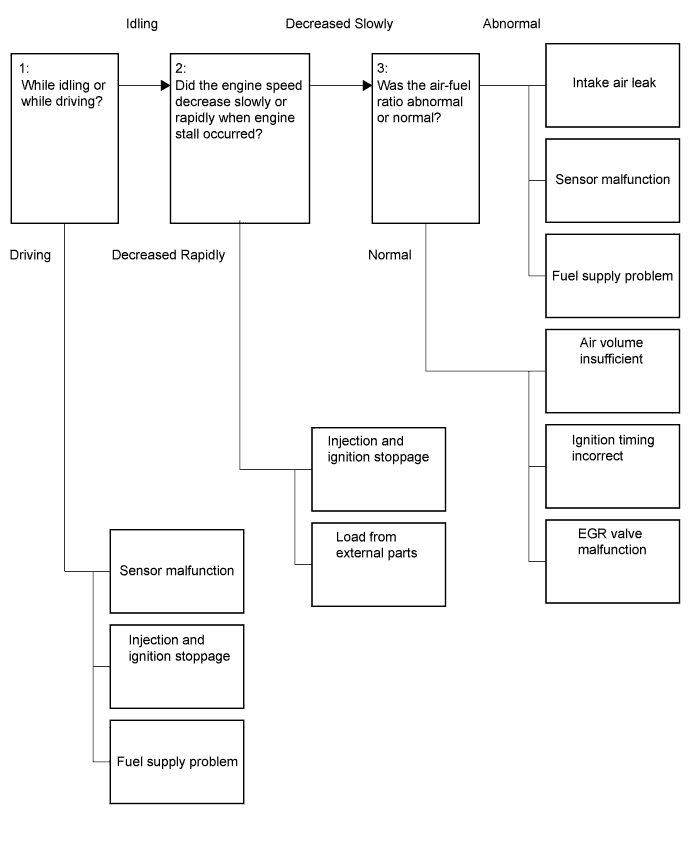
If the engine stalled when the intake air volume was low (during idling or deceleration), there may be a decrease in torque due to an incorrect air-fuel ratio, etc.
-
If the engine stalled when the intake air volume was high (during driving or acceleration), there may be a major malfunction such as continuous misfire due to ignition stoppage, fuel injection stoppage, etc. and the torque drops to zero.
1:
-
If the engine speed decreased slowly, there may have been a decrease in torque due to an air-fuel ratio that was incorrect (by approximately 20 to 30%), etc.
-
If the engine speed decreased rapidly, there may have been a malfunction such as when the engine misfires almost continuously due to ignition stoppage, fuel injection stoppage, etc., or when the external load increases due to an external part malfunctioning.
2:
-
If the air-fuel ratio is abnormal, there may have been an intake air leak, sensor malfunction, or fuel supply problem.
-
If the vehicle was normal, the air volume may have been insufficient or the ignition timing may have been incorrect or the EGR valve may have been stuck open.
3:
P1603 inspection flow: Narrow down the parts to be inspected according to the vehicle conditions at the time when the malfunction occurred (freeze frame data).
| Vehicle State | Engine Speed | Suspected Area | Primary Parts to Inspect | Procedure | |
|---|---|---|---|---|---|
| Idling or decelerating | Slowly decreases and engine stalls | Ignition system abnormal | Igniter abnormal |
|
10, 38, 52 |
| Air-fuel ratio abnormal | Air suction |
|
5 to 9 | ||
| Sensor malfunction (value from sensor too lean) |
|
11 to 23 | |||
| Sensor malfunction (value from sensor too rich) | 39 to 51 | ||||
| Fuel supply problem |
|
24 to 37 | |||
| Intake air volume insufficient | Problem with air passage |
|
53 to 55 | ||
| Excessive valve overlap |
|
56 to 59 | |||
| Abnormal combustion |
|
60, 61 | |||
| Ignition timing incorrect | Does not operate as expected |
|
62 to 66 | ||
| Rapidly decreases and engine stalls | Ignition and injection stops (electrical system malfunction) | Power temporarily cut |
|
67, 68 | |
| External part malfunctioning | Increase in load |
|
69 to 72 | ||
| Accelerating | - | Crankshaft position sensor or VVT sensor malfunction | Power temporarily cut |
|
1 |
| Mass air flow meter | Foreign matter adhesion |
|
73 to 76 | ||
| Ignition and injection stops (electrical system malfunction) | Power temporarily cut |
|
77, 78 | ||
| Fuel supply problem | Fuel leak, clog |
|
79 to 83 | ||
-
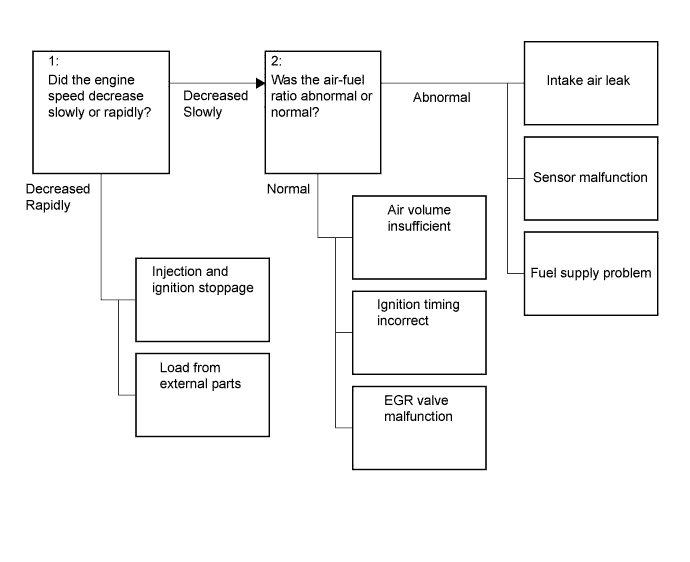
If the engine speed decreased slowly, there may have been a decrease in torque due to an air-fuel ratio that was incorrect (by approximately 20 to 30%), etc.
-
If the engine speed decreased rapidly, there may have been a malfunction such as when the engine misfires almost continuously due to ignition stoppage, fuel injection stoppage, etc., or when the external load increases due to an external part malfunctioning.
1:
-
If the air-fuel ratio is abnormal, there may have been an intake air leak, sensor malfunction, or fuel supply problem.
-
If the vehicle was normal, the air volume may have been insufficient or the ignition timing may have been incorrect or the EGR valve may have been stuck open.
2:
P1605 inspection flow: Narrow down the parts to be inspected according to the vehicle conditions at the time when the malfunction occurred (freeze frame data).
| Engine Speed | Suspected Area | Primary Parts to Inspect | Procedure | |
|---|---|---|---|---|
| Slowly decreases | Ignition system abnormal | Igniter abnormal |
|
10, 38, 52 |
| Air-fuel ratio abnormal | Air suction |
|
5 to 9 | |
| Sensor malfunction (value from sensor too lean) |
|
11 to 23 | ||
| Sensor malfunction (value from sensor too rich) | 39 to 51 | |||
| Fuel supply problem |
|
24 to 37 | ||
| Intake air volume insufficient | Problem with air passage |
|
53 to 55 | |
| Excessive valve overlap |
|
56 to 59 | ||
| Abnormal combustion |
|
60, 61 | ||
| Ignition timing incorrect | Does not operate as expected |
|
62 to 66 | |
| Rapidly decreases | Ignition and injection stops (electrical system malfunction) | Power temporarily cut |
|
67, 68 |
| External part malfunctioning | Increase in load |
|
69 to 71 | |
*1: for CVT
Note
Inspect the fuses for circuits related to this system before performing the following inspection procedure.
PROCEDURE
-
CHECK FOR ANY OTHER DTCS OUTPUT
-
Connect the intelligent tester to the DLC3.
-
Turn the ignition switch to ON.
-
Turn the tester on.
-
Read the DTCs Click here.
Result Result Proceed to Only DTC P1603 and/or P1605 is output A DTCs other than P1603 and/or P1605 are output B Tech Tips
If any DTCs other than P1603 or P1605 are output, troubleshoot those DTCs first.
B 
GO TO DTC CHART Click here
A 
-
-
CHECK FREEZE FRAME DATA
-
Connect the intelligent tester to the DLC3.
-
Turn the ignition switch to ON.
-
Turn the tester on.
-
Using the tester, confirm the vehicle conditions recorded in the freeze frame data which were present when the DTC was stored Click here.
OK Immobiliser Fuel Cut is OFF. Result Result Proceed to Abnormal A Normal B
B 
READ FREEZE FRAME DATA Click here
A
-
-
CHECK ENGINE IMMOBILISER SYSTEM
-
Connect the intelligent tester to the DLC3.
-
Start the engine.
-
Idle the engine
-
Turn the tester on.
-
Enter the following menus: Powertrain / Engine and ECT / Data List / Immobiliser Communication and Immobiliser Fuel Cut.
-
Check the Data List indication.
Result Data List Result Immobiliser Communication ON Immobiliser Fuel Cut OFF Result Result Proceed to OK A NG (w/ entry and start system) B NG (w/o entry and start system) C
B
CHECK ENGINE IMMOBILISER SYSTEM (W/ ENTRY AND START SYSTEM) Click here
C
CHECK ENGINE IMMOBILISER SYSTEM (W/O ENTRY AND START SYSTEM) Click here
A
-
-
READ FREEZE FRAME DATA
-
Connect the intelligent tester to the DLC3.
-
Turn the ignition switch to ON.
-
Turn the tester on.
-
Using the tester, confirm the vehicle conditions recorded in the freeze frame data which were present when the DTC was stored Click here.
Result Problem Symptom Freeze Frame Data Item for DTC P1605 Suspected Area Proceed to Closed Throttle Position SW Engine Speed Total of Short FT #1 and Long FT #1 When idling or decelerating, engine speed slowly decreases and engine stalls All 5 sets of freeze frame data are ON Decreases slowly*1 All 5 sets of freeze frame data are +15% or more*2
-
Air suction
-
Sensor malfunction (value from sensor too lean)
-
Fuel supply problem
A At least 1 of the 5 sets of freeze frame data is -15% or less*3 Sensor malfunction (value from sensor too rich) B All 5 sets of freeze frame data are from -15% to +15%
-
Intake air volume insufficient
-
Ignition timing incorrect
C When idling or decelerating, engine speed rapidly decreases and engine stalls Decreases rapidly*1 -
-
Injection stoppage, ignition stoppage
-
Load from external parts
D When accelerating or driving at constant speed, engine stalls*4 At least one is OFF - -
-
Sensor malfunction
-
Injection stoppage, ignition stoppage
-
Fuel supply problem
E 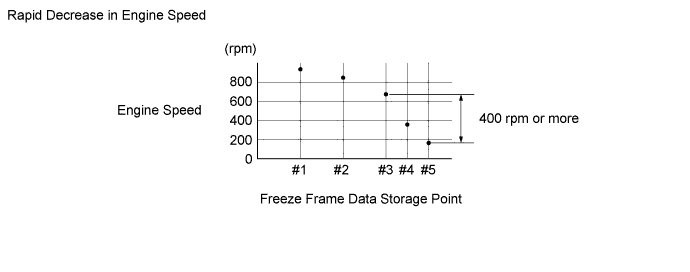
Tech Tips
-
*1: A rapid decrease in engine speed may be caused by an electrical fault in the shared wiring of all or a number of cylinders, an increase in load from external parts, etc. The engine speed is considered to have decreased rapidly if either of the following conditions applies.
Otherwise, the engine speed is considered to have decreased slowly.
-
In the freeze frame data, the decrease in engine speed from #3 to #5 is 400 rpm or more.
-
In the freeze frame data, the engine speed at #5 is 120 rpm or less.
-
If the vehicle speed is 18 km/h (11 mph) or less and the difference between Engine Speed and SPD (NT) is 100 rpm or less, inspect the CVT. (Depending on the rate of vehicle deceleration, the engine speed may have decreased due to the CVT lock-up release being late.)
-
*2: When a DTC is stored, feedback compensation increases because the air-fuel ratio is determined to be lean.
-
*3: When a DTC is stored, feedback compensation decreases because the air-fuel ratio is determined to be rich.
-
*4: This item should be checked when DTC P1603 is output and is not necessary to check when only P1605 is output.
-
B
CHECK IGNITION SYSTEM Click here
C
CHECK IGNITION SYSTEM Click here
D
CHECK TERMINAL VOLTAGE (FUEL INJECTOR POWER SOURCE) Click here
E
CHECK FREEZE FRAME DATA Click here
A
-
-
CHECK INTAKE SYSTEM
-
Check for air leakage in the intake system [vacuum hose disconnection, cracks, damaged gaskets, etc.] Click here.
Tech Tips
-
If the accelerator pedal is released after racing the engine, the inspection is easier to perform because the vacuum inside the intake pipes increases and the air suction noise becomes louder.
-
If Short FT #1 and Long FT #1 are largely different from the normal values when idling (the intake air volume is small) and almost the same as the normal values when racing the engine (the intake air volume is high), air leakage may be present.
OK There is no air leakage. -
NG
REPAIR OR REPLACE INTAKE SYSTEM
OK
-
-
CHECK PURGE VALVE
-
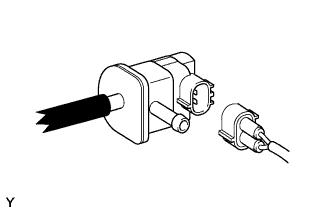
Disconnect the purge hose (on the canister side) of the purge valve.
-
Start the engine.
-
Idle the engine.
-
Disconnect the connector of the purge valve.
-
Check if air flows through the purge valve.
OK Air does not flow. -
Connect the connector of the purge valve.
-
Connect the purge hose of the purge valve.
Tech Tips
When this inspection is performed, the MIL may illuminate. After finishing the inspection, check and clear DTCs Click here.
NG
REPLACE PURGE VALVE Click here
OK
-
-
READ FREEZE FRAME DATA
-
Connect the intelligent tester to the DLC3.
-
Turn the ignition switch to ON.
-
Turn the tester on.
-
Using the tester, confirm the vehicle conditions recorded in the freeze frame data which were present when the DTC was stored Click here.
Result Freeze Frame Data Item for DTC P1605 Result Suspected Area Proceed to Stop Light Switch At least 1 of the 5 sets of freeze frame data is ON Air suction from brake booster A All 5 sets of freeze frame data are OFF - B
B
CHECK IGNITION SYSTEM Click here
A
-
-
READ VALUE USING INTELLIGENT TESTER (SHORT FT #1)
-
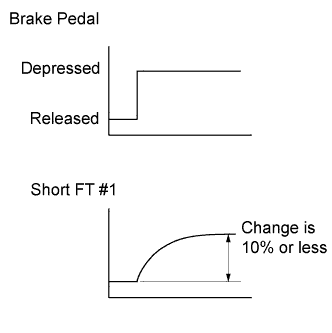
Connect the intelligent tester to the DLC3.
-
Turn the ignition switch to ON.
-
Turn the tester on.
-
Start the engine and warm it up until the engine coolant temperature stabilizes.
Tech Tips
The A/C switch and all accessory switches should be off.
-
Idle the engine.
-
Using the tester, read the value of Short FT #1 in the Data List while depressing the brake pedal.
Standard Short FT #1 changes by +10% or less. Result Result Proceed to OK A NG (for LHD) B NG (for RHD) C Tech Tips
When air leakage from the brake booster is present, the feedback compensation increases because the air-fuel ratio becomes lean.
B
INSPECT BRAKE BOOSTER ASSEMBLY (FOR LHD) Click here
C
INSPECT BRAKE BOOSTER ASSEMBLY (FOR RHD) Click here
A
-
-
PERFORM DRIVE TEST
-
Connect the intelligent tester to the DLC3.
-
Turn the ignition switch to ON.
-
Turn the tester on.
-
Start the engine and warm it up until the engine coolant temperature stabilizes.
Tech Tips
The A/C switch and all accessory switches should be off.
-
Idle the engine.
-
Using the tester, read the value of Short FT #1 and Long FT #1 in the Data List.
Standard Value Data List Condition Specified Condition Short FT #1 + Long FT #1 The conditions of the vehicle are matched to those present when the problem occurs -15 to +15% Result Result Proceed to OK A NG (for LHD) B NG (for RHD) C
B
INSPECT BRAKE BOOSTER ASSEMBLY (FOR LHD) Click here
C
INSPECT BRAKE BOOSTER ASSEMBLY (FOR RHD) Click here
A
-
-
CHECK IGNITION SYSTEM
-
Perform ignition system On-vehicle Inspection Click here.
NG
REPAIR OR REPLACE MALFUNCTIONING PARTS, COMPONENT AND AREA
OK
-
-
READ FREEZE FRAME DATA
-
Connect the intelligent tester to the DLC3.
-
Turn the ignition switch to ON.
-
Turn the tester on.
-
Using the tester, confirm the vehicle conditions recorded in the freeze frame data which were present when the DTC was stored Click here.
Result Freeze Frame Data Item for DTC P1605 Result Suspected Area Proceed to Calculate Load Below 90% of the current value of the vehicle*1 Mass air flow meter A AFS Voltage B1S1 3.3 V or higher*2
-
Air fuel ratio sensor
-
Wire harness or connector
B Tech Tips
-
*1: If the mass air flow meter is malfunctioning and incorrectly measures the pressure to be less than the actual intake manifold pressure, the freeze frame data will show a low engine load value.
-
*2: If the air fuel ratio sensor is malfunctioning and constantly outputs a value indicating the air-fuel ratio is lean, the actual air-fuel ratio will become rich and the engine may stall.
-
B
PERFORM ACTIVE TEST USING INTELLIGENT TESTER (CONTROL THE INJECTION VOLUME FOR A/F SENSOR) Click here
A
-
-
INSPECT MASS AIR FLOW METER
-
Remove the mass air flow meter.
-
Check for foreign matter in the airflow passage of the mass air flow meter.
Result Result Proceed to Visible foreign matter is not present A Visible foreign matter is present B
B
REPLACE MASS AIR FLOW METER Click here
A
-
-
CHECK HARNESS AND CONNECTOR (ECM - MASS AIR FLOW METER)
-
Check the harnesses and connectors, referring to DTC P0102 inspection procedure Click here.
Tech Tips
-
Jiggle the wire harness and connector to increase the likelihood of detecting malfunctions that do not always occur.
-
Make sure there is not an excessive amount of force applied to the wire harness.
-
NG
REPAIR OR REPLACE HARNESS OR CONNECTOR
OK
-
-
PERFORM DRIVE TEST
-
Connect the intelligent tester to the DLC3.
-
Turn the ignition switch to ON.
-
Turn the tester on.
-
Start the engine and warm it up until the engine coolant temperature stabilizes.
Tech Tips
The A/C switch and all accessory switches should be off.
-
Idle the engine.
-
Using the tester, read the value of Calculate Load in the Data List.
Standard Data List Specified Condition Calculate Load 90 to 110% of the current value of the vehicle Result Result Proceed to Abnormal A Normal B
B
READ FREEZE FRAME DATA Click here
A 
REPLACE MASS AIR FLOW METER Click here
-
-
PERFORM ACTIVE TEST USING INTELLIGENT TESTER (CONTROL THE INJECTION VOLUME FOR A/F SENSOR)
-
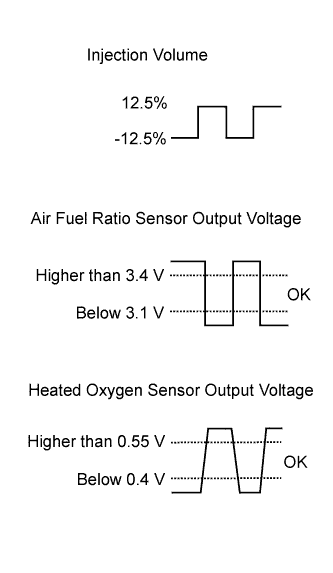
Connect the intelligent tester to the DLC3.
-
Turn the ignition switch to ON.
-
Turn the tester on.
-
Start the engine, turn off all accessory switches and warm up the engine until the engine coolant temperature stabilizes.
Tech Tips
The A/C switch and all accessory switches should be off.
-
Idle the engine.
-
Enter the following menus: Powertrain / Engine and ECT / Active Test / Control the Injection Volume for A/F Sensor.
-
Read the output voltage from the air fuel ratio sensor when increasing and decreasing the fuel injection volume.
Standard Tester Display Specified Condition Control the Injection Volume for A/F Sensor (12.5%) Air fuel ratio sensor output voltage is below 3.1 V Control the Injection Volume for A/F Sensor (-12.5%) Air fuel ratio sensor output voltage is higher than 3.4 V Result Result Proceed to Abnormal A Normal B Tech Tips
The air fuel ratio sensor has an output delay of a few seconds and the heated oxygen sensor has a maximum output delay of approximately 20 seconds.
B
READ FREEZE FRAME DATA Click here
A
-
-
CHECK TERMINAL VOLTAGE (AIR FUEL RATIO SENSOR POWER SOURCE)
-
Check the harnesses and connectors, referring to DTC P0031 inspection procedure Click here.
Tech Tips
-
Jiggle the wire harness and connector to increase the likelihood of detecting malfunctions that do not always occur.
-
Make sure there is not an excessive amount of force applied to the wire harness.
-
NG
REPAIR AIR FUEL RATIO SENSOR POWER SOURCE CIRCUIT Click here
OK
-
-
CHECK HARNESS AND CONNECTOR (AIR FUEL RATIO SENSOR - ECM)
-
Check the harnesses and connectors, referring to DTC P2237 inspection procedure Click here.
Tech Tips
-
Jiggle the wire harness and connector to increase the likelihood of detecting malfunctions that do not always occur.
-
Make sure there is not an excessive amount of force applied to the wire harness.
-
NG
REPAIR OR REPLACE HARNESS OR CONNECTOR
OK
-
-
READ FREEZE FRAME DATA
-
Connect the intelligent tester to the DLC3.
-
Turn the ignition switch to ON.
-
Turn the tester on.
-
Using the tester, confirm the vehicle conditions recorded in the freeze frame data which were present when the DTC was stored Click here.
Result Freeze Frame Data Item for DTC P1605 Result Proceed to Initial Engine Coolant Temp, Ambient Temperature, Initial Intake Air Temp Difference in temperature between each item is less than 10°C*1 A Difference in temperature between each item is 10°C or more*2 B Tech Tips
-
*1: A long time had elapsed after stopping the engine.
-
*2: A long time had not elapsed after stopping the engine.
-
B
READ FREEZE FRAME DATA Click here
A
-
-
READ FREEZE FRAME DATA
-
Connect the intelligent tester to the DLC3.
-
Turn the ignition switch to ON.
-
Turn the tester on.
-
Using the tester, confirm the vehicle conditions recorded in the freeze frame data which were present when the DTC was stored Click here.
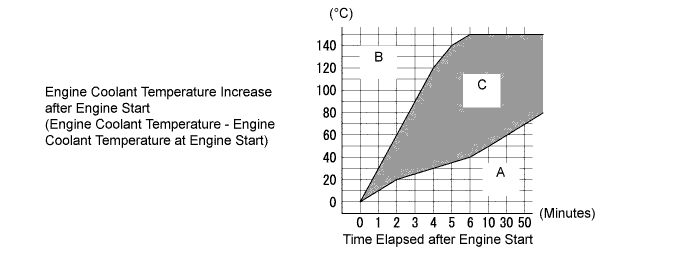
Result Freeze Frame Data Item for DTC P1605 Result Suspected Area Proceed to Initial Engine Coolant Temp, Coolant Temp, Engine Run Time Range A
-
Engine coolant temperature sensor
-
Thermostat
A Range B Engine coolant temperature sensor B Range C - C Tech Tips
This step is not directly related to engine stall.
-
B
INSPECT ENGINE COOLANT TEMPERATURE SENSOR Click here
C
READ FREEZE FRAME DATA Click here
A
-
-
INSPECT THERMOSTAT
Tech Tips
For the thermostat inspection, refer to the following procedures Click here.
Result Result Proceed to Abnormal A Normal B
B
INSPECT ENGINE COOLANT TEMPERATURE SENSOR Click here
A
REPLACE THERMOSTAT Click here
-
READ FREEZE FRAME DATA
-
Connect the intelligent tester to the DLC3.
-
Turn the ignition switch to ON.
-
Turn the tester on.
-
Using the tester, confirm the vehicle conditions recorded in the freeze frame data which were present when the DTC was stored Click here.
Result Freeze Frame Data Item for DTC P1605 Result Suspected Area Proceed to Coolant Temp 120°C or higher Engine coolant temperature sensor A Coolant Temp, Ambient Temperature Engine coolant temperature is lower than outside temperature by 15°C or more Engine coolant temperature sensor Both freeze frame data items listed above Values are other than above - B
B
READ FREEZE FRAME DATA Click here
A
-
-
INSPECT ENGINE COOLANT TEMPERATURE SENSOR
Tech Tips
For the engine coolant temperature sensor inspection, refer to the following procedures Click here.
Result Result Proceed to Normal A Abnormal B
B
REPLACE ENGINE COOLANT TEMPERATURE SENSOR Click here
A
-
CHECK HARNESS AND CONNECTOR (ECM - ENGINE COOLANT TEMPERATURE SENSOR)
-
Check the harness and connectors, referring to DTC P0115 inspection procedure Click here.
Tech Tips
-
Jiggle the wire harness and connector to increase the likelihood of detecting malfunctions that do not always occur.
-
Make sure there is not an excessive amount of force applied to the wire harness.
-
NG
REPAIR OR REPLACE HARNESS OR CONNECTOR
OK
-
-
READ FREEZE FRAME DATA
-
Connect the intelligent tester to the DLC3.
-
Turn the ignition switch to ON.
-
Turn the tester on.
-
Using the tester, confirm the vehicle conditions recorded in the freeze frame data which were present when the DTC was stored Click here.
Result Freeze Frame Data Item for DTC P1605 Result Suspected Area Proceed to EVAP (Purge) VSV At least 1 of the 5 sets of freeze frame data is not 0% Purge valve A All 5 sets of freeze frame data are 0% - B Tech Tips
If the purge valve is stuck closed, air-fuel ratio compensation by the purge valve is incorrectly adjusted, and then the air-fuel ratio becomes lean and the engine may stall.
B
PERFORM ACTIVE TEST USING INTELLIGENT TESTER (CONTROL THE FUEL PUMP/SPEED) Click here
A
-
-
PERFORM ACTIVE TEST USING INTELLIGENT TESTER (ACTIVATE THE VSV FOR EVAP CONTROL)
-
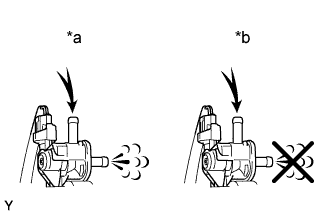
Text in Illustration *a VSV is on *b VSV is off Disconnect the purge hose (on the canister side) of the purge valve.
-
Connect the intelligent tester to the DLC3.
-
Turn the ignition switch to ON.
-
Turn the tester on.
-
Start the engine.
-
Enter the following menus: Powertrain / Engine and ECT / Active Test / Activate the VSV for Evap Control.
-
Operate the purge valve and check the airflow.
OK Activate the VSV for Evap Control Specified Condition ON Air flows OFF Air does not flow Result Result Proceed to Abnormal A Normal B Tech Tips
Jiggle the wire harness and connector to increase the likelihood of detecting malfunctions that do not always occur.
B
PERFORM ACTIVE TEST USING INTELLIGENT TESTER (CONTROL THE FUEL PUMP/SPEED) Click here
A
-
-
INSPECT PURGE VALVE
-
Inspect the purge valve Click here.
NG
REPLACE PURGE VALVE Click here
OK
-
-
CHECK TERMINAL VOLTAGE (PURGE VALVE POWER SOURCE)
-
Check the harness and connectors, referring to DTC P0443 inspection procedure Click here.
Tech Tips
-
Jiggle the wire harness and connector to increase the likelihood of detecting malfunctions that do not always occur.
-
Make sure there is not an excessive amount of force applied to the wire harness.
-
NG
REPAIR PURGE VALVE POWER SOURCE CIRCUIT Click here
OK
-
-
CHECK HARNESS AND CONNECTOR (PURGE VALVE - ECM)
-
Check the harness and connectors, referring to DTC P0443 inspection procedure Click here.
Tech Tips
-
Jiggle the wire harness and connector to increase the likelihood of detecting malfunctions that do not always occur.
-
Make sure there is not an excessive amount of force applied to the wire harness.
-
NG
REPAIR OR REPLACE HARNESS OR CONNECTOR
OK
-
-
CLEAR DTC
-
Connect the intelligent tester to the DLC3.
-
Turn the ignition switch to ON.
-
Turn the tester on.
-
Clear the DTCs Click here.
NEXT
-
-
READ VALUE USING INTELLIGENT TESTER (EVAP (PURGE) VSV)
-
Connect the intelligent tester to the DLC3.
-
Turn the ignition switch to ON.
-
Turn the tester on.
-
Start the engine and warm it up until the engine coolant temperature stabilizes.
Tech Tips
The A/C switch and all accessory switches should be off.
-
Idle the engine for 15 minutes or more.
-
Using the tester, read the value of EVAP (Purge) VSV in the Data List.
Standard Data List Specified Condition EVAP (Purge) VSV Value other than 0% is displayed Result Result Proceed to Abnormal A Normal B
B
CHECK FOR INTERMITTENT PROBLEMS Click here
A
-
-
PERFORM ACTIVE TEST USING INTELLIGENT TESTER (ACTIVATE THE VSV FOR EVAP CONTROL)
-
*a VSV is on *b VSV is off Disconnect the purge hose (on the canister side) of the purge valve.
-
Connect the intelligent tester to the DLC3.
-
Turn the ignition switch to ON.
-
Turn the tester on.
-
Start the engine.
-
Enter the following menus: Powertrain / Engine and ECT / Active Test / Activate the VSV for Evap Control.
-
Operate the purge valve and check the airflow.
OK Activate the VSV for Evap Control Specified Condition ON Air flows OFF Air does not flow Result Result Proceed to Abnormal A Normal B Tech Tips
Jiggle the wire harness and connector to increase the likelihood of detecting malfunctions that do not always occur.
B
CHECK FOR INTERMITTENT PROBLEMS Click here
A
-
-
CHECK CONNECTOR CONNECTION CONDITION (ECM)
-
Check the ECM connector connection condition.
Tech Tips
-
Jiggle the wire harness and connector to increase the likelihood of detecting malfunctions that do not always occur.
-
Make sure there is not an excessive amount of force applied to the wire harness.
-
NG
RECONNECT CONNECTOR CORRECTLY
OK
REPLACE ECM Click here
-
-
PERFORM ACTIVE TEST USING INTELLIGENT TESTER (CONTROL THE FUEL PUMP/SPEED)
-
Connect the intelligent tester to the DLC3.
-
Turn the ignition switch to ON.
-
Turn the tester on.
-
Enter the following menus: Powertrain / Engine and ECT / Active Test / Control the Fuel Pump/Speed.
-
When performing the Active Test, check for an operating sound from the fuel pump.
Standard Control the Fuel Pump/Speed Specified Condition ON Operating sound heard OFF Operating sound not heard Result Result Proceed to Abnormal A Normal B Tech Tips
-
Jiggle the wire harness and connector to increase the likelihood of detecting malfunctions that do not always occur.
-
While performing the Active Test, make sure that there is no fuel leakage from the pipes, no signs that fuel has leaked, and no fuel smell.
-
If the fuel pump operating noise is abnormal, proceed to step 34.
-
B
CHECK FUEL SYSTEM Click here
A
-
-
INSPECT FUEL PUMP
-
Inspect the fuel pump Click here.
NG
REPLACE FUEL PUMP Click here
OK
CHECK FUEL PUMP CONTROL CIRCUIT Click here
-
-
CHECK FUEL SYSTEM
-
Check the fuel system.
-
Check the fuel pump operation.
-
Check the fuel leaks.
-
Check the fuel pressure.
Tech Tips
For the fuel system On-vehicle Inspection, refer to the following procedures Click here.
Result Result Proceed to Abnormal A Normal B -
B
CHECK FOR INTERMITTENT PROBLEMS Click here
A
-
-
CHECK FUEL SYSTEM
-
Check for foreign matter such as iron particles around the fuel pump (fuel pump, fuel pump filter and inside the fuel tank), and for signs that the fuel pump was stuck.
Result Result Proceed to There is foreign matter or signs that fuel pump was stuck A There is no foreign matter and no signs that fuel pump was stuck B Tech Tips
If there is foreign matter such as iron particles on the fuel pump, fuel filter or fuel tank, remove the foreign matter.
B
REPAIR OR REPLACE FUEL SYSTEM
A
-
-
CHECK FUEL SYSTEM
-
Check the fuel system.
-
Check the fuel pump operation.
-
Check the fuel leaks.
-
Check the fuel pressure.
Tech Tips
For the fuel system On-vehicle Inspection, refer to the following procedures Click here.
-
NG
REPAIR OR REPLACE MALFUNCTIONING PARTS, COMPONENT AND AREA
OK
END
-
-
CHECK IGNITION SYSTEM
-
Perform ignition system On-vehicle Inspection Click here.
NG
REPAIR OR REPLACE MALFUNCTIONING PARTS, COMPONENT AND AREA
OK
-
-
READ FREEZE FRAME DATA
-
Connect the intelligent tester to the DLC3.
-
Turn the ignition switch to ON.
-
Turn the tester on.
-
Using the tester, confirm the vehicle conditions recorded in the freeze frame data which were present when the DTC was stored Click here.
Result Freeze Frame Data Item for DTC P1605 Result Suspected Area Proceed to Calculate Load 110% or more of the current value of the vehicle*1 Mass air flow meter A AFS Voltage B1S1 Below 3.3 V*2
-
Air fuel ratio sensor
-
Harness and connector
B Both freeze frame data items listed above Values are other than above - C Tech Tips
-
*1: If the mass air flow meter is malfunctioning and incorrectly measures the intake air volume to be higher than the actual volume of air flowing through the intake manifold, the freeze frame data will show a high engine load value.
-
*2: As the air fuel ratio sensor output is low before the sensor warms up, the value at that time cannot be used for diagnosis. If the air fuel ratio sensor is malfunctioning and constantly outputs a value indicating the air-fuel ratio is rich, the actual air-fuel ratio will become lean and the engine may stall.
-
B
PERFORM ACTIVE TEST USING INTELLIGENT TESTER (CONTROL THE INJECTION VOLUME FOR A/F SENSOR) Click here
C
READ FREEZE FRAME DATA Click here
A
-
-
INSPECT MASS AIR FLOW METER
-
Remove the mass air flow meter.
-
Check for foreign matter in the airflow passage of the mass air flow meter.
Result Result Proceed to Visible foreign matter is not present A Visible foreign matter is present B
B
REPLACE MASS AIR FLOW METER Click here
A
-
-
CHECK HARNESS AND CONNECTOR (ECM - MASS AIR FLOW METER)
-
Check the harnesses and connectors, referring to DTC P0102 inspection procedure Click here.
Tech Tips
-
Jiggle the wire harness and connector to increase the likelihood of detecting malfunctions that do not always occur.
-
Make sure there is not an excessive amount of force applied to the wire harness.
-
NG
REPAIR OR REPLACE HARNESS OR CONNECTOR
OK
-
-
PERFORM DRIVE TEST
-
Connect the intelligent tester to the DLC3.
-
Turn the ignition switch to ON.
-
Turn the tester on.
-
Start the engine and warm it up until the engine coolant temperature stabilizes.
Tech Tips
The A/C switch and all accessory switches should be off.
-
Idle the engine.
-
Using the tester, read the value of Calculate Load in the Data List.
Standard Data List Specified Condition Calculate Load 90 to 110% of the current value of the vehicle
NG
REPLACE MASS AIR FLOW METER Click here
OK
-
-
PERFORM ACTIVE TEST USING INTELLIGENT TESTER (CONTROL THE INJECTION VOLUME FOR A/F SENSOR)
-
Connect the intelligent tester to the DLC3.
-
Turn the ignition switch to ON.
-
Turn the tester on.
-
Start the engine, turn off all accessory switches and warm up the engine until the engine coolant temperature stabilizes.
Tech Tips
The A/C switch and all accessory switches should be off.
-
Idle the engine.
-
Enter the following menus: Powertrain / Engine and ECT / Active Test / Control the Injection Volume for A/F Sensor.
-
Read the output voltage from the air fuel ratio sensor when increasing and decreasing the fuel injection volume.
Standard Tester Display Specified Condition Control the Injection Volume for A/F Sensor (12.5%) Air fuel ratio sensor output voltage is below 3.1 V Control the Injection Volume for A/F Sensor (-12.5%) Air fuel ratio sensor output voltage is higher than 3.4 V Result Result Proceed to Abnormal A Normal B Tech Tips
The air fuel ratio sensor has an output delay of a few seconds and the heated oxygen sensor has a maximum output delay of approximately 20 seconds.
B
READ FREEZE FRAME DATA Click here
A
-
-
CHECK TERMINAL VOLTAGE (AIR FUEL RATIO SENSOR POWER SOURCE)
-
Check the harnesses and connectors, referring to DTC P0031 inspection procedure Click here.
Tech Tips
-
Jiggle the wire harness and connector to increase the likelihood of detecting malfunctions that do not always occur.
-
Make sure there is not an excessive amount of force applied to the wire harness.
-
NG
REPAIR AIR FUEL RATIO SENSOR POWER SOURCE CIRCUIT Click here
OK
-
-
CHECK HARNESS AND CONNECTOR (AIR FUEL RATIO SENSOR - ECM)
-
Check the harnesses and connectors, referring to DTC P2237 inspection procedure Click here.
Tech Tips
-
Jiggle the wire harness and connector to increase the likelihood of detecting malfunctions that do not always occur.
-
Make sure there is not an excessive amount of force applied to the wire harness.
-
NG
REPAIR OR REPLACE HARNESS OR CONNECTOR
OK
-
-
READ FREEZE FRAME DATA
-
Connect the intelligent tester to the DLC3.
-
Turn the ignition switch to ON.
-
Turn the tester on.
-
Using the tester, confirm the vehicle conditions recorded in the freeze frame data which were present when the DTC was stored Click here.
Result Freeze Frame Data Item for DTC P1605 Result Proceed to Initial Engine Coolant Temp, Ambient Temperature, Initial Intake Air Temp Difference in temperature between each item is less than 10°C*1 A Difference in temperature between each item is 10°C or more*2 B Tech Tips
-
*1: A long time had elapsed after stopping the engine.
-
*2: A long time had not elapsed after stopping the engine.
-
B
READ FREEZE FRAME DATA Click here
A
-
-
READ FREEZE FRAME DATA
-
Connect the intelligent tester to the DLC3.
-
Turn the ignition switch to ON.
-
Turn the tester on.
-
Using the tester, confirm the vehicle conditions recorded in the freeze frame data which were present when the DTC was stored Click here.
Result Freeze Frame Data Item for DTC P1605 Result Suspected Area Proceed to Initial Engine Coolant Temp, Coolant Temp, Engine Run Time Range A
-
Engine coolant temperature sensor
-
Thermostat
A Range B Engine coolant temperature B Range C - C Tech Tips
This step is not directly related to engine stall.
-
B
INSPECT ENGINE COOLANT TEMPERATURE SENSOR Click here
C
CHECK FUEL SYSTEM Click here
A
-
-
INSPECT THERMOSTAT
Tech Tips
For the thermostat inspection, refer to the following procedures Click here.
Result Result Proceed to Abnormal A Normal B Tech Tips
This step is not directly related to engine stall.
B
INSPECT ENGINE COOLANT TEMPERATURE SENSOR Click here
A
REPLACE THERMOSTAT Click here
-
READ FREEZE FRAME DATA
-
Connect the intelligent tester to the DLC3.
-
Turn the ignition switch to ON.
-
Turn the tester on.
-
Using the tester, confirm the vehicle conditions recorded in the freeze frame data which were present when the DTC was stored Click here.
Result Freeze Frame Data Item for DTC P1605 Result Suspected Area Proceed to Coolant Temp 120°C or higher Engine coolant temperature sensor A Coolant Temp, Ambient Temperature Engine coolant temperature is lower than outside temperature by 15°C or more Engine coolant temperature sensor Both freeze frame data items listed above Values are other than above - B
B
CLEAR DTC Click here
A
-
-
INSPECT ENGINE COOLANT TEMPERATURE SENSOR
Tech Tips
For the engine coolant temperature sensor inspection, refer to the following procedures Click here.
Result Result Proceed to Normal A Abnormal B
B
REPLACE ENGINE COOLANT TEMPERATURE SENSOR Click here
A
-
CHECK HARNESS AND CONNECTOR (ECM - ENGINE COOLANT TEMPERATURE SENSOR)
-
Check the harness and connectors, referring to DTC P0115 inspection procedure Click here.
Tech Tips
-
Jiggle the wire harness and connector to increase the likelihood of detecting malfunctions that do not always occur.
-
Make sure there is not an excessive amount of force applied to the wire harness.
-
NG
REPAIR OR REPLACE HARNESS OR CONNECTOR
OK
CHECK FOR INTERMITTENT PROBLEMS Click here
-
-
CHECK IGNITION SYSTEM
-
Perform ignition system On-vehicle Inspection Click here.
NG
REPAIR OR REPLACE MALFUNCTIONING PARTS, COMPONENT AND AREA
OK
-
-
READ FREEZE FRAME DATA
-
Connect the intelligent tester to the DLC3.
-
Turn the ignition switch to ON.
-
Turn the tester on.
-
Using the tester, confirm the vehicle conditions recorded in the freeze frame data which were present when the DTC was stored Click here.
Result Freeze Frame Data Item for DTC P1605 Result Suspected Area Proceed to Total of ISC Learning Value and ISC Feedback Value Below 80% of the current value of the vehicle Intake air volume insufficient A 80% or more of the current value of the vehicle B
B
PERFORM ACTIVE TEST USING INTELLIGENT TESTER (CONTROL THE VVT LINEAR (BANK1)) Click here
A
-
-
CHECK INTAKE SYSTEM
-
Check for air leakage in the intake system [vacuum hose disconnection, cracks, damaged gaskets, etc.] Click here.
Tech Tips
-
If the accelerator pedal is released after racing the engine, the inspection is easier to perform because the vacuum inside the intake pipes increases and the air suction noise becomes louder.
-
If Short FT #1 and Long FT #1 are largely different from the normal values when idling (the intake air volume is small) and almost the same as the normal values when racing the engine (the intake air volume is high), air leakage may be present.
OK There is no air leakage. -
NG
REPAIR OR REPLACE INTAKE SYSTEM
OK
-
-
CHECK INTAKE SYSTEM
-
Check the intake system.
-
Inspect the brake booster assembly (for LHD) Click here.
-
Inspect the brake booster assembly (for RHD) Click here.
-
Inspect the mass air flow meter Click here.
-
Check the PCV hose Click here.
-
Inspect the PCV valve Click here.
-
Inspect the purge valve Click here.
Result Result Proceed to Abnormal A Normal B -
B
READ FREEZE FRAME DATA Click here
A
REPAIR OR REPLACE MALFUNCTIONING PARTS, COMPONENT AND AREA
-
-
PERFORM ACTIVE TEST USING INTELLIGENT TESTER (CONTROL THE VVT LINEAR (BANK1))
-
Connect the intelligent tester to the DLC3.
-
Turn the ignition switch to ON.
-
Turn the tester on.
-
Warm up the engine.
-
Enter the following menus: Powertrain / Engine and ECT / Active Test / Control the VVT Linear (Bank1).
Tech Tips
When performing the Active Test, make sure the A/C is on and the shift lever is in P or N.
-
Check the engine speed while operating the camshaft timing oil control valve (for intake camshaft) using the tester.
OK Tester Operation Specified Condition 0% Normal engine speed 100% Engine idles roughly or stalls Tech Tips
-
Jiggle the wire harness and connector to increase the likelihood of detecting malfunctions that do not always occur.
-
When the results of the inspection using the Active Test are normal but the valve operating noise is abnormal, check the valve for any signs of problems.
-
If the camshaft timing oil control valve (for intake camshaft) is stuck at the advanced side, the valve overlap increases and combustion worsens due to the interval EGR which may cause rough idle or cause the engine to stall.
-
NG
REPLACE CAMSHAFT TIMING OIL CONTROL VALVE ASSEMBLY (FOR INTAKE CAMSHAFT) Click here
OK
-
-
CHECK HARNESS AND CONNECTOR (CAMSHAFT TIMING OIL CONTROL VALVE ASSEMBLY (FOR INTAKE CAMSHAFT) - ECM)
-
Check the harnesses and connectors, referring to DTC P0010 inspection procedure Click here.
Tech Tips
-
Jiggle the wire harness and connector to increase the likelihood of detecting malfunctions that do not always occur.
-
Make sure there is not an excessive amount of force applied to the wire harness.
-
NG
REPAIR OR REPLACE HARNESS OR CONNECTOR
OK
-
-
PERFORM ACTIVE TEST USING INTELLIGENT TESTER (CONTROL THE VVT EXHAUST LINEAR (BANK1))
-
Connect the intelligent tester to the DLC3.
-
Turn the ignition switch to ON.
-
Turn the tester on.
-
Warm up the engine.
-
Enter the following menus: Powertrain / Engine and ECT / Active Test / Control the VVT Exhaust Linear (Bank1).
Tech Tips
When performing the Active Test, make sure the A/C is on and the shift lever is in P or N.
-
Check the engine speed while operating the camshaft timing oil control valve (for exhaust camshaft) using the tester.
OK Tester Operation Specified Condition 0% Normal engine speed 100% Engine idles roughly or stalls Tech Tips
-
Jiggle the wire harness and connector to increase the likelihood of detecting malfunctions that do not always occur.
-
When the results of the inspection using the Active Test are normal but the valve operating noise is abnormal, check the valve for any signs of problems.
-
If the camshaft timing oil control valve is stuck on, the valve overlap increases and combustion worsens due to the internal EGR which may cause rough idle or cause the engine to stall.
-
NG
REPLACE CAMSHAFT TIMING OIL CONTROL VALVE ASSEMBLY (FOR EXHAUST CAMSHAFT) Click here
OK
-
-
CHECK HARNESS AND CONNECTOR (CAMSHAFT TIMING OIL CONTROL VALVE ASSEMBLY (FOR EXHAUST CAMSHAFT) - ECM)
-
Check the harnesses and connectors, referring to DTC P0013 inspection procedure Click here.
Tech Tips
-
Jiggle the wire harness and connector to increase the likelihood of detecting malfunctions that do not always occur.
-
Make sure there is not an excessive amount of force applied to the wire harness.
-
NG
REPAIR OR REPLACE HARNESS OR CONNECTOR
OK
-
-
PERFORM ACTIVE TEST USING INTELLIGENT TESTER (CONTROL THE EGR STEP POSITION)
-
Connect the intelligent tester to the DLC3.
-
Turn the ignition switch to ON.
-
Turn the tester on.
-
Start the engine and warm it up until the engine coolant temperature reaches 75°C (167°F) or more.
Tech Tips
-
When performing the Active Test, make sure the shift lever is in P or N.
-
The air conditioning switch and all accessory switches should be off.
-
-
Enter the following menus: Powertrain / Engine and ECT / Active Test / Control the EGR Step Position.
-
Check the MAP and Engine Speed in Data List at the idling condition while performing Active Test.
OK MAP and idling condition change in response to EGR step position. - EGR Step Position (Active Test) 0 Steps 0 to 30 Steps Idling condition Steady idling Idling changes from steady to rough idling MAP
(Data List)
MAP value is 20 to 40 kPa
(150 to 300 mmHg)
(EGR valve is fully closed)
MAP value is at least +10 kPa (75 mmHg) higher than when EGR valve is fully closed Note
-
Do not leave the EGR valve open for 10 seconds or more during the Active Test.
-
Be sure to return the EGR valve to step 0 when Active Test is completed.
Tech Tips
During Active Test, if the idling condition does not change in response to EGR step position, then there is probably a malfunction in the EGR valve.
Result Result Proceed to Abnormal A Normal B -
B
READ FREEZE FRAME DATA Click here
A
-
-
INSPECT EGR VALVE ASSEMBLY
-
Remove the EGR valve assembly Click here.
-
Check if the EGR valve assembly is stuck open.
OK EGR valve is tightly closed (It is not stuck open).
NG
REPLACE EGR VALVE ASSEMBLY Click here
OK
-
-
READ FREEZE FRAME DATA
-
Connect the intelligent tester to the DLC3.
-
Turn the ignition switch to ON.
-
Turn the tester on.
-
Using the tester, confirm the vehicle conditions recorded in the freeze frame data which were present when the DTC was stored Click here.
Result Freeze Frame Data Item for DTC P1605 Suspected Area Proceed to IGN Advance Knock Correct Learn Value Differs from the current value of the vehicle by 10° or more Less than 3°
-
Engine coolant temperature sensor
-
Mass air flow meter
-
Knock sensor
A 3° or more - B Differs from the current value of the vehicle by less than 10° - - -
B
CHECK FOR INTERMITTENT PROBLEMS Click here
A
-
-
INSPECT ENGINE COOLANT TEMPERATURE SENSOR
Tech Tips
For the engine coolant temperature sensor inspection, refer to the following procedures Click here.
NG
REPLACE ENGINE COOLANT TEMPERATURE SENSOR Click here
OK
-
CHECK HARNESS AND CONNECTOR (ECM - ENGINE COOLANT TEMPERATURE SENSOR)
-
Check the harness and connectors, referring to DTC P0115 inspection procedure Click here.
Tech Tips
-
Jiggle the wire harness and connector to increase the likelihood of detecting malfunctions that do not always occur.
-
Make sure there is not an excessive amount of force applied to the wire harness.
-
NG
REPAIR OR REPLACE HARNESS OR CONNECTOR
OK
-
-
INSPECT MASS AIR FLOW METER (INTAKE AIR TEMPERATURE SENSOR)
-
Inspect the mass air flow meter Click here.
Tech Tips
If the intake air temperature sent to the ECM is higher than the standard due to the mass air flow meter (intake air temperature sensor) malfunctioning, the ignition timing may become delayed.
NG
REPLACE MASS AIR FLOW METER Click here
OK
-
-
READ VALUE USING INTELLIGENT TESTER
-
Connect the intelligent tester to the DLC3.
-
Start the engine and warm it up until the engine coolant temperature stabilizes.
Tech Tips
The A/C switch and all accessory switches should be off.
-
Turn the tester on.
-
Idle the engine.
-
Enter the following menus: Powertrain / Engine and ECT / Data List / IGN Advance and Knock Correct Learn Value.
-
Check the Data List indication.
Result Data List Proceed to IGN Advance Knock Correct Learn Value Differs from the current value of the vehicle by 10° or more Less than 3° A 3° or more B Differs from the current value of the vehicle by less than 10° - Tech Tips
If the results of the checks performed in steps 56 to 66 were all normal and the sum of ISC Feedback Value and ISC Learning Value in the Data List is 120% of the normal value or more, check for carbon deposits in the throttle body assembly. If there are carbon deposits, clean them off to finish the troubleshooting procedure.
B
END
A
CHECK KNOCK SENSOR CIRCUIT Click here
-
-
CHECK TERMINAL VOLTAGE (FUEL INJECTOR POWER SOURCE)
-
Check the harness and connectors, referring to Fuel Injector Circuit inspection procedure Click here.
Tech Tips
-
Jiggle the wire harness and connector to increase the likelihood of detecting malfunctions that do not always occur.
-
Make sure there is not an excessive amount of force applied to the wire harness.
-
A rapid decrease in engine speed may have been caused by a malfunction in all or multiple cylinders. (There may be an electrical malfunction in the wiring shared by all the cylinders.)
-
NG
REPAIR FUEL INJECTOR POWER SOURCE CIRCUIT Click here
OK
-
-
CHECK IGNITION SYSTEM
-
Perform ignition system On-vehicle Inspection Click here.
NG
REPAIR OR REPLACE MALFUNCTIONING PARTS, COMPONENT AND AREA
OK
-
-
CHECK FREEZE FRAME DATA
-
Connect the intelligent tester to the DLC3.
-
Turn the ignition switch to ON.
-
Turn the tester on.
-
Using the tester, confirm the vehicle conditions recorded in the freeze frame data which were present when the DTC was stored Click here.
Result Freeze Frame Data Item for DTC P1605 Suspected Area Proceed to A/C Signal Air Conditioner FB Val Power Steering Signal A/C Signal display changes from OFF to ON*1 Value is shown - A/C system A*2
B*3
Value is 0 L/s Does not change from OFF - C*4
D*5
Changes from OFF to ON Power steering system A/C Signal display does not change from OFF*1 - Changes from OFF to ON Does not change from OFF - Tech Tips
-
*1: Check not only the on/off state of the air conditioner but also the change in air conditioner load.
-
*2: for Automatic Air Conditioning
-
*3: for Manual Air Conditioning
-
*4: CVT
-
*5: for Manual Transaxle
-
The normal value for the ISC learned value is engine displacement (liters) x 0.9.
-
Even if the results are normal, the power steering system and/or A/C system may have been malfunctioning. If there are no problems with other parts, inspect the power steering system and/or A/C system.
-
B
CHECK AIR CONDITIONING SYSTEM (FOR MANUAL AIR CONDITIONING) Click here
C
CHECK FREEZE FRAME DATA Click here
D
READ FREEZE FRAME DATA Click here
A
CHECK AIR CONDITIONING SYSTEM (FOR AUTOMATIC AIR CONDITIONING) Click here
-
-
CHECK FREEZE FRAME DATA
-
Connect the intelligent tester to the DLC3.
-
Turn the ignition switch to ON.
-
Turn the tester on.
-
Using the tester, confirm the vehicle conditions recorded in the freeze frame data which were present when the DTC was stored Click here.
Result Freeze Frame Data Item for DTC P1605 Suspected Area Proceed to Electrical Load Signal or Electric Load Feedback Val Electric Load Feedback Val Difference between Engine Speed and SPD (NT) Vehicle Speed Electrical Load Signal display changes from OFF to ON*1, or value displayed for Electric Load Feedback Val increases*1 Value displayed for Electric Load Val changes - - Electrical load signal circuit C Value displayed for Electric Load Val does not change At least 1 of the 5 sets of freeze frame data is less than 100 rpm Less than 18 km/h (11 mph) CVT system B 18 km/h (11 mph) or more - A All 5 sets of freeze frame data are 100 rpm or more - - A Electrical Load Signal display does not change from OFF, or value displayed for Electric Load Feedback Val does not increase - At least 1 of the 5 sets of freeze frame data is less than 100 rpm Less than 18 km/h (11 mph) CVT system B 18 km/h (11 mph) or more - A All 5 sets of freeze frame data are 100 rpm or more - - A Tech Tips
-
*1: If the Electrical Load Signal display changes from OFF to ON, or the "Electric Load Feedback Val" increases, it probably is a malfunction due to a change in electrical load. Check the generator and the continuity and connections between the generator and ECM.
-
If the vehicle speed is 18 km/h (11 mph) or less and the difference between Engine Speed and SPD (NT) is 100 rpm or less, inspect the CVT. (Depending on the rate of vehicle deceleration, the engine speed may have decreased due to the CVT lock-up release being late.)
-
The normal value for the ISC learned value is engine displacement (liters) x 0.9.
-
Even if the results are normal, the electrical load signal system and/or CVT system may have been malfunctioning. If there are no problems with other parts, inspect the electrical load system and/or CVT system.
-
B
CHECK CVT SYSTEM Click here
C
CHECK GENERATOR CIRCUIT Click here
A
-
-
CHECK FREEZE FRAME DATA
-
Connect the intelligent tester to the DLC3.
-
Turn the ignition switch to ON.
-
Turn the tester on.
-
Using the tester, confirm the vehicle conditions recorded in the freeze frame data which were present when the DTC was stored Click here.
Result Freeze Frame Data Item for DTC P1605 Suspected Area Proceed to Shift SW Status (P Range)
Shift SW Status (N Range)
Neutral Position SW Signal P and N position are both OFF in at least one data set In D or R, NSW is ON Park/neutral position switch assembly A In D or R, NSW is OFF CVT system B All 5 sets of freeze frame data are ON - - C Tech Tips
Even if the results are normal, the park/neutral position switch assembly and/or CVT system may have been malfunctioning. If there are no problems with other parts, inspect the park/neutral position switch assembly and/or CVT system.
B
CHECK CVT SYSTEM Click here
C
CHECK FOR INTERMITTENT PROBLEMS Click here
A
INSPECT PARK/NEUTRAL POSITION SWITCH ASSEMBLY Click here
-
-
READ FREEZE FRAME DATA
-
Connect the intelligent tester to the DLC3.
-
Turn the ignition switch to ON.
-
Turn the tester on.
-
Using the tester, confirm the vehicle conditions recorded in the freeze frame data which were present when the DTC was stored.
OK Freeze Frame Data Item for P1605 Standard Specification Electrical Load Signal*1 Change from OFF to ON Electric Load Feedback Val*1 Value increase Tech Tips
-
*1: If the Electrical Load Signal display changes from OFF to ON, or the "Electric Load Feedback Val" increases, it probably is a malfunction due to a change in electrical load. Check the generator and the continuity and connections between the generator and ECM.
-
Even if the results are normal, the electrical load signal system may have been malfunctioning. If there are no problems with other parts, inspect the electrical load system.
-
NG
CHECK FOR INTERMITTENT PROBLEMS Click here
OK
CHECK GENERATOR CIRCUIT Click here
-
-
CHECK FREEZE FRAME DATA
-
Connect the intelligent tester to the DLC3.
-
Turn the ignition switch to ON.
-
Turn the tester on.
-
Using the tester, confirm the vehicle conditions recorded in the freeze frame data which were present when the DTC was stored Click here.
Result Freeze Frame Data Item Result Suspected Area Proceed to Throttle Sensor Position, Calculate Load Calculate Load decreases while Throttle Sensor Position increases Mass air flow meter A Calculate Load does not decrease while Throttle Sensor Position increases - B
B
CHECK TERMINAL VOLTAGE (FUEL INJECTOR POWER SOURCE) Click here
A
-
-
INSPECT MASS AIR FLOW METER
-
Remove the mass air flow meter.
-
Check for foreign matter in the airflow passage of the mass airflow meter.
Result Result Proceed to Visible foreign matter is not present A Visible foreign matter is present B
B
REPLACE MASS AIR FLOW METER Click here
A
-
-
CHECK HARNESS AND CONNECTOR (ECM - MASS AIR FLOW METER)
-
Check the harnesses and connectors, referring to DTC P0102 inspection procedure Click here.
Tech Tips
-
Jiggle the wire harness and connector to increase the likelihood of detecting malfunctions that do not always occur.
-
Make sure there is not an excessive amount of force applied to the wire harness.
-
NG
REPAIR OR REPLACE HARNESS OR CONNECTOR
OK
-
-
PERFORM DRIVE TEST
-
Connect the intelligent tester to the DLC3.
-
Turn the ignition switch to ON.
-
Turn the tester on.
-
Start the engine and warm it up until the engine coolant temperature stabilizes.
Tech Tips
The A/C switch and all accessory switches should be off.
-
Idle the engine.
-
Using the tester, read the value of Calculate Load in the Data List.
Standard Data List Specified Condition Calculate Load 90 to 110% of the current value of the vehicle
NG
REPLACE MASS AIR FLOW METER Click here
OK
-
-
CHECK TERMINAL VOLTAGE (FUEL INJECTOR POWER SOURCE)
-
Check the harness and connectors, referring to Fuel Injector Circuit inspection procedure Click here.
Tech Tips
-
Jiggle the wire harness and connector to increase the likelihood of detecting malfunctions that do not always occur.
-
Make sure there is not an excessive amount of force applied to the wire harness.
-
A rapid decrease in engine speed may have been caused by a malfunction in all or multiple cylinders. (There may be an electrical malfunction in the wiring shared by all the cylinders.)
-
NG
REPAIR FUEL INJECTOR POWER SOURCE CIRCUIT Click here
OK
-
-
CHECK IGNITION SYSTEM
-
Perform ignition system On-vehicle Inspection Click here.
NG
REPAIR OR REPLACE MALFUNCTIONING PARTS, COMPONENT AND AREA
OK
-
-
PERFORM ACTIVE TEST USING INTELLIGENT TESTER (CONTROL THE FUEL PUMP/SPEED)
-
Connect the intelligent tester to the DLC3.
-
Turn the ignition switch to ON.
-
Turn the tester on.
-
Enter the following menus: Powertrain / Engine and ECT / Active Test / Control the Fuel Pump/Speed.
-
When performing the Active Test, check for an operating sound from the fuel pump.
Standard Control the Fuel Pump/Speed Specified Condition ON Operating sound heard OFF Operating sound not heard Result Result Proceed to Abnormal A Normal B Tech Tips
-
Jiggle the wire harness and connector to increase the likelihood of detecting malfunctions that do not always occur.
-
While performing the Active Test, make sure that there is no fuel leakage from the pipes, no signs that fuel has leaked, and no fuel smell.
-
If the fuel pump operating noise is abnormal, proceed to step 80.
-
B
CHECK FUEL SYSTEM Click here
A
-
-
INSPECT FUEL PUMP
-
Inspect the fuel pump Click here.
NG
REPLACE FUEL PUMP Click here
OK
CHECK FUEL PUMP CONTROL CIRCUIT Click here
-
-
CHECK FUEL SYSTEM
-
Check the fuel system.
-
Check the fuel pump operation.
-
Check the fuel leaks.
-
Check the fuel pressure.
Tech Tips
For the fuel system On-vehicle Inspection, refer to the following procedures Click here.
Result Result Proceed to Abnormal A Normal B -
B
CHECK FOR INTERMITTENT PROBLEMS Click here
A
-
-
CHECK FUEL SYSTEM
-
Check for foreign matter such as iron particles around the fuel pump (fuel pump, fuel pump filter and inside the fuel tank), and for signs that the fuel pump was stuck.
Result Result Proceed to There is foreign matter or signs that fuel pump was stuck A There is no foreign matter and no signs that fuel pump was stuck B Tech Tips
If there is foreign matter such as iron particles on the fuel pump, fuel filter or fuel tank, remove the foreign matter.
B
REPAIR OR REPLACE FUEL SYSTEM
A
-
-
CHECK FUEL SYSTEM
-
Check the fuel system.
-
Check the fuel pump operation.
-
Check the fuel leaks.
-
Check the fuel pressure.
Tech Tips
For the fuel system On-vehicle Inspection, refer to the following procedures Click here.
-
NG
REPAIR OR REPLACE MALFUNCTIONING PARTS, COMPONENT AND AREA
OK
END
-
-
CLEAR DTC
-
Connect the intelligent tester to the DLC3.
-
Turn the ignition switch to ON.
-
Turn the tester on.
-
Clear the DTCs Click here.
NEXT
END
-