ECM INSTALLATION

-
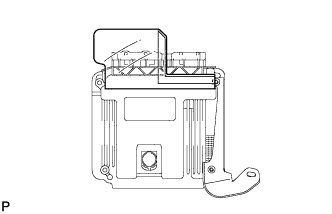
INSTALL COVER
-
Install a new cover with the double-sided tape.
-
-
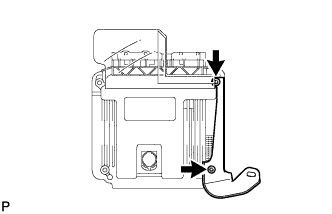
INSTALL NO. 2 ECM BRACKET
-
Using an "TORX" socket, install the No. 2 ECM bracket with the 2 screws.
-
-
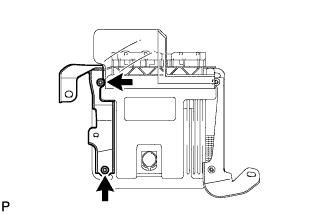
INSTALL NO. 1 ECM BRACKET
-
Using an "TORX" socket, install the No. 1 ECM bracket with the 2 screws.
-
-
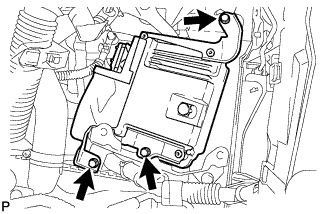
INSTALL ECM
-
Install the ECM with the 3 bolts.
- Torque:
- 13 N*m { 127 kgf*cm, 9 ft.*lbf }
-
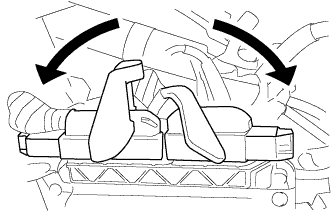
Pull down the lever to engage the lock and connect the 2 connectors to the ECM.
-
-
INSTALL NO. 2 BATTERY CARRIER
-
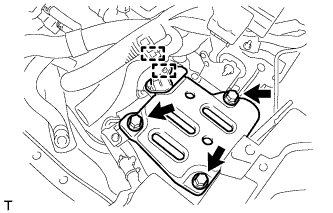
Install the No. 2 battery carrier with the 3 bolts.
- Torque:
- 17 N*m { 175 kgf*cm, 13 ft.*lbf }
-
Connect the 2 wire harness clamps.
-
-
INSTALL BATTERY TRAY
-
INSTALL BATTERY
-
INSTALL BATTERY CLAMP SUB-ASSEMBLY
-
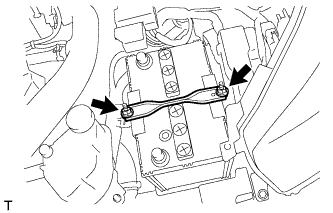
Install the battery clamp with the 2 nuts.
- Torque:
- 3.5 N*m { 36 kgf*cm, 31 in.*lbf }
-