REPAIR INSTRUCTION CUSTOMIZE PARAMETERS
Tech Tips
The following items can be customized.
Note
-
When the customer requests a change in a function, first make sure that the function can be customized.
-
Be sure to make a note of the current settings before customizing.
-
When troubleshooting a function, first make sure that the function is set to the default setting.
-
WIRELESS DOOR LOCK CONTROL SYSTEM (w/ Entry and Start System)
Wireless Door Lock Control System Display Default Content Setting Wireless Door Lock ON ON/OFF of wireless door lock function. ON or OFF Hazard Answer Back ON When LOCK switch on transmitter pressed, all hazard warning lights illuminate once. When UNLOCK switch pressed, all hazard warning lights illuminate twice. ON or OFF Open Door Warning ON If door is not completely closed and transmitter LOCK switch is pressed, this function sounds a buzzer for 10 seconds. ON or OFF Auto Lock Time 30 s This function controls amount of time from unlocking doors to automatic re-locking function. 30 s, 60 s or 120 s Wireless Buzzer Volume Level 7 This function changes the wireless buzzer volume. Level 0, Level 1, Level 2, Level 3, Level 4, Level 5, Level 6 or Level 7 Illuminated Entry Display Default Content Setting Lighting Time 15 s Changes the lighting time after closing all of the doors. (It will quickly fade out in case of turning the engine switch from off to on (ACC or IG).) 7.5 s, 15 s or 30 s -
WIRELESS DOOR LOCK CONTROL SYSTEM (w/o Entry and Start System)
Main Body Display Default Content Setting Wireless Control ON ON/OFF of wireless door lock function. ON or OFF Hazard Answer Back ON When wireless lock switch on transmitter pressed, illuminate all hazard warning lights once. When unlock switch pressed, all hazard warning lights illuminate twice ON or OFF Auto Lock Time 30 seconds Time until relocking after unlocking with wireless door lock function 30, 60 or 120 seconds -
ENTRY AND START SYSTEM (for Entry Function)
Entry & Start Display Default Content Setting Park Wait Time 2.5 s Function to set waiting time to permit opening door after door is locked with entry lock function 0.5 s, 1.5 s, 2.5 s or 5 s Ignition Available Area ALL Function that switches the entry ignition detection area FRONT or ALL Back Door Opening Operation LONG Function to open the back door when the driver has the electrical key and presses back door opener switch assembly (opener switch) LONG, TWICE or OFF Key Low Battery Warning ON Function to warn driver that key battery is low ON or OFF -
Electrical Key Cancel
The electrical key cancel operation disables the following functions:
-
Entry Unlock/Lock
-
Entry Back Door Open
-
Electrical Key Lock-in Prevention
-
Warning functions
-
The operation procedures are as follows:
Precondition:
Engine switch off, driver side door closed and unlocked.
-
Unlock the driver side door once with the UNLOCK switch of the electrical key.
-
Open the driver door within 5 seconds.
-
Unlock the driver side door twice with the UNLOCK switch of the electrical key within 5 seconds.
-
Close and open the driver door twice within 30 seconds.
(Driver door: Close → Open → Close → Open)
-
Unlock the driver side door twice with the UNLOCK switch of the electrical key within 5 seconds.
-
Close and open the driver door within 30 seconds.
(Driver door: Close → Open)
-
Close the driver door within 5 seconds.
When electrical key cancel is activated, the wireless door lock buzzer sounds twice.
To return to the original condition, perform the procedures again. When the original condition is returned, the wireless door lock buzzer sounds once.
-
-
-
THEFT DETERRENT SYSTEM
Main Body Display (Item) Default Content Setting Warning by Horn ON Function that allows the vehicle horn and theft deterrent horn to be used as warning devices ON or OFF -
LIGHTING SYSTEM (INT)
Illuminated Entry Display Default Content Setting Lighting Time 15 seconds Changes the lighting time of the map light after closing all of the doors. (It will quickly fade out if the ignition switch is turned to ON) 7.5/15/30 (seconds) I/L when ACC OFF ON Lights up the map light when the ignition switch is turned from ACC to LOCK. ON/OFF I/L ON W/Door Key Unlock ON Light up the map light and when a door is unlocked. ON/OFF Room Light when Aprchd*1 ON Function of lighting map light when vehicle is approached by its owner with smart key. ON/OFF *1: w/ Entry and Start System
-
METER / GAUGE SYSTEM
Warning Display Default Content Setting Driver Side Seatbelt Warning Buzzer ON To change the seat-belt warning buzzer ON/OFF Front Passenger Side Seatbelt Warning Buzzer ON To change the seat-belt warning buzzer ON/OFF Rear Seatbelt Warning Buzzer*1 ON To change the seat-belt warning buzzer ON/OFF *1: w/ Rear Seat Belt Warning System
Display Display Default Content Setting ECO Drive Indicator Light*1 ON To change the ECO driving indicator light ON/OFF ECO Drive Indicator*1 ON To change the ECO driving indicator zone display ON/OFF *1: w/ ECO Drive Indicator
-
CUSTOMIZE ECO DRIVING INDICATOR LIGHT (w/ ECO Drive Indicator)
-
Turn the ignition switch to ON.
-
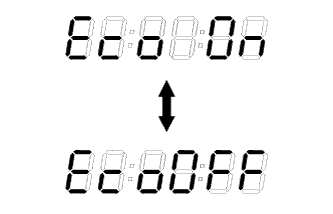
Press the trip meter reset knob until the odometer displays "ECO driving indicator light customize screen"
-
While pressing the trip meter reset knob, hold it for 0.8 seconds or more.
-
When "Eco OFF" is displayed as shown in the illustration, the customization is completed.
Tech Tips
-
When canceling, do not perform the ECO driving indicator light bulb check.
-
Select "Eco On" to restore normal operation.
-
-
-
SEAT BELT WARNING SYSTEM
Warning Display Default Content Setting Driver Side Seatbelt ON Seat belt warning buzzer ON/ OFF setting ON: Driver buzzer ON
OFF: Driver buzzer OFF
Front Passenger Side Seatbelt Warning Buzzer ON Seat belt warning buzzer ON/ OFF setting ON: Passenger buzzer ON
OFF: Passenger buzzer OFF
Rear Seatbelt Warning Buzzer ON Seat belt warning buzzer ON/ OFF setting ON: Rear buzzer ON
OFF: Rear buzzer OFF
-
AIR CONDITIONING SYSTEM (for Automatic Air Conditioning System)
Air Conditioner Display Default Content Setting Set Temperature Shift Normal To control with the shifted temperature against the display temperature +2 C / +1 C / Normal / -1 C / -2 C Evaporator Control Automatic Function to set the evaporator control to the AUTOMATIC position (Automatic) to save power, or to the coldest position (Manual) to dehumidify the air and to prevent the windows from fogging up Manual/Automatic Compressor Mode*1 Automatic Function to turn the A/C ON automatically by pressing the AUTO button when the blower is ON and the A/C is OFF Manual/Automatic Air Inlet Mode Automatic In case of turning the A/C ON when you desire to make the compartment cool down quickly, this is the function to change the mode automatically to RECIRCULATION mode Manual/Automatic Foot/DEF Auto Mode ON Function to turn the airflow from FOOT/DEF ON automatically when AUTO MODE is ON OFF/ON Foot/DEF Automatic Blow Up Function ON Function to change the blower level automatically when the defroster is ON OFF/ON ECO MODE Cancel OFF - OFF/ON *1: w/ Stop and Start System
-
LIGHTING SYSTEM (EXT)
Light Control Display Default Content Setting Light Auto OFF Delay OFF Function to continue illuminating headlight for certain period of time after closing all doors with ignition switch turned from ON to OFF under condition that light control switch is at HEAD or AUTO with the headlight ON OFF/30s/60s/90s Sensitivity NORMAL Function to adjust sensitivity of lighting illumination*1 Light2/Light1/Normal/Dark1/Dark2 Tech Tips
*1: The sensitivity adjustment may be difficult to confirm. Check by driving the customer's vehicle.
*1 Lighting brightness 
Setting Dark2 Dark1 Normal Light1 Light2