TELEVISION CAMERA (for Sedan) REMOVAL

-
REMOVE BACK DOOR ASSIST GRIP
-
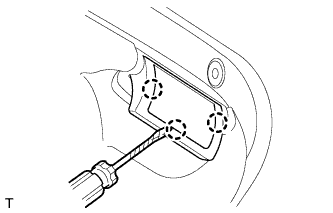
Using a screwdriver, detach the 3 claws.
Tech Tips
Tape the screwdriver tip before use.
-
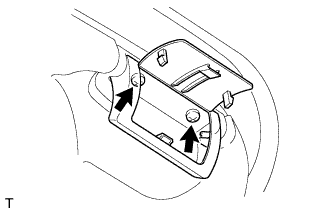
Remove the 2 screws and assist grip.
-
-
REMOVE DOOR ASSIST GRIP
-
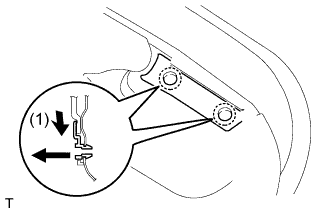
Pull the assist grip in the direction shown by the arrow labeled (1) to disconnect the grip.
-
Pull out the assist grip to remove it.
-
-
REMOVE BACK DOOR TRIM COVER
-
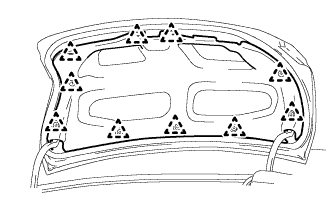
Using a clip remover, remove the 10 clips and cover.
-
-
REMOVE LUGGAGE DOOR OPENER CABLE PROTECTOR RH (w/ Double Locking System)
-
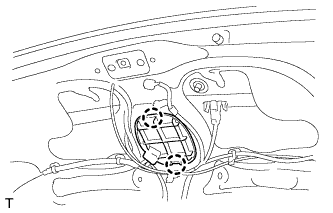
Detach the 2 claws and remove the luggage door opener cable protector.
-
-
REMOVE LUGGAGE COMPARTMENT DOOR OUTSIDE GARNISH
-
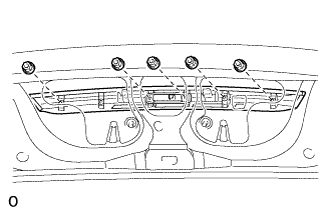
Remove the 5 nuts.
-
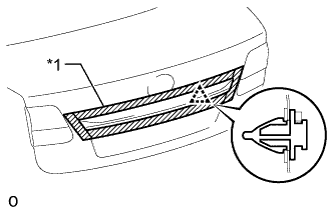
Text in Illustration *1 Protective Tape Put protective tape around the luggage compartment door outside garnish.
-
Detach the clip and remove the luggage compartment door outside garnish.
-
-
REMOVE REAR TELEVISION CAMERA ASSEMBLY
-
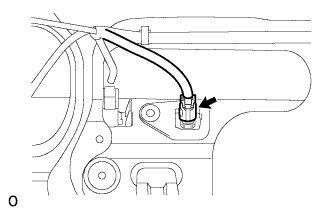
Disconnect the connector.
-
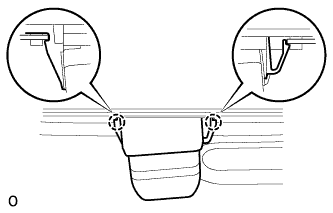
Detach the 2 claws and remove the rear television camera assembly.
-