NAVIGATION SYSTEM (for HDD) The Other Caller's Voice cannot be Heard, is too Quiet, or Distorted
INSPECTION PROCEDURE
PROCEDURE
-
CHECK CELLULAR PHONE
-
Check if the voice on the other side can be heard using the cellular phone.
OK The voice can be heard.
NG 
CELLULAR PHONE IS FAULTY
OK 
-
-
CHECK NAVIGATION SYSTEM
-
Check that voice guidance can be heard from the driver side speaker.
OK The voice guidance can be heard.
NG
GO TO "VOICE GUIDANCE DOES NOT FUNCTION" IN PROBLEM SYMPTOMS TABLE Click here
OK
-
-
CHECK SETTINGS
-
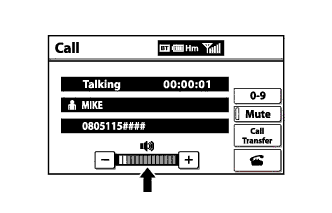
Check if the volume level is low on the "Call" screen.
OK The level is not low.
NG
TURN VOLUME UP
OK
-
-
CHECK SETTINGS
-
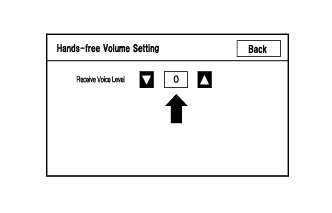
Enter the "Hands-free Volume Setting" mode Click here.
-
Check if the Receive Voice Level is set to "0".
Tech Tips
The Receive Voice Level can be set to 11 different levels, -5 to +5, each with a 3 dB difference.
-
Check if the Receive Voice Level is set to the minimum or maximum level.
Tech Tips
When the Receive Voice Level is set to the minimum or maximum level, the sound may be distorted.
OK The Receive Voice Level is set to "0".
NG
SET RECEIVE VOICE LEVEL TO "0"
OK 
PROCEED TO NEXT SUSPECTED AREA SHOWN IN PROBLEM SYMPTOMS TABLE Click here
-