NAVIGATION SYSTEM (for HDD) Voice Guidance does not Function
INSPECTION PROCEDURE
PROCEDURE
-
CHECK NAVIGATION SETTING
-
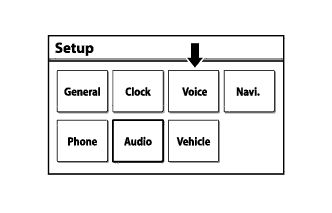
Enter the "Setup" screen by pressing the "SETUP" switch.
-
Select "Voice".
-
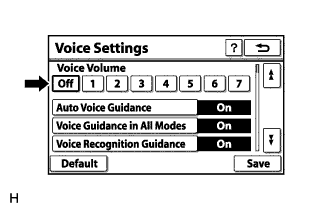
Check that "Off" is not selected.
OK OFF is not selected.
NG 
TURN "Auto Voice Guidance" ON
OK 
-
-
CHECK NAVIGATION SETTING
-
Enter the "Setup" screen by pressing the "SETUP" switch.
-
Select "Voice".
-
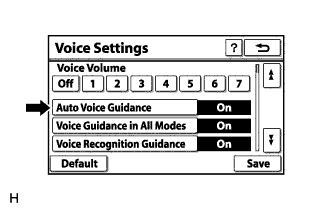
Check that "Auto Voice Guidance" is not off.
OK "Auto Voice Guidance" is not off.
NG
TURN "Auto Voice Guidance" ON
OK
-
-
CHECK NAVIGATION SETTING
-
Enter the "Setup" screen by pressing the "SETUP" switch.
-
Select "Voice".
-
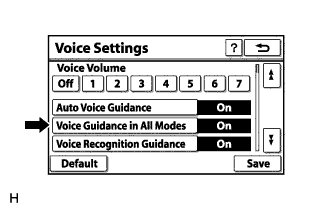
Check that "Voice Guidance in All Modes" is not off.
OK "Voice Guidance in All Modes" is not off.
NG
TURN "Voice Guidance in All Modes" ON
OK
-
-
CHECK NAVIGATION RECEIVER ASSEMBLY
-
Check that audio can be heard from the speakers.
OK Audio can be heard.
NG
GO TO "Speaker Circuit" Click here
OK 
REPLACE NAVIGATION RECEIVER ASSEMBLY Click here
-