NAVIGATION SYSTEM (for DVD) Voice Guidance does not Function
INSPECTION PROCEDURE
PROCEDURE
-
CHECK NAVIGATION SETTING
-
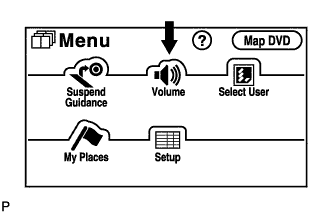
Enter the "Menu" screen by pressing the "MENU" switch.
-
Select "Volume".
-
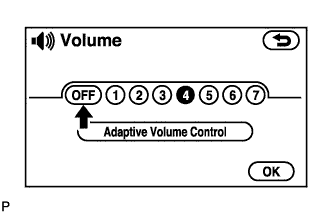
Check that "OFF" is not selected.
OK OFF is not selected.
NG 
TURN UP AUTO VOICE GUIDANCE VOLUME
OK 
-
-
CHECK NAVIGATION SETTING
-
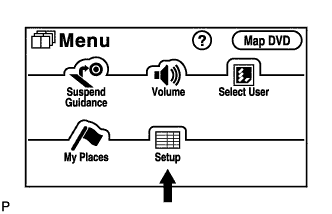
Enter the "Menu" screen by pressing the "MENU" switch.
-
Select "Setup".
-
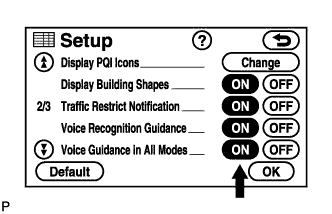
Check that "Voice Guidance in All Modes" is not OFF.
OK "Voice Guidance in All Modes" is not OFF.
NG
TURN VOICE GUIDANCE IN ALL MODES "ON"
OK
-
-
CHECK NAVIGATION SETTING
-
Enter the "Menu" screen by pressing the "MENU" switch.
-
Select "Setup".
-
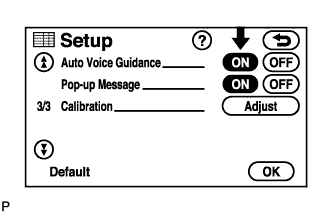
Check that "Auto Voice Guidance" is not OFF.
OK "Auto Voice Guidance" is not OFF.
NG
TURN UP AUTO VOICE GUIDANCE VOLUME
OK
-
-
CHECK MAP DISC
-
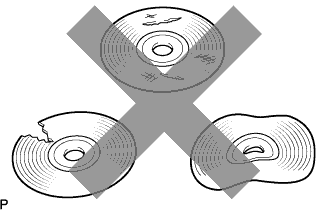
Check that the map disc is not deformed or cracked.
OK No deformations or cracks in the map disc.
NG
REPLACE MAP DISC
OK
-
-
CHECK NAVIGATION RECEIVER ASSEMBLY
-
Check that audio can be heard from the speakers.
OK Audio can be heard.
NG
GO TO "Speaker Circuit" Click here
OK 
REPLACE NAVIGATION RECEIVER ASSEMBLY Click here
-