NAVIGATION SYSTEM (for DVD) CD cannot be Inserted / Played or CD is Ejected Right After Insertion
INSPECTION PROCEDURE
PROCEDURE
-
CHECK IF A PROPER CD IS INSERTED
-
Make sure that the CD is an audio CD, or a CD with an MP3 or WMA file, and that it is not deformed, flawed, stained, burred or otherwise defective.
OK The CD is normal. Tech Tips
-
Translucent or uniquely-shaped CDs cannot be played.
-
Commercial audio CDs can be played.
-
CD-DA files on CD-ROMs, CD-Rs, and CD-RWs can be played.
-
MP3 and WMA files on CD-ROMs, CD-Rs and CD-RWs can be played.
-
For details on playable CDs, refer to the Owner's Manual.
-
NG 
CD IS FAULTY
OK 
-
-
CHECK THAT CD IS INSERTED PROPERLY
-
Check whether or not the CD is inserted upside down.
OK The CD is properly inserted.
NG
INSERT CD PROPERLY
OK
-
-
CHECK CD
-
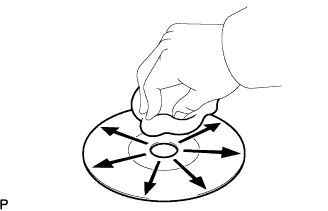
Check for dirt on the CD surface.
OK Dirt is on the CD surface. Tech Tips
If the CD is dirty, clean the CD by wiping the CD surface radially with a soft cloth.
Note
Do not use a conventional record cleaner or antistatic preservative.
NG 
REPLACE CD WITH ANOTHER AND RECHECK Click here
OK 
CD WAS DIRTY
-
-
REPLACE CD WITH ANOTHER AND RECHECK
-
Replace the CD with a normal one and check that the same trouble does not occur.
OK The same trouble does not occur.
NG
REPLACE NAVIGATION RECEIVER ASSEMBLY Click here
OK
CD IS FAULTY
-