ROOF HEADLINING (for Sedan) REMOVAL

-
PRECAUTION
Note
After turning the ignition switch off, waiting time may be required before disconnecting the cable from the battery terminal. Therefore, make sure to read the disconnecting the cable from the battery terminal notice before proceeding with work Click here.
-
DISCONNECT CABLE FROM NEGATIVE BATTERY TERMINAL
Note
When disconnecting the cable some systems need to be initialized after the cable is reconnected Click here
-
REMOVE FRONT SEAT ASSEMBLY LH
-
for Manual Seat:
Remove the front seat assembly Click here.
-
for Power Seat:
Remove the front seat assembly Click here.
-
-
REMOVE FRONT SEAT ASSEMBLY RH
Tech Tips
Use the same procedure described for the LH side.
-
REMOVE REAR BENCH TYPE SEAT CUSHION ASSEMBLY
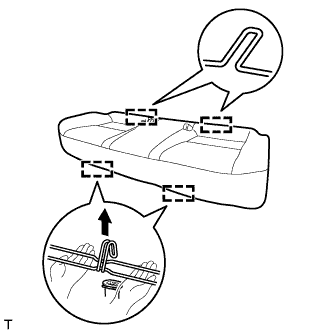
-
Detach the 2 front hooks of the seat cushion from the vehicle body.
Note
Follow the instructions below carefully as the cushion frame deforms easily.
-
Choose a hook to detach first. Place your hands near the hook as shown in the illustration. Then lift the seat cushion to detach the hook.
-
Repeat for the other hook.
-
-
Detach the 2 rear hooks of the seat cushion from the seatback.
Note
Be careful not to damage the vehicle body.
-
-
REMOVE REAR SIDE SEATBACK ASSEMBLY LH
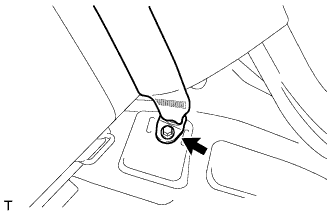
-
Remove the bolt and disconnect the rear seat 3 point type belt anchor.
-
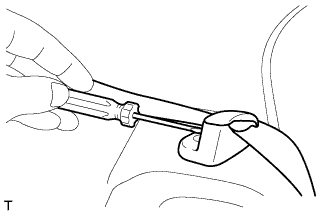
Using a screwdriver, detach the claw to open the cap of the rear seat shoulder belt guide.
-
Remove the seat belt from the belt guide.
-
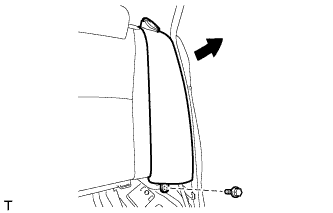
Remove the bolt, and then remove the side seatback LH as shown in the illustration.
-
-
REMOVE REAR SIDE SEATBACK ASSEMBLY RH
Tech Tips
Use the same procedure described for the LH side.
-
REMOVE FRONT DOOR SCUFF PLATE LH
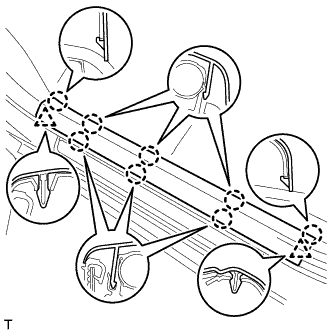
-
Detach the 8 claws and 2 clips, and remove the front door scuff plate.
-
-
REMOVE FRONT DOOR SCUFF PLATE RH
Tech Tips
Use the same procedure described for the LH side.
-
REMOVE COWL SIDE TRIM BOARD LH
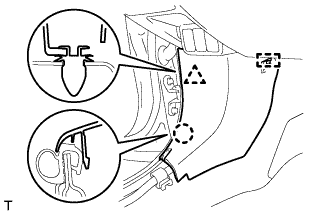
-
Detach the clip, claw and guide, and remove the cowl side trim board.
-
-
REMOVE COWL SIDE TRIM BOARD RH
Tech Tips
Use the same procedure described for the LH side.
-
REMOVE FRONT DOOR OPENING TRIM WEATHERSTRIP LH
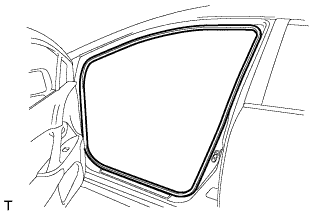
-
Remove the front door opening trim weatherstrip.
-
-
REMOVE FRONT DOOR OPENING TRIM WEATHERSTRIP RH
Tech Tips
Use the same procedure described for the LH side.
-
REMOVE REAR DOOR SCUFF PLATE LH
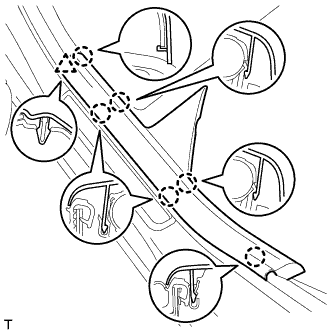
-
Detach the 6 claws and clip, and remove the rear door scuff plate.
-
-
REMOVE REAR DOOR SCUFF PLATE RH
Tech Tips
Use the same procedure described for the LH side.
-
REMOVE REAR DOOR OPENING TRIM WEATHERSTRIP LH
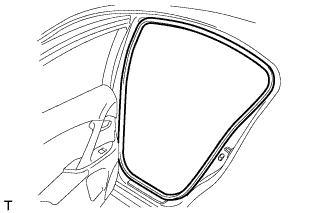
-
Remove the rear door opening trim weatherstrip.
-
-
REMOVE REAR DOOR OPENING TRIM WEATHERSTRIP RH
Tech Tips
Use the same procedure described for the LH side.
-
REMOVE FRONT PILLAR GARNISH LH
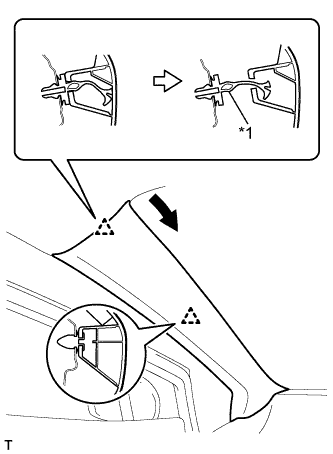
Text in Illustration *1 Front Pillar Garnish Clip
-
Pull the upper part of the garnish toward the inside of the cabin and detach the 2 clips.
Tech Tips
Make the front pillar garnish hang down from the front pillar garnish clip.
-
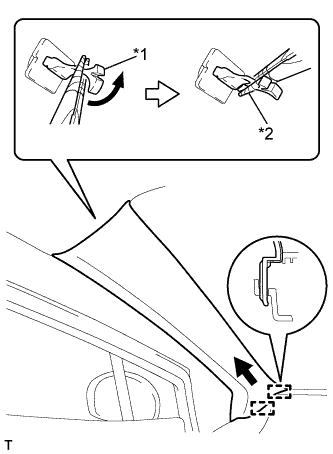
Text in Illustration *1 Front Pillar Garnish Clip *2 Protective Tape Turn the end of the front pillar garnish clip 90° with needle-nose pliers and remove it from the front pillar garnish.
Note
-
Front pillar garnish clips are reusable if they are not removed from the vehicle and have no damage.
-
Replace the front pillar garnish clips with new ones if they are removed from the vehicle.
Tech Tips
Tape the tips of the needle-nose pliers before use.
-
-
Detach the 2 guides and remove the front pillar garnish.
-
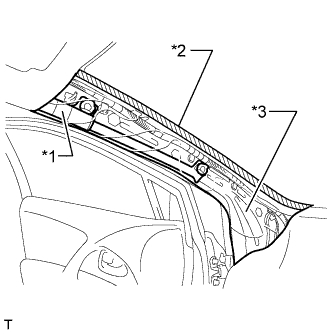
Text in Illustration *1 Curtain Shield Airbag Assembly *2 Adhesive Tape *3 Protective Cover w/ Curtain Shield Airbag:
Protect the curtain shield airbag assembly.
-
Completely cover the airbag with a cloth or nylon sheet and secure the ends of the cover with adhesive tape as shown in the illustration.
Note
Cover the curtain shield airbag with a protective cover as soon as the front pillar garnish is removed.
-
-
-
REMOVE FRONT PILLAR GARNISH RH
Tech Tips
Use the same procedure described for the LH side.
-
REMOVE LOWER CENTER PILLAR GARNISH LH
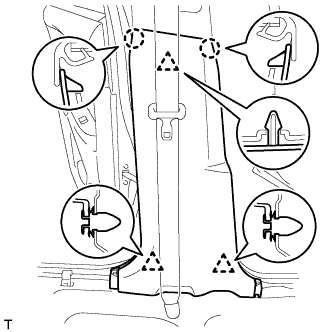
-
Detach the 2 claws and 3 clips, and remove the lower center pillar garnish.
-
-
REMOVE LOWER CENTER PILLAR GARNISH RH
Tech Tips
Use the same procedure described for the LH side.
-
REMOVE LAP BELT OUTER ANCHOR COVER
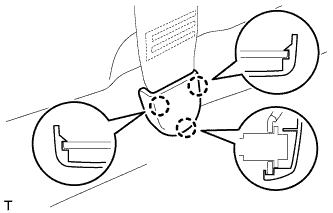
Tech Tips
Use the same procedure for the other lap belt outer anchor cover.
-
Detach the 3 claws and remove the lap belt outer anchor cover.
-
-
REMOVE CENTER PILLAR GARNISH LH
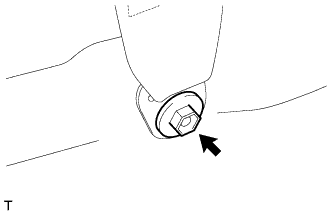
-
Remove the bolt and disconnect the front seat outer belt floor anchor.
-
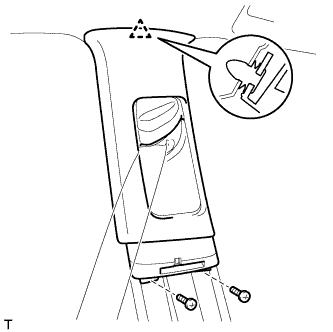
Remove the 2 screws.
-
Detach the clip.
-
Pass the front seat outer belt floor anchor through the center pillar garnish, and remove the center pillar garnish.
-
-
REMOVE CENTER PILLAR GARNISH RH
Tech Tips
Use the same procedure described for the LH side.
-
REMOVE INNER ROOF SIDE GARNISH LH
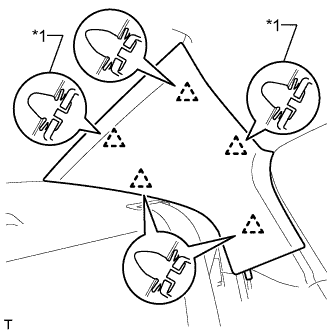
Text in Illustration *1 Clip A
-
Detach the 5 clips and remove the inner roof side garnish.
Tech Tips
The 2 clips labeled A remain attached to the body.
-
Remove the 2 clips labeled A from the vehicle body.
-
-
REMOVE INNER ROOF SIDE GARNISH RH
Tech Tips
Use the same procedure described for the LH side.
-
REMOVE UPPER INSTRUMENT PANEL SUB-ASSEMBLY
Tech Tips
-
Use the same procedure for RHD and LHD vehicles.
-
The procedure listed below is for LHD vehicles.
-
Remove the upper instrument panel sub-assembly Click here.
-
-
REMOVE CONSOLE BOX ASSEMBLY
-
Remove the console box assembly Click here.
-
-
REMOVE LOWER INSTRUMENT PANEL SUB-ASSEMBLY
Tech Tips
-
Use the same procedure for RHD and LHD vehicles.
-
The procedure listed below is for LHD vehicles.
-
Remove the lower instrument panel sub-assembly Click here.
-
-
REMOVE MAP LIGHT ASSEMBLY
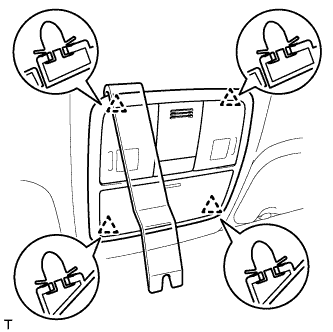
-
Using a moulding remover, detach the 4 clips.
-
Disconnect the connector and remove the map light.
-
-
REMOVE FRONT ROOF TOP GARNISH (w/ Lane Keeping Assist System)
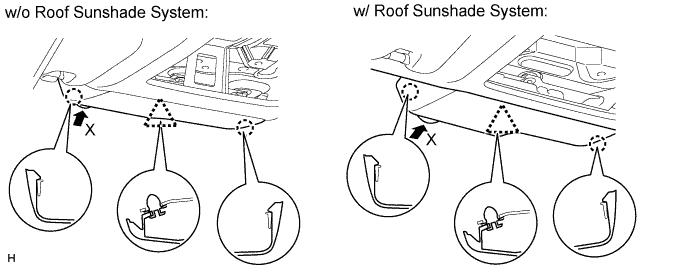
-
Detach the clip and 2 claws and remove the front roof top garnish.
Note
When removing the rain sensor cover, do not apply force to the lane recognition camera sensor assembly areas labeled "X".
-
-
REMOVE NO. 1 ROOM LIGHT ASSEMBLY
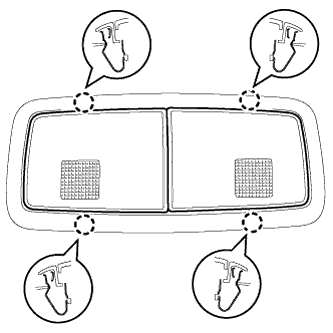
-
Detach the 4 claws.
-
Disconnect the connector and remove the No. 1 room light.
-
-
REMOVE INNER REAR VIEW MIRROR STAY HOLDER COVER (w/ EC Mirror)
-
w/o Rear Monitor:
Remove the inner rear view mirror stay holder cover Click here.
-
w/ Rear Monitor:
Remove the inner rear view mirror stay holder cover Click here.
-
-
REMOVE RAIN SENSOR COVER (w/ Rain Sensor)
-
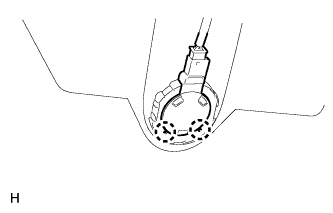
Detach the 2 claws and remove the rain sensor.
Note
Do not touch the silicon mixture directly with a finger.
-
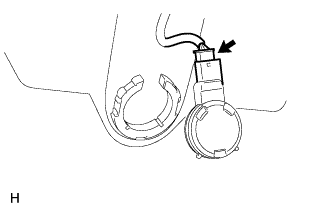
Disconnect the connector.
Note
Do not touch the silicon mixture directly with a finger.
-
-
REMOVE VISOR ASSEMBLY LH
-
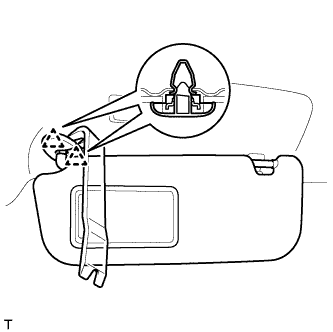
Using a moulding remover, detach the 2 clips and remove the visor.
-
-
REMOVE VISOR ASSEMBLY RH
Tech Tips
Use the same procedure described for the LH side.
-
REMOVE VISOR HOLDER
Tech Tips
Use the same procedure for the other visor holder.
-
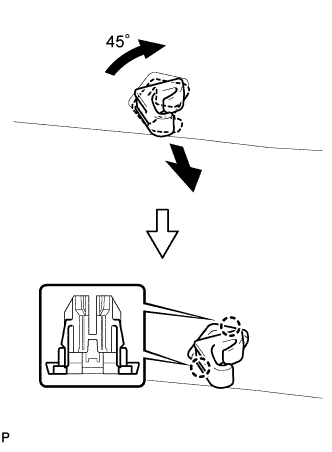
Turn the visor holder clockwise approximately 45° and pull it out as shown in the illustration.
-
Detach the 2 claws and remove the visor holder.
-
-
REMOVE ASSIST GRIP SUB-ASSEMBLY
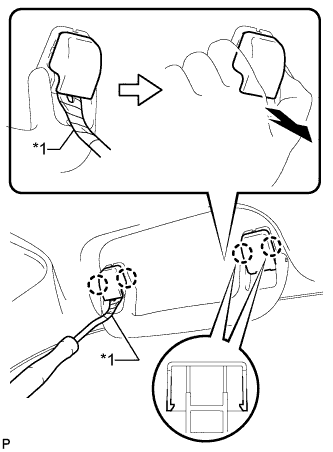
Tech Tips
Use the same procedure for the other assist grip.
-
Using a clip remover, detach the 4 claws.
Note
Do not forcibly pry the assist grip plugs to prevent them from being deformed.
Tech Tips
-
Gently pry on the assist grip plugs as shown in the illustration to remove them.
-
Tape the clip remover tip before use.
Text in Illustration *1 Protective Tape -
-
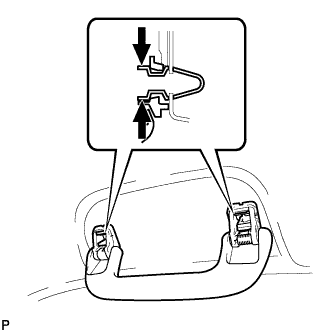
Pull off the 2 assist grip plugs by hand.
-
Detach the 2 clips and remove the assist grip.
-
Remove the 2 clips from the vehicle body.
-
-
REMOVE REAR ASSIST GRIP ASSEMBLY LH
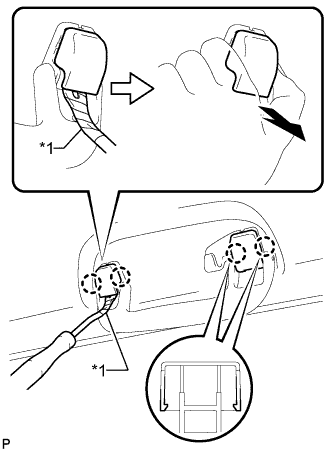
-
Using a clip remover, detach the 4 claws.
Note
Do not forcibly pry the assist grip plugs to prevent them from being deformed.
Tech Tips
-
Gently pry on the assist grip plugs as shown in the illustration to remove them.
-
Tape the clip remover tip before use.
Text in Illustration *1 Protective Tape -
-
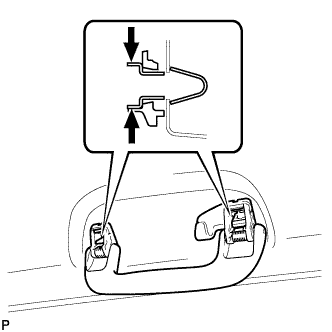
Pull off the 2 assist grip plugs by hand.
-
Detach the 2 clips and remove the rear assist grip.
-
Remove the 2 clips from the vehicle body.
-
-
REMOVE REAR ASSIST GRIP ASSEMBLY RH
Tech Tips
Use the same procedure described for the LH side.
-
REMOVE SUNSHADE TRIM HOLDER
-
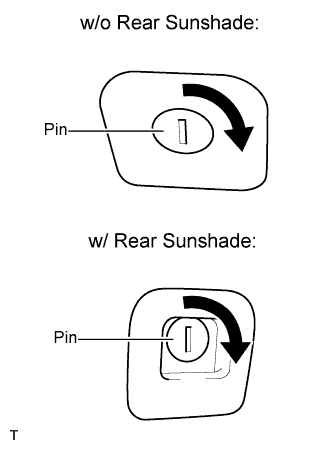
Turn the pin and remove the sunshade trim holder.
-
-
REMOVE ROOF HEADLINING ASSEMBLY
-
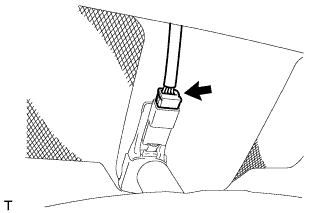
w/ EC Mirror:
Disconnect the EC mirror connector.
-
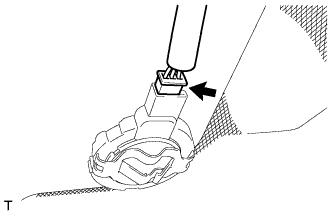
w/ Rain Sensor:
Disconnect the rain sensor connector.
-
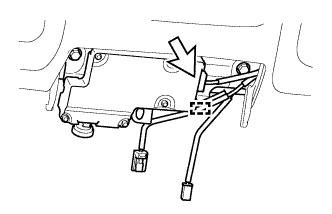
w/ Lane Keeping Assist System:
Tech Tips
-
Use the same procedure for RHD and LHD vehicles.
-
The procedure listed below is for LHD vehicles.
-
Disconnect the connector and detach the clamp.
-
-
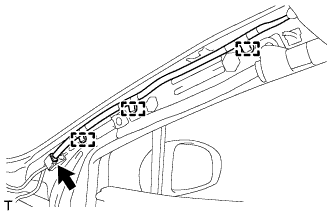
Disconnect the connector and 3 clamps from the front pillar RH.
-
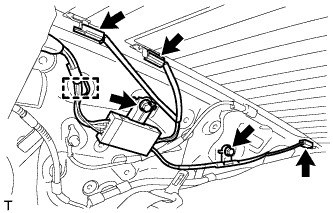
Remove the 2 bolts.
-
Disconnect the 3 connectors and clamp from the rear pillar RH.
-
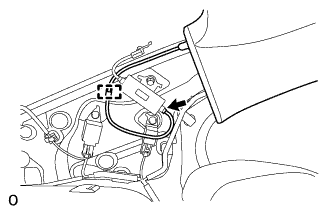
w/ Digital Audio Broadcasting Antenna:
Disconnect the connector and detach the wire harness clamp from the rear pillar LH.
-
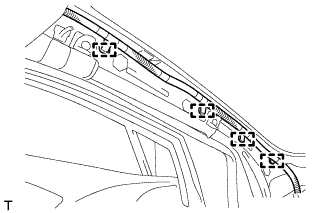
Disconnect the 4 clamps from the front pillar LH.
-
for LHD:
-
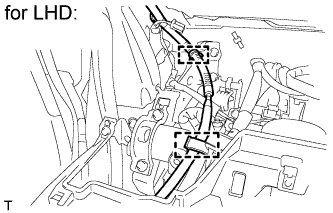
Disconnect the 2 clamps.
-
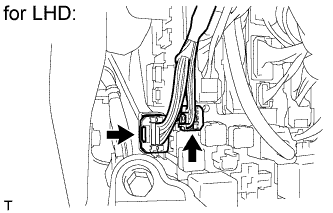
Disconnect the 2 roof wire connectors.
-
-
for RHD:
-
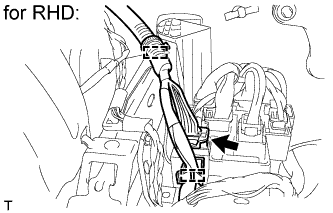
Disconnect the 2 clamps and roof wire connector.
-
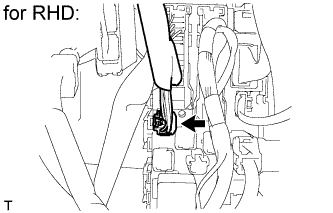
Disconnect the roof wire connector.
-
-
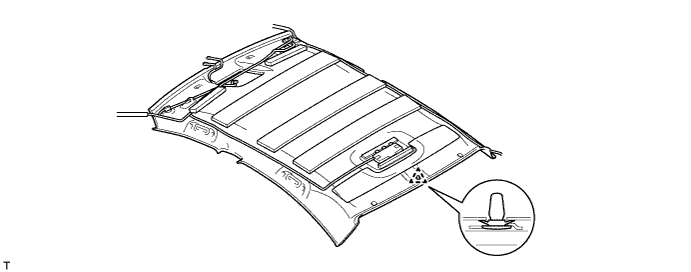
Detach the clip.
-
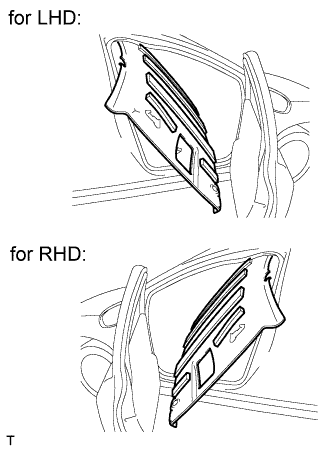
Remove the roof headlining from the passenger door as shown in the illustration.
Note
Be careful not to damage the roof headlining when taking it out.
-
-
REMOVE FRONT DOOR SCUFF PLATE OUTSIDE LH
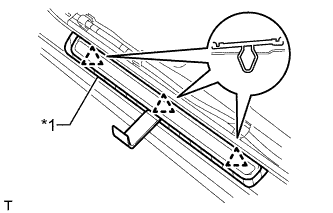
Text in Illustration *1 Protective Tape
-
Put protective tape around the front door scuff plate outside.
-
Using a moulding remover, detach the 3 clips and remove the front door scuff plate outside.
-
-
REMOVE FRONT DOOR SCUFF PLATE OUTSIDE RH
Tech Tips
Use the same procedure described for the LH side.
-
REMOVE REAR DOOR SCUFF PLATE OUTSIDE LH
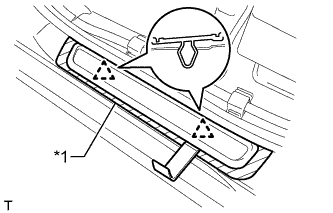
Text in Illustration *1 Protective Tape
-
Put protective tape around the rear door scuff plate outside.
-
Using a moulding remover, detach the 2 clips and remove the rear door scuff plate outside.
-
-
REMOVE REAR DOOR SCUFF PLATE OUTSIDE RH
Tech Tips
Use the same procedure described for the LH side.
-
REMOVE FRONT SHOULDER BELT ANCHOR PLATE SUB-ASSEMBLY LH
-
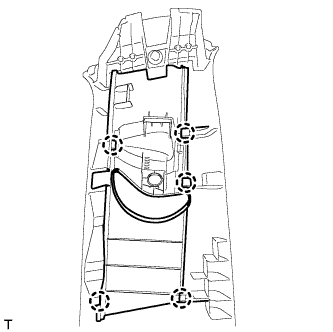
Detach the 5 claws and remove the front shoulder belt anchor plate.
-
-
REMOVE FRONT SHOULDER BELT ANCHOR PLATE SUB-ASSEMBLY RH
Tech Tips
Use the same procedure described for the LH side.
-
REMOVE REAR NO. 2 SIDE RAIL SPACER LH
-
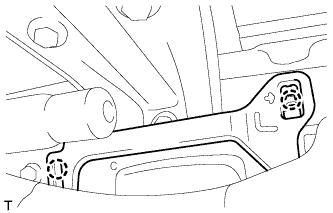
Detach the 2 claws and remove the No. 2 side rail spacer.
-
-
REMOVE REAR NO. 2 SIDE RAIL SPACER RH
Tech Tips
Use the same procedure described for the LH side.