AIR CONDITIONING PANEL REMOVAL

-
REMOVE LOWER NO. 2 INSTRUMENT PANEL FINISH PANEL
-
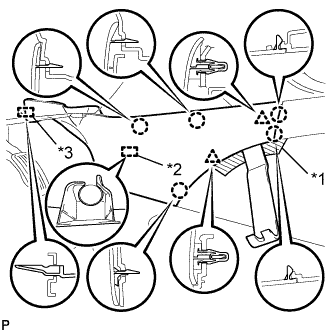
Text in Illustration *1 Protective Tape *2 Clamp *3 Guide Place protective tape as shown in the illustration.
-
Using a moulding remover B, detach the 2 clips and 5 claws.
-
Detach the clamp.
-
Detach the guide near the front of the vehicle and remove the finish panel.
-
-
REMOVE LOWER NO. 1 INSTRUMENT PANEL FINISH PANEL
-
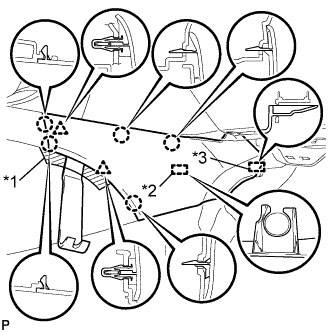
Text in Illustration *1 Protective Tape *2 Clamp *3 Guide Place protective tape as shown in the illustration.
-
Using a moulding remover B, detach the 2 clips and 5 claws.
-
Detach the clamp.
-
Detach the guide near the front of the vehicle and remove the finish panel.
-
-
REMOVE NO. 3 BOX PANEL (w/ Console Box Lid)
-
Place protective tape as shown in the illustration.
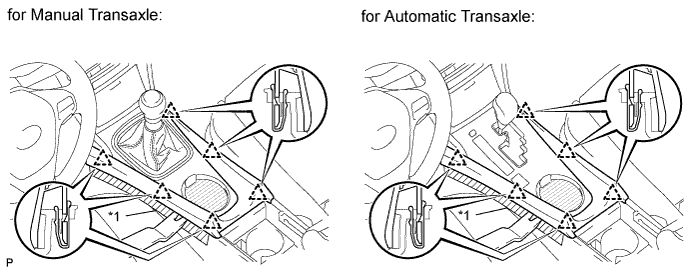
Text in Illustration *1 Protective Tape -
Using a moulding remover B, detach the 6 clips and remove the box panel.
-
-
REMOVE NO. 3 BOX PANEL (w/o Console Box Lid)
-
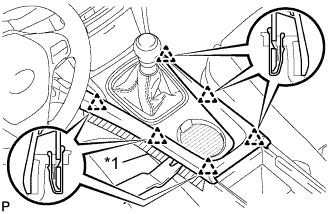
Text in Illustration *1 Protective Tape Place protective tape as shown in the illustration.
-
Using a moulding remover, detach the 6 clips and remove the box panel.
-
-
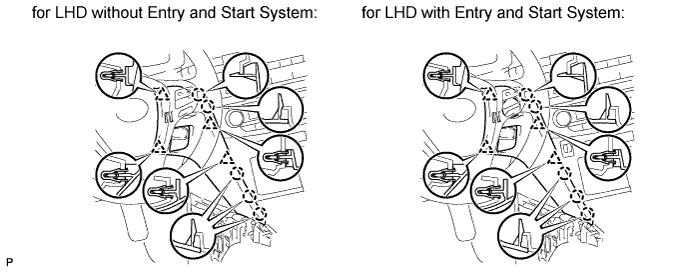
REMOVE INSTRUMENT PANEL FINISH PANEL END LH
-
Using a moulding remover B, detach the 4 clips and 5 claws and remove the panel end.
-
-
REMOVE INSTRUMENT PANEL FINISH PANEL END RH (for LHD)
-
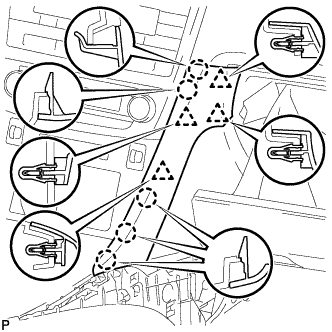
Using a moulding remover B, detach the 4 clips and 5 claws and remove the panel end.
-
-
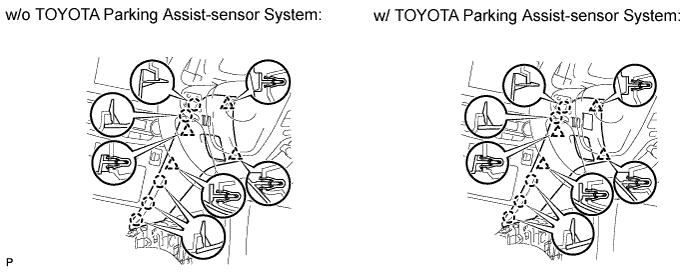
REMOVE INSTRUMENT PANEL FINISH PANEL END RH (for RHD)
-
w/o TOYOTA Parking Assist-sensor System:
-
Using a moulding remover B, detach the 4 clips and 5 claws and remove the panel end.
-
-
w/ TOYOTA Parking Assist-sensor System:
-
Using a moulding remover B, detach the 4 clips and 5 claws.
-
Remove the panel end and then disconnect the connector.
-
-
-
REMOVE CENTER INSTRUMENT PANEL REGISTER ASSEMBLY (for Audio, HDD Navigation System)
-
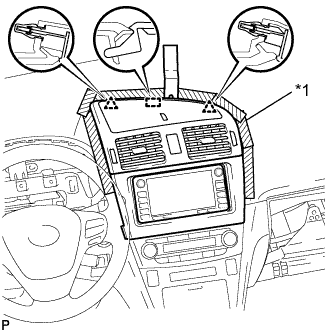
Text in Illustration *1 Protective Tape Place protective tape as shown in the illustration.
-
Using a moulding remover B, detach the 2 clips and hook.
-
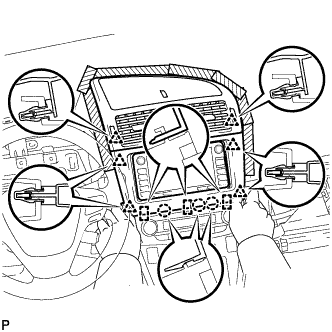
Detach the 3 claws and 3 hooks.
-
Detach the 6 clips.
-
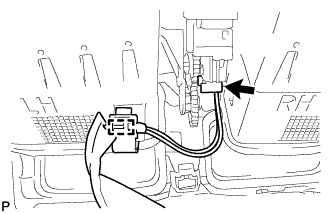
Remove the panel register. Then disconnect the connector and detach the clamp.
-
-
REMOVE CENTER INSTRUMENT PANEL REGISTER ASSEMBLY (for Audio-less, DVD Navigation System)
-
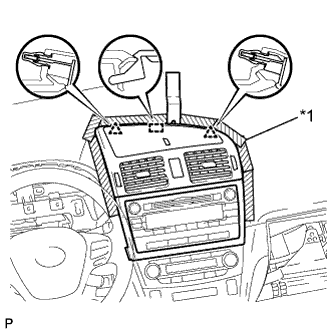
Text in Illustration *1 Protective Tape Place protective tape as shown in the illustration.
-
Using a moulding remover B, detach the 2 clips and hook.
-
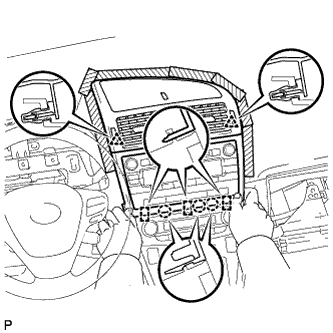
Detach the 3 claws and 3 hooks.
-
Detach the 2 clips.
-
Remove the panel register. Then disconnect the connector and detach the clamp.
-
-
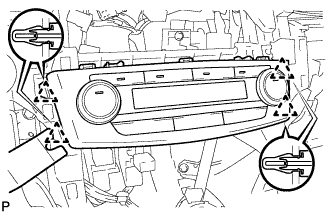
REMOVE AIR CONDITIONING CONTROL ASSEMBLY
-
Using a moulding remover, detach the 4 clips.
-
Disconnect the connector and remove the air conditioning control.
-