AIR CONDITIONING SYSTEM (for Automatic Air Conditioning System) CHECK MODE PROCEDURE

-
LIST OF OPERATION METHODS
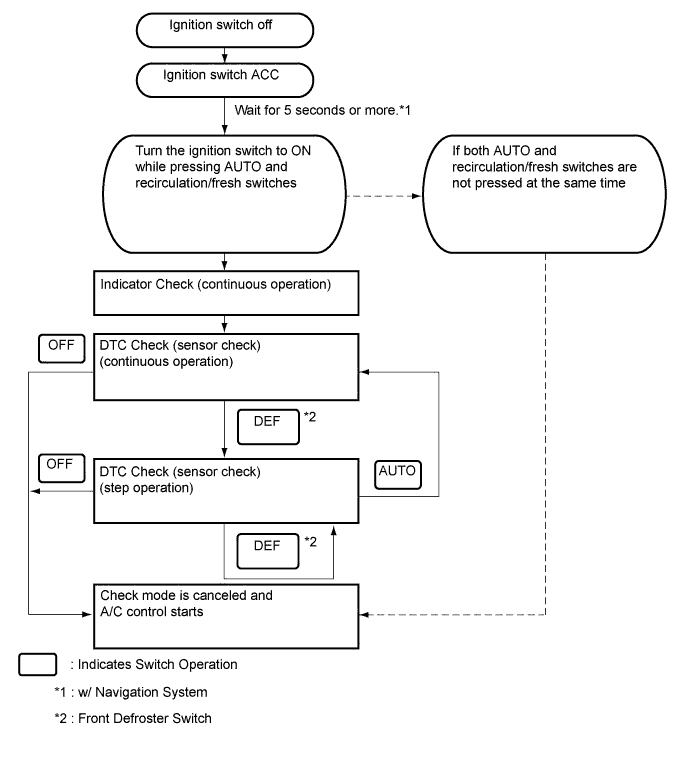
By operating each of the air conditioning control switches as shown in the diagram below, it is possible to enter the diagnostic check mode.
-
INDICATOR CHECK
-
Turn the ignition switch off.
-
Turn the ignition switch to ACC.
-
w/ Navigation System:
-
Wait for 5 seconds or more.
Tech Tips
5 seconds is an approximation of the time needed for the map or other screen to completely display.
-
-
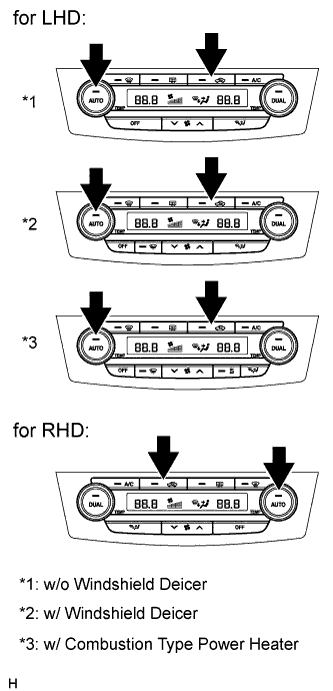
Press and hold the air conditioning system control AUTO switch and recirculation/fresh switch simultaneously, and turn the ignition switch to ON. Continue holding the 2 switches until the panel diagnosis mode begins.
Tech Tips
When the above operation is performed, each mode switch indicator light illuminates. For vehicles equipped with a multi-display, each mode switch indicator light illuminates and an operation confirmation buzzer sounds.
-
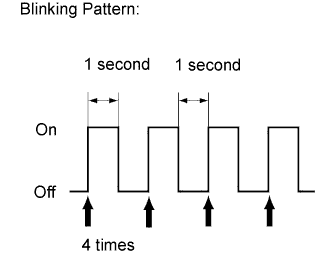
Check that all indicators turn on and off 4 times in succession at 1 second intervals.
Tech Tips
-
After the indicator check is completed, the system enters the DTC mode automatically.
-
Press the "OFF" switch to cancel the check mode.
-
-
-
DTC CHECK (SENSOR CHECK)
-
Start the engine and warm it up.
-
Perform the indicator check.
Tech Tips
After the indicator check is completed, the system enters the DTC check mode automatically.
-
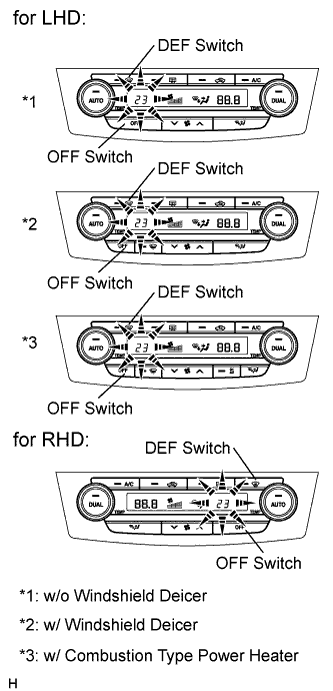
Read the code displayed on the panel.
Note
In the sensor check mode, which is automatically entered after the indicator check mode, troubleshooting may be only partially completed.
Tech Tips
Refer to the Diagnostic Trouble Code Chart for details of the codes Click here.
-
When there are no problems, DTC 00 is output.
-
As an example, the illustration shows that DTC 23 is output.
-
-
If the codes are difficult to read because they change automatically, push the "DEF" switch to display the codes one at a time so that they can be read easily. The items are displayed one by one each time the "DEF" switch is pushed.
Tech Tips
Push the "OFF" switch to finish panel diagnosis.
-