POWER WINDOW REGULATOR MOTOR (for Front Door) REMOVAL

Tech Tips
-
Use the same procedure for the RH and LH sides.
-
The procedure listed below is for the LH side.
-
PRECAUTION
Note
After turning the ignition switch off, waiting time may be required before disconnecting the cable from the battery terminal. Therefore, make sure to read the disconnecting the cable from the battery terminal notice before proceeding with work Click here.
-
DISCONNECT CABLE FROM NEGATIVE BATTERY TERMINAL
CAUTION:
Wait at least 90 seconds after disconnecting the cable from the negative (-) battery terminal to disable the SRS system.
Note
When disconnecting the cable, some systems need to be initialized after the cable is reconnected Click here.
-
REMOVE FRONT DOOR INSIDE HANDLE BEZEL PLUG LH
-
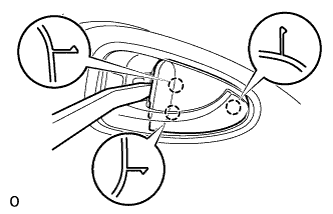
Using moulding remover A, detach the 3 claws and remove the bezel plug.
-
-
REMOVE ASSIST GRIP COVER LH
-
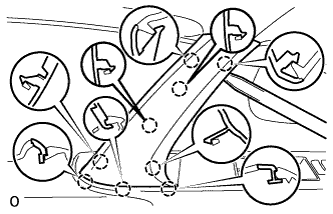
Using moulding remover A, detach the 9 claws and remove the assist grip cover.
-
-
REMOVE POWER WINDOW REGULATOR MASTER SWITCH ASSEMBLY WITH FRONT DOOR ARMREST BASE PANEL (for Driver Side)
-
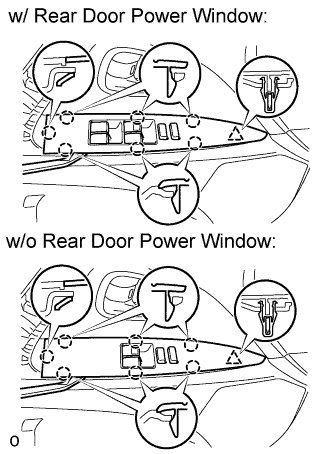
Using moulding remover A, detach the clip and 7 claws and remove the power window regulator master switch assembly with front door armrest base panel.
-
Disconnect the connector and remove the power window regulator master switch.
-
-
REMOVE POWER WINDOW REGULATOR SWITCH ASSEMBLY WITH FRONT DOOR ARMREST BASE PANEL (for Front Passenger Side)
Tech Tips
Use the same procedure described for the driver side.
-
REMOVE FRONT DOOR NO. 1 STIFFENER CUSHION
-
Remove the front door No. 1 stiffener cushion.
-
-
REMOVE FRONT DOOR TRIM BOARD SUB-ASSEMBLY LH
-
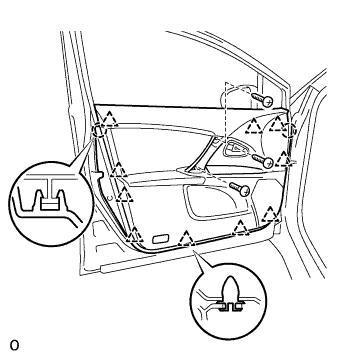
Remove the 3 screws.
-
Remove the 10 clips and 2 claws.
-
Disconnect the courtesy light connector.
-
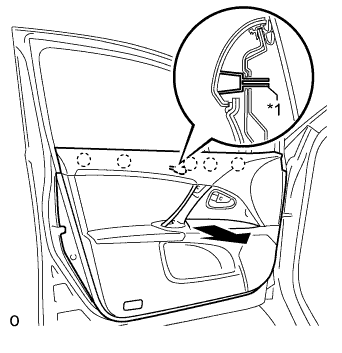
Text in Illustration *1 Reference Boss Pull out the front door trim board in the direction indicated by the arrow in the illustration to detach the 5 claws of the front inner door glass weatherstrip and remove the reference boss together with the trim board.
-
Remove the reference boss from the front door trim board.
-
for Power Seat:
-
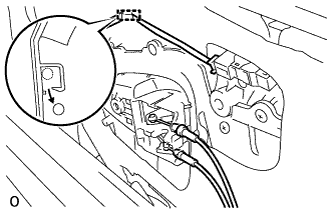
Detach the wire harness.
-
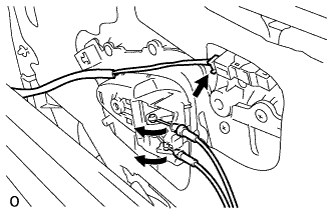
Disconnect the connector.
-
Disconnect the 2 cables from the inside handle.
-
-

for Manual Seat:
Disconnect the 2 cables from the inside handle.
-
-
REMOVE COURTESY LIGHT ASSEMBLY
-
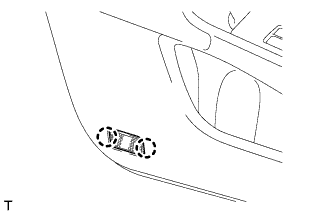
Detach the 2 claws and remove the courtesy light.
-
-
REMOVE FRONT DOOR INNER GLASS WEATHERSTRIP LH
-
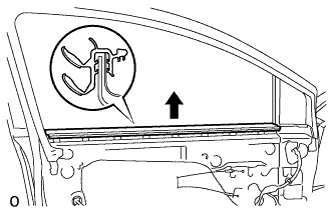
Detach the 4 claws by pulling the weatherstrip upward in the direction indicated by the arrow in the illustration to remove the weatherstrip.
-
-
REMOVE DOOR FRAME GARNISH LH
-
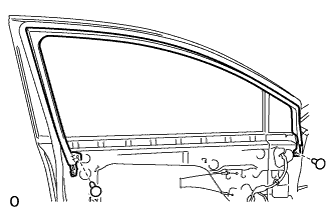
Using a clip remover, remove the 2 clips and frame garnish.
-
-
REMOVE FRONT NO. 1 SPEAKER ASSEMBLY
-
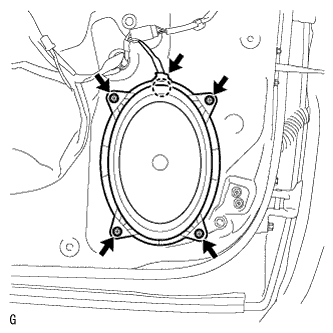
Disconnect the speaker connector.
-
Remove the 4 screws.
-
Detach the claw and remove the speaker.
Note
Do not touch the cone part of the speaker.
-
-
REMOVE FRONT DOOR SERVICE HOLE COVER LH
-
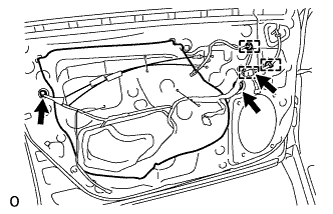
for Power Seat:
Using a clip remover, remove the 3 clamps.
-
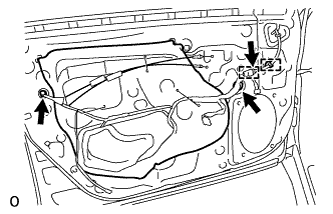
for Manual Seat:
Using a clip remover, remove the 2 clamps.
-
Disconnect the 3 connectors and remove the service hole cover.
Tech Tips
Remove the remaining tape on the door.
-
-
REMOVE FRONT DOOR GLASS SUB-ASSEMBLY LH
-
Connect the connector to the front door window regulator assembly.
-
for Driver Side:
Temporarily install the master switch assembly.
-
for Front Passenger Side:
Temporarily install the regulator switch assembly.
-
Connect the cable to the negative (-) battery terminal.
-
Move the door glass until the bolts appear in the service holes.
-
Disconnect the cable from the negative (-) battery terminal.
Note
-
w/ Navigation System (for HDD):
After the ignition switch is turned off, the HDD navigation system requires approximately a minute to record various types of memory and settings. As a result, after turning the ignition switch off, wait a minute or more before disconnecting the cable from the negative (-) battery terminal.
-
When disconnecting the cable, some systems need to be initialized after the cable is reconnected Click here.
-
-
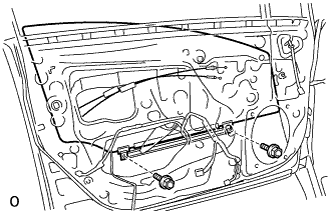
Remove the 2 bolts.
Note
Be careful when removing the bolts as the glass may fall and become damaged.
-
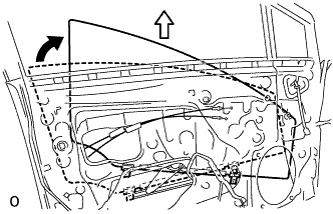
Remove the door glass in the direction indicated by the arrows in the illustration.
Tech Tips
Remove the glass upward.
Note
Be careful not to damage the glass.
-
for Driver Side:
Remove the master switch assembly.
-
for Front Passenger Side:
Remove the regulator switch assembly.
-
Disconnect the connector from the front door window regulator assembly.
-
-
REMOVE FRONT DOOR WINDOW REGULATOR ASSEMBLY LH
-
Disconnect the connector.
-
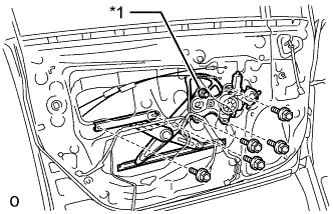
Text in Illustration *1 Temporary Bolt Loosen the temporary bolt.
Note
Do not remove the temporary bolt. If the temporary bolt is removed, the front door window regulator may fall and cause damage.
-
Remove the 5 bolts.
-
Remove the front door window regulator assembly.
-
Remove the temporary bolt from the front door window regulator assembly.
-