SFI SYSTEM(w/ Canister Pump Module), Diagnostic DTC:P2420
| DTC Code | DTC Name |
|---|---|
| P2420 | Evaporative Emission Pressure Switching Valve Stuck OFF |
DTC SUMMARY
| DTC No. | Detection Item | DTC Detection Condition | Trouble Area | MIL | Memory |
|---|---|---|---|---|---|
| P2420 | Evaporative Emission Pressure Switching Valve Stuck OFF | Following condition is met during key-off EVAP monitor: EVAP pressure change when vent valve closed (on) less than 0.3 kPa(gauge) [2.25 mmHg(gauge)] |
|
Comes on | DTC stored |
| DTC No. | Monitoring Item | Detection Timing | Detection Logic |
|---|---|---|---|
| P2420 | Vent valve stuck open (vent) | While engine switch off | 2 trip |
Tech Tips
The vent valve is built into the canister pump module.
MONITOR DESCRIPTION
5 hours* after the engine switch is turned off, the leak detection pump creates negative pressure (vacuum) in the EVAP (Evaporative Emission) system. The ECM monitors for leaks and actuator malfunctions based on the EVAP pressure.
Tech Tips
*: If the engine coolant temperature is not less than 35°C (95°F) 5 hours after the engine switch is turned off, the monitor check starts 2 hours later. If it is still not less than 35°C (95°F) 7 hours after the engine switch is turned off, the monitor check starts 2.5 hours later.
| Sequence | Operation | Description | Duration |
|---|---|---|---|
| - | ECM activation | Activated by soak timer, 5 hours (7 or 9.5 hours) after engine switch is turned off. | - |
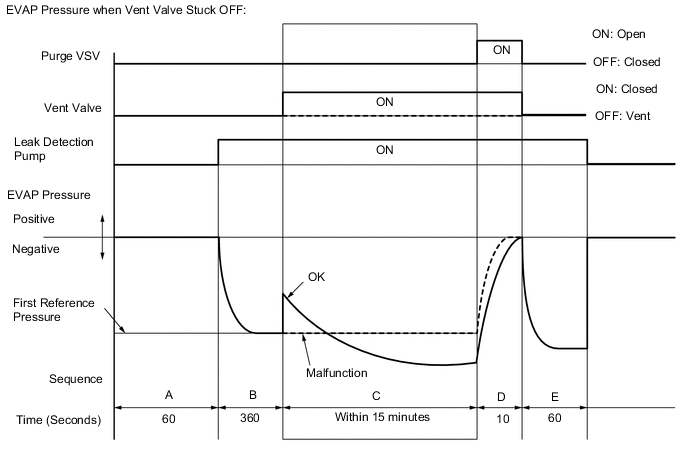
| A | Atmospheric pressure measurement | Vent valve is turned off (vent) and EVAP system pressure is measured by ECM in order to register atmospheric pressure. If pressure in EVAP system is not between 70 kPa(abs) and 110 kPa(abs) [525 mmHg(abs) and 825 mmHg(abs)], ECM cancels EVAP system monitor. |
60 seconds |
| B | First reference pressure measurement | In order to determine reference pressure, leak detection pump creates negative pressure (vacuum) through reference orifice and then ECM checks if leak detection pump and vent valve operate normally. | 360 seconds |
| C | EVAP system pressure measurement | Vent valve is turned on (closed) to shut EVAP system. Negative pressure (vacuum) is created in EVAP system, and then EVAP system pressure is measured. Write down measured value as they will be used in leak check. If EVAP pressure does not stabilize within 15 minutes, ECM cancels EVAP system monitor. |
15 minutes* |
| D | Purge VSV monitor | Purge VSV is opened and then EVAP system pressure is measured by ECM. Large increase indicates normal. |
10 seconds |
| E | Second reference pressure measurement | After second reference pressure measurement, leak check is performed by comparing first and second reference pressure measurements. If stabilized system pressure is higher than second reference pressure, ECM determines that there is a leak in EVAP system. |
60 seconds |
| - | Final check | Atmospheric pressure is measured and then monitoring result is recorded by ECM. | - |
*: If only a small amount of fuel is in the fuel tank, it takes longer for the EVAP pressure to stabilize.
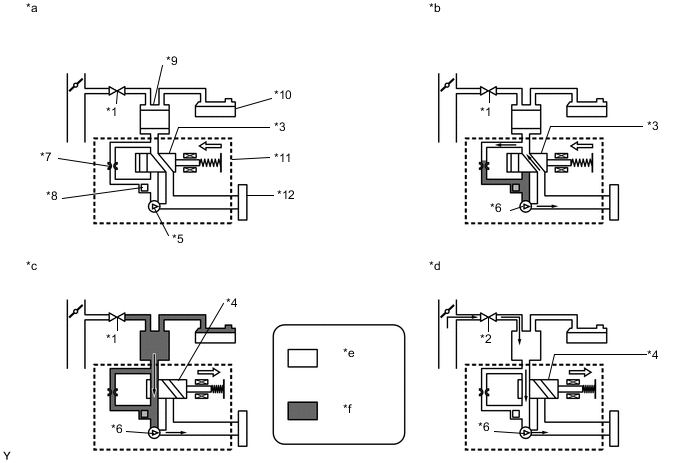
| *1 | Purge VSV: Off (Closed) | *2 | Purge VSV: On (Open) |
| *3 | Vent Valve: Off (Vent) | *4 | Vent Valve: On (Closed) |
| *5 | Leak Detection Pump: Off | *6 | Leak Detection Pump: On |
| *7 | Reference Orifice (0.02 inch) | *8 | Canister Pressure Sensor |
| *9 | Canister | *10 | Fuel Tank |
| *11 | Canister Pump Module | *12 | Canister Filter |
| *a | Operation A: Atmospheric Pressure Measurement |
*b | Operation B, E: Reference Pressure Measurement |
| *c | Operation C: EVAP System Pressure Measurement |
*d | Operation D: Purge VSV Monitor |
| *e | Atmospheric Pressure | *f | Negative Pressure |
P2420: Vent valve stuck open (vent)
In operation C, the vent valve turns on (closed) and the EVAP system pressure is then measured by the ECM using the canister pressure sensor to conduct an EVAP leak check. If the pressure does not increase when the vent valve is open, the ECM interprets this as the vent valve being stuck open. In this case the ECM will illuminate the MIL and store this DTC.
MONITOR STRATEGY
| Required Sensors/Components | Purge VSV Canister pump module |
| Frequency of Operation | Once per driving cycle |
CONFIRMATION DRIVING PATTERN
Note
-
The Evaporative System Check (Automatic Mode) consists of 6 steps performed automatically by the GTS. It takes a maximum of approximately 24 minutes.
-
Do not perform the Evaporative System Check when the fuel tank is more than 90% full because the cut-off valve may be closed, making the fuel tank leak check unavailable.
-
Do not run the engine during this operation.
-
When the temperature of the fuel is 35°C (95°F) or higher, a large amount of vapor forms and any check results become inaccurate. When performing the Evaporative System Check, keep the fuel temperature below 35°C (95°F).
-
Connect the GTS to the DLC3.
-
Turn the engine switch on (IG) and turn the GTS on.
-
Clear the DTCs (even if no DTCs are stored, perform the clear DTC procedure).
-
Turn the engine switch off and wait for at least 30 seconds.
-
Turn the engine switch on (IG) and turn the GTS on.
-
Enter the following menus: Powertrain / Engine / Utility / Evaporative System Check / Automatic Mode.
-
After the Evaporative System Check is completed, check for All Readiness by entering the following menus: Powertrain / Engine / Utility / All Readiness.
-
Input the DTC: P2420.
-
Check the DTC judgment result.
GTS Display Description NORMAL
-
DTC judgment completed
-
System normal
ABNORMAL
-
DTC judgment completed
-
System abnormal
INCOMPLETE
-
DTC judgment not completed
-
Perform driving pattern after confirming DTC enabling conditions
N/A
-
Unable to perform DTC judgment
-
Number of DTCs which do not fulfill DTC preconditions has reached ECU memory limit
Tech Tips
-
If the judgment result shows NORMAL, the system is normal.
-
If the judgment result shows ABNORMAL, the system has a malfunction.
-
