REAR AIRBAG SENSOR INSTALLATION

Tech Tips
-
Use the same procedures for the LH side and RH side.
-
The procedures listed below are for the LH side.
-
INSTALL REAR AIRBAG SENSOR
-
Check that the engine switch is off.
-
Check that the cable is disconnected from the battery negative (-) terminal.
CAUTION:
Wait at least 90 seconds after disconnecting the cable from the negative (-) battery terminal to disable the SRS system.
Note
When disconnecting the cable, some systems need to be initialized after the cable is reconnected Click here.
-
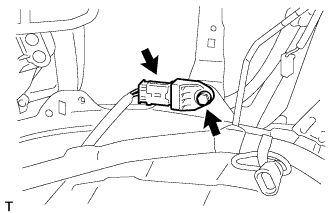
Install the rear airbag sensor with the bolt.
- Torque:
- 9.0 N*m { 92 kgf*cm, 80 in.*lbf }
Note
-
If the rear airbag sensor has been dropped, or there are any cracks, dents or other defects in the case, bracket or connector, replace it with a new one.
-
When installing the rear airbag sensor, be careful that the SRS wiring does not interfere with other parts and that it is not pinched between other parts.
-
Check that there is no looseness in the installation parts of the rear airbag sensor.
-
Connect the connector.
-
-
INSTALL FRONT QUARTER TRIM PANEL ASSEMBLY LH
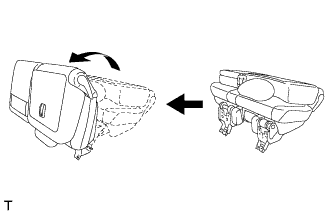
Tech Tips
When installing the front quarter trim panel, operate the reclining adjuster release handle and move the No. 1 rear seat to the position shown in the illustration.
-
Connect the thermistor connector.
-
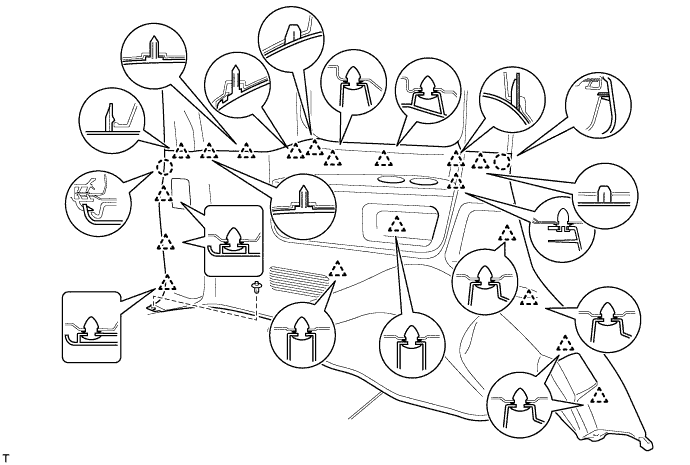
Attach the 19 clips and 2 claws to install the quarter trim panel.
-
Install the clip.
-
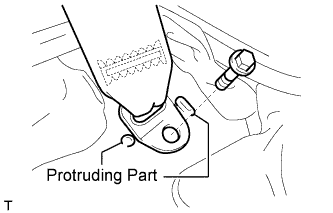
Install the rear No. 2 seat belt anchor with the bolt.
- Torque:
- 42 N*m { 428 kgf*cm, 31 ft.*lbf }
Note
Do not overlap the anchor part of the seat belt and protruding parts of the vehicle body.
-
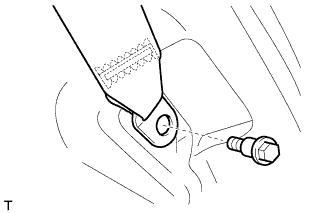
Install the rear No. 1 seat belt anchor with the bolt.
- Torque:
- 42 N*m { 428 kgf*cm, 31 ft.*lbf }
-
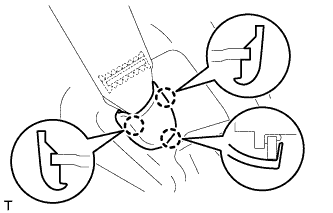
Attach the 3 claws to install the cover.
-
-
INSTALL REAR DOOR SCUFF PLATE LH
-
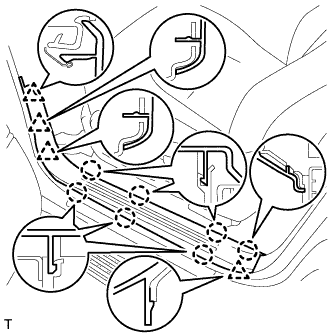
w/o Illumination:
-
Attach the 7 claws and 4 clips to install the scuff plate.
-
-
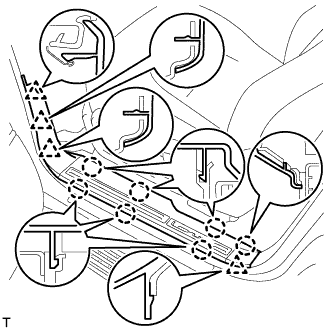
w/ Illumination:
-
Connect the connector.
-
Attach the 7 claws and 4 clips to install the scuff plate.
-
-
-
INSTALL REAR STEP COVER
Tech Tips
Use the same procedure to install the step cover on the other side.
-
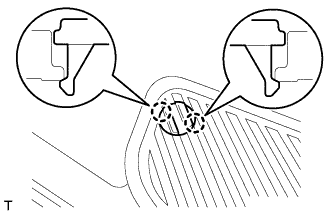
w/o Illumination Type Front Door Scuff Plate:
Attach the 2 claws to install the step cover.
-
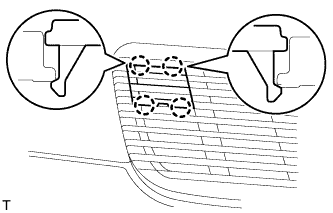
w/ Illumination Type Front Door Scuff Plate:
Attach the 4 claws to install the step cover.
-
-
INSTALL REAR FLOOR MAT REAR SUPPORT PLATE
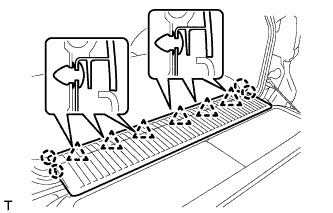
-
Attach the 6 clips and 4 claws to install the support plate.
-
-
INSTALL REAR NO. 2 SEAT ASSEMBLY LH
-
Install the rear No. 2 seat assembly Click here.
-
-
CONNECT CABLE TO NEGATIVE BATTERY TERMINAL
Note
When disconnecting the cable, some systems need to be initialized after the cable is reconnected Click here.
-
INSTALL ENGINE ROOM SIDE COVER LH
-
Install the engine room side cover LH with the 7 clips.
-
-
CHECK SRS WARNING LIGHT
-
Check the SRS warning light Click here.
-