FRONT AND SIDE MONITOR MAIN SWITCH INSPECTION

-
INSPECT MAIN SWITCH ASSEMBLY (FRONT AND SIDE MONITOR MAIN SWITCH)
-
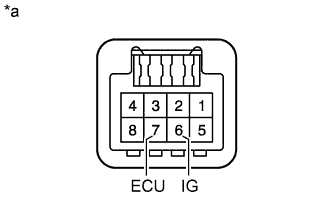
Measure the resistance according to the value(s) in the table below.
Standard Resistance Tester Connection Switch Condition Specified Condition 7 (ECU) - 6 (IG) Main switch assembly (front and side monitor main switch) on Below 1 Ω 7 (ECU) - 6 (IG) Main switch assembly (front and side monitor main switch) off 10 kΩ or higher Text in Illustration *a Component without harness connected
(Main Switch Assembly (Front And Side Monitor Main Switch))
If the result is not as specified, replace the main switch assembly.
-
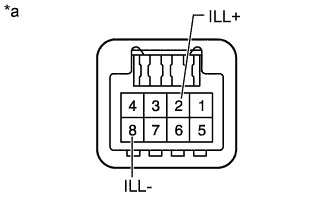
Text in Illustration *a Component without harness connected
(Main Switch Assembly (Front And Side Monitor Main Switch))
Check the switch illuminates.
-
Apply battery voltage to the main switch assembly (front and side monitor main switch) and check that the switch illuminates.
OK Tester Connection Specified Condition Battery positive (+) → Terminal 2 (ILL+)
Battery negative (-) → Terminal 8 (ILL-)
Illuminates If the result is not as specified, replace the main switch assembly.
-
-