TELEVISION CAMERA (for Rear) REMOVAL

-
REMOVE CENTER BACK DOOR GARNISH
-
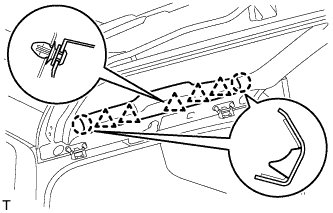
Detach the 5 clips and 2 claws, and remove the back door garnish.
-
-
REMOVE BACK DOOR SIDE GARNISH LH
-
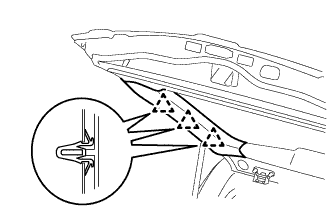
Detach the 3 clips and remove the back door side garnish.
-
-
REMOVE BACK DOOR SIDE GARNISH RH
-
w/o Power Back Door:
Tech Tips
Use the same procedures described for the LH side.
-
w/ Power Back Door:
-
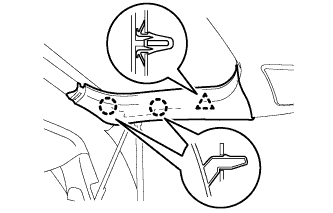
Detach the clip and 2 claws and remove the back door side garnish.
-
-
-
REMOVE BACK DOOR GARNISH
-
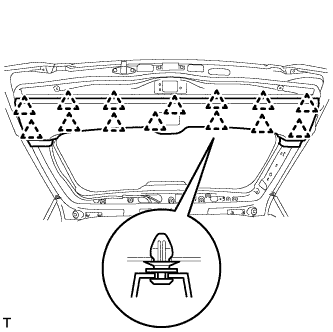
Using a screwdriver, detach the 14 clips and remove the back door garnish.
-
-
REMOVE BACK DOOR GARNISH RETAINER SUB-ASSEMBLY
-
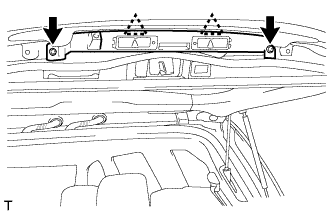
Using a T30 "TORX" socket wrench, detach the 2 clips and remove the 2 screws and garnish.
-
Disconnect the connector.
-
-
REMOVE REAR TELEVISION CAMERA ASSEMBLY
-
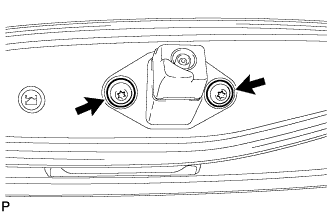
Using a T30 "TORX" socket wrench, remove the 2 screws.
-
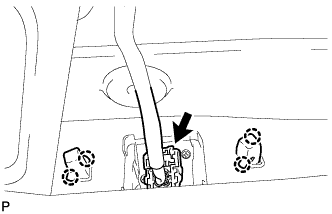
Detach the 2 screws grommet and remove the rear television camera assembly.
-
Disconnect the connector.
-