HARD DISK DRIVE PRECAUTION

-
PRECAUTION FOR MULTI-MEDIA MODULE RECEIVER ASSEMBLY
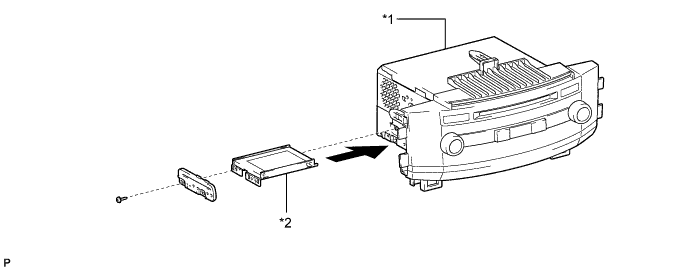
Text in Illustration *1 Hard disc *2 Multi-media module receiver assembly
-
The hard disc has a built-in hard disk drive (HDD) for storing maps and other data used by the navigation system. When handling the hard disc, follow the precautions below.
-
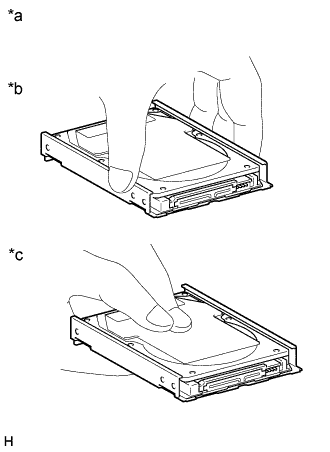
Text in Illustration *a Example *b CORRECT *c INCORRECT Do not touch cover of the HDD
Note
When removing or installing the hard disc, hold it as shown in the illustration.
-
Avoid vibrations and impacts
Note
-
Do not drop or strike the hard disc. Do not use a hard disc that has been dropped or struck.
-
Prepare a new hard disc before removing the hard disc.
-
-
Avoid condensation
Note
-
Introducing the hard disc to sudden temperature changes may cause condensation to form inside it, and may lead to malfunctions in the HDD.
-
The removed multi-media module receiver assembly must be stored in an environment where the temperature, humidity, etc. is the same as the vehicle interior, and the hard disc must not be removed.
-
If transporting the hard disc from its storage area to a location where the temperature, humidity, etc. is different, allow it some time to adapt to the surrounding environment.
-
-
Avoid static electricity
Note
-
Touching the connector terminals may transmit static electricity to the inner circuits and may lead to malfunctions in the HDD.
-
When installing or removing the hard disc, observe all precautions to prevent damage to the system by electrostatic discharge (ESD).
-
-
Keep away from magnetic items
Note
Keep speakers, motors, magnetized tools, etc. away from the hard disc.
-
-
When replacing the hard disc, follow the precaution below.
-
After removing and installing the hard disc, use the HDD information screen to perform the SMART inspection and confirm that there are no malfunctions in the HDD Click here.
-
-
-
PRECAUTIONS DURING REPLACEMENT
Note
When replacing electronic parts, if there is a possibility that your body may contact a circuit board, etc., use the recommended tools and observe all precautions to prevent damage to the system by electrostatic discharge (ESD).
-
Procedures where static electricity countermeasures are necessary
-
Hard disc replacement.
-
Internal wiring connection/disconnection, inspection, and replacement.
-
-
Precautions during procedures
-
Before performing any procedures, touch an unpainted metal part or ground bolt of the vehicle to eliminate any static electricity.
-
To prevent damage to electrical equipment, disconnect the battery's power supply before installing and removing electrical equipment.
-
Never touch the electronic parts of a circuit board, or the pins of an integrated circuit.
-
When performing procedures, do not allow clothing to come near or contact parts.
-
-