HARD DISK DRIVE REMOVAL

-
REMOVE ENGINE ROOM SIDE COVER LH
-
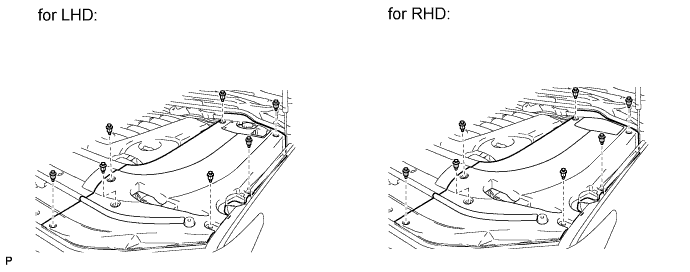
Remove the 7 clips and engine room side cover LH.
-
-
DISCONNECT CABLE FROM NEGATIVE BATTERY TERMINAL
Note
-
After the engine switch is turned off, the HDD navigation system requires approximately 6 minutes to record various types of memory and settings. As a result, after turning the engine switch off, wait 6 minutes or more before disconnecting the cable from the negative (-) battery terminal.
-
When disconnecting the cable, some systems need to be initialized after the cable is reconnected Click here.
-
-
REMOVE MULTI-MEDIA MODULE RECEIVER ASSEMBLY WITH BRACKET
-
REMOVE NO. 2 RADIO BRACKET
-
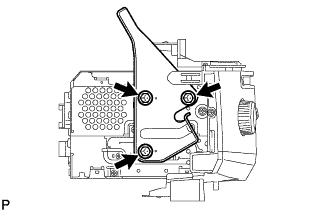
Remove the 3 bolts and No. 2 radio bracket.
-
-
REMOVE HARD DISC
-
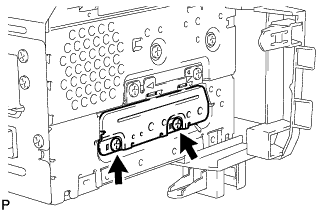
Remove the 2 screws.
-
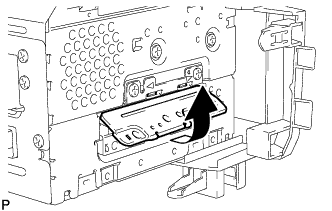
Move the cover in the direction of the arrow shown in the illustration to remove it.
-
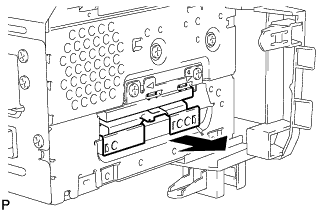
Remove the hard disc in the direction of the arrow shown in the illustration.
-