NAVIGATION SYSTEM, Diagnostic DTC:B15C0, B15C1

| DTC Code | DTC Name |
|---|---|
| B15C0 | Short in GPS Antenna |
| B15C1 | Open in GPS Antenna |
DESCRIPTION
These DTCs are stored when a malfunction occurs in the navigation antenna assembly (w/o Roof Antenna) or telephone antenna assembly (w/ Roof Antenna).
| DTC Code | DTC Detection Condition | Trouble Area |
|---|---|---|
| B15C0 | Navigation antenna error |
|
| B15C1 | Error of the power source to the navigation antenna |
WIRING DIAGRAM
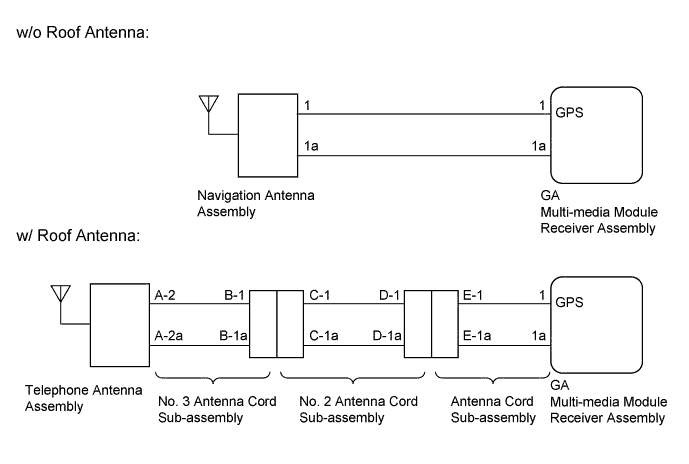
INSPECTION PROCEDURE
PROCEDURE
-
CHECK VEHICLE TYPE
-
Select the vehicle setting.
Result Result Proceed to w/o Roof Antenna A w/ Roof Antenna B
B 
INSPECT TELEPHONE ANTENNA ASSEMBLY Click here
A 
-
-
CHECK CONNECTION OF NAVIGATION ANTENNA ASSEMBLY
-
Check if the navigation antenna assembly is securely connected to the multi-media module receiver assembly.
OK Navigation antenna assembly is securely connected.
NG 
SECURELY CONNECT NAVIGATION ANTENNA ASSEMBLY
OK
-
-
REPLACE NAVIGATION ANTENNA ASSEMBLY
-
Replace the navigation antenna assembly with a normally functioning one Click here.
NEXT
-
-
CLEAR DTC
-
Clear the DTCs Click here.
NEXT
-
-
CHECK DTC
-
Recheck for DTCs and check if the same DTCs are output again Click here.
OK No DTCs are output.
NG
REPLACE MULTI-MEDIA MODULE RECEIVER ASSEMBLY Click here
OK 
END (NAVIGATION ANTENNA ASSEMBLY IS DEFECTIVE)
-
-
INSPECT TELEPHONE ANTENNA ASSEMBLY
-
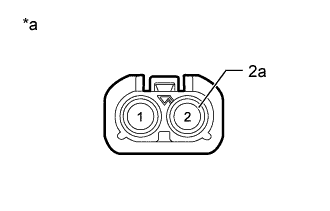
Text in Illustration *a Telephone Antenna Assembly Disconnect the telephone antenna assembly connector.
-
Measure the resistance according to the value(s) in the table below.
Standard Resistance Tester Connection Condition Specified Condition 2 - 2a Always 4 to 11 kΩ
NG
REPLACE TELEPHONE ANTENNA ASSEMBLY Click here
OK
-
-
INSPECT NO. 3 ANTENNA CORD SUB-ASSEMBLY
-
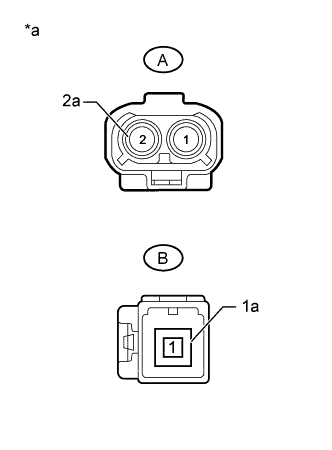
Text in Illustration *a No. 3 Antenna Cord Sub-assembly Disconnect the No. 3 antenna cord sub-assembly from telephone antenna assembly connector.
-
Disconnect the No. 3 antenna cord sub-assembly from No. 2 antenna cord sub-assembly.
-
Measure the resistance according to the value(s) in the table below.
Standard Resistance Tester Connection Condition Specified Condition A-2 - B-1 Always Below 1 Ω A-2a - B-1a Always Below 1 Ω A-2 - Body ground Always 10 kΩ or higher A-2a - Body ground Always 10 kΩ or higher
NG
REPLACE NO. 3 ANTENNA CORD SUB-ASSEMBLY Click here
OK
-
-
INSPECT NO. 2 ANTENNA CORD SUB-ASSEMBLY
-
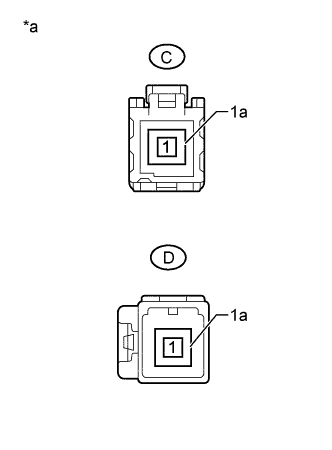
Text in Illustration *a No. 2 Antenna Cord Sub-assembly Disconnect the No. 2 antenna cord sub-assembly from No. 3 antenna cord sub-assembly.
-
Disconnect the No. 2 antenna cord sub-assembly from antenna cord sub-assembly.
-
Measure the resistance according to the value(s) in the table below.
Standard Resistance Tester Connection Condition Specified Condition C-1 - D-1 Always Below 1 Ω C-1a - D-1a Always Below 1 Ω C-1 - Body ground Always 10 kΩ or higher C-1a - Body ground Always 10 kΩ or higher
NG
REPLACE NO. 2 ANTENNA CORD SUB-ASSEMBLY Click here
OK
-
-
INSPECT ANTENNA CORD SUB-ASSEMBLY
-
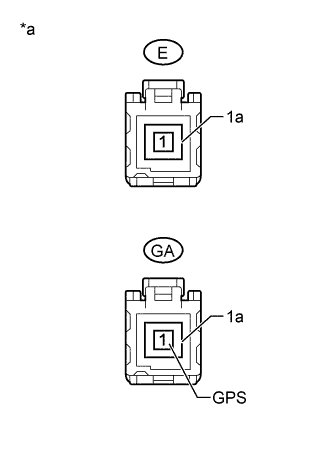
Text in Illustration *a Antenna Cord Sub-assembly Disconnect the antenna cord sub-assembly from No. 2 antenna cord sub-assembly.
-
Disconnect the antenna cord sub-assembly from multi-media module receiver assembly.
-
Measure the resistance according to the value(s) in the table below.
Standard Resistance Tester Connection Condition Specified Condition E-1 - GA-1 (GPS) Always Below 1 Ω E-1a - GA-1a Always Below 1 Ω E-1 - Body ground Always 10 kΩ or higher E-1a - Body ground Always 10 kΩ or higher
NG
REPLACE ANTENNA CORD SUB-ASSEMBLY Click here
OK
-
-
REPLACE TELEPHONE ANTENNA ASSEMBLY
-
Replace the telephone antenna assembly with a normally functioning one Click here.
NEXT
-
-
CLEAR DTC
-
Clear the DTCs Click here.
NEXT
-
-
CHECK DTC
-
Recheck for DTCs and check if the same DTCs are output again Click here.
OK No DTCs are output.
NG
REPLACE MULTI-MEDIA MODULE RECEIVER ASSEMBLY Click here
OK
END (TELEPHONE ANTENNA ASSEMBLY IS DEFECTIVE)
-