REAR SEAT ENTERTAINMENT ECU REMOVAL

-
REMOVE ENGINE ROOM SIDE COVER LH
-
Remove the 7 clips and engine room side cover LH.
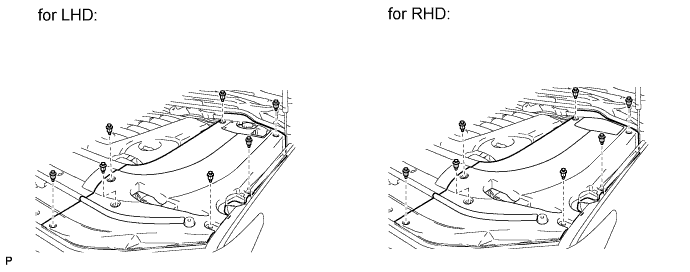
-
-
DISCONNECT CABLE FROM NEGATIVE BATTERY TERMINAL
CAUTION:
Wait at least 90 seconds after disconnecting the cable from the negative (-) battery terminal to disable the SRS system.
Note
-
w/ Navigation System:
After the engine switch is turned off, the HDD navigation system requires approximately 6 minutes to record various types of memory and settings. As a result, after turning the engine switch off, wait 6 minutes or more before disconnecting the cable from the negative (-) battery terminal.
-
When disconnecting the cable, some systems need to be initialized after the cable is reconnected Click here.
-
-
REMOVE FRONT SEAT ASSEMBLY RH
-
Remove the front seat assembly RH Click here.
-
-
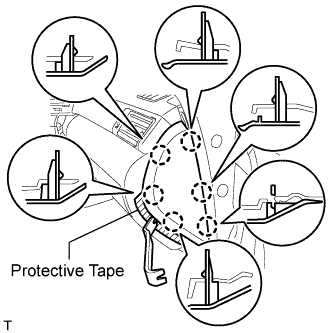
REMOVE INSTRUMENT SIDE PANEL RH
-
w/o Airbag Cut Off Switch:
-
Place protective tape as shown in the illustration.
-
Using a moulding remover, detach the 6 claws and remove the side panel.
-
-
w/ Airbag Cut Off Switch:
-
Place protective tape as shown in the illustration.
-
Using a moulding remover, detach the 6 claws.
-
Remove the side panel and disconnect the connector.
-
-
-
REMOVE FRONT DOOR SCUFF PLATE RH
Tech Tips
Use the same procedures described for the LH side.
-
REMOVE COWL SIDE TRIM BOARD RH
-
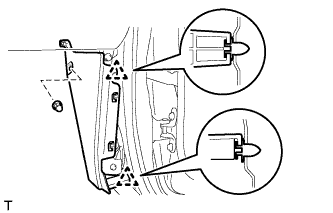
Remove the cap nut.
-
Detach the 2 clips and remove the trim board.
-
-
REMOVE FRONT FLOOR CARPET ASSEMBLY
-
Pull back the carpet far enough so that the selector can be removed. For further details, refer to the removal procedure Click here.
-
-
REMOVE MULTI-DISPLAY CONTROLLER SUB-ASSEMBLY WITH BRACKET
-
Disconnect the connectors.
-
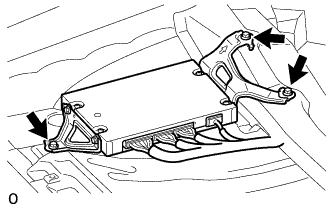
Remove the 3 bolts and multi-display controller sub-assembly with bracket.
-
-
REMOVE NO. 2 MULTI-DISPLAY CONTROLLER BRACKET
-
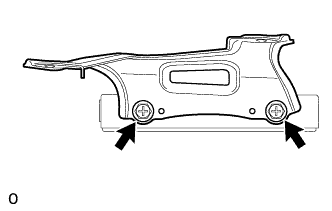
Remove the 2 bolts and No. 2 multi-display controller bracket.
-
-
REMOVE NO. 3 MULTI-DISPLAY CONTROLLER BRACKET
-
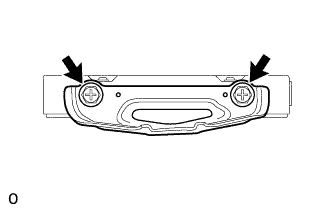
Remove the 2 bolts and No. 3 multi-display controller bracket.
-