TELEVISION DISPLAY (for Roof Side) INSTALLATION

-
INSTALL TELEVISION DISPLAY ASSEMBLY
-
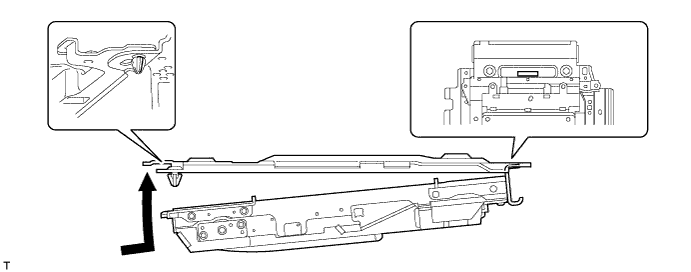
Attach the display to the claws on the front side of the bracket by moving it in the direction of the arrow in the illustration, and then attach the clips to temporarily install the display.
-
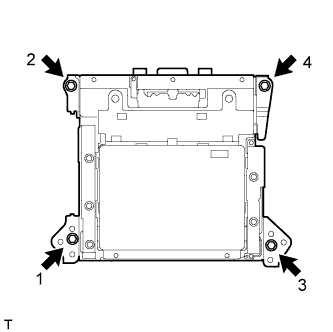
Install the television display with the 4 bolts.
Tech Tips
Install the bolts in the order shown in the illustration.
-
Connect the connectors.
-
-
INSTALL ROOF CONSOLE BOX ASSEMBLY
-
Connect the connector.
-
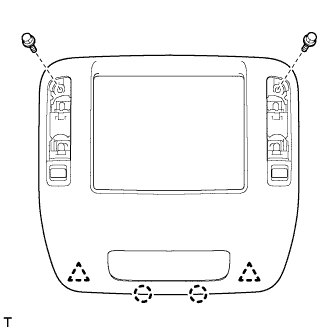
Attach the 2 clips and 2 claws to install the roof console box.
-
Install the 2 bolts.
-
-
INSTALL NO. 2 ROOF LINING TRIM COVER
-
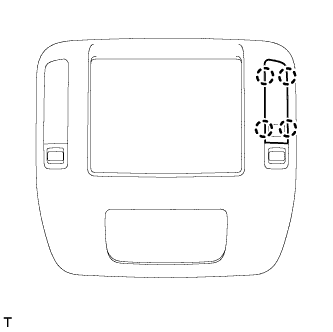
Attach the 4 claws to install the cover.
-
-
INSTALL NO. 1 ROOF LINING TRIM COVER
-
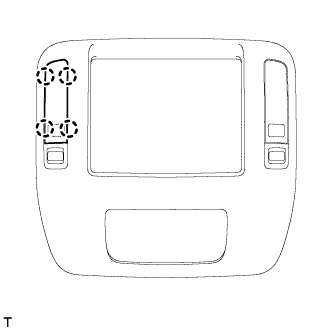
Attach the 4 claws to install the cover.
-
-
CONNECT CABLE TO NEGATIVE BATTERY TERMINAL
Note
When disconnecting the cable, some systems need to be initialized after the cable is reconnected Click here.
-
INSTALL ENGINE ROOM SIDE COVER LH
-
Install the engine room side cover LH with the 7 clips.
-