REAR SEAT ENTERTAINMENT SYSTEM (for Seatback) Visual Mute Signal Circuit between Radio Receiver and Multi-display Controller
DESCRIPTION
This is the visual mute signal circuit between the multi-media module receiver assembly and the multi-display controller sub-assembly.
WIRING DIAGRAM
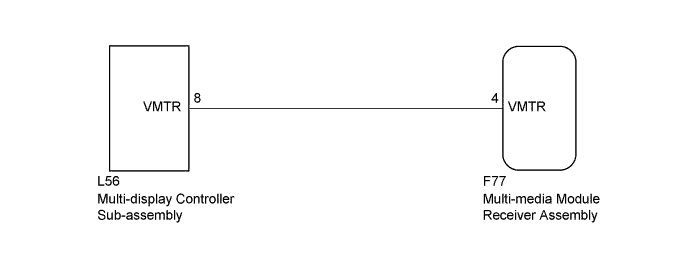
INSPECTION PROCEDURE
PROCEDURE
-
CHECK MULTI-MEDIA MODULE RECEIVER ASSEMBLY
-
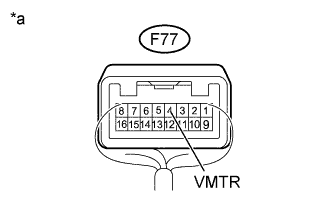
Text in Illustration *a Component with harness connected
(Multi-media Module Receiver Assembly)
Measure the voltage according to the value(s) in the table below.
Standard Voltage Tester Connection Condition Specified Condition F77-4 (VMTR) - Body ground RSE playing → Source changed 3.5 V or higher → Below 1 V
NG 
CHECK HARNESS AND CONNECTOR (MULTI-MEDIA MODULE RECEIVER ASSEMBLY - MULTI-DISPLAY CONTROLLER SUB-ASSEMBLY) Click here
OK 
PROCEED TO NEXT SUSPECTED AREA SHOWN IN PROBLEM SYMPTOMS TABLE Click here
-
-
CHECK HARNESS AND CONNECTOR (MULTI-MEDIA MODULE RECEIVER ASSEMBLY - MULTI-DISPLAY CONTROLLER SUB-ASSEMBLY)
-
Disconnect the F77 multi-media module receiver assembly connector.
-
Disconnect the L56 multi-display controller sub-assembly connector.
-
Measure the resistance according to the value(s) in the table below.
Standard Resistance Tester Connection Condition Specified Condition F77-4 (VMTR) - L56-8 (VMTR) Always Below 1 Ω F77-4 (VMTR) - Body ground Always 10 kΩ or higher
NG 
REPAIR OR REPLACE HARNESS OR CONNECTOR
OK 
-
-
CHECK MULTI-MEDIA MODULE RECEIVER ASSEMBLY
-
Disconnect the multi-display controller sub-assembly connector.
-
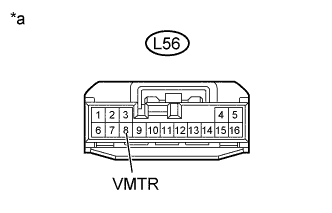
Text in Illustration *a Front view of wire harness connector
(to Multi-display Controller Sub-assembly)
Measure the voltage according to the value(s) in the table below.
Standard Voltage Tester Connection Condition Specified Condition L56-8 (VMTR) - Body ground RSE playing → Source changed 3.5 V or higher → Below 1 V
NG
REPLACE MULTI-MEDIA MODULE RECEIVER ASSEMBLY Click here
OK
REPLACE MULTI-DISPLAY CONTROLLER SUB-ASSEMBLY Click here
-