ROOF HEADLINING REMOVAL

-
OPEN BACK DOOR
-
Open the back door before disconnecting the cable from the negative (-) battery terminal, as some procedures are performed with the back door open.
Note
The back door cannot be opened after the cable is disconnected from the negative (-) battery terminal.
-
-
REMOVE ENGINE ROOM SIDE COVER LH
-
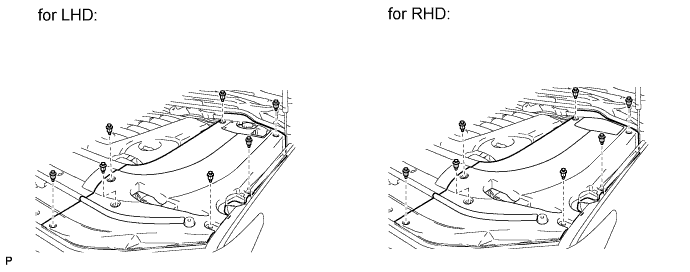
Remove the 7 clips and engine room side cover LH.
-
-
DISCONNECT CABLE FROM NEGATIVE BATTERY TERMINAL
CAUTION:
Wait at least 90 seconds after disconnecting the cable from the negative (-) battery terminal to disable the SRS system.
Note
-
w/ Navigation System:
After the engine switch is turned off, the HDD navigation system requires approximately 6 minutes to record various types of memory and settings. As a result, after turning the engine switch off, wait 6 minutes or more before disconnecting the cable from the negative (-) battery terminal.
-
When disconnecting the cable, some systems need to be initialized after the cable is reconnected Click here.
-
-
REMOVE REAR NO. 2 SEAT ASSEMBLY LH
-
Remove the rear No. 2 seat assembly LH Click here.
-
-
REMOVE REAR NO. 2 SEAT ASSEMBLY RH
Tech Tips
Use the same procedures described for the LH side.
-
REMOVE FRONT DOOR SCUFF PLATE LH
-
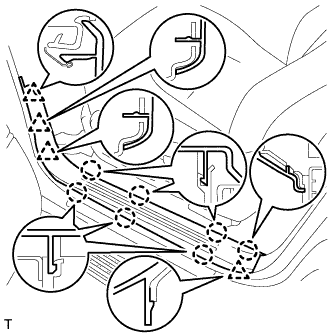
w/o Illumination:
-
Detach the 7 claws and 4 clips, and remove the scuff plate.
-
-
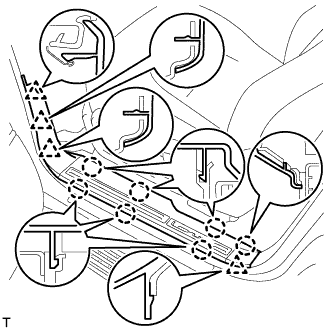
w/ Illumination:
-
Detach the 7 claws and 4 clips.
-
Disconnect the connector and remove the scuff plate.
-
-
-
REMOVE FRONT DOOR SCUFF PLATE RH
Tech Tips
Use the same procedures described for the LH side.
-
REMOVE REAR STEP COVER
Tech Tips
Use the same procedure to remove the step cover on the other side.
-
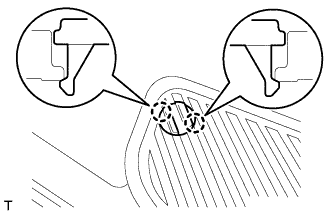
w/o Illumination Type Front Door Scuff Plate:
Detach the 2 claws and remove the step cover.
-
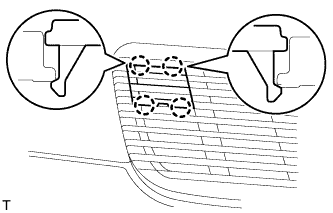
w/ Illumination Type Front Door Scuff Plate:
Detach the 4 claws and remove the step cover.
-
-
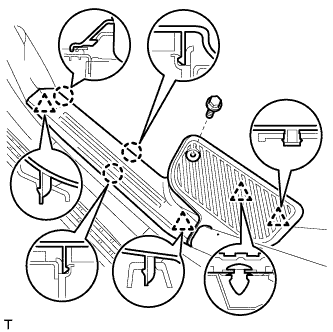
REMOVE REAR DOOR SCUFF PLATE LH
-
w/o Illumination Type Front Door Scuff Plate:
Remove the rear door scuff plate.
-
Remove the screw.
-
Detach the 3 claws and 4 clips, and remove the scuff plate.
-
-
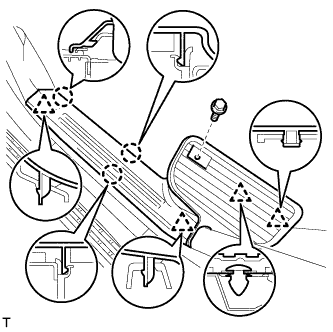
w/ Illumination Type Front Door Scuff Plate:
Remove the rear door scuff plate.
-
Remove the screw.
-
Detach the 3 claws and 4 clips, and remove the scuff plate.
-
-
-
REMOVE REAR DOOR SCUFF PLATE RH
Tech Tips
Use the same procedures described for the LH side.
-
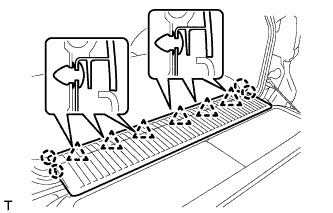
REMOVE REAR FLOOR MAT REAR SUPPORT PLATE
-
Detach the 6 clips and 4 claws, and remove the support plate.
-
-
REMOVE FRONT ASSIST GRIP SUB-ASSEMBLY
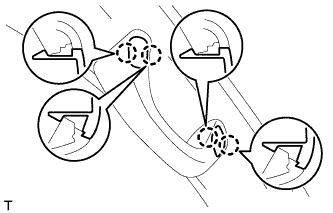
Tech Tips
Use the same procedure to remove the front assist grip on the other side.
-
Detach the 4 claws and remove the 2 assist grip plugs.
-
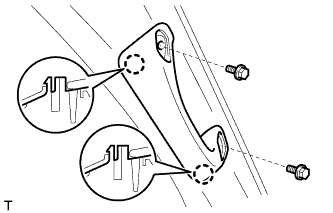
Remove the 2 bolts.
-
Detach the 2 claws and remove the front assist grip.
-
-
REMOVE FRONT PILLAR GARNISH LH
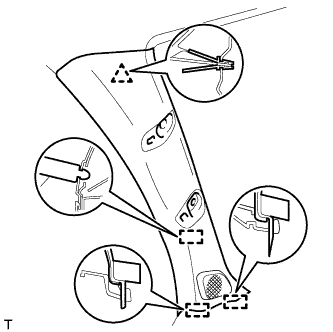
-
Detach the clip and 3 guides.
-
Disconnect the speaker connector and then remove the front pillar garnish.
-
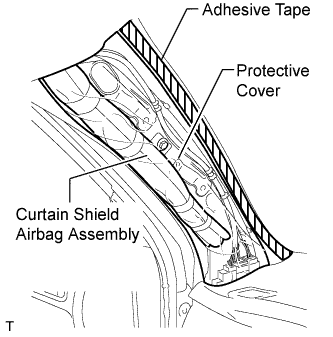
Protect the curtain shield airbag.
-
Thoroughly cover the airbag with a cloth or nylon sheet and fix the ends of the cover with adhesive tape, as shown in the illustration.
Note
Cover the curtain shield airbag with a protective cover as soon as the front pillar garnish is removed.
-
-
-
REMOVE FRONT PILLAR GARNISH RH
Tech Tips
Use the same procedures described for the LH side.
-
REMOVE CENTER PILLAR GARNISH COVER LH
Tech Tips
-
When removing the center pillar garnish cover, connect the cable to the negative (-) battery terminal and operate the power seat switch to move the front seat and seatback to the foremost upright position.
-
After moving the front seat, disconnect the cable from the negative (-) battery terminal.
-
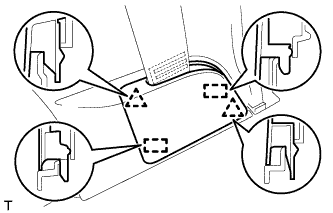
Detach the 2 clips and 2 guides, and remove the cover.
-
-
REMOVE CENTER PILLAR GARNISH COVER RH
Tech Tips
Use the same procedures described for the LH side.
-
REMOVE CENTER LOWER PILLAR GARNISH LH
Tech Tips
-
When removing the center lower pillar garnish, connect the cable to the negative (-) battery terminal and operate the power seat switch to move the front seat and seatback to the foremost upright position.
-
After moving the front seat, disconnect the cable from the negative (-) battery terminal.
-
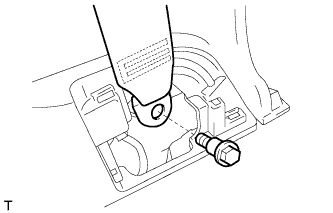
Remove the bolt and seat belt anchor.
-
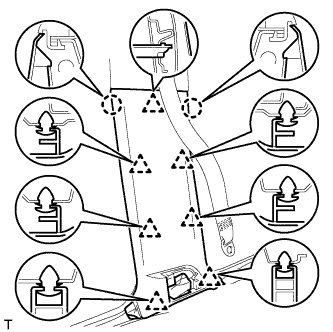
Detach the 2 claws and 7 clips, and remove the center lower pillar garnish.
-
-
REMOVE CENTER LOWER PILLAR GARNISH RH
Tech Tips
Use the same procedures described for the LH side.
-
REMOVE REAR ASSIST GRIP ASSEMBLY
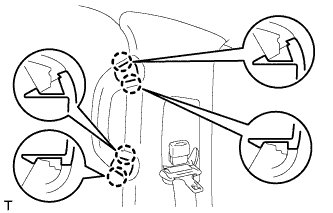
Tech Tips
Use the same procedure to remove the rear assist grip on the other side.
-
Detach the 4 claws and remove the 2 assist grip plugs.
-
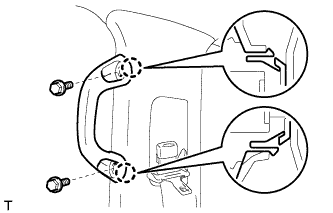
Remove the 2 bolts.
-
Detach the 2 claws and remove the rear assist grip.
-
-
REMOVE CENTER PILLAR GARNISH LH
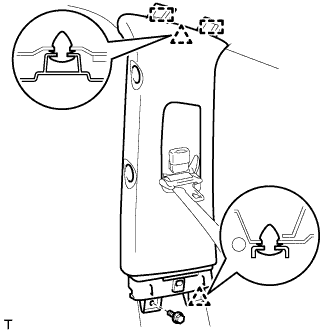
-
Remove the bolt.
-
Detach the 2 clips and 2 guides.
-
Pass the seat belt anchor through the center pillar garnish, and remove the center pillar garnish.
-
-
REMOVE CENTER PILLAR GARNISH RH
Tech Tips
Use the same procedures described for the LH side.
-
REMOVE FRONT QUARTER TRIM PANEL ASSEMBLY LH
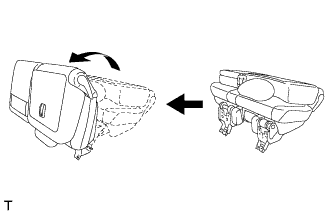
Tech Tips
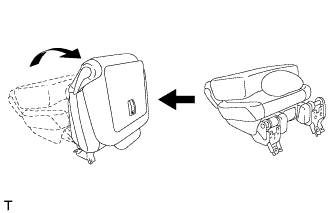
When removing the front quarter trim panel, operate the reclining adjuster release handle and move the No. 1 rear seat to the position shown in the illustration.
-
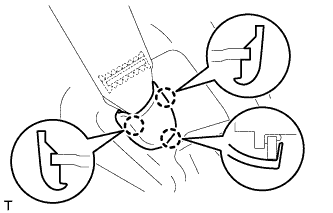
Detach the 3 claws and remove the cover.
-
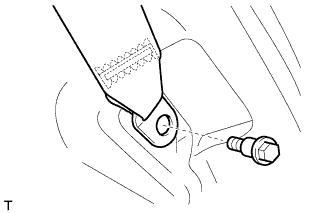
Remove the bolt and rear No. 1 seat belt anchor.
-
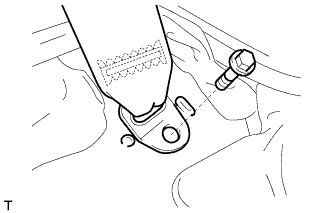
Remove the bolt and rear No. 2 seat belt anchor.
-
Remove the clip.
-
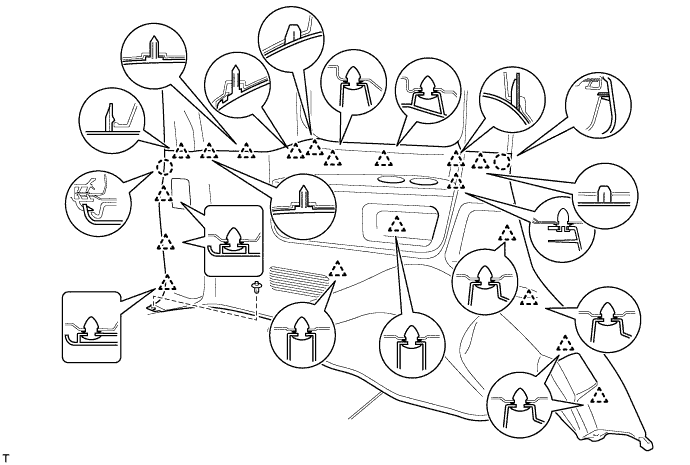
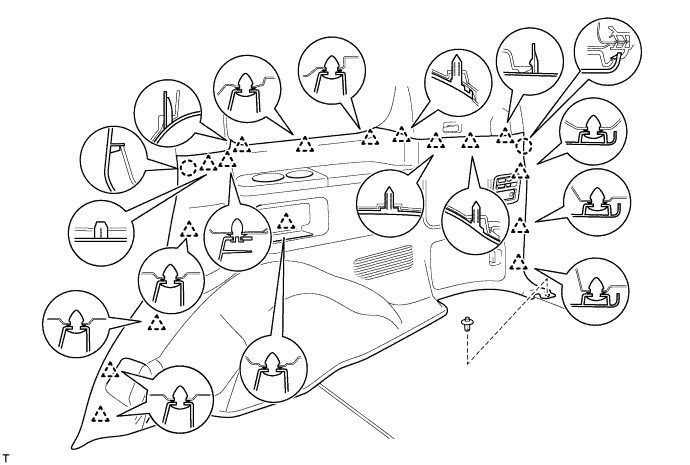
Detach the 19 clips and 2 claws.
-
Disconnect the thermistor connector and then remove the quarter trim panel.
-
-
REMOVE FRONT QUARTER TRIM PANEL ASSEMBLY RH
Tech Tips
When removing the front quarter trim panel, operate the reclining adjuster release handle and move the No. 1 rear seat to the position shown in the illustration.
-
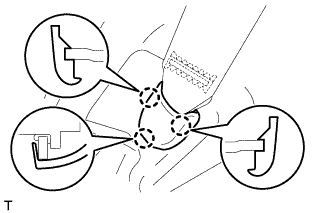
Detach the 3 claws and remove the cover.
-
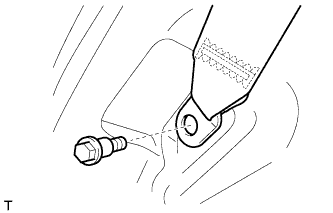
Remove the bolt and rear No. 1 seat belt anchor.
-
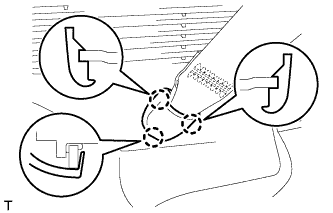
Detach the 3 claws and remove the cover.
-
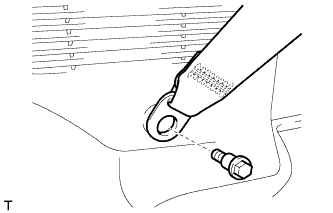
Remove the bolt and rear No. 2 seat belt anchor.
-
Remove the clip.
-
Detach the 17 clips and 2 claws.
-
Disconnect the thermistor connector and then remove the quarter trim panel.
-
-
REMOVE REAR FRONT QUARTER TRIM GARNISH LH
-
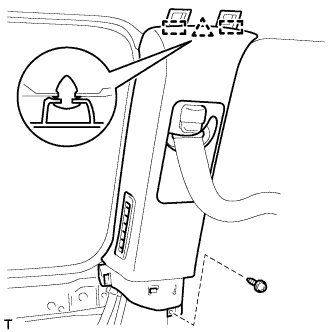
Remove the screw.
-
Detach the clip and 2 guides.
-
Pass the seat belt anchor through the quarter trim garnish, and remove the quarter trim garnish.
-
-
REMOVE REAR FRONT QUARTER TRIM GARNISH RH
Tech Tips
Use the same procedures described for the LH side.
-
REMOVE REAR UPPER PILLAR GARNISH LH
-
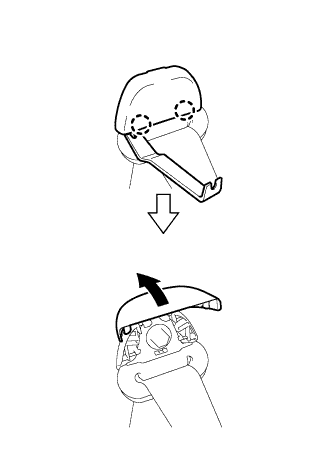
Using a moulding remover, detach the 2 claws and open the seat belt shoulder anchor cover.
-
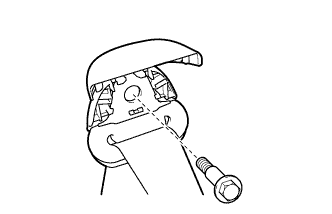
Remove the bolt and seat belt shoulder anchor.
-
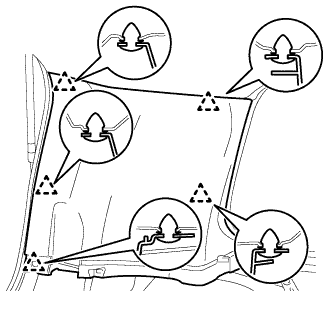
Detach the 5 clips and remove the rear upper pillar garnish.
-
-
REMOVE CENTER BACK DOOR GARNISH (w/ Power Back Door)
-
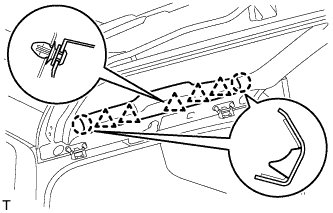
Detach the 5 clips and 2 claws, and remove the back door garnish.
-
-
REMOVE BACK DOOR SIDE GARNISH RH (w/ Power Back Door)
-
w/o Power Back Door:
Tech Tips
Use the same procedures described for the LH side.
-
w/ Power Back Door:
-
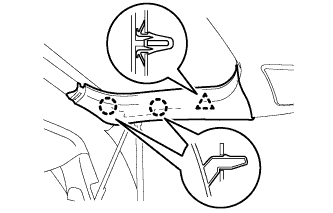
Detach the clip and 2 claws and remove the back door side garnish.
-
-
-
REMOVE BACK DOOR SERVICE HOLE COVER RH (w/ Power Back Door)
-
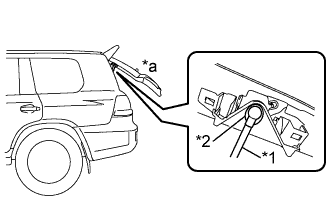
Text in Illustration *1 Power Back Door Rod *2 Hole of Back Door Service Hole Cover *a Back Door is Half-open Move the back door to a half-open position so that the hole in the center of the back door service hole cover is aligned lengthwise with the power back door rod.
-
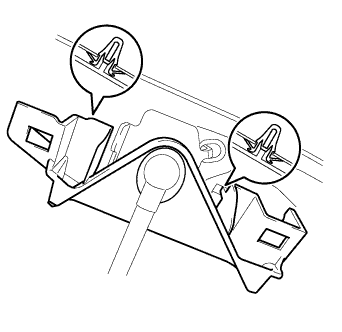
Detach the 2 clips and separate the back door service hole cover, passing the power back door rod through the hole of the back door service hole cover.
Note
If the back door is in a fully-open position, the power back door rod will interfere with the hole of the back door service hole cover, so do not perform this operation with the back door in a fully open position.
Tech Tips
If any of the clips have remained on the back door, remove the clips from the back door and install them to the back door service hole cover.
-
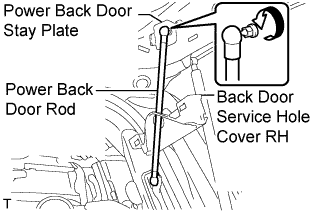
Remove the ball joint bolt, power back door rod and back door stay plate.
-
Remove the service hole cover from the power back door rod.
-
-
REMOVE REAR UPPER PILLAR GARNISH RH
-
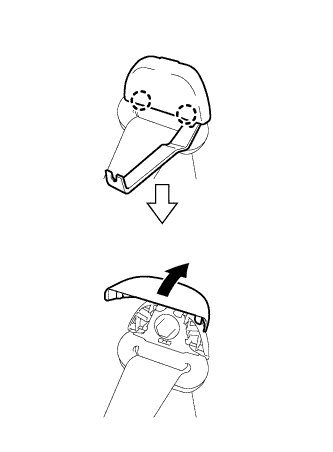
Using a moulding remover, detach the 2 claws and open the seat belt shoulder anchor cover.
-
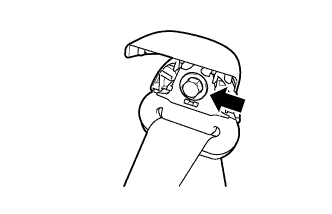
Remove the bolt and seat belt shoulder anchor.
-
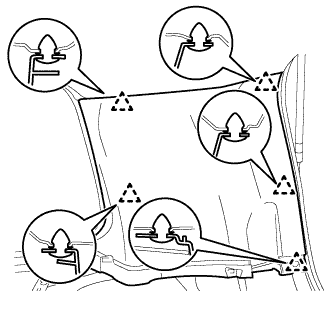
w/o Power Back Door:
-
Detach the 5 clips and remove the rear upper pillar garnish.
-
-
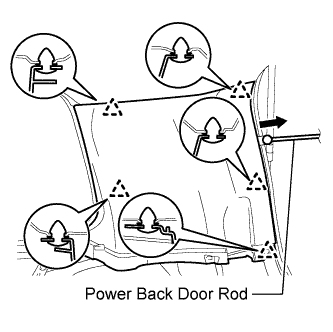
w/ Power Back Door:
-
Detach the 5 clips.
-
Pass the power back door rod through the rear upper pillar garnish, and remove the rear upper pillar garnish.
-
-
-
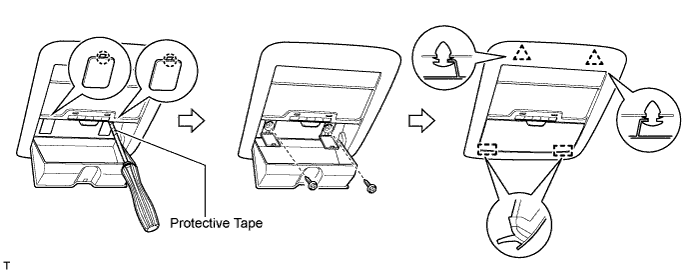
REMOVE MAP LIGHT ASSEMBLY
-
Using a screwdriver, detach the 2 claws and open the 2 covers.
Tech Tips
Tape the screwdriver tip before use.
-
Remove the 2 screws.
-
Detach the 2 clips and 2 guides.
-
Disconnect the 2 connectors and then remove the map light.
-
-
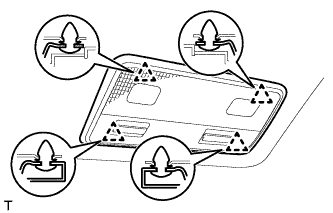
REMOVE NO. 1 ROOM LIGHT ASSEMBLY (w/o Rear Seat Entertainment System)
-
Detach the 4 clips.
-
Disconnect the connector and then remove the room light.
-
-
REMOVE NO. 1 ROOF LINING TRIM COVER (w/ Rear Seat Entertainment System)
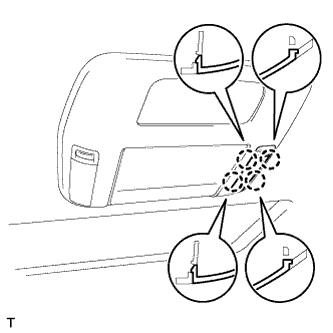
-
Detach the 4 claws and remove the cover.
-
-
REMOVE NO. 2 ROOF LINING TRIM COVER (w/ Rear Seat Entertainment System)
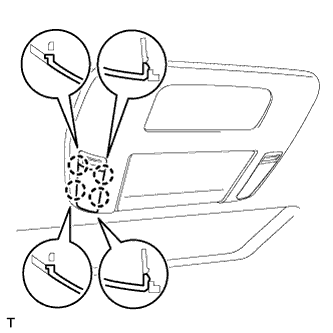
-
Detach the 4 claws and remove the cover.
-
-
REMOVE ROOF CONSOLE BOX ASSEMBLY (w/ Rear Seat Entertainment System)
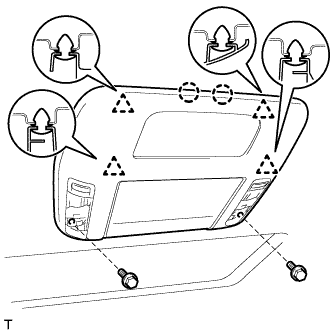
-
Remove the 2 bolts.
-
Detach the 4 clips and 2 claws.
-
Disconnect the connector and then remove the roof console box.
-
-
REMOVE NO. 3 ROOM LIGHT ASSEMBLY
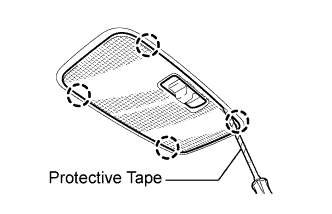
-
Using a screwdriver, detach the 4 claws and remove the room light lens.
Tech Tips
Tape the screwdriver tip before use.
-
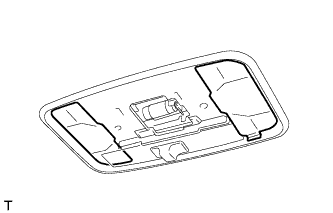
Remove the 2 covers.
-
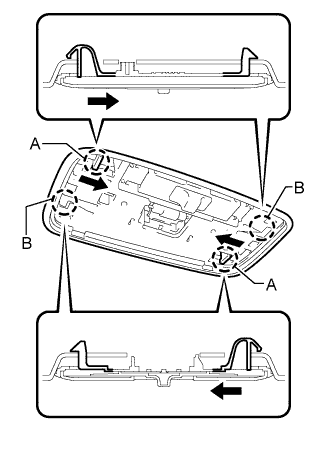
Using a screwdriver, push the 2 levers in the direction of the arrows in the illustration, and detach the 2 claws labeled A.
-
Detach the 2 claws labeled B.
-
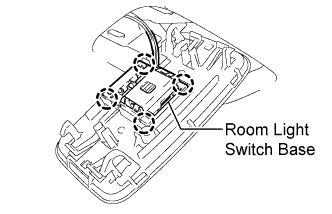
Detach the 4 claws and remove the room light from the room light switch base.
-
-
REMOVE VISOR BRACKET COVER
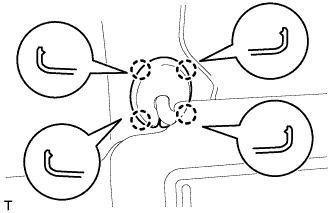
Tech Tips
Use the same procedure to remove the visor bracket cover on the other side.
-
Detach the 4 claws and remove the visor bracket cover.
-
-
REMOVE VISOR ASSEMBLY LH
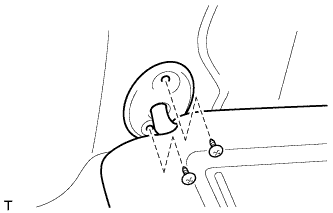
-
Remove the 2 screws and visor.
-
-
REMOVE VISOR ASSEMBLY RH
Tech Tips
Use the same procedures described for the LH side.
-
REMOVE VISOR HOLDER
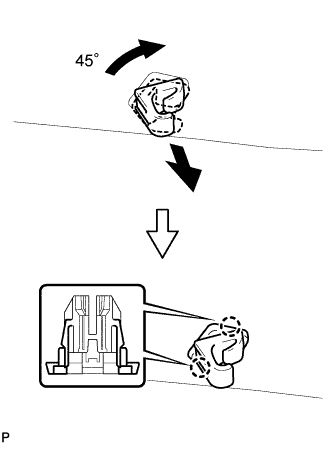
Tech Tips
Use the same procedure to remove the visor holder on the other side.
-
Turn the visor holder approximately 45° and pull it out as shown in the illustration.
-
Detach the 2 claws and remove the visor holder.
-
-
REMOVE CENTER VISOR ASSEMBLY LH
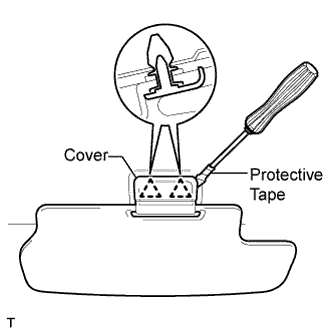
-
Using a screwdriver, pry off the cover to detach the 2 clips and remove the center visor.
Tech Tips
Tape the screwdriver tip before use.
-
-
REMOVE CENTER VISOR ASSEMBLY RH
Tech Tips
Use the same procedures described for the LH side.
-
REMOVE INNER REAR VIEW MIRROR STAY HOLDER COVER
-
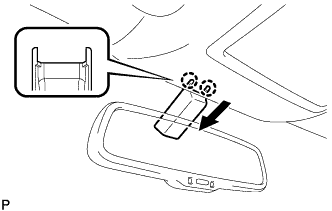
Detach the 2 claws and slide the inner rear view mirror stay holder cover in the direction indicated by the arrow shown in the illustration..
-
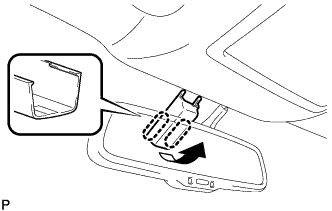
Detach the 2 claws and remove the inner rear view mirror stay holder cover.
-
-
REMOVE RAIN SENSOR COVER
-
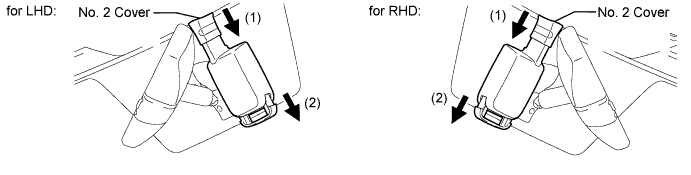
Slide the No. 2 cover in the direction of the arrow labeled (1).
-
Pull the stopper in the direction of the arrow labeled (2) to remove the rain sensor cover.
-
-
REMOVE SEAT BELT ANCHOR COVER
-
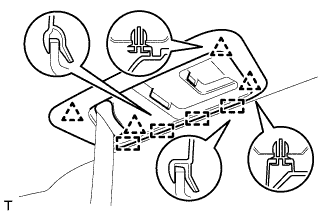
Detach the 4 clips and 4 guides, and remove the seat belt anchor cover.
-
-
REMOVE ASSIST GRIP ASSEMBLY
Tech Tips
Use the same procedure to remove the assist grip on the other side.
-
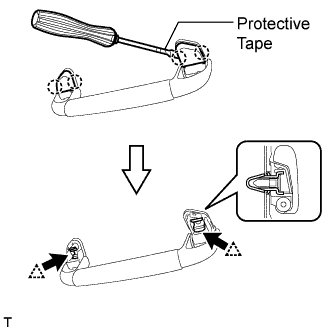
Using a screwdriver, detach the 4 claws and remove the 2 assist grip covers.
Tech Tips
Tape the screwdriver tip before use.
-
Detach the 2 clips and remove the assist grip.
-
Remove the 2 clips from the vehicle body.
-
-
REMOVE NO. 2 ASSIST GRIP ASSEMBLY LH
-
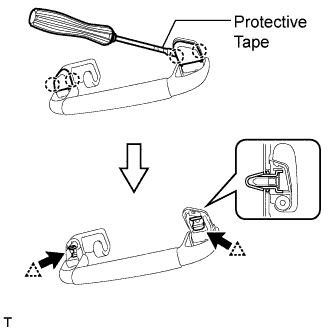
Using a screwdriver, detach the 4 claws and remove the 2 assist grip covers.
Tech Tips
Tape the screwdriver tip before use.
-
Detach the 2 clips and remove the assist grip.
-
Remove the 2 clips from the vehicle body.
-
-
REMOVE NO. 2 ASSIST GRIP ASSEMBLY RH
Tech Tips
Use the same procedures described for the LH side.
-
REMOVE 3RD SEAT ASSIST GRIP ASSEMBLY
Tech Tips
Use the same procedure to remove the 3rd seat assist grip on the other side.
-
Using a screwdriver, detach the 4 claws and remove the 2 assist grip covers.
Tech Tips
Tape the screwdriver tip before use.
-
Detach the 2 clips and remove the assist grip.
-
Remove the 2 clips from the vehicle body.
-
-
REMOVE ROOF HEADLINING ASSEMBLY
Tech Tips
-
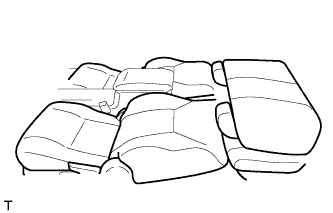
When removing the roof headlining, connect the cable to the negative (-) battery terminal and move the front seats and No. 1 rear seat to the position shown in the illustration.
-
After moving the seats, disconnect the cable from the negative (-) battery terminal.
-
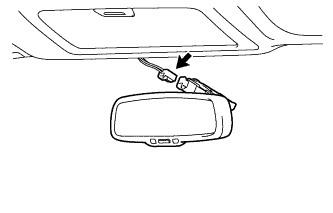
Disconnect the inner mirror connector.
-
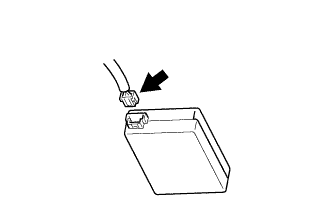
Disconnect the rain sensor connector.
-
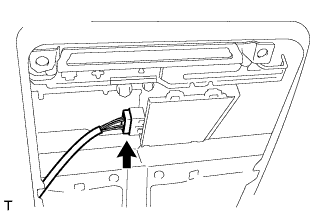
Disconnect the drive gear connector.
-
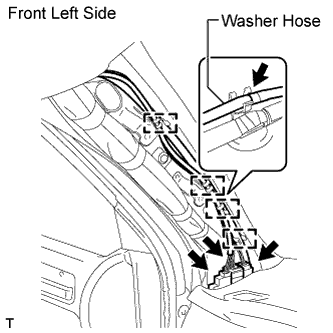
Disconnect the 3 roof wire connectors and washer hose.
-
Detach the 4 clamps.
-
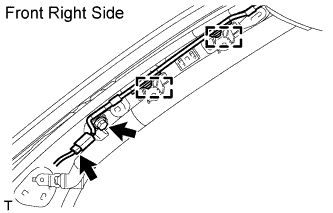
Remove the bolt.
-
Disconnect the antenna cord connector and detach the 2 clamps.
-
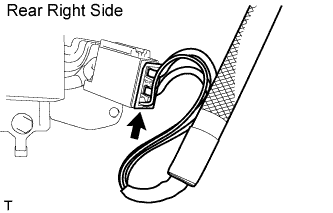
Disconnect the antenna cord connector.
-
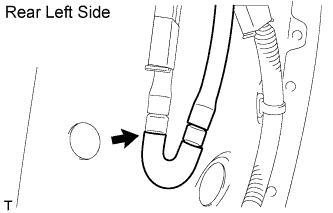
Disconnect the washer hose.
-
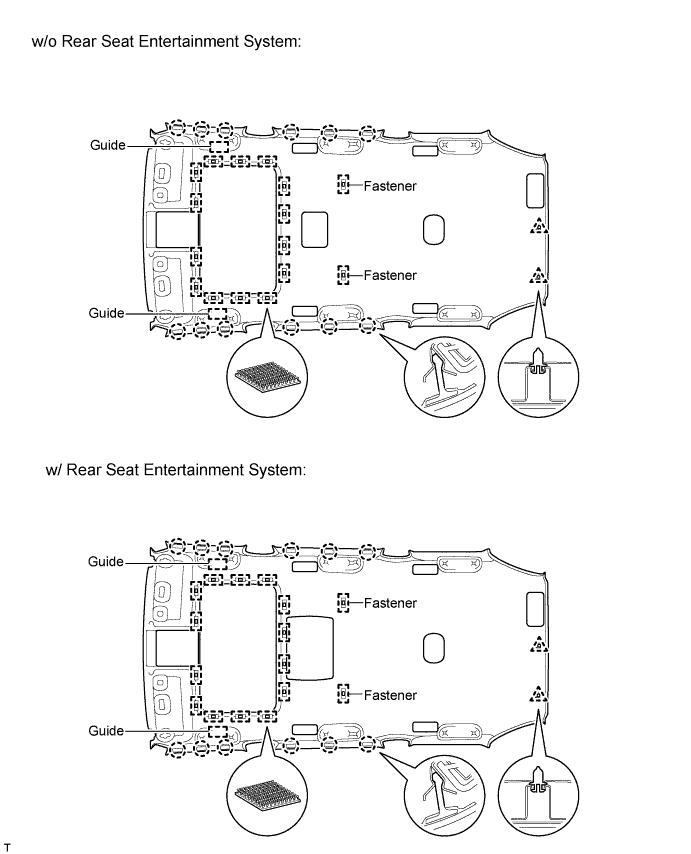
Detach the 12 claws, 2 clips, 2 guides and 16 fasteners.
-
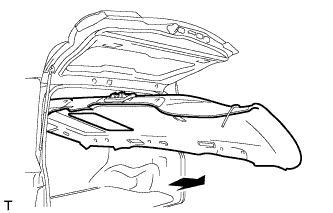
Remove the headlining from the rear of the vehicle as shown in the illustration.
Note
Be careful not to damage the roof headlining when taking it out.
-
-
REMOVE FRONT ROOF SIDE RAIL GARNISH LH
-
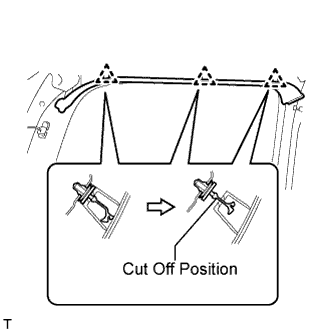
Detach the 3 clips.
-
Cut off the 3 clips and remove the roof side rail garnish.
-
Remove the 3 clips from the vehicle body.
-
-
REMOVE FRONT ROOF SIDE RAIL GARNISH RH
Tech Tips
Use the same procedures described for the LH side.
-
REMOVE FRONT DOOR OPENING TRIM WEATHERSTRIP LH
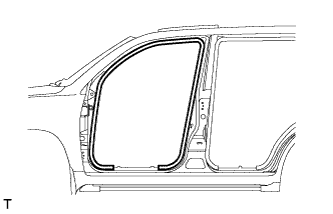
-
Remove the front door opening trim weatherstrip.
-
-
REMOVE FRONT DOOR OPENING TRIM WEATHERSTRIP RH
Tech Tips
Use the same procedures described for the LH side.
-
REMOVE REAR DOOR OPENING TRIM WEATHERSTRIP LH
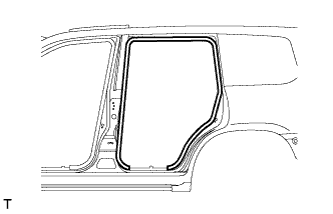
-
Remove the rear door opening trim weatherstrip.
-
-
REMOVE REAR DOOR OPENING TRIM WEATHERSTRIP RH
Tech Tips
Use the same procedures described for the LH side.
-
REMOVE BACK DOOR WEATHERSTRIP
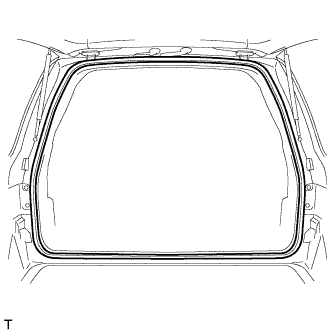
-
Remove the back door weatherstrip.
-
-
REMOVE FRONT DOOR SCUFF PLATE OUTSIDE LH
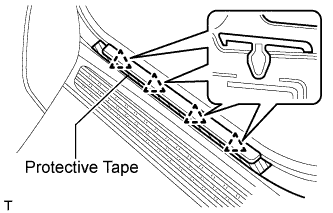
-
Put protective tape around the front door scuff plate outside.
-
Detach the 4 clips and remove the front door scuff plate outside.
-
-
REMOVE FRONT DOOR SCUFF PLATE RH
Tech Tips
Use the same procedures described for the LH side.
-
REMOVE REAR DOOR SCUFF PLATE OUTSIDE LH
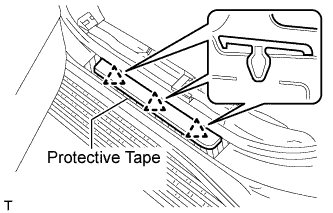
-
Put protective tape around the rear door scuff plate outside.
-
Detach the 3 clips and remove the rear door scuff plate outside.
-
-
REMOVE REAR DOOR SCUFF PLATE OUTSIDE RH
Tech Tips
Use the same procedures described for the LH side.
-
REMOVE FRONT SHOULDER BELT ANCHOR PLATE SUB-ASSEMBLY LH
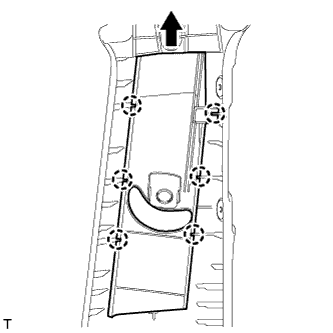
-
Detach the 6 claws of the plate, and slide the plate in the direction of the arrow to remove it.
-
-
REMOVE FRONT SHOULDER BELT ANCHOR PLATE SUB-ASSEMBLY RH
Tech Tips
Use the same procedures described for the LH side.
-
REMOVE REAR SHOULDER BELT ANCHOR PLATE SUB-ASSEMBLY LH
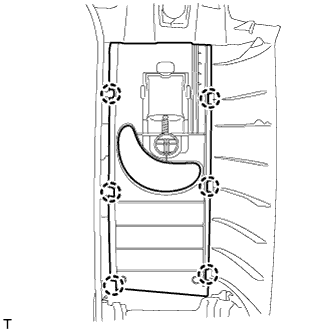
-
Detach the 6 claws and remove the plate.
-
-
REMOVE REAR SHOULDER BELT ANCHOR PLATE SUB-ASSEMBLY RH
Tech Tips
Use the same procedures described for the LH side.
-
REMOVE ROOF SIDE INNER GARNISH COVER LH
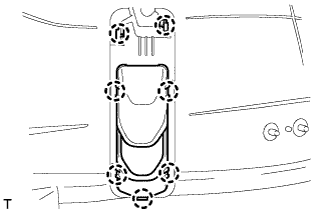
-
Detach the 7 claws and remove the cover.
-
-
REMOVE ROOF SIDE INNER GARNISH COVER RH
Tech Tips
Use the same procedures described for the LH side.
-
REMOVE REAR NO. 1 SEAT SHOULDER BELT HANGER
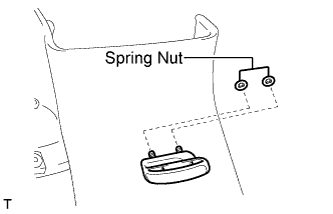
Tech Tips
Use the same procedure to remove the hanger on the other side.
-
Remove the 2 spring nuts and hanger.
-
-
REMOVE REAR NO. 2 SEAT SHOULDER BELT HANGER LH
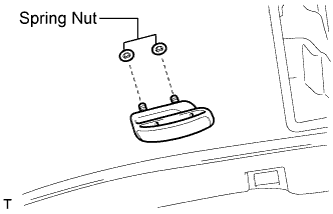
-
Remove the 2 spring nuts and hanger.
-
-
REMOVE REAR NO. 2 SEAT SHOULDER BELT HANGER RH
Tech Tips
Use the same procedures described for the LH side.
-
REMOVE QUARTER TRIM COVER SUB-ASSEMBLY LH
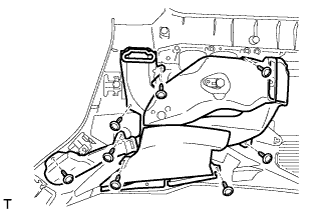
-
Remove the 8 screws and duct.
-
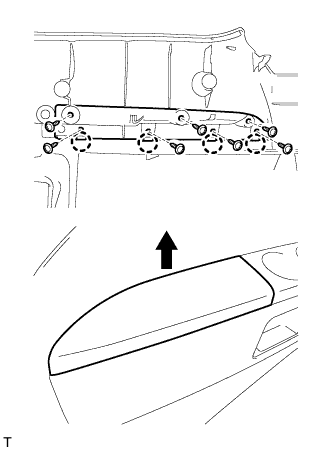
Remove the 7 screws.
-
Detach the 4 claws and remove the quarter trim cover.
-
-
REMOVE QUARTER TRIM COVER SUB-ASSEMBLY RH
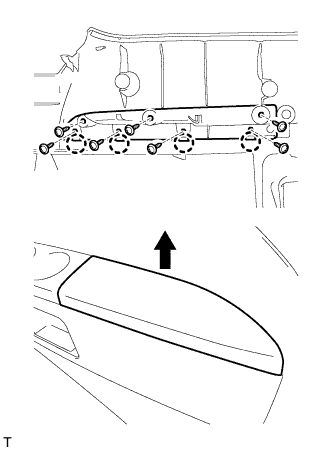
-
Remove the 7 screws.
-
Detach the 4 claws and remove the quarter trim cover.
-
-
REMOVE NO. 2 CUP HOLDER
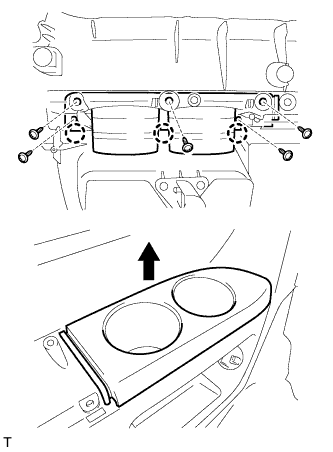
-
Remove the 5 screws.
-
Detach the 3 claws and remove the cup holder.
-
-
REMOVE NO. 1 CUP HOLDER
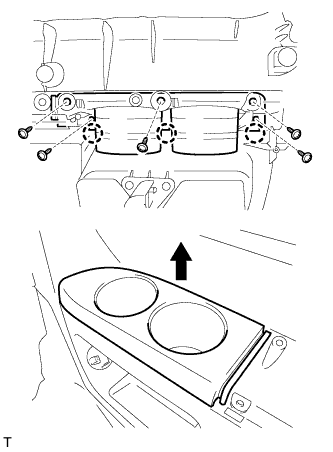
-
Remove the 5 screws.
-
Detach the 3 claws and remove the cup holder.
-
-
REMOVE NO. 1 SIDE TRIM BASE COVER LH
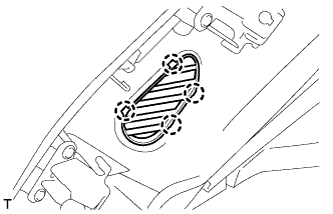
-
Detach the 4 claws and remove the cover.
-
-
REMOVE NO. 1 SIDE TRIM BASE COVER RH
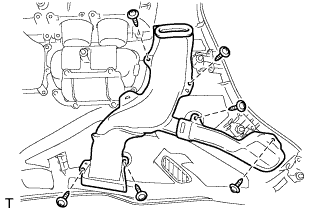
-
Remove the 6 screws and duct.
-
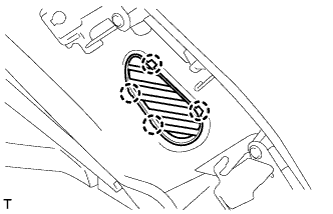
Detach the 4 claws and remove the cover.
-
-
REMOVE NO. 2 SIDE TRIM BASE COVER LH
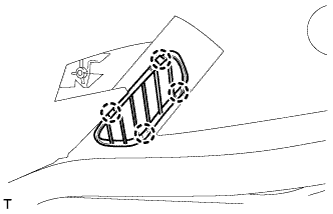
-
Detach the 4 claws and remove the cover.
-
-
REMOVE NO. 2 SIDE TRIM BASE COVER RH
Tech Tips
Use the same procedures described for the LH side.
-
REMOVE FOLD SEAT SWITCH ASSEMBLY
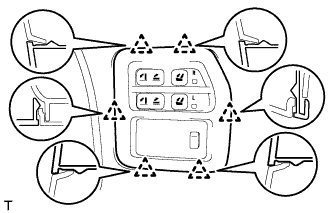
-
Detach the 6 clips and remove the fold seat switch.
-
-
REMOVE QUARTER TRIM COVER LH
-
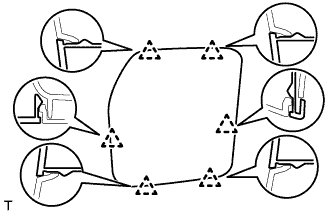
Detach the 6 clips and remove the quarter trim cover.
-
-
REMOVE QUARTER TRIM LID SUB-ASSEMBLY RH
-
Remove the quarter trim lid.
-
-
REMOVE SIDE TRIM BOX COVER (w/o Woofer)
-
Remove the side trim box cover.
-
-
REMOVE SIDE TRIM BOX (w/o Woofer)
-
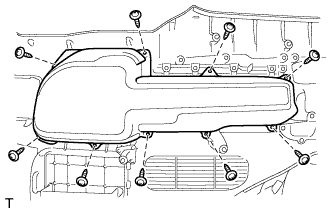
Remove the 9 screws and side trim box.
-
-
REMOVE NO. 2 MULTIPLEX NETWORK BODY ECU
-
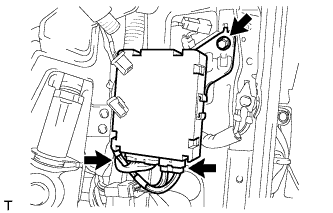
Disconnect the 2 connectors.
-
Remove the bolt and multiplex network body ECU.
-